Build Your Own AI Agent Desktop App with Multi-LLM Support & Browser Control
Imagine having a personal AI assistant that researches products, scrapes websites, and automates tasks - running entirely on your computer without cloud dependencies. This desktop app combines multiple LLM models with browser automation to create a powerful local AI agent that follows your commands.
Why Build a Local AI Agent Desktop App?
Business professionals and researchers constantly need to gather information, compare products, and automate repetitive web tasks. Traditional approaches either require manual work or rely on cloud-based solutions that compromise privacy and control. A local AI agent solves both problems.
This desktop application runs entirely on your machine, giving you complete control over sensitive data while providing powerful automation capabilities. Unlike cloud services, there are no usage limits or API costs once the initial setup is complete.
Key advantage: The app combines multiple LLM models with direct browser control, allowing it to handle complex workflows that would normally require human intervention - like researching products across multiple sites while avoiding captchas and login walls.
Key Features of the Desktop AI Agent
The AI agent desktop app provides an all-in-one solution for intelligent automation with several standout capabilities:
- Multi-LLM support: Switch between OpenAI, Claude, Gemini, Olama, or custom local models with a single click
- Voice & text commands: Interact via microphone or typed instructions
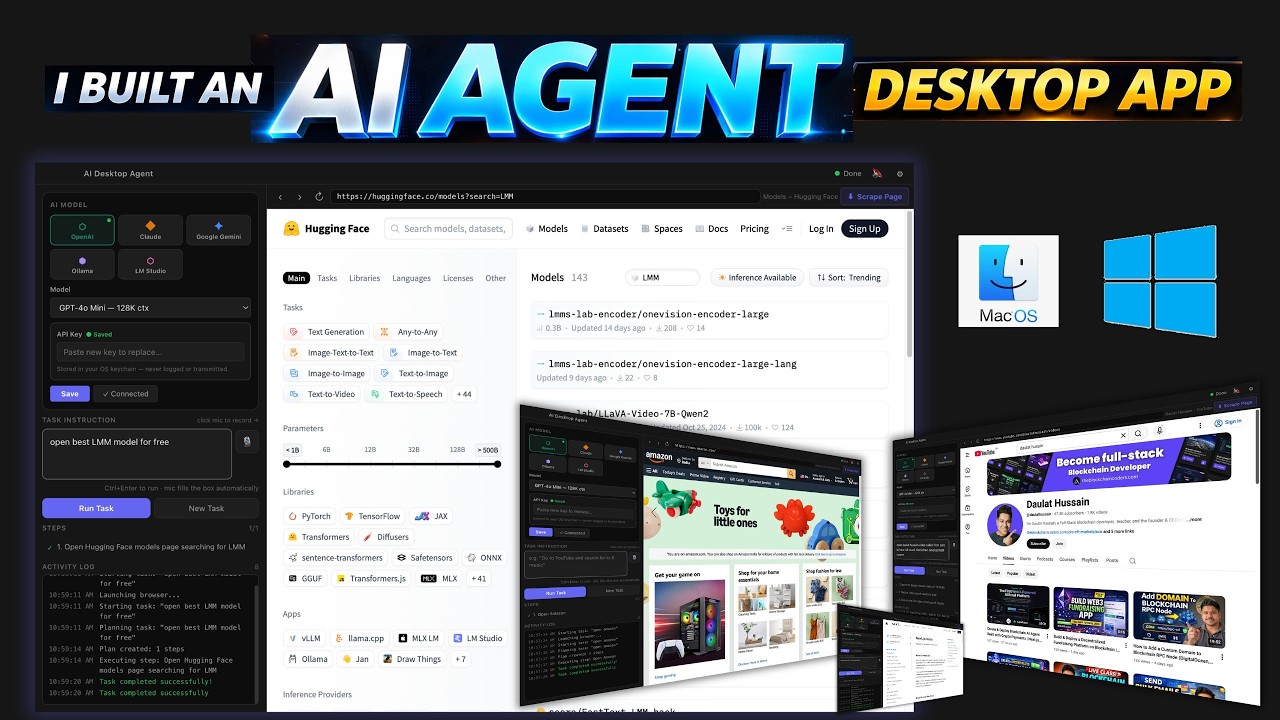
- Browser automation: Full control over Chromium for navigation, form filling, and data scraping
- Task planning: The agent breaks down complex requests into executable steps
- Execution monitoring: Real-time logs show exactly what actions the agent is taking
- Local operation: All processing happens on your machine with no external dependencies
At 4:32 in the video tutorial, you can see the agent successfully finding a YouTube channel and playing videos based on a simple voice command - demonstrating the seamless integration of voice recognition, task planning, and browser control.
Technical Architecture Overview
The desktop app follows a modular architecture designed for stability and extensibility:
Core components: Electron framework for the UI, Node.js backend, Playwright for browser automation, and a provider-based LLM integration system that makes adding new models straightforward.
Main Application Layers:
- UI Layer: Built with React, handles user interactions and displays execution logs
- Agent Core: Manages task planning, execution, and error recovery
- Browser Controller: Uses Playwright to automate Chromium with CDP access
- LLM Providers: Modular system supporting multiple AI models
- Storage: Temporary in-memory storage for API keys and session data
This separation of concerns makes the system both stable and easy to modify. You can extend any layer without affecting the others - for example, adding a new LLM provider requires changes only to the LLM integration layer.
Multi-LLM Model Support System
One of the most powerful features is the ability to switch between different LLM models seamlessly. The app includes built-in support for:
- OpenAI's GPT models
- Anthropic's Claude
- Google's Gemini
- Local models via Olama or LM Studio
The provider factory pattern makes it simple to add new model integrations. Each provider implements a standard interface for text completion, allowing the core agent logic to remain model-agnostic.
Smart fallback: At 8:15 in the video, you can see the system automatically switching to a simpler model when token usage exceeds limits - demonstrating the adaptive capabilities built into the architecture.
Advanced Browser Automation Capabilities
The browser control system goes beyond simple navigation to handle real-world web interactions:
- Element targeting: Precise selection of buttons, forms, and other page elements
- Form filling: Automatic completion of text fields and dropdowns
- Data extraction: Structured scraping of product information, prices, etc.
- Login detection: Identifies authentication requirements and pauses execution
- Captcha handling: Recognizes captcha challenges for manual intervention
At 6:47 in the tutorial, the agent demonstrates searching Amazon for products - navigating the search flow, filtering results, and extracting product details while handling page transitions smoothly.
Intelligent Task Execution Flow
When you give the agent a command, it follows a sophisticated execution process:
Step 1: Command Interpretation
The input (voice or text) is processed by the selected LLM to extract intent and parameters.
Step 2: Task Planning
The agent generates a step-by-step plan to achieve the goal, considering available capabilities.
Step 3: Execution with Monitoring
Each step executes while logging progress and detecting failures.
Step 4: Adaptive Recovery
If steps fail, the agent attempts alternative approaches or requests human input.
Step 5: Result Delivery
Final outputs are presented in the UI and can be exported to files.
Real-world example: At 10:32, the agent successfully handles a failed product search by automatically reformulating the query and retrying with a different approach - no manual intervention required.
Security & Privacy Features
Because the app runs locally, it provides several important security advantages:
- Credential isolation: API keys exist only in memory and are cleared on exit
- No data persistence: All session information is temporary
- Controlled automation: Login and captcha handling requires manual approval
- Local processing: No sensitive data leaves your machine
The architecture is designed to prevent accidental exposure of credentials or private information, making it suitable for handling business-sensitive tasks.
Extending the Agent's Functionality
The modular design makes it easy to add new capabilities:
Adding New LLM Providers
Create a new class in the LLM providers directory implementing the base provider interface.
Creating Custom Agents
Specialized agents can be added to handle domain-specific tasks like e-commerce research or data analysis.
Enhancing Browser Control
The Playwright controller can be extended with new page interaction patterns.
Integrating External Services
Connect to databases, APIs, or other local applications for expanded functionality.
At 18:40 in the video, the walkthrough shows how to modify the agent's behavior by editing the planner module - demonstrating how accessible the codebase is for customization.
Watch the Full Tutorial
See the desktop AI agent in action with complete demonstrations of all major features. The tutorial includes setup instructions, architecture explanations, and real-world usage examples like product research and video finding (shown at 4:32 and 6:47).
Key Takeaways
This desktop AI agent represents a significant leap forward in local automation capabilities. By combining multiple LLM models with direct browser control, it creates a powerful assistant that operates entirely on your machine.
In summary: You now have a framework for building your own local AI assistant that can research products, automate web tasks, and process information - all while maintaining complete privacy and control over your data.
Frequently Asked Questions
Common questions about building AI agent desktop apps
The desktop app supports multiple LLM models including OpenAI, Claude, Gemini, Olama, and any custom local models you want to integrate. The provider factory pattern makes it straightforward to add new model integrations.
You can switch between models seamlessly during operation based on factors like cost, performance, or specific capabilities needed for different tasks. The UI includes a model selector that shows available options and connection status.
- OpenAI GPT models through their API
- Anthropic Claude via API
- Google Gemini integration
- Local models through Olama or LM Studio
The app uses Playwright and CDP (Chrome DevTools Protocol) to control Chromium browsers with precision. This combination provides reliable automation capabilities including page navigation, form filling, clicking elements, and scraping data.
The browser controller includes intelligent features like element waiting strategies, automatic retries for failed actions, and visual feedback during execution. You can run the browser in headless mode for performance or display it for debugging purposes.
- Full DOM access and manipulation
- Automatic waiting for element availability
- Visual execution indicators
- Headless or visible operation modes
All API keys are stored locally in memory only and never persisted to disk or transmitted externally. The application follows security best practices by isolating credential handling in a dedicated storage module.
When you close the application, all credentials are automatically cleared. There's no risk of accidental exposure through saved files or network transmission. For additional security, you can configure the app to require re-entry of API keys on each launch.
- Memory-only storage
- Automatic credential clearing on exit
- No external transmission
- Optional per-session authentication
The app includes a sophisticated login detector that identifies authentication requirements through multiple signals including page URLs, form fields, and common patterns. When login is detected, execution pauses for manual intervention.
For security reasons, the agent won't attempt to bypass captchas automatically - it will prompt for manual completion. You can configure the sensitivity of these protections based on your specific needs and risk tolerance.
- Multi-factor login detection
- Configurable security thresholds
- Manual intervention prompts
- Session resumption after authentication
The desktop app is built with Electron for the cross-platform UI framework, Node.js for backend logic, and React for the frontend components. The browser automation uses Playwright, while the LLM integration follows a modular provider pattern.
TypeScript is used throughout for type safety and maintainability. The architecture leverages modern JavaScript patterns including async/await for control flow, dependency injection for modularity, and reactive programming where appropriate.
- Electron for desktop UI
- Node.js backend
- React frontend components
- Playwright for browser automation
The system includes sophisticated automatic retry logic with exponential backoff. When a task fails, the agent analyzes the failure reason through multiple diagnostic channels and can switch to simpler models or alternative approaches.
All retry attempts are logged in the execution history with detailed context about why each attempt succeeded or failed. This creates an audit trail that helps improve future performance through pattern recognition.
- Context-aware retries
- Model fallback strategies
- Detailed failure analysis
- Execution history logging
The architecture is specifically designed for extensibility with clear separation of concerns between components. You can add new agent behaviors by creating modules in the agents folder following the existing patterns.
Integrating additional LLM providers simply requires extending the base provider class and implementing the required methods. The browser control logic can be modified in the Playwright controller without affecting other system components.
- Modular agent behaviors
- Extensible LLM provider system
- Customizable browser control
- Plugin architecture for new features
GrowwStacks specializes in building custom AI automation solutions tailored to specific business workflows. We can adapt this desktop agent framework to your unique requirements, integrate it with your existing systems, and deploy it securely within your infrastructure.
Our team handles everything from initial consultation and requirements analysis to implementation, testing, and ongoing maintenance. We've helped businesses automate processes ranging from competitive research to customer support triage using similar agent architectures.
- Custom workflow automation
- Enterprise security hardening
- Existing system integration
- Ongoing support and maintenance
Ready to Build Your Custom AI Agent?
Manual research and repetitive tasks drain productivity. Our AI automation experts can build you a custom desktop agent that saves hours every week. Get started with a free 30-minute consultation.