How AI Chatbots & Voice Assistants Can Transform Your Business Customer Service
Imagine never missing another customer inquiry - whether it comes through your website, social media DMs, or phone calls. AI-powered chatbots and voice assistants handle routine questions 24/7 while sounding exactly like your brand, freeing your team to focus on high-value interactions.
The Customer Service Revolution Happening Now
Businesses lose an average of $75 billion annually due to poor customer service - often simply because they can't respond to inquiries fast enough. Phone calls go unanswered after hours, website chat requests pile up overnight, and social media DMs languish for days. This creates frustrated customers and missed opportunities.
AI-powered chatbots and voice assistants solve this by providing instant, 24/7 responses across all customer touchpoints. They handle routine inquiries about business hours, product details, or appointment scheduling - precisely the types of questions that consume your team's time but don't require human judgment.
Key stat: 64% of consumers say 24/7 availability is the most useful feature of chatbots, while 55% of businesses report reduced customer service costs after implementation.
How the Chatbot Knowledge Base Works
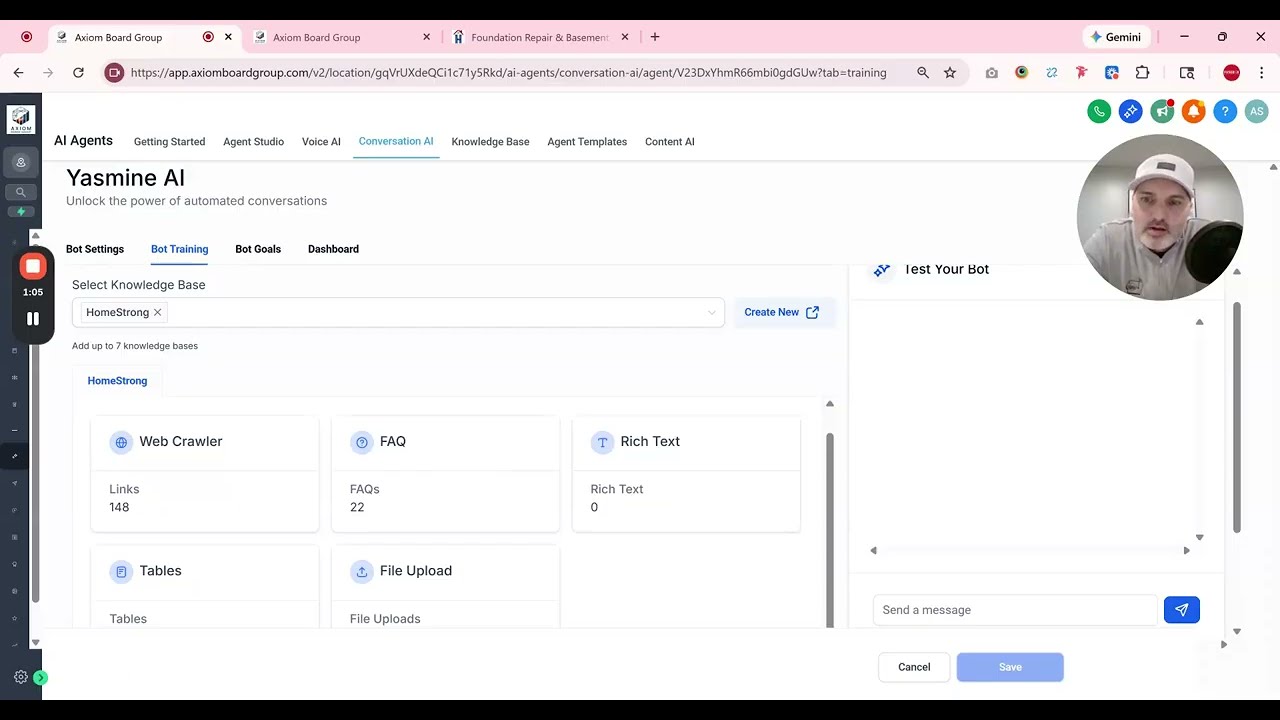
At the core of every effective AI assistant is its knowledge base - essentially the brain that contains all the information needed to answer customer questions. Unlike simple FAQ bots, modern systems combine multiple data sources to create comprehensive understanding.
The knowledge base isn't static. As shown in the video tutorial (timestamp 1:15), it continuously improves through testing and training. Each customer interaction makes the system smarter about how to respond to similar questions in the future.
The Web Crawler: Your Digital Encyclopedia
The web crawler acts like a supercharged intern that reads and memorizes your entire website. It doesn't just scan homepage text - it follows every link to learn about your products, services, company history, and any other information you've published online.
This automated process eliminates the need to manually input basic information about your business. The crawler builds a detailed mental model that helps the chatbot answer questions like "What services do you offer?" or "Where are you located?" without any programming.
Implementation tip: Before running the web crawler, audit your website to ensure all pages contain accurate, up-to-date information about your business. The chatbot will only be as knowledgeable as your public content.
FAQ Training: Teaching Your Chatbot to Sound Like You
The FAQ section is where you teach your chatbot how to respond to common customer questions using your preferred wording and tone. This goes beyond simple keyword matching - the AI learns to recognize similar questions phrased in different ways.
As demonstrated at timestamp 2:30 in the video, you start by entering common questions and your ideal answers. The system then uses natural language processing to understand variations of these questions. Over time, you add more Q&A pairs to expand the chatbot's capabilities.
Rich Text, Tables & Files: Expanding the Knowledge Base
While the web crawler and FAQ handle most common interactions, three additional components complete the knowledge base:
- Rich text for background information that doesn't fit Q&A format
- Tables for product specifications, pricing tiers, or other structured data
- File uploads for documentation, manuals, or policy details
Together, these elements ensure the chatbot can handle complex inquiries like "What's included in the premium service package?" or "How do I troubleshoot this device?" by referencing the appropriate resources.
Testing & Training Your AI Assistant
The testing interface (shown at 3:45 in the video) lets you refine your chatbot before deployment. You ask tricky questions and rate the responses with thumbs up/down. When answers need improvement, you provide alternatives that better match your brand voice.
This training process achieves two goals: it improves answer accuracy while ensuring the tone aligns with your company personality. You can choose between professional, friendly, or even humorous response styles depending on your brand identity.
Pro tip: Involve multiple team members in testing to capture different perspectives on how the chatbot should respond. Customer service reps often identify important edge cases that executives might miss.
Brand Customization: Matching Your Voice & Style
Beyond conversational tone, chatbots offer extensive visual customization. The interface can match your brand colors, logo, and overall aesthetic so it feels like a natural extension of your website rather than a third-party tool.
For voice assistants, you can select from different voice profiles and speaking styles. Some businesses prefer crisp, professional diction while others opt for warmer, more conversational tones - whatever best represents your brand personality.
Advanced Lead Capture Through Conversation
For businesses focused on lead generation, chatbots transform casual inquiries into qualified leads. As mentioned at 4:20 in the video, you can configure forms that require contact information before proceeding with a conversation.
This approach works particularly well for service businesses where customers typically have questions before making purchases. The chatbot qualifies the lead through natural conversation while capturing essential details for your sales team.
Watch the Full Tutorial
See how the knowledge base components work together in this 4-minute demo. Pay special attention to the testing interface at 3:45 where you can train the chatbot to improve its responses over time.
Key Takeaways
AI chatbots and voice assistants represent the next evolution in customer service - providing instant, accurate responses 24/7 across all digital touchpoints. Unlike basic FAQ bots, modern systems combine multiple knowledge sources and continuously improve through training.
In summary: These AI tools handle routine inquiries with your brand's voice, capture qualified leads through natural conversation, and free your team to focus on high-value interactions - all while reducing customer service costs by an average of 30%.
Frequently Asked Questions
Common questions about AI chatbots for business
AI chatbots can handle three primary types of customer interactions: answering frequently asked questions, booking appointments directly into your calendar, and capturing lead information for businesses that rely on lead generation.
They work across websites, social media DMs, and even phone calls, providing 24/7 availability that matches your brand voice. This covers about 60-80% of routine customer service inquiries without human intervention.
- FAQ responses with natural language understanding
- Calendar integration for appointment scheduling
- Form-based lead capture during conversations
The five components create a comprehensive foundation for your chatbot's knowledge:
1) Web crawler that automatically learns from your website content, 2) FAQ section with programmed Q&A pairs, 3) Rich text for additional explanations, 4) Tables for structured data, and 5) File uploads for documentation. Together these ensure the chatbot can handle diverse customer inquiries.
- Automated website scanning eliminates manual data entry
- Multiple knowledge formats accommodate different question types
- Continuous expansion improves answer quality over time
Chatbot training involves asking questions and rating the responses. When answers need improvement, you provide alternative wording that better matches your preferred style.
The system uses this feedback to adjust future responses. Over time, it learns to recognize similar questions and apply your preferred answers automatically. You can also set overall tone parameters from professional to conversational.
- Thumbs up/down rating for each response
- Alternative answer suggestions for improvement
- Brand voice parameters for consistent tone
Yes, chatbots can be powerful lead generation tools when configured properly. They can require contact information before proceeding with certain types of conversations.
For maximum effectiveness, only gate essential conversations (like pricing inquiries) behind lead capture forms. Basic information requests should remain open to avoid frustrating potential customers.
- Configurable form fields (name, email, phone)
- CRM integration for automatic lead distribution
- Conversational approach reduces form abandonment
Chatbot interfaces offer extensive visual customization options to match your brand identity. This includes color schemes, logos, and message bubbles that align with your website design.
You can also customize the initial greeting message, response timing, and conversation flow to create a natural user experience. These elements combine to make the chatbot feel like an integrated part of your digital presence.
- Full color palette customization
- Branded greeting messages
- Adjustable response speed
The web crawler provides comprehensive baseline knowledge without manual data entry. It scans your entire website to learn about products, services, company history, and other published information.
This automatic process ensures the chatbot has broad contextual understanding before you begin specific FAQ training. It also stays updated as you add new content to your website over time.
- Eliminates manual data entry
- Captures all public-facing information
- Automatically updates with website changes
Basic chatbots can launch within days after initial knowledge base setup. The web crawler completes its scan quickly, and you can start with a core set of FAQs while continuing to expand the knowledge base.
More complex implementations with CRM integration, appointment scheduling, and advanced lead capture typically take 1-2 weeks. The timeline depends on how much customization and testing is required before launch.
- Basic FAQ bots: 3-5 days
- Full-featured implementations: 1-2 weeks
- Ongoing training improves performance
GrowwStacks specializes in implementing customized AI chatbot and voice assistant solutions tailored to your specific business needs. We handle everything from initial knowledge base setup to deployment across your website, social media, and phone systems.
Our team ensures the AI reflects your brand voice and handles your most common customer interactions effectively. We integrate with your existing tools and provide training to help your team manage the system long-term.
- Free consultation to identify use cases
- Custom knowledge base configuration
- Ongoing optimization and support
Ready to Transform Your Customer Service with AI?
Every hour your team spends answering routine questions is an hour not spent growing your business. Let us build a customized AI assistant that handles customer inquiries 24/7 while sounding exactly like your brand.