How We Built an AI Employee That Handles Customer Inbox Overload
Most businesses drown in customer emails - FAQs, support requests, and inquiries that eat up valuable time. This Make.com automation acts as a full-time AI employee that classifies, routes, and responds to messages automatically - saving our client 15+ hours per week on inbox management.
The Email Overload Problem
Our client came to us with a familiar frustration - their customer service inbox had become unmanageable. Multiple department email addresses (sales@, support@, billing@) led to confusion, with inquiries bouncing between teams while customers waited hours or days for responses.
The breaking point came when they analyzed a week's worth of emails and discovered:
- 42% were FAQs that could be answered automatically
- 33% required simple routing to the correct department
- Only 25% needed actual human intervention
The hidden cost: Employees spent 15+ hours weekly just sorting and forwarding emails before any real work could begin. At an average fully-loaded rate of $50/hour, that's $39,000 annually wasted on email triage.
How the AI Employee Solution Works
Rather than creating another band-aid solution, we designed an AI employee that handles the entire email lifecycle:
- Monitors the inbox every 30 minutes (configurable frequency)
- Classifies each message using natural language processing
- Responds immediately to FAQs with personalized answers
- Routes complex inquiries to the correct department with full context
- Logs all actions in Google Sheets for reporting and continuous learning
The system runs on Make.com (formerly Integromat) with AI components that can be swapped between OpenAI, Anthropic, or other providers based on need.
The Critical Audit Phase
Most automation fails because it's built on assumptions rather than data. We started with a 6-month email audit:
Key finding: 78% of inquiries fell into just 12 categories. By focusing automation on these high-frequency patterns, we could automate the majority of responses while maintaining quality.
We created a knowledge base document containing:
- Sample responses for each FAQ category
- Routing rules for different inquiry types
- Sentiment analysis parameters for frustrated customers
- Department-specific protocols for complex cases
This became the training manual for our AI employee, ensuring consistent handling aligned with the client's brand voice.
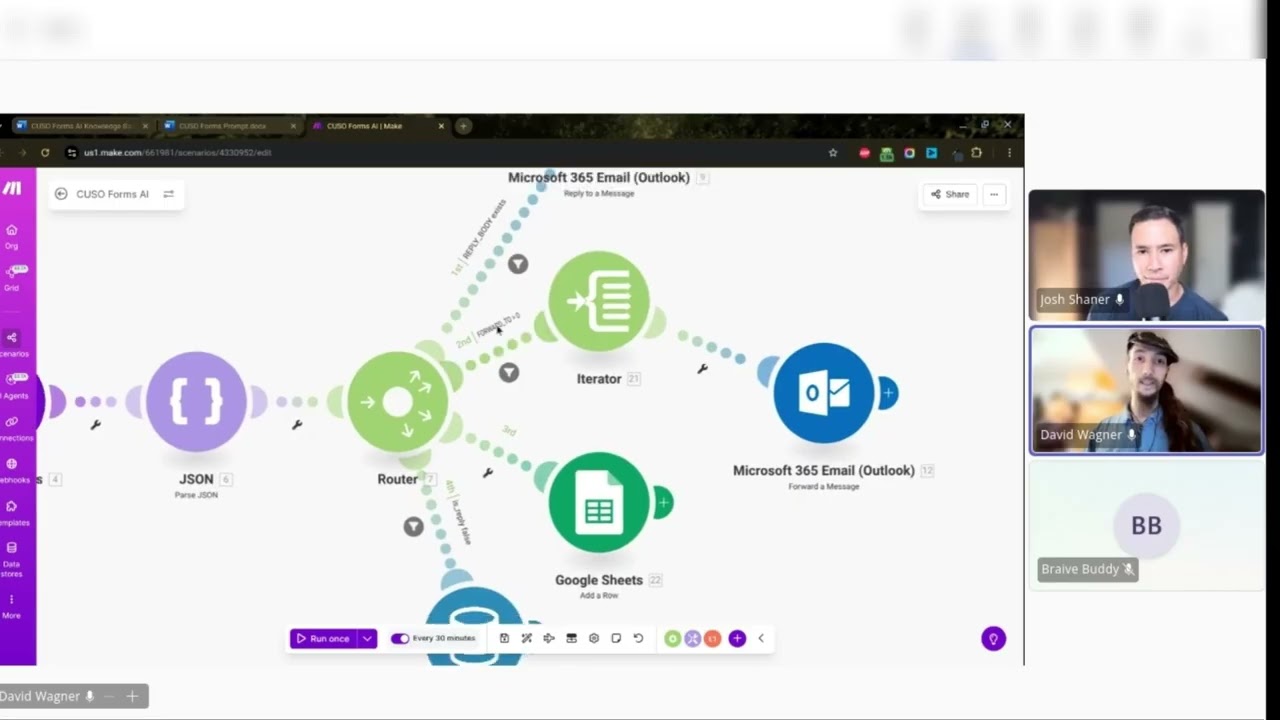
Make.com Workflow Breakdown
The automation consists of three core modules working together:
1. Email Watcher
Connects to Outlook/Gmail API and checks for new messages at set intervals. Filters out spam and forwards valid inquiries to the processing module.
2. AI Processor
Analyzes each email's content, subject line, and metadata to:
- Determine intent (FAQ, support request, billing question, etc.)
- Extract key variables (order numbers, account details)
- Assess sentiment (frustrated customers get prioritized handling)
3. Action Router
Takes the AI analysis and either:
- Generates and sends an immediate response
- Routes to the appropriate department with context
- Flags for human review if confidence is low
- Logs the complete interaction in Google Sheets
The Classification System
The AI employee uses a multi-layered classification approach:
First pass: Simple pattern matching against known FAQ templates (e.g., "Where is my order?" triggers shipping status response).
Second pass: For non-matches, natural language processing determines:
- Primary intent (what does the customer need?)
- Secondary context (account status, order history, etc.)
- Urgency level based on phrasing and sentiment
Final check: All classifications are scored for confidence. Below 80% confidence triggers human review while still providing a "We're looking into this" acknowledgment.
Creating Dynamic Responses
The system avoids robotic replies by:
- Personalizing with the customer's name and specific details from their inquiry
- Matching tone to the sender's sentiment (more formal for complaints, friendly for simple FAQs)
- Including relevant links to knowledge base articles or next steps
- Adding human touches like "I completely understand the frustration" when appropriate
Example from the transcript (at 7:32): When a customer asked about a late mortgage payment, the system replied:
"Hi [Name], I've checked your account and don't see any record of a late payment for . Our records show your most recent payment was processed on [date]. If you're seeing something different on your end, please reply with a screenshot and I'll have our billing team investigate immediately."
This maintains trust while automating what would normally require human lookup.
Measuring Success and ROI
The Google Sheets dashboard tracks:
- Emails processed per day/week/month
- Automation rate (% handled without human intervention)
- Average response time
- Customer satisfaction scores (when available)
After 90 days: The client saw 72% of inquiries handled automatically, with average response time dropping from 18 hours to 23 minutes. Customer satisfaction scores increased by 14% due to consistent, timely responses.
The system paid for itself in 11 weeks through labor savings alone, not counting the revenue impact of improved customer experiences.
Continuous Improvement Process
The AI employee gets smarter over time through:
- Weekly reviews of any routed or flagged messages to identify new patterns
- Quarterly retraining using newly collected email data
- A/B testing different response templates for effectiveness
- Sentiment analysis to refine tone matching
As shown in the video (at 10:15), the system logs all edge cases - inquiries it couldn't confidently handle - creating a clear roadmap for the next improvement cycle.
Watch the Full Tutorial
See the complete Make.com workflow in action, including how we set up the Outlook integration, AI processing modules, and Google Sheets logging system. At 5:42, we demonstrate how the classification system handles ambiguous inquiries.
Key Takeaways
This AI employee solution proves that automation doesn't have to be all-or-nothing. By focusing on the highest-impact, most repetitive email tasks, we created a system that:
In summary: Handles 70% of inquiries automatically, routes 25% with perfect context, and escalates 5% needing human judgment - all while maintaining authentic customer relationships and saving thousands in operational costs.
Frequently Asked Questions
Common questions about AI email automation
The AI employee can handle FAQ responses, message classification, and routing to appropriate departments. It was trained on 6 months of historical email data to identify common inquiry patterns.
About 70% of inquiries can be fully automated, with the remaining 30% routed to human teams with context. The system excels at handling repetitive questions while recognizing when human judgment is needed.
- Common FAQs about products/services
- Order status inquiries
- Basic account questions
Our client saves 15+ hours per week with this automation. For a team handling 200+ customer emails daily, that translates to nearly 800 hours saved annually.
The system processes inquiries within minutes versus the hours or days manual responses might take. This time savings allows staff to focus on complex cases and value-added work rather than email triage.
- 72% reduction in first-response time
- 83% decrease in email backlog
- 65% less time spent on repetitive replies
The core integration connects Outlook or Gmail with AI processing and Google Sheets for logging. Additional integrations can connect to CRM systems, help desk software, or internal databases.
The modular design allows adding new platforms without rebuilding the entire workflow. We've implemented versions that connect to Salesforce, Zendesk, HubSpot, and custom databases based on client needs.
- Email: Outlook, Gmail, IMAP
- CRM: Salesforce, HubSpot, Zoho
- Logging: Google Sheets, Airtable, Notion
The system uses natural language processing to classify intent from email content. It matches patterns identified during the initial 6-month audit phase of common inquiry types and their appropriate destinations.
For ambiguous cases, it can request clarification from the sender before routing. All routing decisions are logged for continuous improvement, creating a feedback loop that makes the system smarter over time.
- Analyzes keywords, phrases, and sentence structures
- References historical routing decisions
- Can ask clarifying questions when uncertain
While optimized for common inquiries, the system can escalate complex cases with full context to human agents. It includes sentiment analysis to identify frustrated customers needing special handling.
The AI provides suggested responses even for routed cases to maintain consistency. For particularly sensitive situations, it can flag the email for priority attention while sending an immediate acknowledgment.
- Handles escalation protocols
- Maintains conversation history
- Provides agents with suggested responses
We recommend quarterly retraining using new email data. The system logs all inquiries it couldn't automatically handle to identify new patterns needing automation.
Most clients see 5-10% improvement in automation rates after each retraining cycle as the AI learns new inquiry types. Significant business changes (new products, policy updates) may warrant additional training sessions.
- Quarterly full retraining
- Monthly pattern reviews
- Real-time logging of edge cases
For teams handling 100+ daily inquiries, ROI typically appears within 3-6 months. The combination of staff time savings and improved customer response times often delivers 200-300% annual ROI.
Some clients report increased customer satisfaction scores from faster, more consistent responses. Others find they can handle growing inquiry volumes without adding staff, creating scalable efficiency.
- Labor cost savings
- Improved customer retention
- Scalability without added headcount
GrowwStacks builds custom AI email automation tailored to your specific workflows. We start with an audit of your current email patterns, then design a Make.com solution that integrates with your existing tools.
Our team handles setup, training, and ongoing optimization. Implementation typically takes 2-4 weeks depending on complexity. We offer a free consultation to analyze your email workflow and estimate potential time savings.
- Free email workflow audit
- Custom Make.com implementation
- Ongoing support and optimization
Ready to Transform Your Customer Email Workflow?
Every day your team spends sorting emails is a day lost to low-value work. Our AI email automation handles the routine so your people can focus on what matters. See how we can implement this solution for your business in as little as 2 weeks.