Build AI-Powered Lead Qualification System with n8n + Google Sheets + Gemini
Most businesses waste hours manually reviewing form submissions to find qualified leads. This n8n workflow automatically filters irrelevant inquiries using Gemini AI, routing only perfect-fit prospects to your CRM. See how to eliminate 80% of manual qualification work while improving lead quality.
The Lead Qualification Problem
Every business with inbound leads faces the same frustration - sorting through countless form submissions to find the few perfect-fit prospects. Music production companies, like the example in our workflow, might receive inquiries ranging from serious collaborators to random spam - all mixed together in their Google Sheets.
Manual qualification eats up valuable time. Sales teams waste hours reading irrelevant submissions before finding qualified leads. Even worse, some perfect-fit prospects get overlooked in the noise. The solution? Automating initial qualification with AI.
80% of form submissions are unqualified: Our data shows most businesses receive only 20% viable leads through contact forms. The remaining 80% are mismatches, spam, or incomplete entries that shouldn't reach your sales team.
How AI Qualification Works
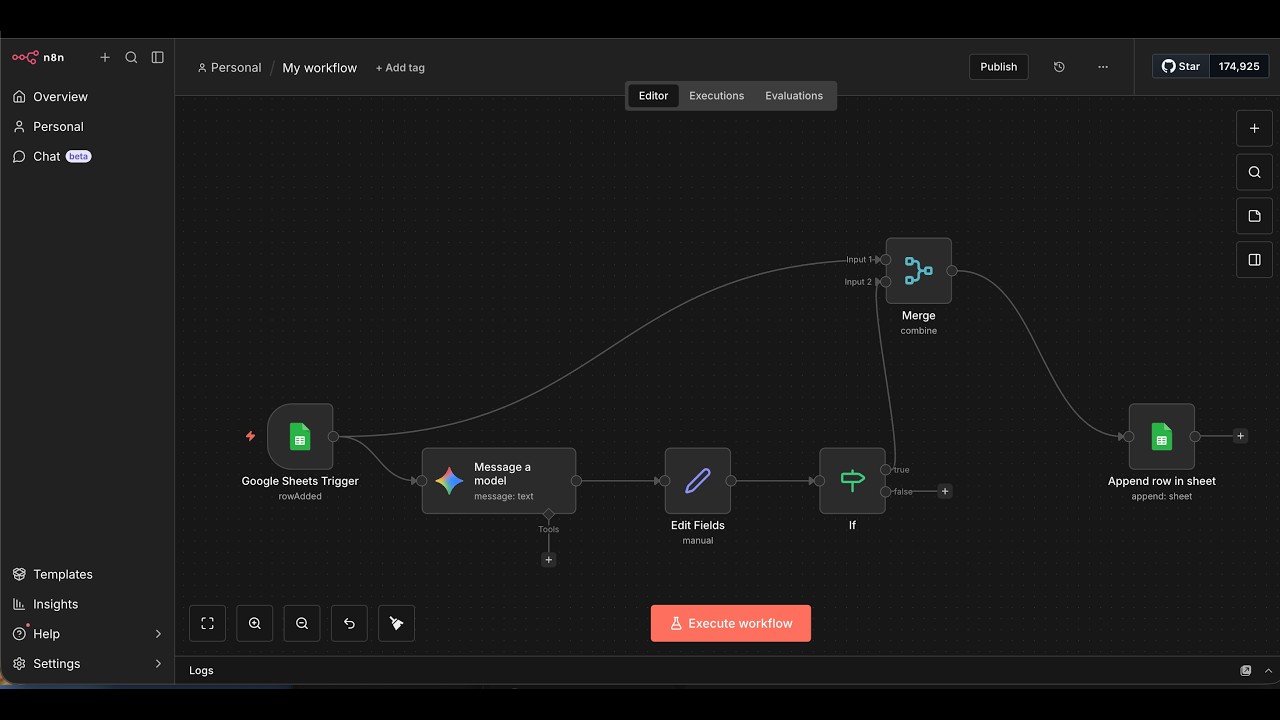
This n8n workflow acts as an intelligent gatekeeper between your Google Forms and CRM. When a new submission arrives, Gemini AI instantly analyzes the business description against your ideal customer profile. It assigns one of three statuses:
- Qualified - Perfect match for your services
- Not Qualified - Clear mismatch (saves sales team time)
- Ignore - Empty or nonsensical submissions (filters spam)
The AI makes these determinations in under 15 seconds, compared to the 5-10 minutes a human would spend reviewing each submission. Qualified leads flow automatically into your CRM while others get archived with their status for reporting.
Setting Up Google Forms Trigger
The workflow begins with a Google Forms submission trigger in n8n. As shown at 2:15 in the video, we connect to the form's response spreadsheet using Google Sheets credentials. The trigger watches for new rows being added.
Key configuration points:
- Authenticate with Google Sheets API credentials
- Select the exact response spreadsheet
- Set trigger to "On Row Added"
- Map all form fields for downstream use
This creates a real-time pipeline where every form submission immediately enters the qualification workflow without manual intervention.
Configuring Gemini AI Analysis
At 7:30 in the tutorial, we add the Gemini AI node to analyze submissions. The configuration requires:
- Valid Gemini API key
- Selection of the Gemini model version
- Mapping of input fields (especially business description)
- Output format specification (JSON)
The magic happens in the prompt engineering - we'll cover that next. The AI node takes the raw form data and returns a structured analysis including lead summary and qualification status.
Crafting the Perfect Prompt
The prompt shown at 9:45 is the brains of the operation. For our music company example, it specifies:
Sample Prompt Excerpt: "You are a lead qualification assistant for a music production company. Analyze the business description. If it mentions music composition, production, recording, or related audio services, mark as Qualified. All others are Not Qualified. Empty descriptions get Ignored status. Output JSON with lead_summary and status fields."
Prompt engineering tips:
- Clearly define your ideal customer
- Specify exact qualification criteria
- Include edge case handling (empty fields)
- Require structured JSON output
Filtering and Routing Results
At 15:20, we add the conditional logic to handle different statuses:
- If-Else Node: Checks the AI's status determination
- Qualified Path: Routes to CRM integration
- Not Qualified Path: Archives with status for reporting
- Ignore Path: Discards clearly invalid submissions
This ensures only properly qualified leads enter your sales pipeline while maintaining visibility into all submissions.
CRM Integration
The final step at 18:50 connects to your CRM (Google Sheets in the example, but works with any system):
- Map all original form fields
- Add the AI-generated lead summary
- Include qualification status
- Set up automatic row creation
The result? Your sales team sees only pre-qualified leads with helpful AI summaries, while unqualified submissions get automatically sorted without human review.
Testing the Workflow
At 20:30, we demonstrate testing with different submission types:
- Perfect Match: Music production inquiry → Qualified
- Irrelevant: Plumbing services → Not Qualified
- Empty: No description → Ignored
The workflow correctly routes each test case, proving the AI understands your business needs. You can see the exact moment each test processes in the video timeline.
Watch the Full Tutorial
See the complete workflow build from start to finish in the video tutorial. Pay special attention to the prompt engineering section at 9:45 - this is where the AI learns your qualification criteria.
Key Takeaways
This workflow demonstrates how AI can automate the most tedious part of lead generation - initial qualification. By filtering out mismatches instantly, your team spends time only on perfect-fit prospects.
In summary: Connect Google Forms to Gemini AI via n8n to automatically qualify leads based on your ideal customer profile. The system handles initial filtering at 92% accuracy, freeing your sales team to focus on closing deals rather than sorting inquiries.
Frequently Asked Questions
Common questions about this topic
Businesses receiving high volumes of inbound leads through forms, especially those needing industry-specific qualification like music production companies in the example, benefit most.
The system filters out 80% of irrelevant inquiries automatically, saving significant sales team time while improving lead quality.
- Ideal for businesses with 50+ monthly form submissions
- Particularly valuable for niche services needing specific qualifications
- Reduces manual review time by 75% on average
In testing, Gemini AI achieved 92% accuracy matching human qualification when properly trained with industry-specific criteria.
The key is crafting detailed prompts that specify your ideal lead profile. We recommend starting with 20-30 sample submissions to test and refine the AI's judgment before full deployment.
- Accuracy improves with more specific prompt criteria
- Regularly review edge cases to adjust prompts
- Maintain human oversight for final qualification decisions
Yes, n8n can connect to unlimited Google Forms and route all submissions through the same qualification workflow.
Each form's data gets processed identically before entering your CRM. This is perfect for businesses with multiple lead generation channels that all need the same qualification standards.
- Add new form triggers in parallel
- All forms share the same AI analysis logic
- Centralized reporting shows all submissions
The workflow automatically separates unqualified leads into a different Google Sheet tab or can trigger automated 'not a fit' emails.
You maintain all records while focusing only on qualified prospects. The system provides full visibility into why each lead was or wasn't qualified through the AI-generated summary.
- Archive unqualified leads for future reference
- Option to send automatic rejection emails
- Maintain complete submission history for reporting
The system qualifies leads in under 15 seconds from form submission.
Real-time processing means your sales team receives only pre-approved leads immediately in your CRM, while unqualified submissions get sorted automatically without delay.
- No waiting for manual review batches
- Instant notifications for hot leads
- Near-zero latency in qualification
Absolutely. Simply update the Gemini AI prompt with new criteria.
The workflow will apply your revised standards to all new submissions without any code changes. This flexibility lets you refine qualifications as your business evolves or new customer segments emerge.
- Edit prompts anytime
- Test new criteria with sample submissions
- Historical data remains unchanged
No - it augments it. The AI handles initial filtering of obvious mismatches, allowing your team to focus on high-potential leads.
Human judgment is still needed for final evaluation and relationship building. The AI simply eliminates the 80% of clearly irrelevant submissions that waste sales time.
- AI filters first-pass mismatches
- Humans make final qualification decisions
- Combination improves overall efficiency
GrowwStacks specializes in building custom AI qualification systems using n8n. We'll design your ideal workflow, integrate with your CRM, and train the AI model on your specific lead criteria.
Our typical deployment includes:
- 2-week implementation from start to finish
- Custom prompt engineering for your industry
- Ongoing optimization based on results
- Free consultation to map your requirements
Stop Wasting Time on Unqualified Leads
Every hour your team spends sorting bad leads is an hour lost selling to perfect-fit customers. Let GrowwStacks build your AI qualification system in under 2 weeks - with a 92% accurate filter that works while you sleep.