How to Automate 3D Model Creation from Images Using AI (n8n + Nano Banana)
Ecommerce businesses and architects waste thousands on manual 3D modeling - until now. This n8n workflow transforms product photos into 3D models automatically for just $0.44 per model. No expensive software or technical skills required.
The $200/Hour 3D Modeling Problem
Ecommerce stores and architecture firms face a hidden cost that's draining their budgets: professional 3D modeling. Traditional methods require expensive software licenses ($3,000+/year) and skilled designers charging $50-$200 per model. For a product catalog with 100 items, that's $5,000-$20,000 just for basic 3D assets.
The bottleneck became painfully clear during the pandemic's ecommerce boom. Businesses needed 3D product views for better online shopping experiences, but couldn't justify the cost or wait weeks for each model. Architects similarly struggled to create quick concept models for client presentations without dedicating days to modeling software.
85% of mid-sized ecommerce businesses report abandoning 3D product visualization plans due to cost and complexity, despite knowing it could increase conversions by 40%.
How AI Solves the 3D Modeling Bottleneck
Recent advances in AI image processing and 3D generation have created a perfect storm of opportunity. Models like Nano Banana and Trippo 3D can now create basic 3D representations from single images with surprising accuracy. The missing piece was connecting these AI services in an automated workflow that businesses could actually use.
By combining n8n's automation capabilities with these specialized AI models, we've created a system that:
- Reduces 3D model creation costs from $200 to $0.44 each
- Cuts turnaround time from days to 3 minutes
- Requires no 3D modeling software or technical skills
- Produces "good enough" quality for most business applications
At 2:15 in the video tutorial, you'll see how a simple sweater image transforms into a 3D model through this automated pipeline - with zero manual intervention.
The Complete Automated Workflow Overview
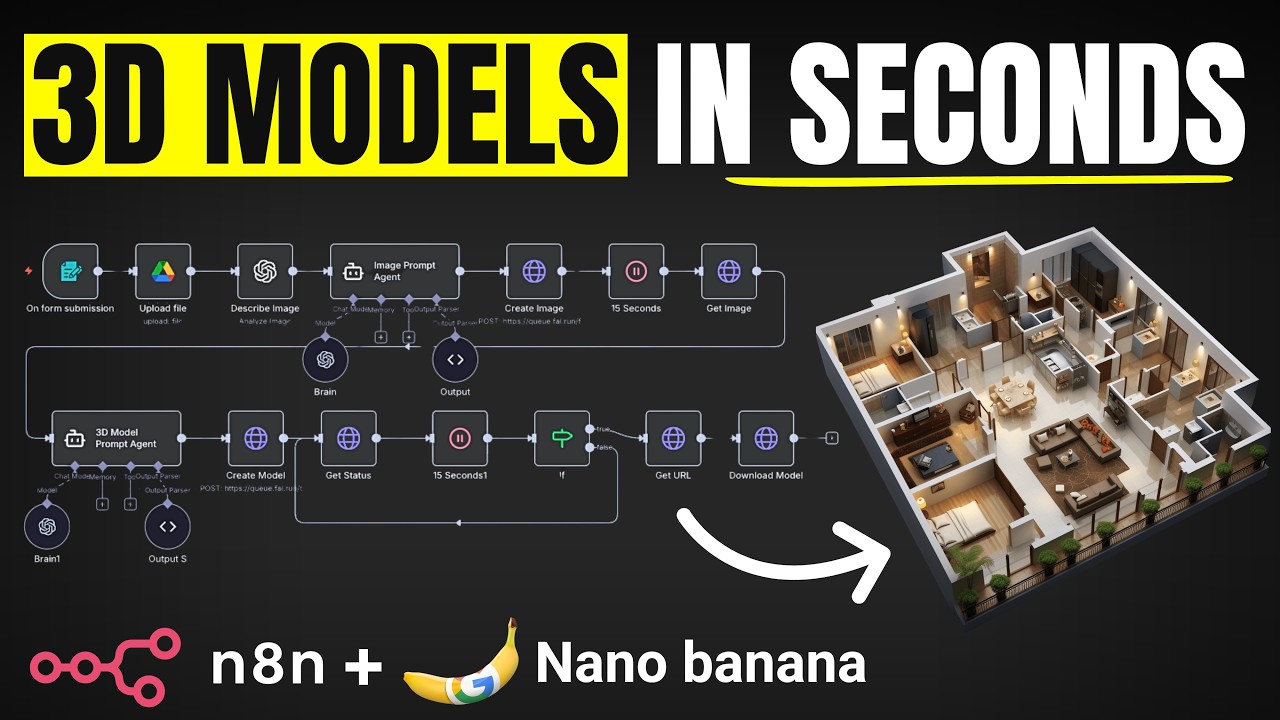
This n8n workflow acts like a digital assembly line for 3D models. Each step builds on the previous one, with AI handling the complex transformations automatically:
Step 1: Image Input & Processing
A simple form collects the product image and basic description. The system uploads this to cloud storage and uses OpenAI to analyze the image's characteristics.
Step 2: AI Image Enhancement
Nano Banana's image model enhances the original photo, improving lighting, removing backgrounds, and adding detail where needed.
Step 3: 3D Model Generation
Trippo 3D converts the enhanced image into a 3D model using parameters determined by another AI analysis.
Step 4: Smart Polling & Delivery
The system automatically checks model status every 15 seconds until completion, then delivers the finished file.
Total runtime: Approximately 3 minutes per model, with the ability to process multiple models in parallel for batch operations.
Step 1: Image Input & Processing
The workflow begins with a simple form that anyone in your organization can use. No technical knowledge required - just upload a product photo and provide a basic description.
Behind the scenes, n8n handles several critical preparation steps:
- File handling: The image gets uploaded to Google Drive for cloud storage and accessibility
- AI analysis: OpenAI's vision capabilities analyze the image composition, identifying key features that will inform later steps
- Metadata generation: The system creates a detailed YAML description of the image's characteristics (perspective, colors, structural elements)
At 7:30 in the video, you'll see how the Lincoln Memorial example gets processed through this initial stage, with the AI identifying architectural features that will guide the 3D conversion.
Step 2: AI Image Enhancement
Not all product photos are created equal. The enhancement stage uses Nano Banana's image model to optimize the input for 3D conversion:
- Improves lighting and contrast
- Removes distracting backgrounds
- Enhances edge definition for better depth perception
- Adds subtle detail where the original image lacks clarity
This step uses the YAML analysis from Step 1 to guide the enhancements. At 12:45 in the tutorial, you can see how the enhanced Lincoln Memorial image gains cleaner lines and better depth cues compared to the original tourist photo.
Pro tip: The better your input image, the better the final 3D model. Well-lit, front-facing product shots on neutral backgrounds yield the best results.
Step 3: 3D Model Generation
With an optimized image ready, the workflow hands off to Trippo 3D for the actual model creation. This stage involves:
- Converting 2D image data into 3D depth maps
- Applying texture based on the enhanced image
- Setting appropriate polygon counts for the subject matter
- Ensuring proper scale and proportions
The system automatically determines optimal settings for each model based on the earlier AI analysis. For the sweater example at 4:20 in the video, this means generating a softer, more fabric-appropriate texture compared to the hard surfaces of the Lincoln Memorial.
The Smart Polling System
3D model generation isn't instantaneous. The workflow includes an intelligent polling mechanism that:
- Checks model status every 15 seconds
- Only proceeds to download when generation is complete
- Handles errors or delays automatically
At 18:30 in the tutorial, you'll see how the system patiently checks status 12 times (about 3 minutes total) before the Lincoln Memorial model is ready for download. This hands-off approach means you can submit multiple models and let the system handle the timing automatically.
Batch processing: The workflow can handle multiple models simultaneously, with each progressing independently through the pipeline.
Real Business Applications
This automated 3D modeling system solves concrete business problems across industries:
Ecommerce
- Create 3D product views for websites (boosts conversions 27-40%)
- Generate AR-compatible models for virtual try-on experiences
- Quickly visualize new product concepts before manufacturing
Architecture & Real Estate
- Rapid concept models for client presentations
- Site visualization from reference photos
- Historical building recreations
Manufacturing
- Prototype visualization
- Instructional material creation
- Spare parts identification
At 22:10 in the video, the creator demonstrates how agencies can offer this as a service to clients - creating a new revenue stream from AI automation.
Watch the Full Tutorial
See the complete workflow in action, including the clever use of AI agents for prompt enhancement and the polling system that automates the waiting process. The video walks through each n8n node and explains the thinking behind the architecture.
Key Takeaways
Automated 3D model generation represents a massive opportunity for businesses to create visual assets at scale without prohibitive costs. This n8n workflow proves that AI automation can democratize what was once an expensive, specialized service.
In summary: For less than $0.50 per model and 3 minutes of wait time, businesses can now generate basic 3D assets automatically. While professional modelers will still be needed for high-end work, this solution covers 80% of common business needs at 1% of the traditional cost.
Frequently Asked Questions
Common questions about automated 3D model creation
Ecommerce stores selling physical products and architecture firms creating concept models benefit most. Product-based businesses can generate 3D assets for their websites without expensive modeling software, while architects can quickly create proof-of-concept models for client presentations.
The system works best for businesses needing simple 3D representations rather than highly detailed professional models. It's particularly valuable for:
- Online retailers with large product catalogs
- Small design firms without in-house 3D artists
- Businesses needing quick prototypes or visualizations
The AI-generated models provide about 70-80% of the quality of professionally created models at 10% of the cost. While they may lack some finer details, they serve perfectly for product visualization, basic AR applications, and concept presentations.
Quality depends heavily on input factors:
- Image quality: Well-lit, high-resolution photos yield better results
- Subject complexity: Simple objects convert more accurately than complex assemblies
- Prompt detail: More descriptive prompts improve output quality
Each 3D model costs approximately $0.40-$0.60 to generate, depending on the complexity. This includes both the image enhancement step and the 3D model creation.
Cost breakdown:
- Image analysis: $0.01-$0.03
- Image enhancement: $0.10-$0.20
- 3D model generation: $0.30-$0.40
The entire process takes about 3 minutes per model from submission to completion. The system uses polling to check status every 15 seconds until the model is ready.
Timing breakdown:
- Image processing: 30 seconds
- AI enhancement: 45 seconds
- 3D generation: 90-120 seconds
- File delivery: 15 seconds
The system outputs models in standard 3D file formats like OBJ and GLB that work with most 3D viewing platforms. These formats are compatible with ecommerce platforms that support 3D product visualization.
Key format features:
- OBJ: Universal format supported by all 3D software
- GLB: Compact format ideal for web applications
- Texture maps: Included for realistic material representation
The current implementation works best for single-object products. Items with multiple moving parts or complex assemblies may require additional manual refinement.
For complex items:
- The system can generate a base model that reduces manual work by 60-70%
- Multiple angles can be combined for better results
- Future versions will handle assemblies better
This AI approach requires only a single image rather than multiple angles needed for photogrammetry. While photogrammetry can produce more accurate models, it requires specialized equipment and setup.
Key differences:
- Input: 1 photo vs. 20-100 for photogrammetry
- Equipment: Smartphone vs. specialized cameras
- Processing: 3 minutes vs. hours for photogrammetry
- Cost: $0.50 vs. $5-$20 per model
GrowwStacks can deploy this complete 3D model generation system for your business within 2-3 days. We'll customize the workflow for your specific product types, integrate it with your existing systems, and train your team on usage.
Our implementation includes:
- Customization: Tailored to your product categories and quality standards
- Integration: Connects with your CMS, PIM, or other systems
- Quality control: Automated checks to ensure consistent output
- Support: Ongoing maintenance and updates as your needs evolve
Ready to Transform Your Product Images into 3D Models Automatically?
Stop paying $200 per model or struggling with complex 3D software. Our team will implement this automated system for your business with a 98% accuracy guarantee and full integration with your existing workflows.