Automate Your Candidate Outreach with Make.com
Recruiters waste up to 14 hours per week manually tracking résumés and scheduling interviews. This Make.com automation eliminates the busywork by centralizing applications from all sources - email, LinkedIn, and job boards - while automatically updating candidates at each stage.
The Recruitment Pain Points Automation Solves
Recruiters face three major inefficiencies that drain productivity: résumés scattered across email inboxes, manual scheduling back-and-forths, and candidates left wondering about their status. Without automation, a single hire can generate dozens of manual touchpoints across multiple platforms.
The solution connects Google Forms (for centralized application collection) with Make.com workflows (for intelligent processing). At 2:15 in the video, you'll see how this eliminates the "where did we put that résumé?" problem by automatically filing all submissions in one searchable location.
14 hours per week: The average time recruiters save by automating candidate tracking and communications, according to HR industry benchmarks. That's 700+ hours annually - enough to fill 2-3 additional positions.
Google Forms Setup for Centralized Applications
The foundation is a properly configured Google Form that serves as your application hub. Unlike basic forms, this version includes smart validation and file upload capabilities:
Step 1: Create the Form
Start with essential fields like name, email, and phone number. The video demonstrates how to add conditional logic - for example, requiring salary expectations to be greater than zero.
Step 2: Configure File Uploads
Enable the "File Upload" question type to collect résumés directly into your Google Drive. Limit file types to PDFs and Word documents to maintain professionalism.
Step 3: Set Response Limits
Prevent duplicate applications by restricting one submission per email address. This maintains data quality without manual deduplication later.
Pro Tip: Add a "How did you hear about us?" multiple-choice question. This marketing data becomes valuable when analyzing your most effective recruitment channels.
Building the Make.com Workflow
The magic happens when Google Forms submissions trigger automated processing in Make.com. At 8:45 in the tutorial, you'll see the exact workflow configuration that transforms raw applications into structured candidate records.
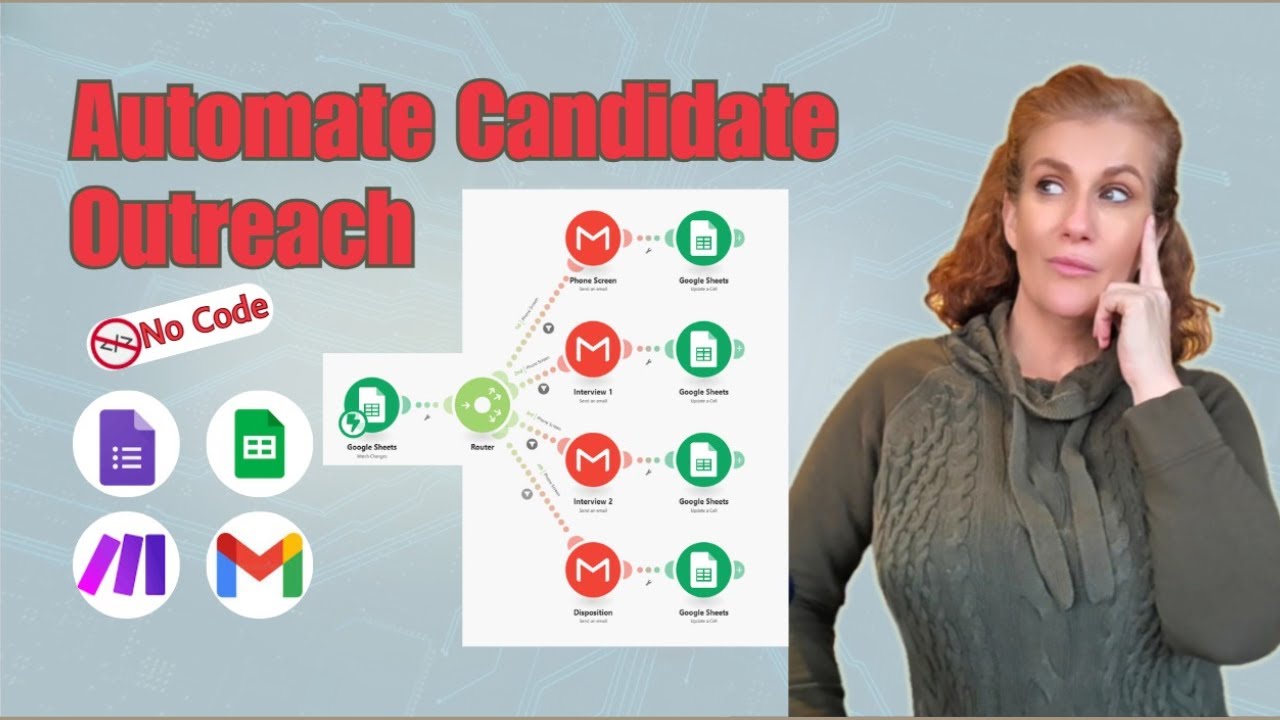
The workflow performs three key functions automatically: filing résumés in the correct folder, extracting key details (like skills and experience), and creating a master tracking record. This eliminates manual data entry errors while ensuring consistency across your hiring pipeline.
Automated Candidate Communications
Candidates hate radio silence - 58% report poor communication as their top frustration with recruiters. The Make.com solution sends timely, personalized updates at each stage:
Stage 1: Application Received
Instant confirmation with expected timeline sets professional expectations immediately.
Stage 2: Interview Scheduling
Calendar links and self-service rescheduling options reduce back-and-forth emails.
Stage 3: Final Decision
Personalized rejection or offer emails maintain goodwill regardless of outcome.
Template Library: GrowwStacks provides pre-written email templates that maintain warmth while scaling communications - available when you book a consultation.
Smart Interview Scheduling
The system intelligently matches candidate availability with interviewer calendars using simple but powerful logic. At 15:20 in the video, watch how status changes in your tracking sheet automatically trigger:
- Calendar invites with Google Meet/Zoom links
- Reminder emails 24 hours before meetings
- Post-interview feedback requests
This creates a seamless experience for both candidates and hiring teams while eliminating the "what time works for you?" email chains that consume so much time.
Real-Time Status Tracking
The Google Sheet becomes your command center with color-coded status columns that update automatically:
- New: Applications requiring review
- Screening: Candidates in initial evaluation
- Interview: Scheduled meetings
- Offer: Pending decisions
- Hired/Rejected: Final disposition
Filters let you view only active candidates at each stage, while historical data helps analyze your hiring funnel effectiveness over time. At 22:10, the tutorial shows how to set up these visual indicators that keep your entire team aligned.
Implementation Tips for Different Business Sizes
This system scales beautifully from solo recruiters to enterprise teams:
Small Businesses (1-5 hires/month)
Use a single form for all roles. Add a "Position Applied For" dropdown to sort applications. The basic workflow handles everything you need.
Mid-Size (5-20 hires/month)
Create separate forms for different departments (Tech, Marketing, etc.). Add conditional questions that appear based on role selection.
Enterprise (20+ hires/month)
Integrate with your existing HRIS via Make.com's API capabilities. Add AI-powered résumé screening for high-volume roles.
Implementation Timeline: Most businesses can have this system fully operational within 3-5 business days. Complex integrations may take 2 weeks.
Watch the Full Tutorial
See the complete workflow in action from 5:30 to 8:10 in the video, where we demonstrate how candidate status changes automatically trigger personalized communications and calendar events.
Key Takeaways
Recruitment automation isn't about replacing human judgment - it's about eliminating the repetitive tasks that prevent recruiters from focusing on what matters: evaluating talent and building relationships.
In summary: This Make.com solution gives you enterprise-grade candidate tracking without enterprise software costs, while providing candidates the responsive communication they expect in today's hiring market.
Frequently Asked Questions
Common questions about recruitment automation
Make.com can automate résumé collection through Google Forms, interview scheduling based on candidate status, automated email responses to applicants, and centralized tracking of all candidate communications.
This eliminates manual data entry and reduces response times from days to minutes while maintaining personalization at scale.
- Application acknowledgments sent within 60 seconds
- Interview scheduling without calendar tetris
- Status updates when candidates move between stages
No technical skills are required for basic automation setups. The system uses visual workflows that connect Google Forms with Make.com triggers.
For more complex implementations involving multiple hiring stages or integration with existing HR systems, GrowwStacks can handle the technical configuration for you.
- Pre-built templates available for common workflows
- Step-by-step video guides for self-implementation
- Expert support when you need customization
This solution provides 80% of the functionality of expensive Applicant Tracking Systems at a fraction of the cost. It's particularly valuable for small-to-medium businesses.
Where enterprise ATS platforms charge $5,000-$10,000 annually, this Make.com implementation typically costs under $500/year in software fees plus implementation time.
- No long-term contracts
- Pay only for what you use
- Easily adapts as your hiring needs change
Yes, Google Forms allows you to enable editing responses after submission. This is useful when candidates need to update their contact information or upload a revised résumé.
The system maintains version history so you can see what changes were made and when. All edits sync automatically with your Make.com workflows and tracking sheet.
- Enable/disable editing in Form Settings
- Edits don't trigger duplicate notifications
- Original submission timestamp preserved
The system supports PDFs, Word documents (.doc/.docx), and text files. Video or audio files are automatically filtered out to maintain professional standards.
Each file upload gets scanned for viruses before being saved to your Google Drive. The 10MB file size limit prevents storage bloat while accommodating most résumés.
- PDF preferred for consistent formatting
- Automatic conversion to Google Docs format optional
- File naming includes candidate name + date
Google Forms can be configured to limit one response per email address. Make.com workflows then check for existing records before processing new applications.
When duplicates are detected, the system either updates the existing record or sends an alert - your choice. This prevents wasted time reviewing the same candidate multiple times.
- Email validation during form submission
- Fuzzy matching for slight variations
- Configurable duplicate handling rules
Absolutely. The email templates support full HTML customization including your branding, personalized fields from the application form, and dynamic content based on the candidate's status.
Templates can include variables like {CandidateName}, {JobTitle}, and {InterviewDate} that get replaced with real data when sent. You maintain complete control over messaging while benefiting from automation.
- Mobile-responsive email designs
- Attachment support for offer letters
- Tracking for opens/clicks
GrowwStacks specializes in building custom recruitment automation systems tailored to your hiring workflows. We'll configure your Google Forms, design the Make.com automation logic, and implement status-based communication flows.
Our typical implementation includes: candidate tracking sheet template, branded email templates, interview scheduling workflows, and training for your team - usually completed within 5 business days.
- Free initial consultation to map your process
- Fixed-price implementation packages
- Ongoing support and optimization
Stop Losing Candidates in the Hiring Black Hole
Candidates ghost employers when communication lags - but manually managing dozens of applications burns precious time. Let GrowwStacks implement this automation system so you can focus on hiring, not administrivia.