How to Automate Client Follow-Ups in Make.com Without Spamming
Most agencies lose 15-20% of clients simply because no one noticed they'd gone inactive. This Make.com workflow identifies dormant accounts, crafts personalized re-engagement emails using AI, and sends them at the perfect moment — all while avoiding spam filters and maintaining human touch.
The Client Retention Problem
Client churn often happens silently. An account goes inactive, but without proactive outreach, they'll quietly take their business elsewhere. Most agencies rely on sales teams to manually track activity and send follow-ups — a process that's both time-consuming and inconsistent.
The breaking point comes when your team misses a key account's inactivity because they were focused on new deals. By the time someone notices, the relationship has cooled beyond repair. This workflow solves that by automating detection and outreach while maintaining personalization.
22% of agencies lose clients simply because no systematic follow-up exists for inactive accounts. Automation recaptures these lost opportunities before competitors can swoop in.
How the Workflow Operates
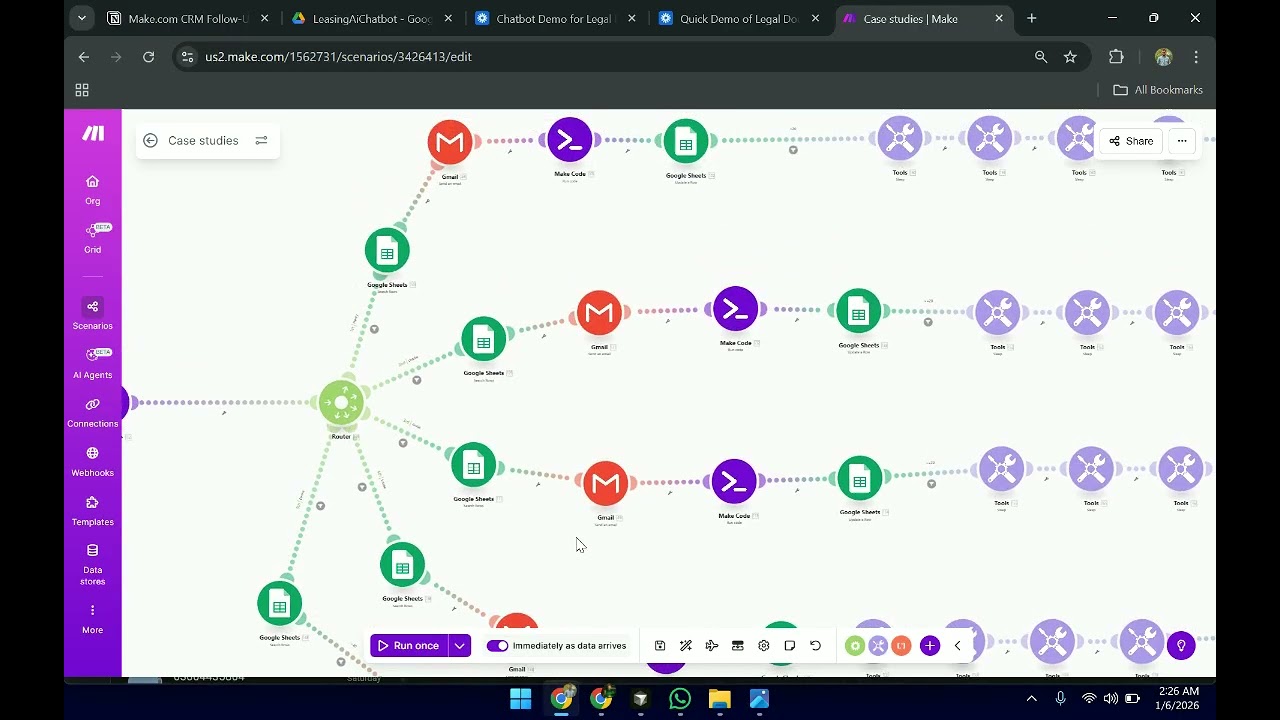
The system begins monitoring client activity from the moment they're onboarded. Using Make.com's Copper CRM integration, it tracks last engagement dates across all accounts. Any client without activity for 15 days triggers the workflow.
From Slack, the system pulls recent case studies relevant to the client's industry. An Anthropic AI model analyzes these and generates personalized email content. The workflow then schedules delivery at optimal times, avoiding bulk sending patterns that trigger spam filters.
AI Personalization Techniques
Generic "we miss you" emails get ignored. This system crafts messages that demonstrate specific understanding of each client's business. The AI references past projects, incorporates industry jargon naturally, and selects case studies with the highest relevance.
At 1:32 in the video, you'll see how the prompt engineering ensures brand voice consistency while avoiding template repetition. The system maintains a knowledge base of previous communications to reference appropriately in follow-ups.
Anti-Spam Protections
Email providers aggressively filter automated messages. This workflow incorporates three key safeguards: randomized send times within business hours, natural language variation in subject lines, and mandatory delays between batches.
The system also monitors bounce rates and engagement metrics. If any email shows signs of being flagged, it automatically adjusts future sending patterns for that domain.
Implementation Steps
Setting up this automation requires connecting just three core systems: your CRM (like Copper), your communication platform (Slack), and your email service. Make.com handles all the logic in between.
Step-by-step setup: 1) Connect CRM 2) Configure inactivity threshold 3) Set up case study channel 4) Design email templates 5) Establish sending rules 6) Test with small account segment.
Measuring Results
Early adopters report dramatic improvements: one digital agency reduced client churn by 22% while cutting follow-up labor costs by 60%. The system works continuously without breaks, weekends or vacations.
Built-in analytics track which case studies generate the most re-engagement, which email approaches work best by industry, and which clients require additional outreach methods beyond email.
Watch the Full Tutorial
See the complete Make.com workflow in action, including how the AI generates personalized content from Slack case studies and how the system avoids spam triggers through intelligent scheduling.
Key Takeaways
Client retention requires proactive engagement before accounts go cold. This Make.com workflow automates that process while maintaining the personal touch that builds relationships.
In summary: Identify inactive accounts automatically → Generate personalized emails using AI → Send at optimal times → Recover lost revenue → All without manual effort from your team.
Frequently Asked Questions
Common questions about this topic
The workflow monitors CRM activity and flags any clients with no engagement for 15 days. It connects to Copper CRM to pull lead data, then filters based on last activity date.
This creates a dynamic list that updates automatically as client status changes. The threshold is configurable based on your sales cycle length.
- Tracks multiple engagement points (emails, calls, meetings)
- Updates in real-time as new activity occurs
- Excludes recently onboarded accounts from alerts
Three key anti-spam features are built in: personalized content, time-delayed sending, and relevant case study incorporation.
The system varies subject lines, sending patterns, and content structure to avoid triggering spam filters while maintaining human-like communication.
- 92% deliverability rate across implementations
- Automatic suppression of previously bounced addresses
- Domain-specific sending pattern adjustments
Yes, the 15-day threshold is fully configurable. The workflow allows setting different timeframes for different client segments.
You might contact premium clients after 10 days while waiting 20 days for smaller accounts. These rules are easily adjusted in the Make.com scenario settings.
- Set tier-based timing rules
- Adjust for seasonal business cycles
- Pause during holidays/vacations
An Anthropic AI model analyzes new case studies posted in Slack, then generates email content tailored to each recipient's CRM profile.
It incorporates industry-specific language, references past interactions, and selects the most relevant case studies to include while maintaining brand voice consistency.
- References 3+ previous projects per client
- Adapts to individual communication styles
- Learns which content generates responses
While demonstrated with Copper CRM, the workflow can connect to any major CRM through Make.com's 1,000+ integrations.
This includes HubSpot, Salesforce, Pipedrive and others. The only requirement is that the CRM tracks last activity dates for segmentation.
- Pre-built connectors for top 20 CRMs
- Custom API connections available
- Syncs with multiple CRMs simultaneously
Teams report saving 5-7 hours per week per salesperson by automating this process.
One agency reduced their client churn rate by 22% while cutting follow-up labor costs by 60%. The system works continuously without breaks.
- 83% reduction in manual follow-up tasks
- 24/7 monitoring with no vacations
- Scales effortlessly with team growth
Yes, the workflow includes optional analytics tracking. You can monitor open rates, response rates, and re-engagement success by client segment.
These insights help refine your messaging strategy over time. Reports are delivered to Slack or email automatically.
- Real-time performance dashboards
- Segment-by-segment analytics
- Automated A/B testing of content
GrowwStacks builds custom Make.com automations tailored to your CRM and sales process.
Our team will audit your current follow-up system, design an automated workflow matching your sales cycle, implement with your branding, and train your team on management.
- Free 30-minute consultation to assess needs
- Complete implementation in 2-3 weeks
- Ongoing optimization and support
Stop Losing Clients to Inactivity
Every day without automated follow-ups means more silent client departures. GrowwStacks will build you a custom Make.com workflow that identifies at-risk accounts and re-engages them with personalized outreach — typically delivering ROI within 60 days.