Automate Your Morning: Build an AI "Executive Brief" Agent with Make.com (No-Code)
That red notification bubble in your email isn't just a number - it's a constant source of stress and decision fatigue. This step-by-step guide shows how to build an AI assistant that reads, summarizes and prioritizes your inbox automatically - delivering a polished executive brief to your inbox daily with zero ongoing effort.
The Hidden Cost of Email Overload
That persistent red notification bubble in your email app represents more than just unread messages - it's a constant cognitive tax that drains productivity. Most professionals start their day facing 100+ emails, only to finish with even more waiting. This creates three major business impacts:
1) Context switching penalty: Each email interruption costs 23 minutes to regain full focus (University of California research). Over a day, this fragments your attention beyond repair.
2) Decision fatigue: Sorting through raw emails forces hundreds of micro-decisions about what matters - depleting mental energy for strategic work.
3) Missed priorities: Without systematic filtering, urgent but unimportant messages consistently drown out truly critical communications.
The solution isn't working harder: No human can effectively process today's email volume manually. The breakthrough comes from automating the information triage while preserving human judgment for decisions.
How the AI Executive Brief Works
This Make.com workflow acts as a 24/7 AI executive assistant that:
- Connects directly to your Gmail account
- Processes all incoming messages through OpenAI
- Generates a structured daily report with:
Priority-ranked items: Each email gets tagged High/Medium/Low based on content analysis and your predefined rules.
The system goes beyond simple summarization by:
- Grouping related threads by topic automatically
- Extracting concrete action items with due dates
- Preserving key quotes from original senders
- Filtering out newsletters and non-essential CCs
Why Make.com for This Workflow
Make.com (formerly Integromat) provides the ideal platform for building this automation because:
Visual workflow builder: The drag-and-drop interface lets you connect apps without writing code - like digital Legos for automation.
Enterprise-grade reliability: Unlike browser extensions or scripts, Make.com runs on cloud servers with 99.9% uptime and automatic error handling.
Cost-effective at scale: At ~$15/month for the Pro plan, the time savings justify the cost within 1-2 days for most professionals.
The platform also offers:
- 1,000+ app integrations beyond just Gmail
- Scheduling down to the minute
- Data transformation tools between steps
- Team collaboration features
Step-by-Step: Building the Automation
Step 1: Connect Gmail
We start by adding a Gmail module configured to:
- Only check emails from specified senders (avoiding spam)
- Limit to last 24 hours (for daily briefs)
- Extract key fields: From, Subject, Date, Body
Step 2: Aggregate Emails
Using Make.com's Text Aggregator tool, we bundle multiple emails into one clean package for the AI:
- Standardizes formatting
- Removes signatures and disclaimers
- Preserves metadata context
Step 3: Connect OpenAI
The AI module receives:
- Carefully engineered system prompt (see next section)
- The bundled email text
- Configuration for GPT-4 or GPT-3.5-turbo
Step 4: Send the Brief
Final Gmail module:
- Sends to your specified address
- Formats in clean HTML
- Includes "Daily Executive Brief" subject line
Crafting the Perfect AI Instructions
The secret to quality outputs lies in the system prompt - the permanent instructions guiding the AI's analysis. Our prompt:
1. Defines the role: "You are an expert executive assistant analyzing emails for a busy professional. Your goal is to identify truly important communications while filtering noise."
2. Structures the output: Clear requirements for categorization, prioritization, and action item extraction.
3. Sets quality rules: Instructions to:
- Quote verbatim when uncertain
- Flag potential misunderstandings
- Maintain original sender intent
- Avoid editorializing
This prompt engineering creates consistent, business-ready outputs rather than generic summaries.
What Your Automated Brief Looks Like
The final product landing in your inbox each morning:
Clean topical sections: Like "Client Requests", "Internal Updates", and "Action Items" - each with priority tags.
Every item includes:
- Original sender and subject
- Concise summary (3-5 bullet points)
- Clear next steps if required
- Links back to original emails
The transformation from chaos to clarity happens automatically at your chosen time (e.g. 6:30 AM daily).
Watch the Full Tutorial
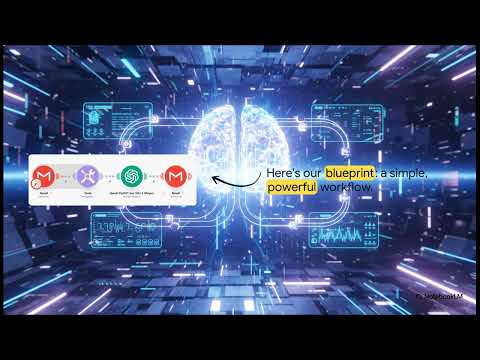
See the complete workflow build from start to finish in this 7-minute tutorial, including the exact AI prompt configuration that makes this system work (jump to 3:12 for the critical prompt engineering section).
Key Takeaways
Email overload isn't inevitable - it's a solvable workflow problem. By automating the information triage with AI, you reclaim:
In summary: This Make.com workflow gives you back 10+ hours weekly while ensuring you never miss critical communications. The system pays for itself in under 48 hours through time savings alone.
Frequently Asked Questions
Common questions about this topic
This Make.com automation connects to your Gmail, analyzes incoming messages using OpenAI, and generates a daily summary report that categorizes emails by topic, assigns priority levels, and extracts action items.
It transforms hundreds of emails into a concise, actionable 1-page brief with:
- Clear sections by topic/priority
- Verbatim quotes for critical items
- Links back to original messages
No coding required. The entire workflow is built using Make.com's visual drag-and-drop interface.
The tutorial walks through each step with clear instructions for:
- Connecting Gmail to OpenAI
- Configuring the text aggregator
- Formatting the output email
Most professionals spend 2-3 hours daily managing emails. This automation reduces that to 5-10 minutes reviewing the AI-generated brief.
Over a week, that's 10+ hours reclaimed for high-value work. The system pays for itself in under two days through time savings alone.
- No more constant inbox checking
- Eliminates repetitive sorting/tagging
- Reduces context switching penalty
Yes. The Gmail module lets you filter by sender, subject keywords, labels, or time period.
You can create multiple versions for different needs:
- Client emails vs internal communications
- Department-specific filters
- Priority sender lists
The tutorial uses GPT-4 for optimal results, but GPT-3.5-turbo works well for most use cases at lower cost.
The system prompt engineering (provided in the workflow) matters more than model selection for consistent quality. Key elements include:
- Role definition
- Output structure requirements
- Accuracy safeguards
The workflow includes prompt engineering that instructs the AI to:
1) Quote key phrases verbatim
2) Flag uncertain interpretations
3) Maintain original sender intent
- You can set up human review for critical communications
- The system learns your preferences over time
- Important emails remain accessible in original form
With additional Make.com modules, yes. The workflow can be extended to:
1) Download attachments
2) Use OCR for PDFs
3) Process spreadsheet data
- These require slightly more advanced configuration
- GrowwStacks offers pre-built templates for these use cases
- Additional AI costs may apply for large file processing
GrowwStacks specializes in custom AI automation workflows for email management. We'll:
1) Configure your specific email filters
2) Tailor the AI prompt to your industry
3) Set up automated delivery via email/Slack/Teams
- Free initial consultation to assess your needs
- Ongoing optimization as your requirements evolve
- Training for your team on maintaining the system
Ready to Transform Your Email Workflow?
Every day you manually process emails is a day lost to decision fatigue and context switching. Let GrowwStacks build your custom AI executive brief system - implemented and optimized in under 48 hours.