How to Automatically Structure Slack Feedback into a Database with Make.com and Keboola
User feedback in Slack disappears into the void - unless you capture and structure it. This automation turns chaotic channel messages into organized data you can analyze, export to project tools, and mine for insights. No more copying and pasting or losing valuable customer input.
The Slack Data Problem
Most companies using Slack have the same frustration - valuable user feedback, bug reports, and feature requests get buried in channels, never to be seen again. Teams waste hours manually copying messages into spreadsheets or project tools, only to have the process break down when things get busy.
The fundamental issue is structure. Slack messages are unstructured by design - freeform text, emoji reactions, files, and threads that don't fit neatly into databases or analysis tools. This automation solves that by automatically capturing and transforming messages the moment they're posted.
80% of product teams say they lose valuable customer insights because feedback gets stuck in Slack. Structured data capture solves this at scale.
How the Automation Works
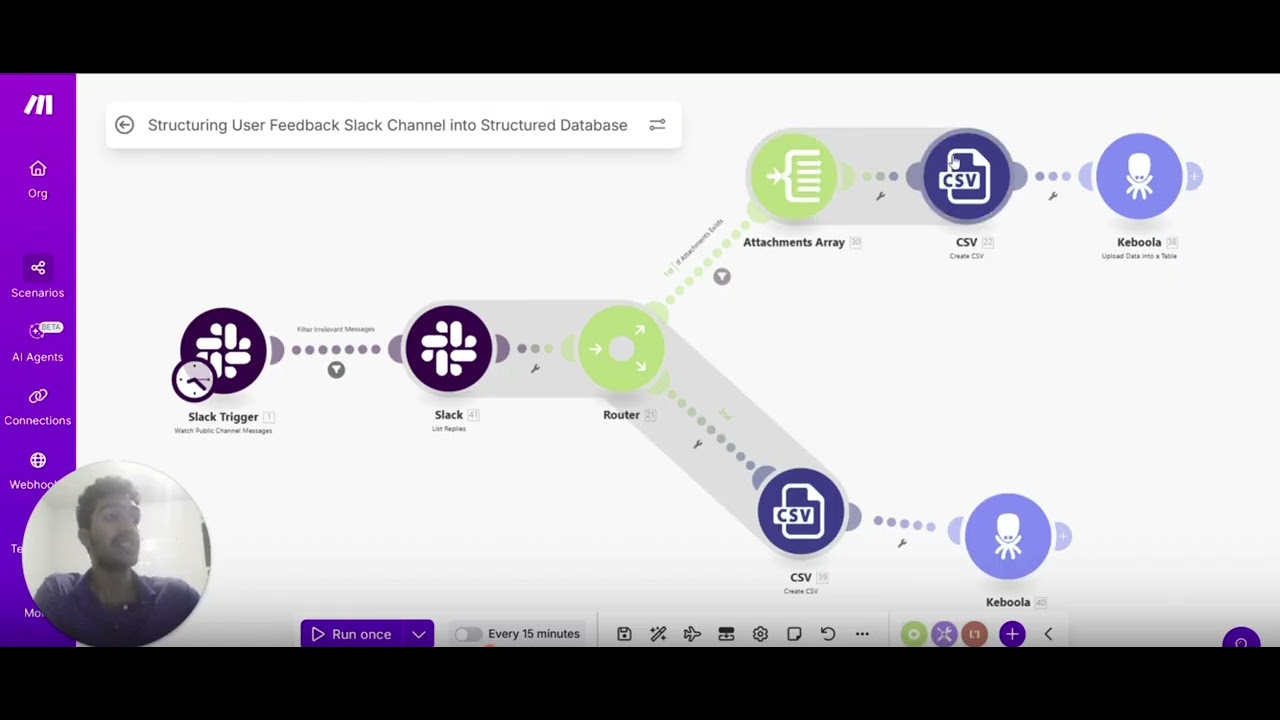
The workflow begins with Make.com monitoring a Slack channel for new messages. When detected, it retrieves the full message content including metadata like user ID, timestamp, and any attachments. A router module then processes different message types appropriately - handling text, files, and screenshots separately.
The magic happens in the CSV module, which flattens all message properties into consistent columns. Each Slack message becomes a structured row with standardized fields, ready for Keboola to ingest. This transformation is what enables all downstream analysis and integration.
Setting Up Make.com
Configuration starts with connecting your Slack workspace to Make.com using OAuth. You'll need admin permissions to set up the webhook that monitors your target channel. The key is selecting the right trigger event - in this case, we use 'New Message in Channel' to capture all public posts.
The Make.com scenario then needs modules for retrieving message details, handling different content types, and formatting the output. Error handling is critical here - you want to capture failed messages in a separate log rather than stopping the entire workflow.
Pro Tip: Use Make.com's error handling routes to capture and retry failed messages without breaking the automation.
Configuring Keboola
On the Keboola side, you'll create a storage bucket and table structure to receive the Slack data. The table columns should match the fields coming from Make.com - message text, user ID, timestamp, attachment URLs, etc. Keboola's API endpoint makes this connection straightforward.
Once configured, test with sample messages to verify the data flows correctly. You'll see messages populate in Keboola within seconds of being posted in Slack. The structured format immediately enables filtering, searching, and exporting to other systems.
Message Processing Flow
Let's walk through exactly how a message gets transformed. At 2:15 in the video, you can see a test message "I love this product but wish it had Snowflake integration" trigger the workflow. Make.com captures it, extracts all metadata, and routes it through the processing modules.
The CSV conversion creates columns for each property - text content becomes one column, user ID another, timestamp another, and so on. This structured record then gets sent to Keboola where it's stored in the predefined table structure, ready for analysis.
Analysis Possibilities
With messages now in Keboola, the real value begins. You can connect to Snowflake for SQL analysis, build sentiment tracking dashboards, or set up automatic ticket creation in Jira or Linear. The structured format enables all the data operations that were impossible with raw Slack messages.
Consider tagging messages by topic automatically using simple pattern matching. Or calculating response times between user messages and team replies. The possibilities expand dramatically when you're working with structured data instead of freeform chat.
Common Use Cases
Product teams use this to track feature requests and bug reports automatically. Customer support captures feedback without manual logging. Engineering monitors system alerts that come through Slack channels. The common thread is turning transient messages into persistent, analyzable data.
One particularly powerful application is sentiment analysis over time. By structuring all user feedback, you can track how sentiment changes after releases or identify emerging pain points before they become widespread complaints.
Watch the Full Tutorial
See the complete workflow in action, including how to handle attachments and test the connection between Make.com and Keboola. The video demonstrates the end-to-end process from Slack message to structured database record.
Key Takeaways
Slack contains a goldmine of user insights that most companies never properly capture. This automation provides the missing link between informal team communication and structured data analysis. Once implemented, you'll never lose valuable feedback to the Slack void again.
In summary: Make.com monitors Slack → processes messages into structured format → Keboola stores the data → Your team gains analyzable insights from previously lost feedback.
Frequently Asked Questions
Common questions about this topic
Unstructured Slack messages containing user feedback, bug reports, and feature requests are valuable but difficult to analyze or integrate with project management tools. By structuring this data in a database like Keboola, you can perform sentiment analysis, export to tools like Jira or Linear, and run SQL queries for insights.
The structured format preserves all the original message context while making it machine-readable. This enables automation that would be impossible with freeform chat messages scattered across channels.
- Enables quantitative analysis of qualitative feedback
- Creates audit trails for compliance and reporting
- Allows integration with other business systems
The workflow captures all public channel messages including text content, attachments, documents, files, and screenshots. It processes each message type appropriately - extracting text from files, converting attachments to URLs, and preserving the original message metadata like user IDs and timestamps.
Threaded replies are handled as separate messages with a parent ID reference. Emoji reactions are captured as additional metadata fields that can be analyzed for sentiment or engagement signals.
- Text messages with full content and metadata
- Files and attachments with accessible URLs
- Threaded conversations with parent-child relationships
Make.com uses a router module to handle different message types, then a CSV module to flatten the message properties into columns. Each Slack message becomes a row with consistent columns for text, user ID, timestamp, attachment URLs, and other metadata. This structured format is what Keboola ingests.
The transformation process preserves all the original information while making it queryable and analyzable. Complex nested objects from the Slack API are simplified into a tabular format that databases can process efficiently.
- Router handles different content types appropriately
- CSV module creates consistent column structure
- Error handling ensures no messages are lost
Once in Keboola, you can connect the data to Snowflake for SQL analysis, build dashboards to track feedback trends, set up alerts for negative sentiment, or automatically create tickets in project management tools. The structured format enables all downstream data operations.
Common analyses include sentiment tracking over time, identifying frequent request topics, measuring response times, and correlating feedback with product changes or releases. The data can also feed into machine learning models for more advanced insights.
- Sentiment analysis and trend tracking
- Automated ticket creation in Jira/Linear
- Integration with BI tools like Tableau or Looker
The Make.com scenario triggers within seconds of a new message appearing in the monitored Slack channel. Processing and delivery to Keboola typically completes in under a minute, making the data available for analysis almost immediately after posting.
This near-real-time processing means you can set up alerts or automations that respond to messages quickly. For example, routing urgent bug reports to an on-call engineer or triggering a customer satisfaction survey after support interactions.
- Messages processed within seconds
- Data available in under a minute
- Enables real-time response workflows
The current implementation monitors public channels only. To include private messages or DMs would require additional Slack API permissions and potentially different authentication methods. The core architecture could be adapted for this with proper authorization.
Privacy considerations are important when dealing with direct messages. Any expansion to private communications would need clear disclosure to users and possibly opt-in mechanisms depending on your jurisdiction's data protection laws.
- Public channels only in standard implementation
- Private messages require additional permissions
- Privacy considerations must be addressed
The workflow currently processes each message once when first posted. To handle edits would require additional logic to detect message updates and either append versions or overwrite the existing record. This could be implemented with Slack's message changed events.
Tracking edits adds complexity but provides more complete audit trails. The choice depends on your use case - for some analyses, seeing the evolution of a message may be valuable, while for others only the final version matters.
- Standard workflow captures initial post only
- Edit tracking requires additional configuration
- Consider whether edit history is needed for your analysis
GrowwStacks can customize this automation for your specific Slack workspace and data needs. We'll configure the Make.com scenario to monitor your channels, structure the output for your analysis tools, and connect to your Keboola or other data warehouse.
Our team handles all API connections, error handling, and monitoring so you get reliable data without the technical overhead. We'll also help design the right database structure and analysis workflows for your particular use cases.
- Custom configuration for your Slack workspace
- Integration with your existing data tools
- Ongoing monitoring and maintenance
Stop Losing Valuable Slack Feedback
Every day without this automation means more customer insights disappearing into Slack history. Let GrowwStacks implement this workflow for you in under a week - complete with your custom analysis and reporting.