How to Automate Social Media Posts Across 4 Platforms for Free Using n8n
Most businesses waste hours each week manually posting the same content to multiple social platforms. This free n8n workflow eliminates the repetition by automatically sharing your images and captions to Instagram, X, LinkedIn and BlueSky simultaneously - with no monthly fees or coding required.
The Social Media Posting Struggle
Social media managers and small business owners face the same frustrating routine: craft a post, then manually upload it to Instagram, reformat it for X, adjust it for LinkedIn, and post again to BlueSky. What should take minutes ends up consuming hours each week, often leading to inconsistent posting schedules and missed opportunities.
The breakthrough came when we realized these platforms all accept posts through their APIs. By connecting them through n8n, we could create one submission point that handles all the platform-specific formatting automatically. No more copying and pasting - just one form submission that reaches all your audiences simultaneously.
68% of marketers report spending 2-5 hours weekly just cross-posting content to multiple platforms according to Social Media Today research. This workflow reduces that to under 5 minutes per post.
How the n8n Automation Works
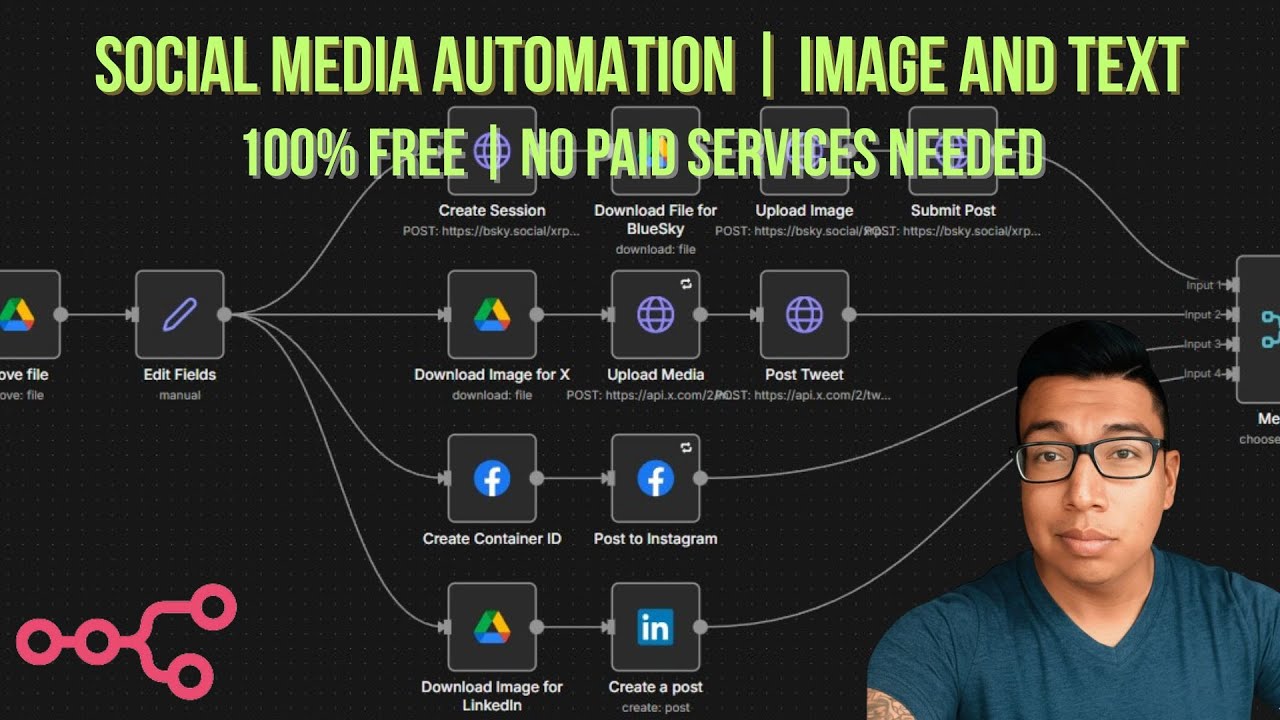
The workflow follows a simple but powerful sequence: You submit an image URL from Google Drive and your caption through a form. n8n then handles all the heavy lifting:
- Retrieves the image from Google Drive
- Formats it appropriately for each platform
- Posts to BlueSky, X, Instagram, and LinkedIn in sequence
- Moves the image to an archive folder
- Sends you one consolidated success notification
The magic happens through each platform's API connections. While the setup requires configuring these once, the template makes this process straightforward with clear instructions for each integration point.
Connecting Google Drive
The workflow uses Google Drive as your image repository. When setting this up (shown at 8:15 in the video), you'll need to:
- Create two folders: "Upcoming Content" and "Posted Content"
- Set sharing permissions to "Anyone with the link" for both
- Connect n8n to Drive using your Google API credentials
- Map these folders in the workflow's Google Drive nodes
This system keeps your images organized automatically - new posts pull from "Upcoming Content" and successfully posted images move to "Posted Content". The workflow handles the file movement seamlessly after each successful post.
Setting Up Platform Integrations
Each social platform requires specific authentication methods:
- BlueSky: Uses an app password from your account settings
- Instagram: Requires Facebook Graph API credentials
- LinkedIn: Needs OAuth 2.0 authentication
- X: Requires special API credential setup (covered next)
The template includes all necessary API nodes pre-configured - you just need to plug in your credentials. For platforms you don't use, simply delete those nodes from the workflow. The modular design makes it easy to customize exactly for your social media mix.
Special Setup for X (Twitter)
X's API changes (mentioned at 12:30 in the video) require using OAuth 2.0 PKCE authentication instead of their standard API keys. The template includes all the necessary fields pre-populated - you just need to:
- Create a developer account at developer.twitter.com
- Generate your client ID and secret
- Paste these into the X credential setup in n8n
- Authorize the app when prompted
This more secure authentication method ensures your X posting will continue working even as they update their API requirements. The workflow handles all the technical complexity behind the scenes once configured.
Email Notification Setup
The workflow's notification system (demonstrated at 22:40) solves a common automation pain point - getting spammed with success messages from each platform. Instead, it:
- Waits until all platforms complete posting
- Merges the results into one clean report
- Sends a single email showing which posts succeeded
- Includes direct links to each live post
To set this up, you'll connect your Gmail account using the same Google API credentials as Drive. The template includes the merge logic already configured - just add your notification email address in the final Gmail node.
Testing Your Automation
Before going live, test with these steps (shown at 24:15 in the video):
- Place a test image in your "Upcoming Content" folder
- Submit the form with the image URL and test caption
- Watch the workflow execute in n8n's execution view
- Verify posts appear correctly on each platform
- Check your email for the consolidated notification
- Confirm the image moved to "Posted Content"
This verification process ensures all connections work properly before automating your real content. The template includes error handling that will alert you if any platform fails to post, making troubleshooting straightforward.
How Much Time This Saves
Let's break down the time savings:
Manual Posting: 2 minutes per platform × 4 platforms = 8 minutes per post
Automated: 30 seconds to submit the form + 1 minute verification = 1.5 minutes
For businesses posting daily, this adds up to 45 hours saved annually - nearly a full work week regained. The automation also eliminates human error like forgetting a platform or posting at inconsistent times. Your social presence becomes reliably consistent with far less effort.
Watch the Full Tutorial
See the complete setup process in action, including the special X API configuration at 12:30 and the final test demonstration starting at 24:15. The video walks through each integration step-by-step.
Key Takeaways
This n8n workflow transforms social media management from a time-consuming chore to a one-click process. By automating cross-platform posting, you ensure consistent content delivery while reclaiming hours each week for higher-value marketing activities.
In summary: The free template handles all the technical complexity - you just connect your accounts and enjoy automated posting to Instagram, X, LinkedIn and BlueSky from one simple form submission.
Frequently Asked Questions
Common questions about social media automation
The workflow posts simultaneously to Instagram, X (Twitter), LinkedIn, and BlueSky. You can easily modify it to add or remove platforms by editing the workflow nodes.
The template handles image uploads and caption formatting for each platform automatically, adjusting for character limits and media requirements specific to each network.
- Instagram: Supports single images with extended captions
- X: Optimizes for shorter text with image attachment
- LinkedIn: Formats for professional audience with proper hashtags
- BlueSky: Maintains compatibility with their unique posting system
No coding required. The template comes pre-built with all necessary nodes configured for immediate use. You only need to connect your social media accounts following the step-by-step instructions.
The most technical part is setting up API credentials, which we provide clear guidance for with screenshots and video walkthroughs. Each platform's documentation also offers straightforward credential generation processes.
- Pre-configured nodes handle all technical operations
- Visual interface makes modifications intuitive
- Comprehensive documentation covers every setup step
You provide a Google Drive link to your image in the submission form. The workflow automatically retrieves the file, converts it to the proper format for each platform, and uploads it through their respective APIs.
After successful posting to all platforms, the workflow moves the image to an archive folder in your Drive. This keeps your content organized and prevents accidental reposting of the same images.
- Supports JPG, PNG, and GIF formats
- Automatically resizes for platform requirements
- Maintains original quality while optimizing file size
Yes, you can add scheduling functionality by incorporating n8n's scheduler trigger or connecting to Google Calendar. The template demonstrates immediate posting after form submission, but is designed for easy scheduling expansion.
For advanced scheduling, you could create a spreadsheet of future posts with dates/times, then have the workflow process them automatically when each scheduled time arrives.
- Basic scheduling with n8n's built-in trigger
- Advanced options through calendar integrations
- Queue multiple posts for automatic future delivery
The workflow includes comprehensive error handling that will notify you specifically which platform(s) encountered issues. Successful posts will still complete, while failed ones can be retried without affecting the others.
You'll receive one consolidated email showing which posts succeeded and which need attention. The notification includes error details and troubleshooting suggestions for common API issues.
- Continues with successful platforms if one fails
- Provides detailed error information
- Allows selective retrying of failed posts
You can connect as many accounts as each platform's API allows. The template shows one account per platform, but you can duplicate the posting nodes to handle multiple Instagram profiles, LinkedIn pages, etc.
Each additional account requires its own set of API credentials. Some platforms like Instagram limit the number of accounts per developer application, so you may need to create separate apps for additional profiles.
- Instagram: Typically 5 accounts per developer app
- X: No hard limit but may require approval for high volumes
- LinkedIn: Supports multiple pages under one organization
- BlueSky: Currently no published limits
The workflow sends one consolidated email notification after all posts complete or if any fail. This includes direct links to each live post for quick verification.
You can customize these notifications by adding additional channels like SMS, Teams, or Slack. The template includes the email notification setup, with clear comments showing where to add other notification methods.
- Default email notification included
- Easy to add SMS or chat app notifications
- Customizable message content and format
GrowwStacks can customize this workflow for your specific social media needs, handle all API credential setup, add advanced features like post scheduling and analytics tracking, and integrate it with your existing marketing tools.
Our automation experts will ensure the workflow matches your exact posting requirements, brand guidelines, and content strategy. We handle the technical implementation so you can focus on creating great content.
- Free 30-minute consultation to assess your needs
- Complete setup and testing of all integrations
- Ongoing support and optimization as platforms update
Ready to Automate Your Social Media in 1 Day?
Stop wasting hours on manual cross-posting. Let GrowwStacks implement this proven automation that saves the average business 45+ hours annually.