How to Automate Any Website Without an API Using Airtop Web Agents in Make.com
Most business tools still don't have APIs, forcing teams to manually copy-paste data between systems. Airtop Web Agents solve this by letting your Make.com workflows browse websites, log into portals, and interact with web apps just like a human would. We'll show you how to build a workflow that turns Loom video URLs into polished LinkedIn posts automatically.
What Airtop Web Agents Can Do
Every business has at least one critical tool that lacks an API - whether it's an internal portal, legacy system, or niche SaaS platform. These become automation black holes, forcing teams to manually transfer data between systems. Airtop Web Agents solve this by giving your Make.com workflows the ability to browse websites and interact with web applications just like a human would.
Unlike traditional web scraping tools, Airtop Agents can log into portals, navigate multi-step forms, click buttons, and extract structured data - all without writing a single line of code. They use AI to understand page layouts and adapt to minor design changes, making them more resilient than traditional automation tools.
Key capability: Airtop Agents can handle JavaScript-heavy sites, single-page applications, and even captcha-protected portals that break traditional automation tools.
Real-World Example: Loom to LinkedIn
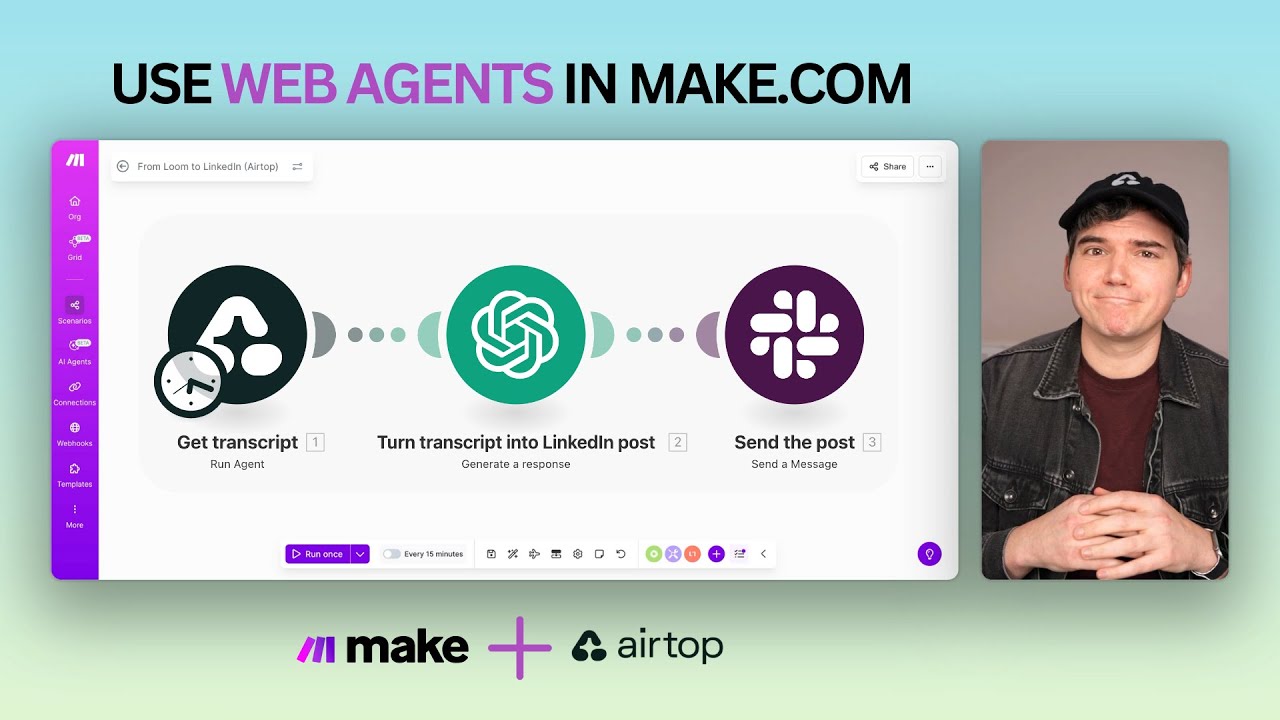
At 1:15 in the video, we see a powerful example workflow: taking a public Loom video URL, extracting the transcript, converting it to a LinkedIn post draft, and sending it to Slack - all automatically. This solves a common pain point for content teams who waste hours manually transcribing and reformatting video content.
The workflow demonstrates Airtop's ability to interact with multiple websites in sequence. First it navigates to the Loom URL (which requires no authentication for public videos), extracts the transcript as structured JSON, then passes that data through additional Make.com modules to transform it into social-ready content.
Setting Up Airtop in Make.com
Connecting Airtop to Make.com takes just three steps. First, create an API key in your Airtop account under the API Keys section. Give it a descriptive name like "Make.com Integration" and copy the key - you won't be able to view it again.
Next, in Make.com, add the Airtop app module to your scenario. When prompted to connect your account, paste the API key you copied earlier. This establishes a secure connection between the platforms.
Pro tip: Create separate API keys for different Make.com scenarios. This lets you revoke access for individual workflows without disrupting others.
Step 1: Find the Airtop Template
Airtop provides pre-built templates for common web automation tasks. Browse their template library to find one matching your use case, or start with a blank agent if you need custom behavior.
Step 2: Configure Your Agent
Configure your agent by describing what you want it to do on the target website. Use natural language like you're explaining the task to a virtual assistant. For example: "Go to this Loom URL, wait for the transcript to load, then extract all the text as JSON."
Step 3: Deploy to Make.com
Once your agent is working correctly in Airtop's testing environment, deploy it to Make.com by copying the agent ID into your scenario's Airtop module.
Configuring Your Web Agent
The magic of Airtop is in how you configure your agents. Unlike traditional automation tools that require precise CSS selectors or XPaths, Airtop understands natural language instructions about what to do on a webpage.
When building your agent, focus on describing the outcome you want rather than the specific steps to get there. For example, instead of saying "Click the button with class 'btn-primary'", say "Click the button that submits the form". This makes your agents more resilient to website changes.
Running Multiple Agents Simultaneously
One powerful feature shown at 3:40 in the video is the ability to run multiple Airtop Agents within the same Make.com scenario. This lets you automate complex workflows that interact with several different websites.
For example, you could have one agent log into your CRM to extract customer data, another agent search your support portal for recent tickets from those customers, and a third agent update a Google Sheet with the combined information - all in a single automated workflow.
Common Use Cases
Airtop Web Agents shine for automating repetitive web tasks that would normally require human intervention. Some of the most valuable use cases include:
- Extracting data from internal tools or legacy systems that lack APIs
- Automating onboarding processes that span multiple web portals
- Monitoring competitor websites or pricing pages for changes
- Submitting forms or applications across government or regulatory sites
- Pulling reports from analytics dashboards that don't offer data exports
The key is identifying processes where employees currently manually transfer information between systems - these are prime candidates for Airtop automation.
Troubleshooting Tips
When your Airtop Agent isn't working as expected, start by testing it in Airtop's interactive debugger. This shows you exactly what the agent sees and does on the webpage, making it easier to identify where the process breaks down.
Common issues include pages loading too slowly (add a wait command), dynamic elements that change position (use more general descriptions), or sites with aggressive bot detection (try adjusting the agent's speed settings). The debugger helps you spot and fix these issues quickly.
Watch the Full Tutorial
At 2:15 in the video, you'll see the exact moment where the Loom transcript gets transformed into a LinkedIn post draft - a perfect example of how Airtop can bridge gaps between tools that weren't designed to work together.
Key Takeaways
Airtop Web Agents remove the biggest barrier to workflow automation: tools that lack APIs. By giving your Make.com scenarios the ability to browse and interact with any website, they unlock automation possibilities that were previously impossible.
In summary: Airtop turns any website interaction into an API call, letting you automate processes that span multiple systems - even when those systems weren't designed to work together.
Frequently Asked Questions
Common questions about this topic
Airtop Web Agents enable Make.com workflows to browse websites, log into portals, fill out forms, and interact with web applications that don't have APIs. They act like a virtual employee that can navigate complex websites and extract structured data.
Unlike traditional web scraping tools, Airtop Agents understand the intent behind web pages and can adapt to minor layout changes. This makes them ideal for automating processes across multiple systems that weren't designed to integrate.
- Navigate multi-step forms and wizards
- Extract data from JavaScript-heavy single-page apps
- Interact with legacy systems and internal tools
Connecting Airtop to Make.com takes just a few minutes. First, create an API key in your Airtop account under the API Keys section. Give it a descriptive name that indicates which Make.com scenario will use it.
In Make.com, add the Airtop app module to your scenario. When prompted to connect your account, paste the API key you created earlier. This establishes a secure connection that allows your Make.com workflow to trigger Airtop Agents.
- API keys can be revoked at any time
- Use separate keys for different scenarios
- Keys are only visible when first created
Airtop can automate nearly any website, including those requiring login, multi-step forms, or complex navigation. The platform is particularly valuable for interacting with SaaS applications that lack proper APIs or export functionality.
Common targets include internal company portals, legacy systems, government websites, and niche industry tools. Airtop's AI adapts to different website designs and can handle JavaScript-rendered content that breaks traditional automation tools.
- Customer portals and account dashboards
- ERP and inventory management systems
- Regulatory and compliance reporting sites
No coding is required to use Airtop Web Agents. You configure agents through a conversational interface similar to ChatGPT, describing what you want the agent to do on the website in plain English.
The platform uses AI to interpret your instructions and determine how to interact with the webpage. For complex tasks, you can provide examples or break the process into smaller steps, but you never need to write code or deal with technical selectors.
- Natural language configuration
- No CSS/XPath selectors needed
- Interactive testing and debugging
Yes, you can run multiple Airtop Agents simultaneously within the same Make.com scenario. This allows you to automate workflows that require interacting with several different websites or performing parallel tasks.
Each agent operates independently, and Make.com can coordinate their actions just like it coordinates API calls to different services. This enables complex automations that would be impossible with traditional tools.
- Run agents in sequence or parallel
- Pass data between agents
- Handle errors for each agent separately
Airtop Agents use AI to adapt to minor website changes automatically. Because they understand the intent behind your instructions rather than relying on fixed selectors, they can often continue working through small layout tweaks or design updates.
For major redesigns that change the fundamental workflow of a site, you may need to update your agent instructions. Airtop provides tools to test agents against the new design and quickly identify where adjustments are needed.
- Automatically adapts to minor changes
- Provides change detection alerts
- Offers visual debugging tools
A common workflow extracts data from a Loom video URL, converts the transcript to a LinkedIn post draft, and sends it to Slack - all automatically. This solves a pain point for content teams who waste hours manually transcribing and reformatting video content.
The workflow demonstrates Airtop's ability to interact with multiple websites in sequence. First it navigates to the Loom URL, extracts the transcript as structured JSON, then passes that data through additional Make.com modules to transform it into social-ready content.
- Extracts Loom video transcripts
- Formats content for LinkedIn
- Posts drafts to Slack for review
GrowwStacks helps businesses implement Airtop Web Agent automations tailored to their specific needs. We identify repetitive web tasks that are draining your team's productivity and build Make.com workflows that handle them automatically.
Our team handles the entire process - from analyzing your current workflows, to configuring the Airtop Agents, to building the Make.com scenarios that tie everything together. We ensure the automation works reliably and provides clear visibility into its operation.
- Free workflow analysis consultation
- Custom Airtop Agent configuration
- End-to-end Make.com implementation
Automate Your Website Tasks Without Coding
Every hour your team spends manually transferring data between systems is an hour lost to low-value work. Let GrowwStacks build custom Airtop Web Agent automations that handle these tasks for you - often in less time than it takes to explain the process.