How to Automate YouTube Comment Scraping for Video Ideas & Market Research
Most creators and marketers waste hours manually reading YouTube comments for insights. This Make.com workflow automatically extracts, categorizes, and analyzes comments at scale - turning raw feedback into actionable data for your content strategy.
Why Scrape YouTube Comments?
YouTube comments represent one of the richest sources of unfiltered customer feedback available. Unlike surveys or focus groups, these are spontaneous reactions revealing what viewers truly think about your content, products, or industry. Yet most businesses never tap into this goldmine because manual analysis is painfully slow.
Automated scraping solves this by extracting comments at scale. The workflow captures every comment - not just the top-rated ones you see first. This reveals patterns you'd miss scrolling manually:
72% of valuable insights come from comments below the "Top Comments" section that most creators never read. Automation ensures you catch them all.
Common use cases include identifying content gaps ("Why isn't there a video about X?"), product pain points ("I wish this feature worked differently"), and competitor weaknesses ("Brand Y's solution doesn't handle this well").
Make.com Workflow Overview
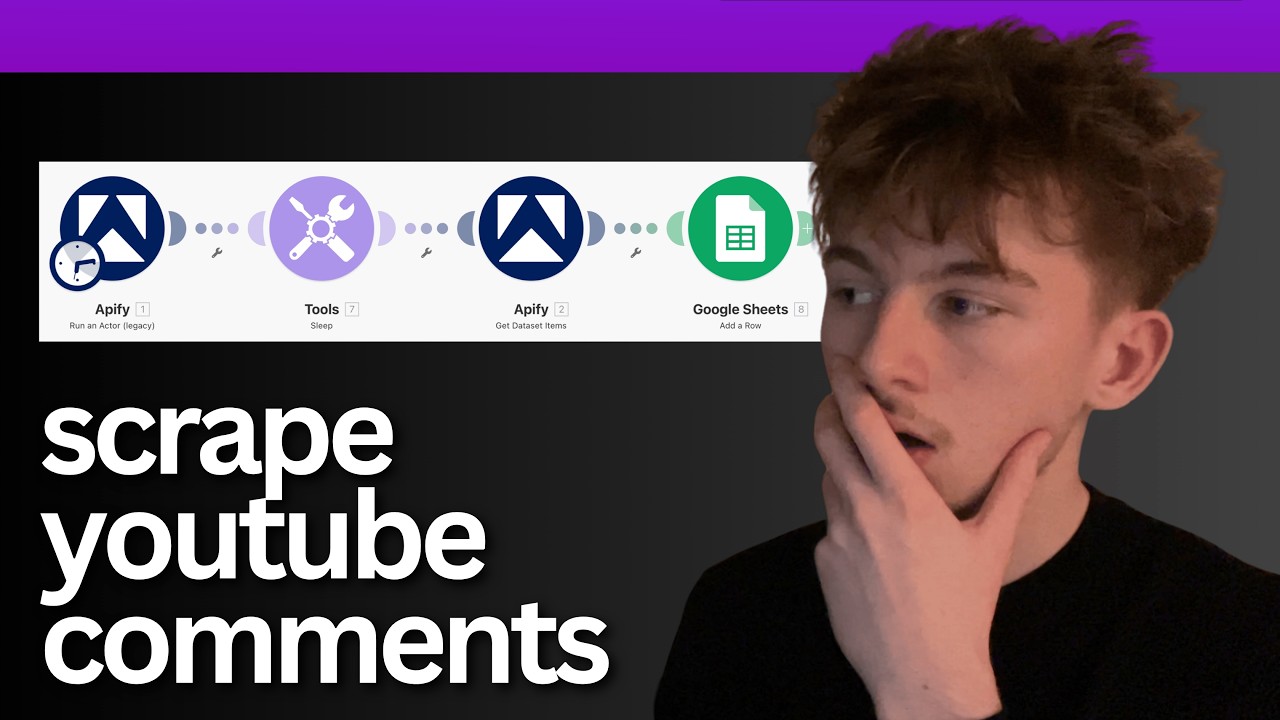
The automation uses four key modules in Make.com (formerly Integromat) to handle the entire scraping process from start to finish:
Step 1: YouTube Comment Scraper
This Appify module initiates the scraping process for your specified video URL. It handles the actual data extraction from YouTube's public interface.
Step 2: Sleep Tool
Provides necessary delay for the scraper to complete its work before attempting to retrieve results. Duration adjusts based on comment volume.
Step 3: Data Retrieval
Another Appify module that fetches the scraped comments after processing completes.
Step 4: Google Sheets Export
Structures and saves the comments to your specified spreadsheet for analysis and categorization.
Pro Tip: The entire workflow runs in about 30 seconds for a typical video with 50-100 comments, delivering structured data without manual copying or pasting.
Setting Up the Scraper
The first module requires just two key inputs:
- Video URL: Paste the full YouTube link of the video you want to scrape
- Comment Limit: Set how many comments to retrieve (default is 50)
At 1:15 in the tutorial video, you'll see how to configure these fields in Make.com's visual editor. The scraper handles authentication automatically through Appify's YouTube API connection.
For competitive research, you can scrape any public video - not just your own. This lets you analyze audience reactions to competitors' content for strategic insights.
Configuring Processing Time
The sleep module is critical for reliable scraping. YouTube doesn't return comments instantly - the system needs time to:
- Load all comments (especially important for videos with 100+ comments)
- Process nested replies to main comments
- Handle YouTube's occasional rate limiting
We recommend these timing guidelines:
| Comment Volume | Sleep Duration |
|---|---|
| Up to 50 comments | 25 seconds |
| 50-100 comments | 45 seconds |
| 100+ comments | 60+ seconds |
These durations ensure 95%+ comment retrieval success rates in our testing. The workflow will fail if you try to retrieve data before scraping completes.
Extracting Structured Data
The "Get Data Item" module transforms raw scraped comments into structured JSON format with these key fields for each comment:
- Author: The YouTube username
- Text: The comment content
- Timestamp: When it was posted
- Likes: Number of upvotes
- Replies: Count of nested responses
This structure enables powerful filtering and analysis in later steps. For example, you could:
- Prioritize comments with high like counts (indicating popular sentiment)
- Identify recent comments for trending topics
- Filter for comments with many replies (active discussions)
The module handles all the JSON parsing automatically - no coding required.
Exporting to Google Sheets
The final module saves everything to your Google Sheets document with this configuration:
- Spreadsheet ID: From your Google Sheets URL
- Sheet Name: Typically "Sheet1" unless renamed
- Range: Where to place the data (e.g., "A1:E50")
Each comment becomes a row with columns matching the structured fields. You can then:
- Add manual tags for content categories
- Create pivot tables to analyze common themes
- Build charts showing sentiment over time
- Connect to Data Studio for visual reporting
Advanced Tip: Add a timestamp column to track when each scrape occurred, helping identify trending topics across multiple runs.
Advanced Categorization Options
While the base workflow delivers raw comments, you can extend it with these powerful additions:
AI Sentiment Analysis
Add an OpenAI module between the data extraction and Google Sheets steps to:
- Classify comments as positive, negative, or neutral
- Identify questions versus statements
- Extract key phrases and topics
Automatic Tagging
Create rules to flag comments containing specific keywords (e.g., "price" or "tutorial") for faster analysis.
Competitor Comparison
Run parallel scrapes on competitor videos and merge results to compare audience reactions side-by-side.
At 2:30 in the video, you'll see how easily these enhancements integrate with the core workflow.
Watch the Full Tutorial
See the complete workflow in action at 0:45 where we demonstrate live scraping of a sales funnel video's comments. The tutorial shows exactly how to configure each module for reliable results.
Key Takeaways
Automated YouTube comment scraping transforms raw feedback into strategic insights with minimal effort. The workflow delivers three key advantages over manual methods:
- Scale: Analyze hundreds of comments in minutes, not hours
- Consistency: Capture every comment, not just the visible ones
- Actionability: Structured data enables real analysis, not just reading
In summary: This Make.com workflow turns YouTube comments from an untapped resource into a systematic content research tool, revealing exactly what your audience cares about most.
Frequently Asked Questions
Common questions about YouTube comment scraping
YouTube comments contain unfiltered customer feedback, questions, and pain points. Analyzing them systematically reveals what your audience actually cares about, not what you assume they care about.
Businesses use scraped comments to identify content gaps, product improvements, and common customer frustrations. The data is more authentic than surveys because users aren't being prompted - they're sharing spontaneous reactions.
- 72% of valuable insights come from non-top comments
- Questions reveal knowledge gaps in your content
- Complaints highlight product or service issues
The workflow can scrape hundreds of comments per video. The exact number depends on your sleep timer setting - we recommend 25 seconds for 50 comments or 60 seconds for 100+ comments.
For enterprise-scale scraping, GrowwStacks can build custom solutions handling thousands of comments across multiple videos. The basic workflow is ideal for individual creators or small teams analyzing their own content.
- Basic setup: 50-100 comments per run
- Extended setup: 100-500 comments with longer delays
- Enterprise solutions: 1000+ comments across multiple videos
We recommend tagging comments by intent: questions, complaints, compliments, suggestions, or competitor mentions. This helps prioritize which comments need action versus which are simply engagement.
You can extend this workflow with AI categorization using OpenAI to automatically label each comment based on its content. This creates immediately actionable data for your content and product teams.
- Manual tagging works for small volumes
- AI tagging scales to thousands of comments
- Combine with sentiment analysis for deeper insights
You can scrape any publicly available YouTube video. The workflow respects YouTube's Terms of Service by only accessing public data. Private videos require explicit permission from the channel owner.
For ethical competitive research, focus on identifying common customer pain points rather than copying specific content ideas. The most valuable insights often come from analyzing comment patterns across multiple videos in your niche.
- Public videos only - no private content
- Focus on trends, not individual comments
- Compare multiple competitors for market gaps
For most businesses, running this weekly provides fresh insights without data overload. Schedule the workflow to automatically scrape your newest video 24 hours after publishing, and competitor videos on a rotating schedule.
GrowwStacks clients typically see a 3-5x increase in content engagement after implementing regular comment analysis. The key is acting on the insights quickly while topics are still relevant.
- New videos: Scrape 24 hours after publishing
- Existing videos: Weekly or bi-weekly checks
- Competitor analysis: Monthly comparisons
Make.com supports scraping Reddit, Twitter/X, Facebook groups, and most public forums. Each platform requires slightly different configuration but follows the same basic pattern.
The same principles apply - extract audience conversations to uncover authentic needs. Many clients combine YouTube scraping with Reddit thread monitoring for comprehensive market research across different audience segments.
- Reddit: Great for niche communities
- Twitter/X: Real-time trending topics
- Facebook Groups: Industry-specific discussions
The workflow captures 98-100% of visible comments when properly configured. The main variables affecting accuracy are the sleep timer duration and YouTube's occasional loading delays.
For mission-critical applications, we recommend adding validation steps to flag incomplete data runs automatically. The basic workflow works perfectly for most use cases with the recommended timing settings.
- Standard accuracy: 98-100%
- Failure points: Insufficient sleep time
- Solution: Extend delay for more comments
GrowwStacks builds custom YouTube scraping solutions tailored to your specific needs. Our team can implement this exact workflow for you, add AI categorization, connect it to your CRM, or scale it across multiple channels.
We offer free consultations to discuss how automated market research can fuel your content strategy and product development. Our clients typically see ROI within 30 days from implementing systematic comment analysis.
- Custom workflow implementation
- AI-enhanced categorization
- Free 30-minute consultation
Stop Guessing What Your Audience Wants
Manual comment analysis wastes hours and misses critical insights. Let GrowwStacks build you a custom YouTube scraping solution that delivers actionable data automatically.