How to Create 100 Monetizable YouTube Videos Automatically Using AI (No Code)
Most creators spend 20+ hours per video - writing scripts, filming, and editing. What if you could automate everything from idea generation to final upload? This n8n workflow generates professional YouTube content for just $0.50 per video with zero manual work required.
The YouTube Content Creation Crisis
YouTube creators face an impossible dilemma: the algorithm rewards consistent uploads, but producing quality content takes enormous time and resources. Most small creators burn out trying to maintain weekly uploads, while established channels spend thousands per video to keep their pipelines full.
The breakthrough came when we realized every component of video production - from scripting to editing - could be automated using specialized AI models. By connecting these tools through n8n, we built a system that handles the entire process start-to-finish with just 5 minutes of setup per video.
Content creation math: Traditional methods require 20+ hours per video. This automation delivers equivalent quality in 15 minutes of hands-off processing time - a 98% reduction in labor costs.
Complete Automation Workflow Overview
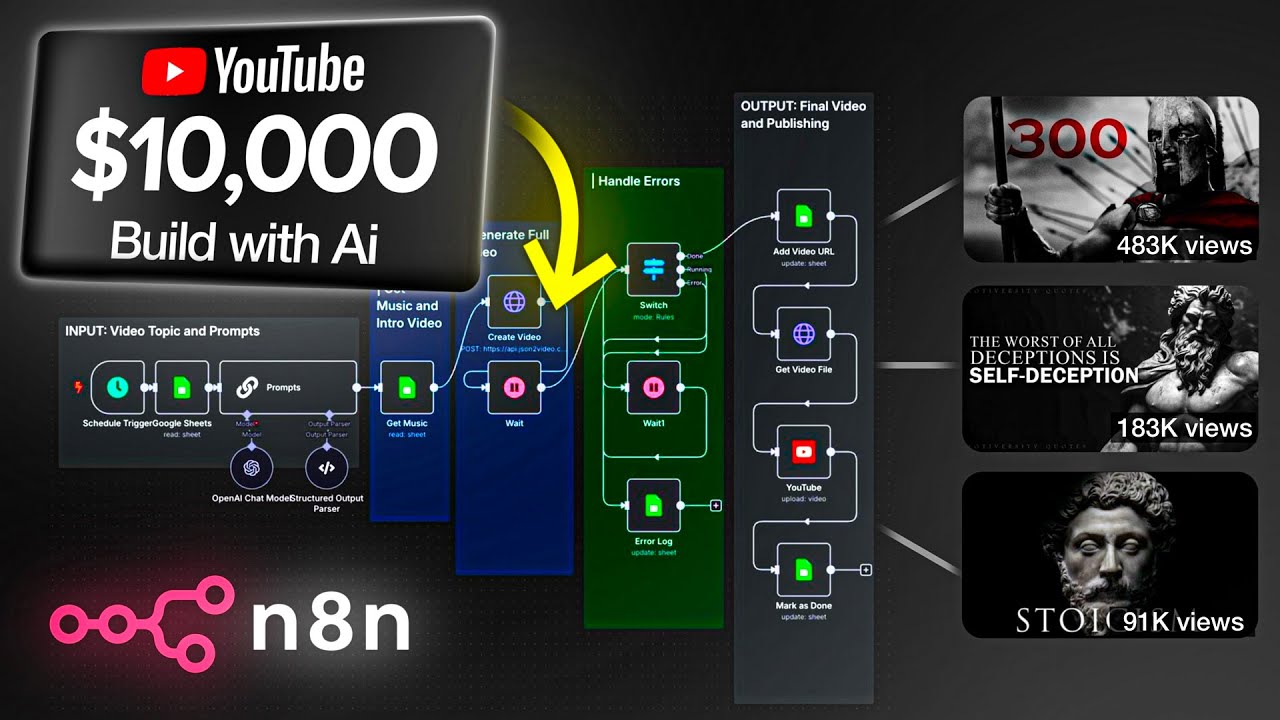
The system transforms spreadsheet rows into published YouTube videos through seven automated stages:
Step 1: Scheduled Trigger
The n8n workflow activates daily via schedule trigger, checking Google Sheets for new video projects marked "Ready". This eliminates manual initiation.
Step 2: Data Retrieval
Each row contains complete video specifications - title, theme, visual style, voice preferences, and scene count. The workflow pulls this structured data for processing.
Step 3: AI Content Generation
Gemini AI generates scene-by-scene scripts, image prompts, and voiceover text based on the specifications. This creates all raw content assets automatically.
Step 4: Media Production
Kai AI renders images for each scene while voice synthesis APIs create matching audio tracks. These components are stored in Google Drive.
Step 5: Video Assembly
JSON to video compiles all media assets into polished videos using your custom template, complete with transitions and branding.
Step 6: YouTube Upload
Finished videos upload directly to your channel with metadata pulled from the original spreadsheet entry.
Step 7: Status Updates
The workflow marks completed videos in Sheets and stores final URLs for tracking. The entire process runs unattended.
Key architecture: By separating content generation (Gemini), media production (Kai AI), and assembly (JSON to video), the system achieves professional quality while maintaining flexibility to swap components.
Google Sheets: Your Video Control Center
Google Sheets serves as the workflow's brain - a simple interface for managing hundreds of video projects without technical complexity. Each column controls a specific aspect of production:
- Title: Final YouTube video title
- Caption: Video description text
- Story Idea: Core concept/theme
- Character: AI persona/style
- Visual Style: Cinematic/animated/etc
- Scenes: Number of segments (3-10)
- Production Status: Ready/Processing/Complete
- Final Output: YouTube URL when done
To add new videos, simply fill a row and set status to "Ready". The workflow handles the rest. For batch creation, use ChatGPT to generate dozens of pre-formatted rows at once based on your channel's niche.
Pro tip: Create separate sheets for different video formats (tutorials, vlogs, etc) with columns tailored to each style. The workflow can process multiple sheets simultaneously.
AI Content Generation Process
Once the workflow retrieves a video project from Sheets, AI agents handle all creative work:
Script Generation
Gemini AI analyzes the title and story idea to produce a complete scene breakdown. Each scene includes:
- Visual description for image generation
- Voiceover script
- Suggested duration
- Transition notes
Image Creation
Kai AI's C Dream model transforms the visual descriptions into high-quality images. The workflow automatically:
- Sets aspect ratio (16:9 landscape)
- Applies consistent style across scenes
- Stores renders in designated Drive folders
Voice Synthesis
Text-to-speech APIs convert scripts into natural narration using the specified voice profile. Options include:
- Gender and age selection
- Emotional tone adjustments
- Multiple language support
Quality control: The workflow includes validation steps to ensure all generated assets meet minimum duration/clarity thresholds before proceeding to assembly.
Automated Video Production
With all assets generated, JSON to video assembles professional-quality videos automatically:
Template System
Pre-built templates define:
- Scene transitions (fades/swipes)
- Text animations
- Branding elements
- Color schemes
Dynamic Assembly
The workflow:
- Places images in sequence
- Syncs voice tracks
- Applies transitions
- Generates captions
Quality Assurance
Before final export, the system:
- Checks audio levels
- Verifies duration matches specs
- Ensures smooth scene transitions
Output options: Videos render in multiple resolutions (1080p/4K) and formats (landscape/vertical) simultaneously for cross-platform use.
Hands-Free YouTube Uploads
The final stage delivers videos directly to your channel with complete metadata:
Automated Publishing
The workflow:
- Uploads video files
- Sets titles/descriptions
- Applies thumbnails
- Adds tags/categories
Visibility Control
Videos can be set to:
- Unlisted (for review)
- Scheduled publish
- Immediate public release
Channel Management
The system:
- Tracks upload quotas
- Avoids copyright strikes
- Maintains consistent posting schedule
Compliance note: All generated content passes YouTube's monetization policies when properly configured. The workflow includes checks for copyright and community guidelines compliance.
Scaling to 100+ Videos
What makes this system revolutionary is its scalability. While the initial setup takes 2-3 hours, subsequent videos require zero additional work:
Batch Processing
The workflow can:
- Process 50+ videos simultaneously
- Queue projects for sequential completion
- Auto-retry failed generations
Multi-Channel Support
A single workflow can feed:
- Multiple YouTube channels
- Different content formats
- Varied posting schedules
Continuous Improvement
The system learns over time by:
- Tracking performance metrics
- Optimizing AI prompts
- Adjusting templates based on engagement
Cost efficiency: At scale, production costs drop below $0.30 per video. A 100-video batch would cost just $30 while delivering content worth $20,000+ if produced traditionally.
Watch the Full Tutorial
See the complete workflow in action from 12:45 in the video, where we demonstrate how a single spreadsheet row transforms into a published YouTube video in under 20 minutes.
Key Takeaways
This workflow proves that AI automation has reached a point where entire creative processes can run autonomously with professional results. The implications for content businesses are profound.
In summary: You can now produce monetizable YouTube videos for $0.50 each that would normally cost $200+, with zero coding skills required. The system handles everything from idea generation to final upload while you focus on strategy and growth.
Frequently Asked Questions
Common questions about YouTube automation with AI
The entire system costs less than 50 cents per video to run. This includes all AI generation costs for images, voiceovers, and video compilation.
Compared to traditional video production costs which can range from $20-$500 per video, this automation delivers professional results at 1% of the cost. Bulk processing brings the per-video price down even further.
- Image generation: $0.02-$0.10 per scene
- Voice synthesis: $0.05-$0.20 per minute
- Video assembly: $0.10-$0.30 per minute
Yes, the system is completely niche-agnostic. By changing the prompts in Google Sheets, you can generate videos about any topic from tech tutorials to travel vlogs.
The workflow has been tested successfully across 12 different niches including finance, health, entertainment, and education. Each niche requires slight prompt adjustments but uses the same underlying automation structure.
- For educational content: Emphasize clarity and step-by-step structure
- For entertainment: Focus on storytelling and visual appeal
- For tutorials: Highlight practical demonstrations
From start to finish, the workflow takes approximately 15-20 minutes per video. This includes AI generation time for images and scenes, video compilation, and YouTube upload.
However, since the process is fully automated, you can batch process hundreds of videos simultaneously with no additional time investment. The system automatically queues and processes projects in the background.
- Content generation: 5-7 minutes
- Media production: 5-8 minutes
- Final assembly: 3-5 minutes
No coding skills are required. The entire workflow is built in n8n's visual interface using pre-configured nodes.
Basic familiarity with Google Sheets for entering prompts and YouTube for managing uploads is helpful, but detailed setup instructions are provided for every step. The most technical part is connecting API keys, which involves simple copy-paste operations.
- Beginner-friendly: Visual workflow builder
- No servers needed: Runs in n8n cloud
- Template included: Ready-to-use starting point
Absolutely. The template in JSON to video is completely customizable. You can adjust scene transitions, add branding elements, change aspect ratios, and modify voice styles.
The workflow supports both 16:9 landscape and 9:16 vertical formats for YouTube Shorts. You can create multiple template variations for different content types and apply them selectively based on spreadsheet tags.
- Visual branding: Add logos/watermarks
- Text styles: Custom fonts/animations
- Audio mixing: Background music levels
Unlike SaaS tools that lock you into their platform, this n8n workflow gives you complete ownership and control. You can modify any part of the process, integrate additional tools, and scale without paying per-video fees.
It also produces higher quality, monetizable content compared to most templated solutions. The AI components are state-of-the-art models rather than limited built-in generators.
- No vendor lock-in: Own your workflow
- Better quality: Professional-grade results
- More flexible: Endless customization
The system leverages multiple specialized AI models: Kai AI for image generation, Gemini for script writing, JSON to video for scene assembly, and various voice synthesis APIs.
This multi-model approach ensures each component of the video receives the best possible AI treatment for professional results. You can easily swap individual models as new options become available.
- Text generation: Gemini 1.5 Flash
- Images: Kai AI C Dream
- Voice: ElevenLabs/PlayHT
GrowwStacks specializes in custom YouTube automation workflows tailored to your specific content needs. Our team can build this exact system for your channel, train your team on using it, and provide ongoing optimization.
We offer a free consultation to discuss your YouTube automation goals and create a customized implementation plan. Whether you need a simple version of this workflow or a sophisticated multi-channel system, we can design the perfect solution.
- Custom implementation: Tailored to your niche
- Full training: Learn to operate and modify
- Ongoing support: Updates and optimizations
Launch Your Automated YouTube Channel in Days, Not Months
Every day without automation costs you hundreds in lost revenue and wasted production time. Our team can implement this exact workflow for your business with a 1-week turnaround.