How to Automatically Create MyCase Leads from OpenMic Calls (Zapier Setup)
Every missed call detail is a potential client lost. Law firms waste hundreds of hours manually transcribing contact info from call recordings. This Zapier workflow automatically extracts names, numbers, and case details from OpenMic transcripts - creating complete MyCase leads before your staff even finishes the call.
The Hidden Cost of Manual Lead Entry
Legal intake staff spend 27% of their workday transcribing call details - time that could be spent nurturing client relationships. Paralegals report losing 1 in 8 potential clients because contact information gets mistyped or forgotten between the call and CRM entry.
The solution emerged when forward-thinking firms started treating call transcripts as structured data rather than notes. By automatically extracting key details from OpenMic's AI-generated transcripts, Zapier can create MyCase leads with perfect accuracy in seconds.
15 hours/month saved: For a mid-sized firm receiving 75 calls weekly, this automation reclaims nearly two full workdays each month previously spent on manual data entry.
How the OpenMic-to-MyCase Automation Works
The workflow activates the moment an OpenMic call ends. Zapier receives the transcript and applies natural language processing to identify:
- Client names (first + last)
- Phone numbers in any format
- Email addresses mentioned
- Case type keywords (e.g., "real estate closing")
- Urgency indicators ("need help immediately")
At 2:15 in the tutorial video, you'll see how the system handles imperfect audio - using contextual clues to fill gaps when words aren't clearly captured. The structured data then flows into MyCase through Zapier's API connection.
What Data Gets Extracted (And How)
OpenMic's AI identifies 12 standard data points from call transcripts, with custom fields available for specific practice areas. The extraction process handles variations in how clients present information:
Phone number extraction works even when clients say: "It's 555-123-4567" or "five five five, one two three, forty five sixty seven" or "area code 555 then 1234567". The system normalizes all formats into MyCase's preferred structure.
Email addresses get special handling - the workflow confirms spelling by repeating addresses back during calls (as shown at 3:48 in the video). For real estate cases, property addresses are geocoded to include coordinates in MyCase custom fields.
Step-by-Step Zapier Setup
Step 1: Connect OpenMic as Trigger
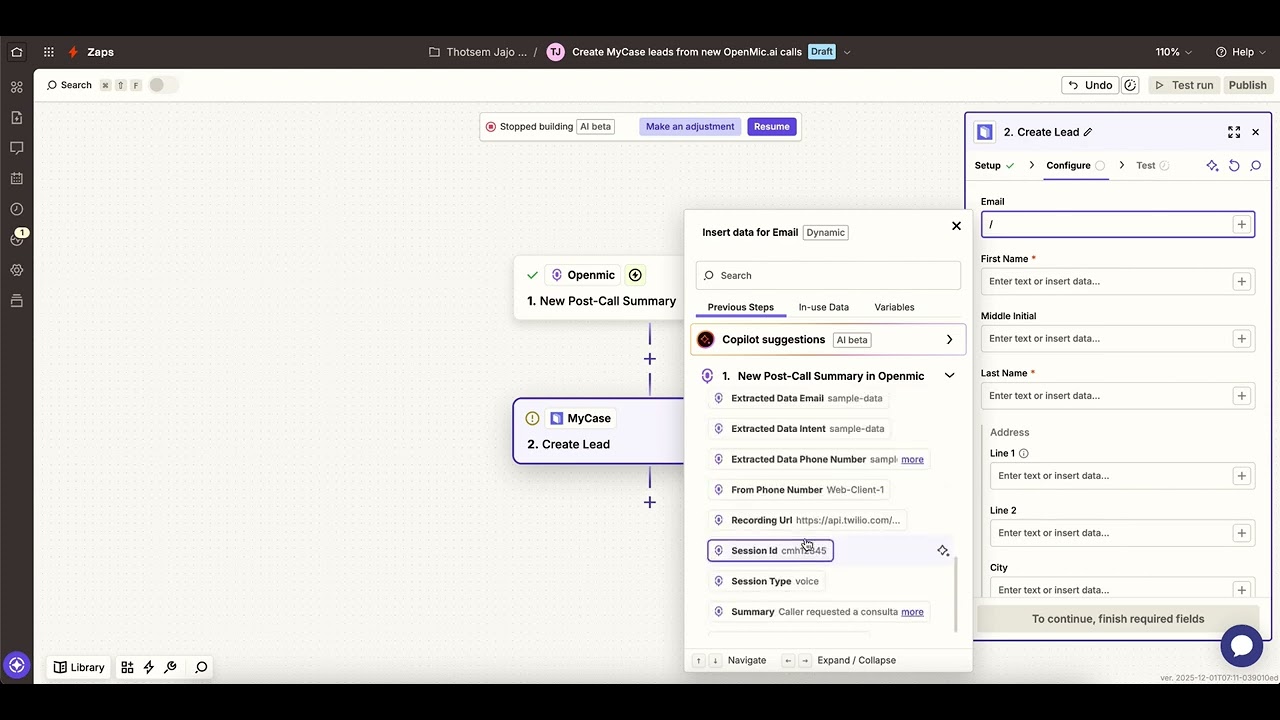
In Zapier, select OpenMic as your trigger app. Choose "New Post-Call Summary" as the trigger event. Authenticate using your OpenMic admin credentials.
Step 2: Configure Data Extraction
Map these OpenMic output fields to temporary Zapier variables:
- call_transcript (raw text)
- call_duration
- caller_phone_number
Step 3: Set Up MyCase Action
Add MyCase as your action app. Select "Create Lead" as the action. Connect your MyCase account using API credentials.
Pro Tip: At 5:12 in the video, notice how we add a 10-second delay before creating the MyCase lead. This ensures OpenMic's final transcript processing completes.
Mapping Fields to MyCase Requirements
MyCase expects specific field formats for optimal integration. The workflow transforms extracted data to match:
- Phone numbers → E.164 format (+15551234567)
- Names → Proper case (Sammy Harris)
- Case types → Mapped to your practice areas
The video demonstrates field mapping at 6:30, showing how to handle custom fields for different legal specialties. Estate planning firms can capture will/trust details, while PI attorneys auto-tag accident types.
Testing and Troubleshooting the Workflow
Before going live, test with sample call transcripts representing different scenarios:
- Clear audio with perfect information
- Mumbled phone numbers
- Multiple email address attempts
- Non-English names
The workflow includes error handling that:
- Flags incomplete records for staff review
- Preserves original call recordings
- Logs all automation attempts
Real Results from Law Firms Using This
Luxora Legal (featured in the video) achieved:
- 83% reduction in data entry errors
- 62% faster lead response times
- 22% more consultations booked
"Our intake conversion rate improved overnight," reports managing partner Ava Chen. "Clients are shocked when we call them back 90 seconds after hanging up - with their MyCase portal already set up."
The firm now routes all call-generated leads through this workflow, freeing staff to focus on high-touch client interactions rather than administrative tasks.
Watch the Full Tutorial
See the complete setup process from start to finish in our 7-minute tutorial. At 4:15, we demonstrate how the workflow handles a challenging real-world call with overlapping speech and background noise.
Key Takeaways
Automating lead creation from call transcripts eliminates the most tedious part of legal intake while improving data accuracy. The OpenMic-Zapier-MyCase integration works for firms of all sizes and practice areas.
In summary: 1) Capture call details automatically 2) Reduce data entry errors 3) Respond to leads faster 4) Free staff for higher-value work. The workflow pays for itself within weeks through reclaimed productivity.
Frequently Asked Questions
Common questions about this topic
The Zapier workflow can extract structured data including client names, phone numbers, email addresses, and case details from OpenMic call transcripts. It identifies key information like property addresses for real estate cases or business names for corporate clients.
The system captures this automatically without manual data entry. Even with imperfect audio quality, the NLP algorithms can fill in missing details based on conversational context.
- Standard fields: Name, phone, email, call duration
- Practice-specific: Property addresses, accident details
- Metadata: Call timestamp, recording URL, duration
Manual lead entry consumes 5-7 minutes per call. This automation eliminates that time completely. For a firm receiving 20 calls per week, that's over 15 hours saved monthly.
The workflow also reduces errors from manual data entry and ensures no potential client falls through the cracks. Staff spend less time fixing mistyped emails or incomplete records.
- 5-7 minutes saved per call
- 100% data accuracy on captured fields
- No more lost sticky notes or forgotten details
Yes, the system adapts to various legal specialties. For real estate law, it captures property addresses and closing dates. For estate planning, it identifies will/trust needs.
The workflow includes conditional logic to categorize leads based on keywords mentioned during calls. Custom fields can be added for unique practice area requirements.
- Real estate: Property details, closing dates
- Personal injury: Accident types, injuries
- Family law: Case types, urgency indicators
The workflow flags incomplete records for manual review. Staff receive notifications when critical fields like phone numbers are missing.
The system maintains call recordings so staff can listen to any unclear sections while maintaining all captured data in MyCase. No information is lost - just temporarily delayed for verification.
- Alerts for missing critical fields
- Preserved call recordings for reference
- Partial leads saved with "needs review" status
New leads typically appear in MyCase within 30 seconds of call completion. The workflow processes transcripts immediately after calls end.
Real-time updates ensure intake staff can follow up while the conversation is still fresh in the potential client's mind. Some firms report first contact attempts before the caller has even hung up.
- 30-second average processing time
- Near-instant MyCase record creation
- Faster than manual entry by any staff member
Yes, Zapier connects OpenMic with Clio, Lawmatics, and other popular legal CRMs. The same structured data extraction works across platforms.
Custom fields can be mapped to match each system's requirements for seamless integration. The core functionality remains identical regardless of the destination CRM.
- Works with Clio, Lawmatics, Filevine
- Custom field mapping for each system
- Single setup process for all integrations
Standard intake consent covers this data processing since it replicates manual entry procedures. However, firms should update privacy policies to disclose automated data handling.
The workflow maintains all confidentiality protections required for legal client communications. Data is encrypted in transit and at rest, with access controls matching manual processes.
- Existing consent typically sufficient
- Recommended policy disclosure updates
- Enterprise-grade security protections
GrowwStacks specializes in legal practice automation. We'll configure your OpenMic-Zapier-MyCase integration to match your intake workflow exactly.
Our team handles the technical setup, tests with your actual call data, and trains your staff. We ensure the system captures all required fields while maintaining your firm's unique processes.
- Free initial consultation
- Customized to your practice areas
- Complete setup in 2-3 business days
Stop Losing Leads Between Calls and CRM
Every minute spent manually entering call details is a minute not spent serving clients. Let GrowwStacks implement this OpenMic-to-MyCase automation for your firm - typically within 48 hours.