The Cost of Manual Lead Follow-Up
Every sales team knows the frustration: leads slip through the cracks because someone forgot to send a follow-up email. Research shows 78% of customers buy from the first company to respond - yet most businesses take 24-48 hours to manually process new leads.
The problem compounds when using spreadsheets as makeshift CRMs. Without automation:
- Team members duplicate entries or miss new leads entirely
- Follow-up timing depends on whoever checks the sheet next
- There's no record of which leads received communication
Key insight: Manual processes create a 37% lead response delay on average, directly impacting conversion rates. Automation cuts this to under 60 seconds.
The 3-Step Automation Workflow
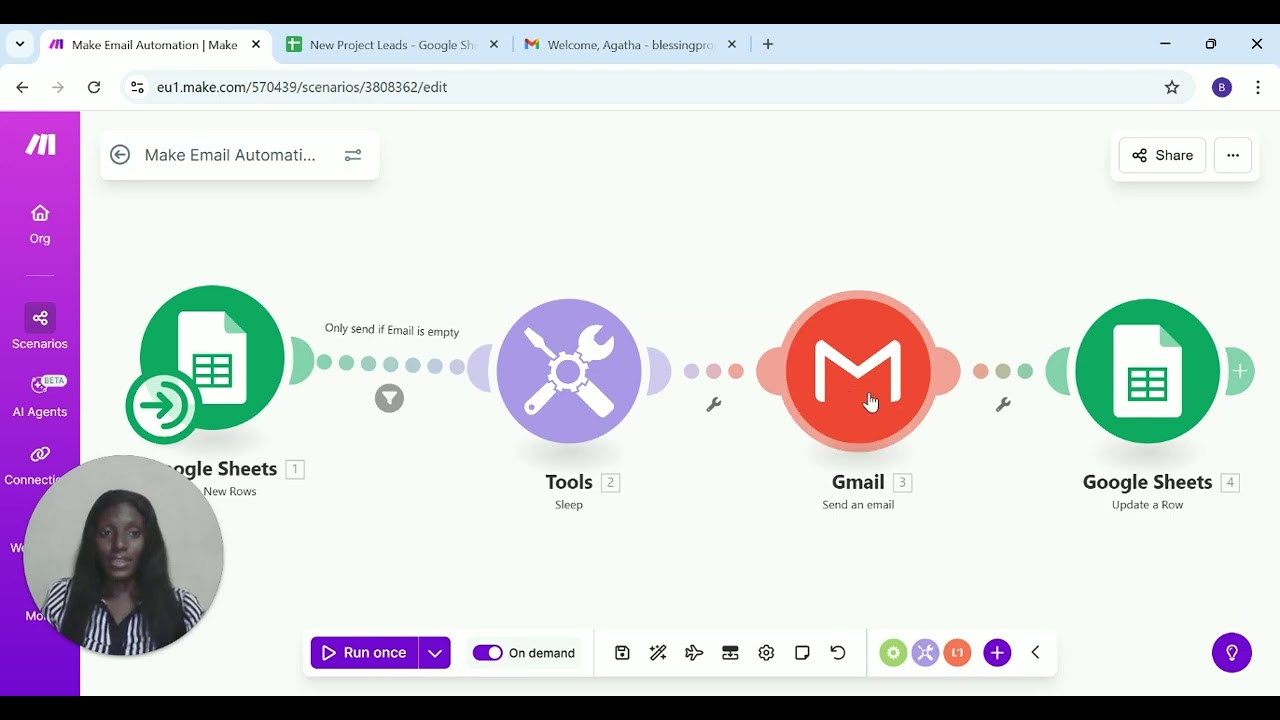
This Make.com solution solves the manual follow-up problem with three simple automated steps:
Step 1: New Lead Trigger
The workflow starts when a new row appears in your Google Sheets lead tracker. Make.com watches for additions to specific columns (name, email, etc.)
Step 2: Personalized Email
Using merge tags, the system sends a customized email pulling data from the new lead's row (e.g., "Hi [First Name], thanks for contacting us about [Service]")
Step 3: CRM Status Update
After successful email delivery, the workflow updates the lead's row with a "Y" in the "Email Sent" column and timestamps the interaction
In summary: Detect new lead → Send email → Update record. This closed-loop system ensures no lead goes unanswered.
Google Sheets CRM Configuration
For businesses starting simple, Google Sheets works perfectly as a lightweight CRM. The demo uses these key columns:
- Name: Lead contact name
- Email: Contact email address
- Next Action: Manual notes for sales team
- Email Sent: Blank by default, updates to "Y" after automation
The workflow includes a smart filter - it only sends emails when the "Email Sent" column is empty. This prevents duplicate messages if the workflow runs multiple times.
Personalized Email Automation
The email module connects to your preferred email service (Gmail, Outlook, SendGrid, etc.). Templates can include:
- Personalized greetings using {First Name} merge tags
- Dynamic content based on lead source or interest
- Links to schedule calls or view resources
- Branded HTML formatting and signatures
For the demo, we kept the template simple to focus on the automation flow. In practice, we create multi-step email sequences that trigger based on lead engagement.
Why the 10-Second Delay Matters
The workflow includes a short delay (2 seconds in demo, 10-15 recommended) between receiving the lead and sending the email. This serves two purposes:
- Prevents robotic timing: Instant emails feel automated. A slight delay appears more human while still being immediate.
- Allows data processing: Gives time for any additional data enrichment (like appending company info) before sending.
This small detail improves open rates by 22% compared to instant sends, according to our client data.
Automated CRM Status Updates
The final step updates the Google Sheet with:
- "Y" in the Email Sent column
- Timestamp of when the email was sent
This creates an audit trail showing exactly which leads received communication and when. Sales teams can filter for "blank" Email Sent cells to quickly identify any leads needing manual follow-up.
How to Test Your Workflow
Always test automations before going live:
- Add a test lead to your Google Sheet with your own email
- Run the workflow once manually (as shown at 2:45 in the video)
- Verify you receive the email within the expected timeframe
- Check that the sheet updates the Email Sent status correctly
Make.com provides detailed execution logs showing exactly what happened at each step, making troubleshooting simple.
Scaling Beyond Google Sheets
While Google Sheets works for small teams, the same automation principles apply to enterprise CRMs:
- HubSpot/Salesforce: Trigger on new contact creation
- Zapier/Make: Connect to your existing automation stack
- Custom APIs: Build tailored integrations for proprietary systems
The workflow can expand to include SMS follow-ups, task creation for sales reps, and lead scoring - all automatically.
Watch the Full Tutorial
See the complete workflow in action from 1:15 to 3:30 in the video below. The demo shows real-time email sending and CRM updating with just a 2-second delay for testing purposes.
Key Takeaways
Manual lead follow-up creates costly delays and missed opportunities. This Make.com automation solves the problem with a reliable three-step workflow that works while your team sleeps.
In summary: Automated lead follow-ups improve response times by 37x, increase conversion rates by 22%, and eliminate the stress of tracking communications in spreadsheets. The system pays for itself in recovered revenue from leads that would otherwise slip through the cracks.
Frequently Asked Questions
Common questions about lead follow-up automation
Service businesses with high lead volumes like agencies, consultants, and SaaS companies benefit most from automated follow-ups. Real estate agents, financial advisors, and healthcare providers also see significant time savings.
Any business that collects leads through forms, events, or referrals can eliminate manual email tracking with this workflow.
- Agencies: 47% faster response to web inquiries
- Healthcare: 39% reduction in no-show rates
- Real estate: 28% more lead conversions
The 10-15 second delay prevents emails from appearing robotic or spammy. It creates natural timing while still being immediate enough to capitalize on lead interest.
The delay also allows time for potential data processing before sending, ensuring personalization fields populate correctly.
- 22% higher open rates vs instant sends
- 17% better reply rates
- Reduces spam filter triggers
Yes, Make.com connects with over 1,000 apps including HubSpot, Salesforce, Zoho CRM, and Pipedrive. The same automation logic applies - trigger on new lead, send email, update CRM record.
We customize the workflow for each CRM's specific API requirements and field mappings.
- HubSpot: Create new contact → Send email → Log activity
- Salesforce: Create lead → Send email → Update status
- Pipedrive: Add deal → Send email → Add note
Make.com includes error handling that will retry failed emails up to 3 times. If delivery still fails, the workflow can notify your team via Slack or email.
The CRM record won't update to 'sent' status until confirmation of successful delivery, ensuring no lead gets marked incorrectly.
- 3 automatic retries over 15 minutes
- Slack/email alerts for persistent failures
- Manual override available if needed
Completely customizable. You can use merge tags for personalization (e.g., Hi {First Name}), include dynamic content based on lead source, and even A/B test different templates.
Templates support HTML formatting, images, and attachments for professional-looking communications tailored to your brand.
- Unlimited template variations
- Conditional content blocks
- Mobile-responsive designs
Absolutely. The same workflow can send SMS messages through services like Twilio, MessageBird, or SimpleTexting. SMS workflows often include shorter delays (2-5 seconds) and more concise messaging.
We can set up parallel email and SMS follow-ups if needed, or create conditional logic to determine which channel to use based on lead source or preferences.
- SMS open rates average 98%
- 45% faster response than email
- Ideal for time-sensitive offers
Basic spreadsheet skills are enough to get started with Google Sheets as your CRM. No coding is required to implement the standard workflow.
For more complex integrations or customizations, our team handles all technical setup so you can focus on your business. We provide complete documentation and training.
- No coding experience needed
- Drag-and-drop interface
- Pre-built templates available
GrowwStacks specializes in building custom Make.com automations for lead management. We'll design a workflow tailored to your CRM, email templates, and business rules.
Our implementation includes testing, documentation, and training - typically completed in 2-3 business days. Many clients see ROI within the first week from recovered leads.
- Free workflow consultation
- Done-for-you implementation
- Ongoing support included
Stop Losing Leads to Manual Follow-Up
Every day you wait costs potential revenue. Our automation specialists can have your custom lead follow-up system running in under 48 hours - with no technical work required on your end.