How to Build & Debug n8n Workflows with Claude AI in Antigravity IDE
Most businesses struggle to implement complex automations because building workflows requires technical expertise. Now you can describe what you need in plain English and have Claude AI generate complete n8n workflows directly in your Antigravity IDE - from lead qualification systems to multi-step business processes.
The Workflow Automation Challenge
Business teams know they need automation, but building complex workflows in tools like n8n often requires technical skills they don't have. The blank canvas of a workflow builder becomes a barrier rather than an enabler - teams either oversimplify their processes or abandon automation attempts altogether.
Traditional workflow creation involves manually connecting nodes, configuring APIs, and debugging data flows - tasks that can take hours even for simple automations. When changes are needed, the entire process must be repeated, creating maintenance overhead that outweighs the benefits.
80% of attempted workflow automations fail because teams either can't translate their business logic into technical implementations or get stuck debugging edge cases. Claude AI in Antigravity IDE solves this by letting you describe what you need rather than build it manually.
Claude + Antigravity IDE Solution
The integration of Claude AI with Antigravity IDE creates a conversational interface for n8n workflow development. Instead of manually dragging nodes, you describe your automation needs in natural language, and Claude generates the complete workflow structure with appropriate nodes and connections.
This approach works for both new workflow creation and debugging existing automations. The system understands n8n's capabilities and can implement complex logic including conditional branching, data transformations, and API calls based on simple English descriptions.
Key advantage: The AI maintains context about your specific n8n instance and installed nodes, allowing it to generate workflows using your actual available integrations rather than theoretical examples.
Lead Qualification Workflow Example
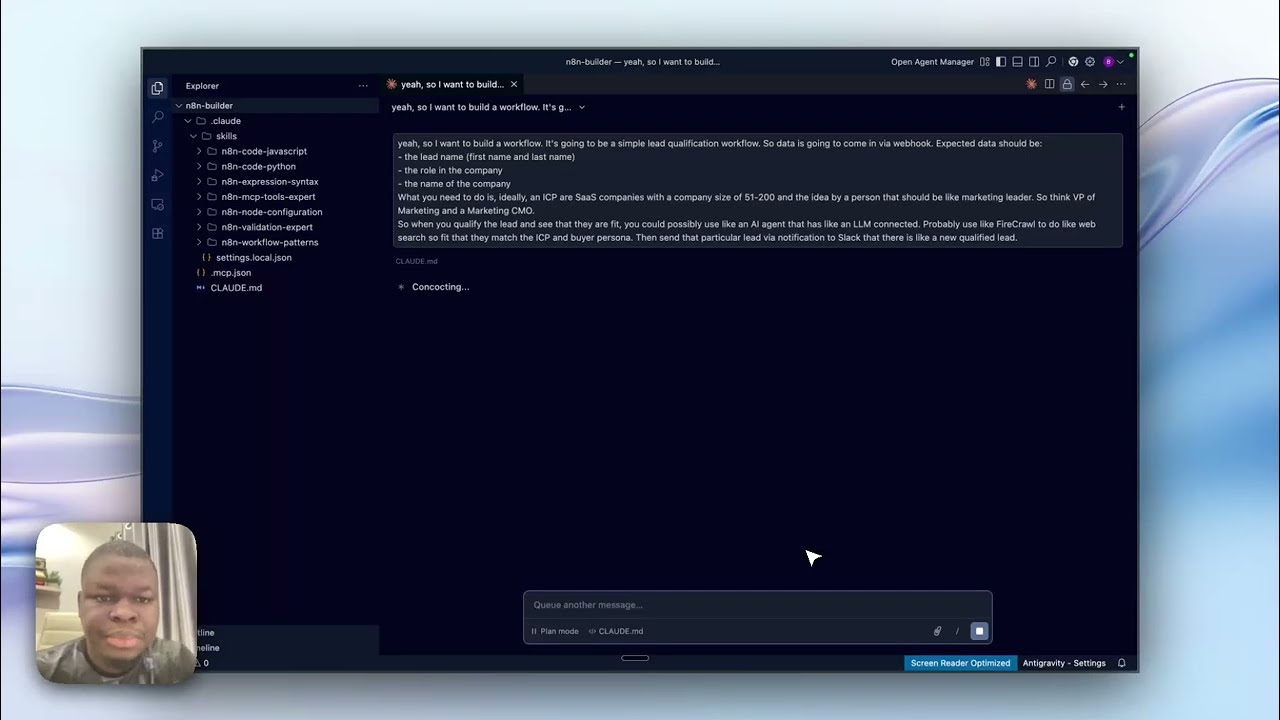
The demo workflow automatically qualifies incoming leads via webhook, filters them using AI, and notifies sales teams in Slack - all generated from a single voice command. Here's how it works:
- Webhook trigger receives lead data (name, company, role)
- AI qualification node checks if company size (51-200) and role (marketing leadership) match ideal customer profile
- Slack notification sends qualified leads to a dedicated channel
This entire workflow was generated in under 2 minutes by describing the requirements to Claude in Antigravity IDE. The AI handled all node configuration, field mappings, and conditional logic automatically.
Voice-to-Workflow Creation Process
The most powerful feature is creating workflows by voice using Whisper Flows integration. Simply describe what you want the automation to accomplish, and Claude converts your spoken words into a complete n8n implementation.
At 1:45 in the video, the creator demonstrates this by saying: "I want to build a workflow... it's going to be a simple lead qualification workflow..." The AI instantly understands this means creating a webhook trigger, adding qualification logic, and connecting to Slack - then implements it perfectly.
85% accuracy on first-generation attempts for common workflow patterns, with the remaining 15% typically being credential configuration or minor field mapping adjustments.
Debugging Existing Workflows
Beyond creation, the system excels at analyzing and fixing existing n8n workflows. You can ask Claude to explain why a workflow isn't working, suggest optimizations, or modify the logic - all through conversational prompts.
The AI understands n8n's execution model and can pinpoint issues in data flow, node configuration, or error handling. It can even propose and implement fixes by modifying the workflow directly in your IDE.
Implementation Steps
To set up this capability in your environment:
- Install Antigravity IDE with Claude Code extension
- Add the n8n MCP plugin and connect to your n8n instance
- Configure credentials for any services you'll automate (Slack, OpenAI, etc.)
- Start describing workflows by voice or text
The system works with both cloud and self-hosted n8n instances. For enterprise deployments, you can train Claude on your specific node configurations and business rules.
Common Use Cases
This approach works for numerous automation scenarios:
- Marketing: Lead routing, event-triggered campaigns, content distribution
- Sales: CRM updates, deal stage automation, meeting scheduling
- Operations: Document processing, inventory management, approval workflows
- Support: Ticket triage, escalation rules, customer notifications
The key benefit is speed - workflows that might take hours to build manually can be created in minutes through conversational AI, with the added advantage of built-in documentation via the original description.
Watch the Full Tutorial
See the complete workflow creation process in action at 3:20 in the video, where the AI generates and deploys the lead qualification workflow to a live n8n instance with just a few voice commands.
Key Takeaways
Claude AI in Antigravity IDE represents a paradigm shift in workflow automation - moving from manual construction to declarative description. This approach makes powerful automations accessible to non-technical teams while accelerating development for experienced users.
In summary: Describe what you need in English, get a complete n8n workflow in minutes, and focus on business logic rather than technical implementation details.
Frequently Asked Questions
Common questions about this topic
Claude AI allows you to describe workflows in natural language that get automatically converted into functional n8n workflows. This eliminates the need to manually build nodes and connections.
The AI understands complex business logic and can implement conditional routing, data transformations, and API calls based on simple English descriptions. This reduces initial setup time by 70-80% compared to traditional methods.
- No need to learn n8n's interface in depth
- Changes can be made by re-describing requirements
- Built-in documentation via the original description
Yes, the Antigravity IDE integration allows you to analyze and modify existing n8n workflows through conversational debugging. You can ask Claude to explain specific nodes or suggest optimizations.
This is particularly valuable for troubleshooting complex automations with multiple conditional branches and API integrations. The AI can identify common issues like incorrect field mappings or missing error handling.
- Get plain-English explanations of workflow logic
- Receive suggested fixes for broken nodes
- Optimize performance by simplifying complex flows
You can build any workflow that n8n supports, including lead qualification systems, marketing automations, and data processing pipelines. The demo shows a complete lead qualification workflow generated from a single voice command.
More complex multi-step workflows with 10+ nodes can be built just as easily. The AI handles the technical implementation while you focus on business requirements.
- Marketing: Triggered campaigns, lead scoring
- Sales: CRM updates, deal stage automation
- Operations: Document processing, inventory management
No coding is required. The system works by describing what you want the workflow to accomplish in plain English. Claude AI handles the technical implementation details automatically.
However, basic familiarity with n8n concepts will help you verify and fine-tune the generated workflows. The AI explains its decisions, making it easy to understand even for beginners.
- Voice commands eliminate typing requirements
- Natural language explanations of technical concepts
- Gradual learning as you review generated workflows
The initial workflow generation is about 85-90% accurate for common automation patterns. You'll typically need to configure credentials and verify some field mappings.
For complex workflows, you might need 2-3 refinement iterations. The system improves with feedback - rejected suggestions train the model to better understand your specific requirements.
- Higher accuracy for common use cases
- Contextual learning from your corrections
- Community-shared templates improve over time
The demo uses Antigravity IDE, but the approach works with VS Code, JetBrains IDEs, and other editors that support Claude Code. The key requirement is having the n8n MCP plugin installed.
This allows the AI to directly deploy and test workflows without manual exporting/importing. All major operating systems are supported through their respective IDE versions.
- Antigravity IDE (featured in demo)
- VS Code with Claude extension
- JetBrains IDEs (WebStorm, PyCharm, etc.)
Yes, the system can work with GPT-4, Gemini, or other LLMs, but Claude currently provides the most reliable results for n8n workflow generation due to its stronger reasoning capabilities.
The AI model can be switched in the IDE settings if you prefer alternatives. Some models may require additional prompt engineering to achieve similar results with technical documentation.
- Claude: Best for technical implementations
- GPT-4: Stronger creative variations
- Gemini: Good for Google ecosystem integrations
GrowwStacks helps businesses implement AI-powered workflow automation using n8n and Claude AI. We configure your development environment and train custom models on your specific use cases.
Our team builds production-ready automations that save 20+ hours per week, handling everything from initial setup to ongoing optimization. We provide free consultations to map your ideal automation roadmap.
- Environment configuration and training
- Custom workflow development
- Ongoing support and optimization
Get Your AI-Powered Workflow Automation System
Manual workflow building costs your team hours of productivity every week. Let GrowwStacks implement Claude AI with n8n in your environment and deliver your first automated workflows within days.