How to Build Premium Shopify Stores in Minutes Using Claude AI
Most entrepreneurs waste weeks (and thousands of dollars) building custom Shopify stores. This AI-powered method creates premium, mobile-optimized stores in hours - complete with product pages, FAQs, and branded designs - without coding expertise.
The AI Store Creation Advantage
Traditional Shopify store development presents a painful choice: generic themes that look like everyone else's store, or expensive custom development that takes weeks and requires technical expertise. Claude AI changes this equation by handling both design and liquid theme coding automatically.
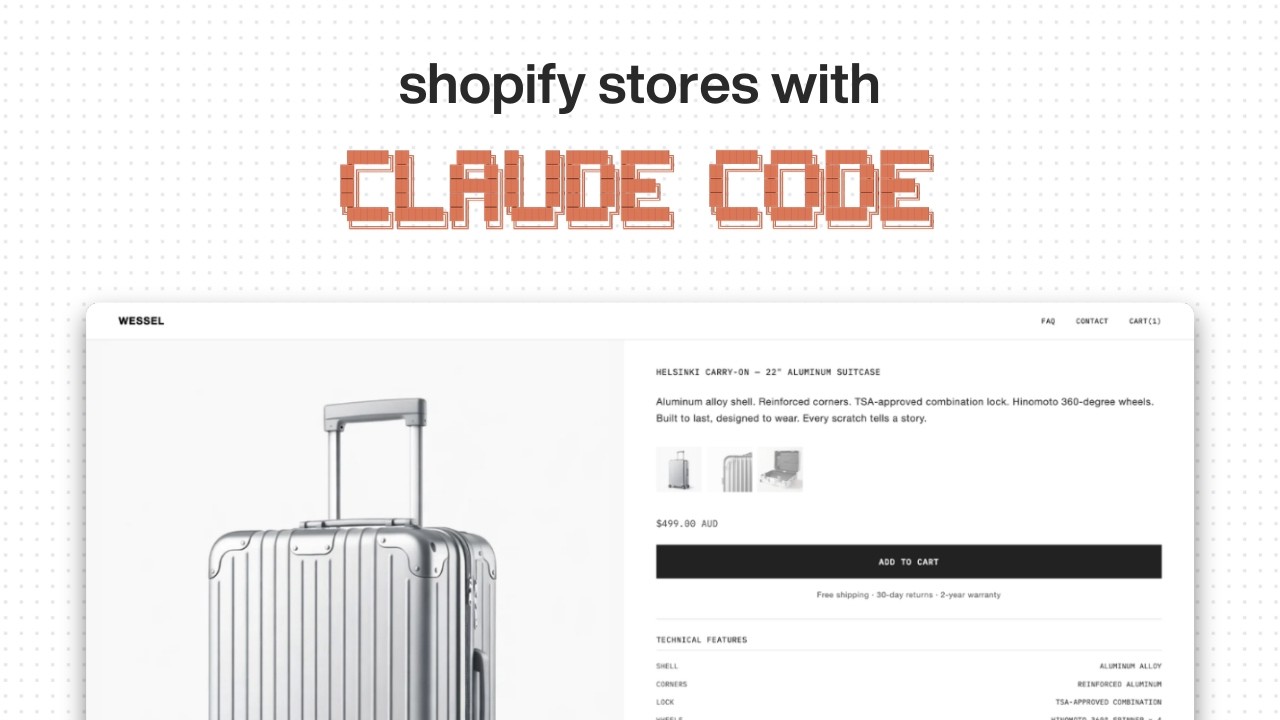
This method creates stores that feel premium and unique while maintaining all Shopify functionality. The aluminum suitcase store shown in the video demonstrates how AI can generate:
- Branded product pages with image galleries
- Technical specification dropdowns
- Mobile-optimized layouts (critical for ecommerce)
- FAQ and contact pages matching the design system
- Custom cart and checkout styling
85% faster: What typically takes 40-80 hours of development time can be accomplished in 3-5 hours using Claude AI, while producing stores that don't look like default Shopify templates.
Building Your Product Requirements Document
The foundation of any AI-generated store is a clear Product Requirements Document (PRD). This replaces traditional design briefs and gives Claude precise instructions about your desired store structure and aesthetic.
Creating the PRD involves:
- Defining your store objectives (showcase products, tell brand story, etc.)
- Establishing design philosophy (minimalist, technical, vibrant, etc.)
- Mapping site structure (product pages, FAQs, contact, etc.)
- Detailing page components (image galleries, specs, CTA placement)
Claude can actually help create the PRD if you provide basic information about your products and brand. The aluminum suitcase example started with just a conversation about positioning before evolving into a complete PRD.
Sourcing Effective Design Inspiration
While the PRD provides direction, visual references ensure Claude understands your aesthetic goals. The suitcase store used Thuano Audio's website as inspiration - a clean, technical design that translated well to product specs.
Effective inspiration sourcing involves:
- Identifying 2-3 reference sites with elements you want to emulate
- Capturing full-page screenshots (not just hero sections)
- Downloading HTML source code for deeper reference (using view-page-source.com)
- Annotating what specific elements you like (typography, spacing, etc.)
Pro tip: Upload both screenshots and HTML source files to Claude. The AI can analyze the actual code of your inspiration sites to better replicate their structure.
Creating the Claude.md Project Blueprint
The claude.md file acts as permanent instructions for your project, similar to custom instructions in ChatGPT. This document ensures Claude maintains context across all interactions.
For Shopify stores, your claude.md should include:
- Brand name and product category
- Confirmation you're using Shopify liquid theme development
- Statement that you're forking from the Dawn theme
- Design system references (colors, typography, spacing)
- Brand voice guidelines (technical, friendly, premium, etc.)
You can generate this file automatically using Claude's /init command after discussing your project. The suitcase example used this approach to create a comprehensive claude.md that guided all subsequent store generation.
Forking the Dawn Theme
Shopify's Dawn theme serves as the ideal foundation for AI-generated stores because:
- It's lightweight and performant
- Contains all core ecommerce functionality
- Follows Shopify's best practices
- Simplifies mobile optimization
The forking process involves:
- Installing Shopify CLI (command line interface)
- Pulling the Dawn theme files into your project
- Connecting your GitHub repository
- Setting up VS Code with the Claude extension
Claude can guide you through each technical step if you're unfamiliar with these tools. At 2:45 in the video, you'll see how the Dawn theme files provide the scaffolding that Claude then customizes.
AI Store Generation Process
With your PRD, design references, claude.md, and Dawn theme in place, actual store generation becomes straightforward. The prompt structure that worked for the suitcase store:
"Build the product page for [Brand Name]. Follow the PRD and use the front-end design skill. Reference the HTML and screenshots in the design reference folder. Create in liquid while forking from Dawn theme."
Claude will then:
- Generate an initial store version based on your inputs
- Create all necessary liquid theme files
- Implement your design references
- Ensure mobile responsiveness
The first output may need refinement, but it establishes the foundation you can iterate on through natural language requests.
Design Refinement & Iteration
Like any design process, the AI-generated store will need adjustments. The suitcase example required several iterations to perfect:
- Logo sizing in the header
- Product image proportions
- Accordion animation speed
- Mobile menu behavior
The advantage of using Claude is that changes require simple natural language prompts rather than code edits. For example:
"Make the logo 20% larger in the header and increase the accordion dropdown speed by 30%"
Claude implements these changes by modifying the liquid theme files directly, saving hours of manual coding.
GitHub to Shopify Deployment
Once satisfied with your store design, deployment involves:
- Having Claude push the theme to your GitHub repository
- Connecting your Shopify store to GitHub
- Importing the theme from your repository
- Activating the new theme in Shopify
The video shows how the suitcase store connected in just a few clicks at 8:20. This GitHub integration provides version control - you can always revert changes or branch your design while preserving previous versions.
Remember to:
- Add your products before deployment
- Test all pages on mobile
- Verify checkout functionality
- Check loading speeds
Watch the Full Tutorial
See the complete process in action from PRD creation to final deployment. The video walkthrough demonstrates how Claude handles liquid theme coding automatically while allowing natural language design refinements.
Key Takeaways
This Claude AI method fundamentally changes Shopify store development by:
- Eliminating the trade-off between custom design and development speed
- Reducing reliance on technical skills for theme customization
- Producing stores that don't look like default Shopify templates
- Maintaining all core ecommerce functionality
In summary: With proper preparation (PRD, design references, claude.md) and Dawn theme forking, Claude AI can generate premium Shopify stores in hours rather than weeks - complete with custom designs, product pages, and mobile optimization.
Frequently Asked Questions
Common questions about this topic
Claude AI accelerates Shopify store creation by handling both design and liquid theme coding, reducing development time from weeks to hours. The AI generates complete product pages, FAQs, and mobile-optimized layouts based on your product requirements document.
Unlike generic theme templates, Claude creates custom designs that match your brand aesthetic while maintaining full Shopify functionality. The aluminum suitcase example in the video demonstrates how this approach produces stores that feel premium and unique.
- 85% faster than traditional development
- No coding expertise required
- Custom designs that don't look like default themes
No technical expertise is required. Claude handles all liquid theme coding automatically after you provide design inspiration and product details. The workflow uses natural language prompts - you simply describe changes needed (like "make the logo bigger" or "adjust product image sizing") and Claude implements them.
Basic familiarity with VS Code and GitHub is helpful but not mandatory. At 4:30 in the video, you'll see how the creator makes design adjustments through simple English requests rather than code edits.
- Natural language interface for changes
- Automatic liquid theme generation
- Visual results without coding
Shopify's Dawn theme serves as the foundation that Claude modifies, ensuring all core ecommerce functionality works out of the box. Claude forks the Dawn theme to create custom versions while maintaining checkout flows, mobile responsiveness, and Shopify API integrations.
This approach is 3x faster than building from scratch while delivering unique designs that don't look like default Shopify templates. The Dawn theme provides the reliable base that Claude then customizes according to your PRD and design references.
- Pre-built ecommerce functionality
- Optimized performance
- Mobile-ready foundation
You'll need three key documents: 1) A Product Requirements Document (PRD) outlining your store structure, 2) Screenshots of design inspiration (2-3 reference sites), and 3) A claude.md file with brand guidelines. Claude can help create all three if needed.
Having product images and descriptions ready will let you test the store immediately after generation. The video shows how the creator developed these assets through conversation with Claude before beginning the actual store build.
- Product Requirements Document
- Design inspiration screenshots
- claude.md brand guidelines
The AI can generate a complete first draft in under 2 hours, with refinement typically taking 3-5 hours total. This includes creating all product pages, FAQ sections, and mobile optimization. Traditional development methods require 40-80 hours for similar custom stores.
The biggest time savings come from automatic liquid theme coding and instant design iteration. At 7:15 in the video, you'll see how quickly adjustments can be made compared to manual coding.
- 2 hours for initial generation
- 3-5 hours total with refinements
- 85% faster than traditional methods
Yes, all generated stores remain fully editable. You can make changes three ways: 1) Through Claude with natural language prompts, 2) Directly in the liquid theme code if you're technical, or 3) Via Shopify's theme editor for basic tweaks.
The GitHub integration means all versions are saved, letting you revert changes or branch designs. This version control is shown at 8:45 in the video when pushing updates to the repository.
- Natural language modifications
- Direct code editing possible
- Full version history
Absolutely. For existing stores, Claude can either create a new theme you can activate or modify your current theme. The process works best when starting from Dawn theme forks, but Claude can analyze and adapt existing liquid code.
Many store owners use this method to completely redesign their shops without losing products or customer data. The AI can work with your current theme files just as it does with fresh Dawn theme forks.
- New theme creation
- Existing theme modification
- Preserves all products/data
GrowwStacks specializes in AI-powered ecommerce automation. Our team can: 1) Build complete Shopify stores using this Claude method in 72 hours or less, 2) Create custom AI workflows for product page generation, 3) Integrate with your existing tools and inventory systems.
We offer free consultations to scope your project and provide a fixed-price quote for implementation. Our experts handle all technical setup while ensuring your store meets brand guidelines and conversion goals.
- 72-hour store creation
- Custom AI workflows
- Free initial consultation
Get Your AI-Generated Shopify Store in 72 Hours
Stop wasting time and money on traditional store development. Our team will build your premium Shopify store using this proven Claude AI method - complete with custom design, product pages, and mobile optimization.