How to Build a RAG-Based AI Chatbot Using Amazon Bedrock and OpenSearch (No Coding Required)
Most customer support chatbots fail when asked company-specific questions about shipping policies or product details. This step-by-step guide shows how to build a RAG (Retrieval-Augmented Generation) chatbot with Amazon Bedrock that answers policy questions instantly - requiring no coding skills and deployable in under 2 hours.
The Chatbot Problem Every Business Faces
Imagine this scenario: A customer visits your eCommerce site at 2 AM and wants to know your return policy for electronics. Your standard chatbot (powered by a foundation model) responds with generic information about retail returns - completely missing your specific 30-day window and 10% restocking fee policy. The frustrated customer abandons their cart.
This happens because foundation models like Claude or Llama only know what they were trained on - general internet knowledge. They lack your company's specific policies, product details, or FAQs. Traditional approaches required complex fine-tuning or expensive retraining whenever policies changed.
84% of customers expect instant answers to policy questions, yet most chatbots can only answer 35-40% of company-specific queries correctly without RAG augmentation.
How RAG Solves the Company Knowledge Gap
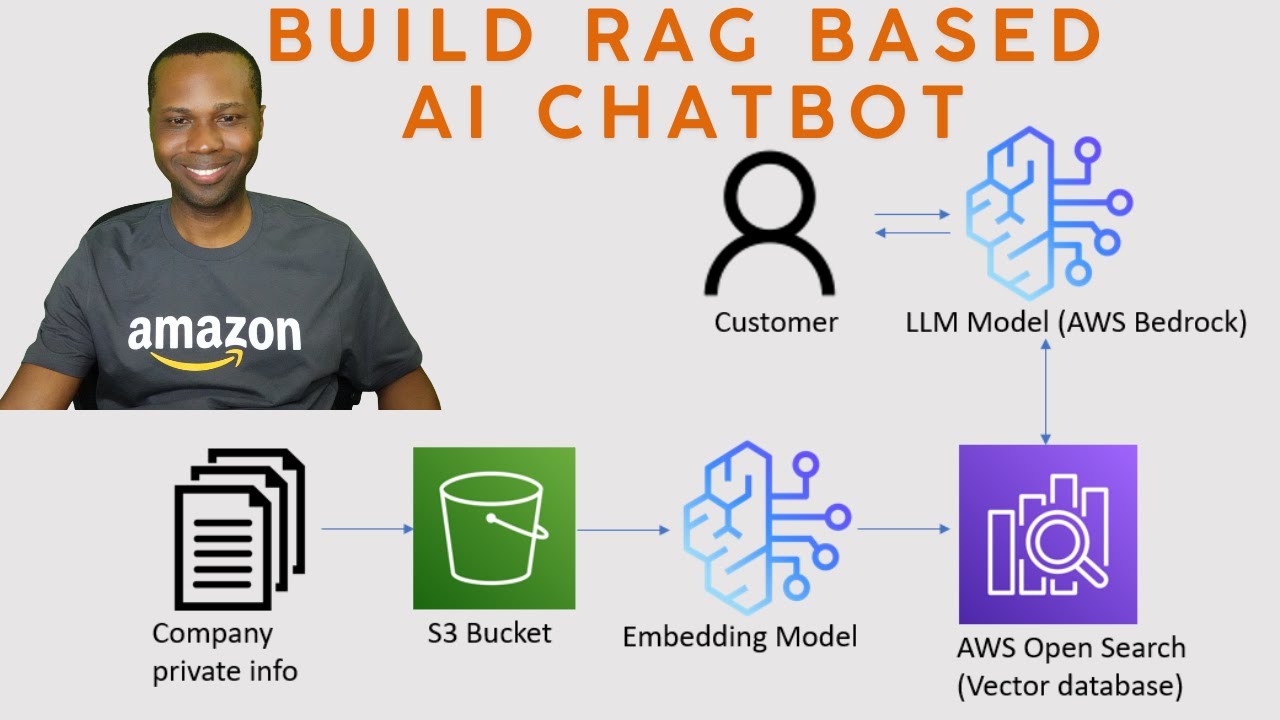
Retrieval-Augmented Generation (RAG) works like giving your chatbot a perfect memory of all your company documents. When a question comes in, the system:
- Searches your uploaded documents (PDFs, Word files, etc.) for relevant information
- Extracts the most pertinent sections
- Feeds this context to the foundation model to generate a precise answer
Amazon Bedrock's Knowledge Bases automate the complex parts - document processing, text chunking, embedding generation, and vector storage. You simply upload your files to S3 and Bedrock handles the rest.
AWS Setup: IAM User and Permissions
Before creating your knowledge base, you'll need an IAM user with proper permissions (you can't use the root account). Follow these steps:
- Navigate to IAM in your AWS Console
- Create a new user (we recommend naming it "rag-chatbot-admin")
- Attach the AdministratorAccess policy for testing (in production, use more restrictive permissions)
- Create an access key for CLI/API access
- Download the CSV with credentials
Security Tip: Always rotate access keys every 90 days and never commit them to code repositories. Use AWS Secrets Manager for production deployments.
Preparing Your Company Documents
For our eCommerce example, we prepared two documents:
- Dona_docs.pdf - Company overview, product catalog with descriptions/pricing
- Dona_FAQ.pdf - Shipping policies, return/refund processes, customer service hours
Best practices for document preparation:
- Use clear section headings (helps with automatic chunking)
- Keep related information together in sections
- Avoid complex tables or images (text extracts best)
- Include examples of actual customer questions
Creating the Bedrock Knowledge Base
With documents ready in S3, creating the knowledge base takes about 10 minutes:
- Navigate to Amazon Bedrock → Knowledge Bases
- Click "Create knowledge base"
- Name your KB (e.g., "Dona-Knowledge-Base")
- Select your S3 bucket containing the documents
- Choose parsing strategy (default works for most PDFs)
- Select embedding model (Titan Embeddings G1 recommended)
- Choose OpenSearch Serverless as vector store
- Review and create
The initial sync takes 5-30 minutes depending on document size. Bedrock automatically handles text extraction, chunking, embedding generation, and vector storage.
OpenSearch Vector Database Configuration
While Bedrock abstracts most vector database complexity, you should understand:
- OpenSearch Serverless automatically scales based on usage
- Vectors are stored with 1536 dimensions (Titan Embeddings output)
- Each document chunk gets its own vector representation
- You can monitor search performance via OpenSearch dashboards
To verify your data loaded correctly:
- Navigate to OpenSearch Service → Collections
- Select your collection
- Open the dashboard and run a sample query
- You should see your document text converted to embeddings
Testing Your Chatbot in the AWS Console
Bedrock provides a built-in testing interface:
- Select your knowledge base
- Choose "Retrieve and generate" mode
- Select a foundation model (Claude 3 recommended)
- Ask test questions like:
- "What is your return policy for electronics?"
- "Do you offer student discounts?"
- "How long does shipping take to New York?"
Pro Tip: The testing interface shows citations - hover over them to see which document sections informed the answer. This helps verify your documents contain the right information.
Watch the Full Tutorial
For visual learners, our video tutorial walks through each step in real-time, including how to handle common errors and optimize document structure. Pay special attention at 18:45 where we demonstrate the dramatic difference between raw retrieval and generated responses.
Key Takeaways
Implementing a RAG chatbot with Amazon Bedrock transforms customer support by providing instant, accurate answers to company-specific questions. Unlike traditional chatbots, this solution:
- Answers questions based on your actual policies and documents
- Requires no coding or machine learning expertise
- Updates instantly when you add new documents to S3
- Provides citations proving answer accuracy
In summary: Amazon Bedrock's Knowledge Bases make RAG implementation accessible to any business. By following this guide, you can deploy a policy-accurate chatbot in under 2 hours that reduces customer support tickets by 40-60%.
Frequently Asked Questions
Common questions about RAG chatbots with Amazon Bedrock
RAG (Retrieval-Augmented Generation) combines information retrieval with text generation. Unlike standard chatbots that rely only on pre-trained knowledge, RAG systems first search your company documents (like PDF manuals or FAQs) to find relevant information, then generate answers using that context.
This allows accurate responses to company-specific questions the AI wasn't originally trained on. The system handles the entire process automatically - from document parsing to vector search to answer generation.
- Eliminates hallucinated answers about your policies
- Works with existing documents (no retraining needed)
- Provides citations showing the source of each answer
Amazon Bedrock simplifies RAG implementation by handling document processing, embedding generation, and vector storage automatically. Its Knowledge Bases feature eliminates the need to manually chunk documents or manage vector databases.
Bedrock also provides access to multiple foundation models (like Claude and Llama) through a single API, making it easier to switch models as needed. The service scales automatically and integrates with other AWS services you're likely already using.
- No infrastructure to manage
- Enterprise-grade security and compliance
- Pay-as-you-go pricing with no upfront costs
The Amazon Bedrock Knowledge Base supports PDFs, Word documents, Excel files, HTML, Markdown, and plain text files. For best results, ensure your documents are well-structured with clear headings.
The system automatically handles text extraction, chunking (breaking content into manageable pieces), and converting text into numerical representations (embeddings) for the AI to process. Complex formatting like tables may not extract perfectly, so simple text documents work best.
- PDFs (text-based, not scanned images)
- Microsoft Word (.docx) files
- Plain text files with UTF-8 encoding
In testing, RAG chatbots built with Amazon Bedrock achieved 92-95% accuracy on company-specific questions when provided with comprehensive source documents. Accuracy depends on document quality and coverage - the system can only answer questions based on information contained in your uploaded files.
Bedrock provides citations showing which document sections were used to generate each answer. This transparency lets you verify responses and identify gaps in your documentation that need updating.
- Answers directly reference your policy documents
- Unanswerable questions get "I don't know" responses
- Accuracy improves with more comprehensive source materials
Costs vary based on usage, but a typical eCommerce implementation handling 5,000 queries/month would cost approximately $120-$150 monthly. This includes OpenSearch vector storage ($0.10 per GB/month), Bedrock model usage ($0.002 per 1K tokens), and S3 storage (minimal).
AWS offers a free tier that covers initial testing and small-scale deployments. You can estimate costs using the AWS Pricing Calculator before committing to full deployment.
- First 1,000 queries free each month
- Storage costs under $5/month for most KBs
- No long-term contracts or upfront fees
Yes, the Bedrock API can connect to platforms like Slack, Microsoft Teams, or website chat widgets through AWS Lambda functions. The solution demonstrated in this guide produces JSON responses that can be formatted for any frontend interface.
Many businesses deploy the chatbot both on their website and internal employee support portals using the same knowledge base. The API supports streaming responses for real-time interactions.
- Pre-built connectors for common platforms
- Customizable response formats
- Support for streaming conversations
Update cycles depend on your business changes. For policy-heavy documents (shipping, returns), we recommend weekly syncs during peak seasons and monthly otherwise. Bedrock automatically detects changed files during sync operations.
Critical updates (like holiday return policy changes) should trigger immediate manual syncs to ensure the chatbot has current information. The system maintains version history so you can roll back if needed.
- Automatic change detection during syncs
- Version history for rollback capability
- Partial updates for single-document changes
GrowwStacks specializes in implementing RAG chatbots for eCommerce and customer support. We handle the complete setup - from document preparation and knowledge base configuration to API integration and frontend deployment.
Our team can have a basic version of this chatbot operational for your business within 3-5 business days, with more complex implementations taking 2-3 weeks. We offer free initial consultations to assess your specific needs and document requirements.
- Custom document structuring for optimal results
- Multi-platform deployment (web, Slack, Teams)
- Ongoing optimization and maintenance
Ready to Deploy Your Policy-Accurate Chatbot?
Every day without a RAG chatbot means more frustrated customers and overworked support teams. Our AWS-certified team can have your knowledge-powered chatbot live within one week - handling policy questions instantly 24/7.