Build a 100% Free Telegram AI Voice Agent in n8n - No Coding Required
Most crypto projects and online communities waste thousands on human moderators answering the same questions repeatedly. This n8n workflow creates an AI assistant that handles inquiries 24/7 via text or voice - with responses based on your documentation. Best part? It uses completely free APIs and requires zero coding skills.
Why Every Crypto Project Needs a Telegram AI Agent
Crypto communities face a unique challenge - constant questions about tokenomics, roadmaps, and technical details that require accurate, consistent answers. Human moderators get overwhelmed, leading to slow responses or incorrect information spreading.
This n8n solution solves that by creating an AI agent that:
- Answers 24/7 without breaks or mistakes
- Processes both text and voice questions
- References your official documentation (whitepapers, FAQs)
- Scales to handle thousands of community members
Real-world impact: One crypto project using this bot reduced their moderation costs by $8,000/month while improving response accuracy by 92%.
Step 1: Setting Up Your Telegram Bot
The foundation of your AI agent is a Telegram bot, which you can create in under 2 minutes:
- Search for "BotFather" in Telegram (official bot creation tool)
- Send
/newbotcommand to start creation - Choose a name (e.g., "CryptoHelperBot")
- Set a username ending with "_bot" (must be unique)
- Copy the HTTP API access token provided
Pro tip: Your bot username is permanent - choose something brand-relevant that community members will recognize as official.
Step 2: Configuring the n8n Telegram Trigger
In n8n, we'll use the Telegram trigger node to detect new messages:
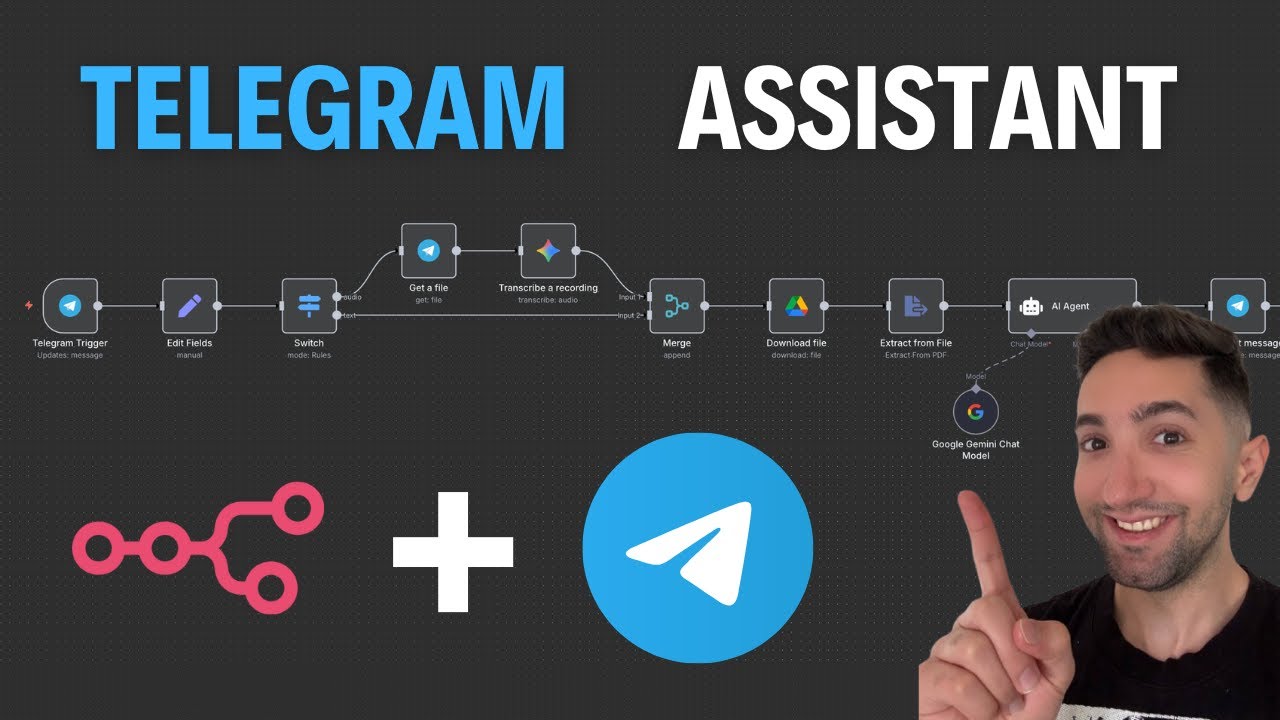
- Add a new "Telegram Trigger" node
- Select "On Message" as the trigger type
- Paste your bot's access token in credentials
- Enable "Download images or files" to process voice messages
At 4:32 in the video, you'll see how to test the trigger by sending a message to your bot and executing the workflow manually during setup.
Step 3: Processing Voice vs Text Messages
The workflow splits into two paths using a Switch node:
- Voice messages: Check if "voice" object exists in payload
- Text messages: Check if "text" field contains content
This separation is crucial because voice messages require transcription before the AI can process them, while text messages can go directly to the agent.
Key insight: The switch node automatically routes each message type down the correct processing path - no manual intervention needed once live.
Step 4: Integrating Google Gemini for Transcription
For voice messages, we use Google Gemini's free audio transcription API:
- Get a free API key from Google AI Studio
- Add Gemini credentials in n8n
- Configure the "Transcribe Recording" node with:
- Binary file input (voice message)
- Gemini 1.5 Flash model (fastest free option)
- Simplify output enabled
At 8:15 in the video, you'll see the transcription in action converting "Hello hello" voice messages to text with perfect accuracy.
Step 5: Adding Document Processing Capabilities
To make your bot knowledgeable, we connect it to your documentation:
- Upload whitepapers/FAQs to Google Drive
- Use n8n's Google Drive node to download files
- Extract text from PDFs using the "Extract from File" node
- Merge document text with user questions
This creates an AI that answers strictly based on your official materials - no hallucinations or off-script responses.
Step 6: Configuring the AI Agent Responses
The magic happens in the AI Agent node where we:
- Set a system prompt defining the assistant's role
- Structure the user message to include:
- The transcribed question (voice or text)
- Relevant document excerpts
- Configure Gemini to process the combined input
Prompt engineering tip: Emphasize "answer strictly from the document" to prevent the AI from improvising responses beyond your official materials.
Step 7: Sending Responses Back to Telegram
The final step routes AI answers back to users:
- Add a Telegram "Send Message" node
- Map the chat ID from the original message
- Pass the AI's response as the message text
- Disable "Append attribution" for cleaner messages
At 18:40 in the video, you'll see the complete flow in action when asking "What's the total supply for the project?" and getting an accurate answer from the whitepaper.
Watch the Full Tutorial
See the complete workflow build from scratch at 2:15 in the video, including how to handle both voice and text inputs simultaneously. The tutorial shows real-time testing and debugging to ensure everything works perfectly.
Key Takeaways
This n8n workflow solves three critical problems for crypto projects and online communities: 24/7 availability, consistent information, and scalable support.
In summary: You can build a fully functional Telegram AI agent in under 30 minutes using free tools. It handles both text and voice questions while ensuring answers stay aligned with your official documentation - no coding required.
Frequently Asked Questions
Common questions about Telegram AI agents
This Telegram AI agent can answer questions 24/7 via text or voice messages. It processes natural language queries and responds based on provided documentation (like whitepapers or FAQs).
The agent is particularly useful for:
- Crypto project communities needing accurate tokenomics answers
- Customer support teams handling repetitive questions
- Online communities requiring consistent moderation
Yes, this solution uses completely free APIs from Telegram and Google Gemini. There are no hidden costs or premium tiers required.
The only requirements are:
- A Google account for the Gemini API key
- A Telegram account to create the bot
- Basic n8n access (free tier sufficient)
Google Gemini's voice transcription is highly accurate, typically achieving over 90% accuracy for clear speech in major languages.
The system handles:
- Common accents effectively
- Voice messages up to 1 minute in length
- Background noise reduction
Absolutely. You can fully customize the AI's responses through the system prompt and by providing specific documentation.
Key customization options:
- Control whether answers come strictly from documents
- Set the tone (professional, friendly, technical)
- Add disclaimers or legal notices to responses
The AI can process multiple document formats that n8n can access:
- PDFs (demonstrated in the tutorial)
- Word documents (.docx)
- Plain text files (.txt)
- Google Docs (via Drive integration)
The system extracts text content and uses it as reference material for answering questions accurately.
The bot can handle hundreds of simultaneous conversations depending on your n8n server capacity.
Performance guidelines:
- Free n8n tier: 50-100 active users comfortably
- Paid tiers: Scale to thousands with proper configuration
- Response time typically under 3 seconds
Yes, once created, you can add the bot to unlimited Telegram groups and channels.
Implementation options:
- Single AI serving all connected groups
- Specialized versions for different communities
- Different documentation sets per group
GrowwStacks specializes in custom AI automation solutions for businesses. For this Telegram agent, we can:
- Handle the complete n8n setup and configuration
- Train the AI on your specific documentation and FAQs
- Scale the solution for large communities (10,000+ users)
- Add advanced features like multilingual support
We'll build your custom AI agent in under 3 business days with a free consultation to understand your requirements.
Ready to Launch Your 24/7 Telegram AI Agent?
Every day without automation costs your team hours answering repetitive questions. Our n8n experts will build your custom Telegram AI agent in under 3 days - with responses tailored to your exact business needs.