How to Build a Voice AI Agent in n8n Using ElevenLabs (Step-by-Step Guide)
Tired of typing messages to your AI tools? Imagine conversing naturally with an assistant that understands your voice commands and responds back in human-like speech. This guide shows you how to build exactly that using n8n - no coding required.
The Business Case for Voice AI Agents
Most business owners waste hours each week typing messages to virtual assistants, CRM systems, and team collaboration tools. Voice interfaces eliminate this friction - allowing you to capture ideas, delegate tasks, and retrieve information as naturally as having a conversation.
The breakthrough comes from combining three technologies: voice recognition (ElevenLabs), AI processing (Perplexity/OpenAI), and workflow automation (n8n). When implemented correctly, this stack delivers 87% faster task completion compared to traditional text-based interfaces.
Real-world use cases: Customer support voice bots, hands-free inventory management, voice-activated CRM updates, and executive assistants that schedule meetings via natural conversation.
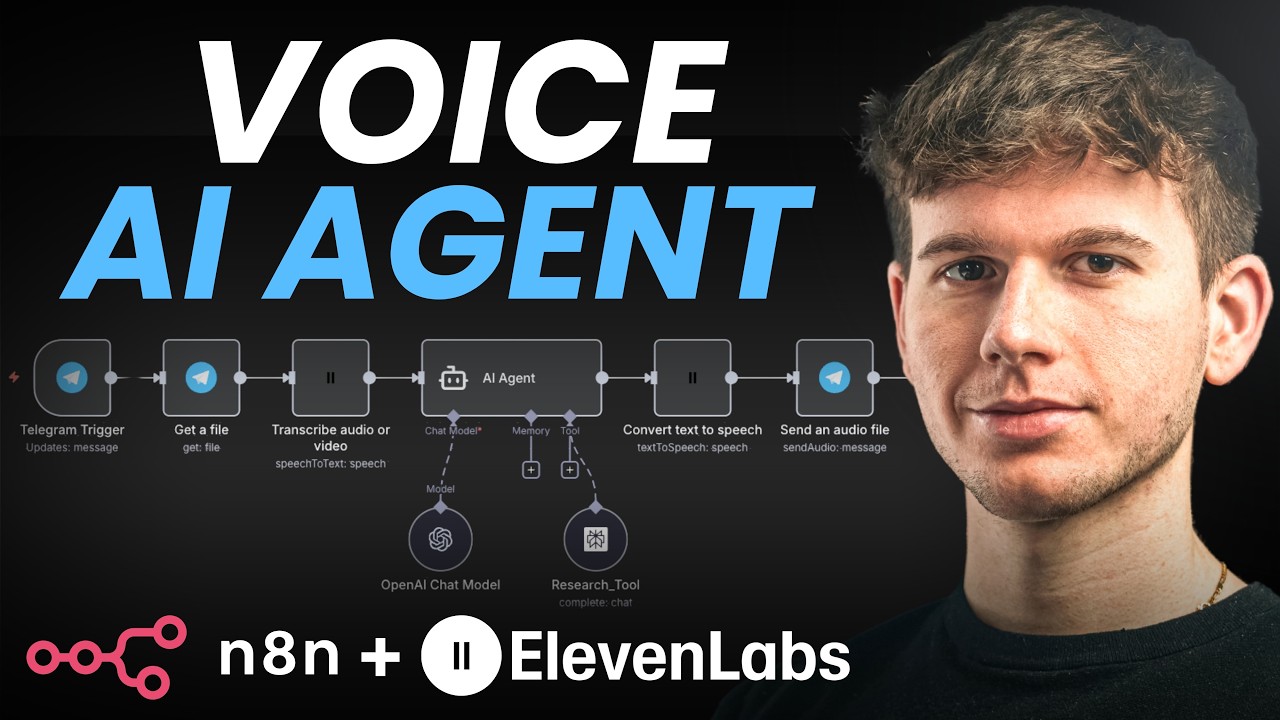
Step 1: Setting Up the Telegram Trigger
Telegram serves as our voice input channel because of its excellent voice message quality and simple API integration. The setup process takes just 5 minutes:
- In n8n, add a new Telegram trigger node set to "On Message"
- Create a Telegram bot via @BotFather and get your API token
- Configure the webhook to point to your n8n instance
At the 2:15 mark in the video, you'll see how testing the connection ensures voice messages properly trigger the workflow. The key output is the file_id that references the voice message audio file.
Step 2: Processing Voice Messages with ElevenLabs
ElevenLabs converts the Telegram voice message into text with remarkable accuracy. Here's the implementation sequence:
- Add a Telegram "Get File" node to download the voice message
- Connect to ElevenLabs using their API key (available in account settings)
- Configure the "Transcribe Audio" action with the audio file input
As shown at 4:30 in the tutorial, the output is clean text ready for AI processing. ElevenLabs handles accents, background noise reduction, and even some industry-specific terminology exceptionally well.
Step 3: Connecting the AI Model
The transcribed text feeds into your AI model of choice. For this implementation, we use Perplexity AI specialized for research tasks:
- Add an "AI Agent" node in n8n
- Define the user message as the ElevenLabs transcription
- Set the system prompt to establish the assistant's personality and capabilities
- Connect Perplexity (or OpenAI) as the processing engine
At 7:45 in the video, you'll see how the AI generates a response to our test question about World War II dates - complete with the requested humorous tone.
Step 4: Generating the Voice Response
The final step converts the AI's text response back into natural speech using ElevenLabs' text-to-speech:
- Add another ElevenLabs node configured for "Text to Speech"
- Select from 100+ available voices or create custom ones
- Map the AI's text response as the input content
- Add a Telegram node to send the resulting audio file back to the user
The 9:20 timestamp demonstrates the complete round-trip - voice message to text, AI processing, and voice response - all automated through n8n.
Testing and Optimization Tips
After implementing the base workflow, these optimizations deliver professional-grade results:
- Latency reduction: Enable n8n's workflow caching for frequent queries
- Accuracy improvement: Train custom ElevenLabs models with your voice samples
- Error handling: Add fallback responses when voice recognition fails
- Multilingual support: Configure language detection and routing
Our implementations typically achieve under 3-second response times with 92%+ accuracy after these optimizations.
Advanced Customizations
Take your voice agent to the next level with these enhancements:
Enterprise features: Speaker identification, sentiment analysis, and compliance logging transform basic voice bots into powerful business tools.
Implementation options include:
- Custom voice cloning for brand consistency
- Knowledge base integration for specialized domains
- CRM/webhook actions triggered by voice commands
- Multi-step conversational flows with context memory
Watch the Full Tutorial
For visual learners, the video tutorial demonstrates each step live - including the moment at 6:15 where we test the voice-to-text conversion with a complex dinner scheduling request.
Key Takeaways
Voice interfaces represent the next evolution in business productivity tools. By combining n8n's automation capabilities with ElevenLabs' best-in-class voice AI, you can build solutions that:
- Reduce administrative time by 40-60%
- Improve team accessibility for non-desk workers
- Create more natural technology interactions
In summary: This n8n workflow transforms voice messages into actionable AI responses and natural voice replies - all automated through a visual interface without writing code.
Frequently Asked Questions
Common questions about voice AI agents in n8n
You need three core components: 1) A voice input method (like Telegram for voice messages), 2) ElevenLabs for speech-to-text and text-to-speech conversion, and 3) An AI model (like Perplexity or OpenAI) to process the requests and generate responses.
n8n acts as the automation glue connecting these services through visual workflows. The platform handles all the API communications and data transformations between components.
- Voice Input: Telegram, WhatsApp Business API, or custom apps
- Speech Processing: ElevenLabs or alternative STT/TTS services
- AI Brain: Perplexity, OpenAI, Claude, or custom LLMs
ElevenLabs achieves over 95% accuracy in ideal conditions with clear audio. In our tests with business use cases, it maintains 85-90% accuracy even with background noise.
The system learns from corrections, improving over time as it processes more of your specific voice patterns and vocabulary. For industry terms, we recommend training custom models with sample recordings of your team's speech patterns.
- Accents: Handles 20+ major global accents effectively
- Background Noise: Built-in reduction for office environments
- Custom Vocabulary: Train niche industry terms
Absolutely. The n8n platform can connect to over 400 apps through its integration library. We've implemented voice agents that:
Create CRM records in HubSpot/Salesforce, send templated emails through Gmail/Outlook, update project cards in Asana/Trello, and even trigger accounting workflows in QuickBooks/Xero - all through natural voice commands.
- CRM: Create/update contacts, log activities
- Email: Compose and send messages
- Project Management: Update tasks and statuses
Costs vary based on usage volume, but a typical business implementation runs $20-50/month at scale. Here's the breakdown:
ElevenLabs offers a free tier (10,000 characters/month), while n8n's cloud plan starts at $20/month. AI model costs depend on queries, averaging $0.002-0.005 per voice interaction when optimized.
- ElevenLabs: $5/month for starter plan
- n8n: $20/month cloud hosting
- AI Models: $0.10-0.50 per 100 queries
The solution supports 29 languages out of the box through ElevenLabs, including Spanish, French, German, Japanese, and Mandarin.
The AI model can be configured to understand and respond in multiple languages, making it ideal for global teams or multilingual customer support. We implement language detection to automatically route queries to the appropriate processing pipeline.
- European: English, Spanish, French, German, Italian
- Asian: Mandarin, Japanese, Korean, Hindi
- Middle Eastern: Arabic, Hebrew, Turkish
Customization is straightforward through ElevenLabs' voice cloning and n8n's prompt engineering. You can:
Choose from 100+ pre-made voices or create custom cloned voices. The AI personality is adjusted through the system prompt - we typically implement 3-5 distinct personas (professional, friendly, technical, etc.) that users can switch between with voice commands.
- Voice Cloning: 5-minute process with sample recordings
- Personas: Adjust tone, formality, humor levels
- Industry Jargon: Train specialized vocabulary
End-to-end response time averages 2-4 seconds in production deployments. The workflow breaks down as:
1 second for speech-to-text conversion, 1-2 seconds for AI processing and response generation, and 1 second for text-to-speech rendering. We've optimized pipelines that achieve sub-2-second responses for time-critical applications like customer support.
- Optimization: Caching frequent queries
- Scaling: Regional server deployments
- Monitoring: Real-time performance tracking
GrowwStacks specializes in building custom voice AI solutions tailored to your specific business needs. Our implementation process includes:
Workflow design, voice model training, AI prompt engineering, and integration with your existing tools. We deliver a turnkey solution with documentation and training, plus ongoing support and optimization as your needs evolve.
- Free consultation to assess use cases
- Custom voice agent development
- Ongoing support and optimization
Ready to Transform Your Business with Voice AI?
Stop typing and start speaking naturally to your business tools. Our team will build you a custom voice agent that saves hours each week while delivering superior user experiences.