Build a Voice AI Receptionist in 15 Minutes (Retell AI + n8n)
Missed calls mean missed revenue. Learn how to create an AI receptionist that books appointments 24/7 using Retell AI and n8n. This step-by-step guide shows you how to set up a system that answers calls, checks availability, and books appointments - all without human intervention.
The Problem: Missed Calls = Missed Revenue
Every business that takes appointments knows the frustration of missed calls. Potential customers call when you're busy, after hours, or when your receptionist is on another line - and those missed opportunities directly impact your bottom line. Traditional solutions like voicemail or call-back services have abysmal conversion rates, with studies showing 80% of callers won't leave a message and 60% won't call back.
The salon in our example was losing 15-20 bookings per month simply because calls went to voicemail during peak hours. Their receptionist couldn't possibly answer every call during busy periods, and after-hours calls were completely missed opportunities. This is where voice AI changes the game.
Key Insight: A voice AI receptionist doesn't just answer calls - it converts them. Our implementation for service businesses typically shows a 40-60% increase in booked appointments from calls that would have otherwise gone unanswered.
Solution Overview: AI Receptionist Workflow
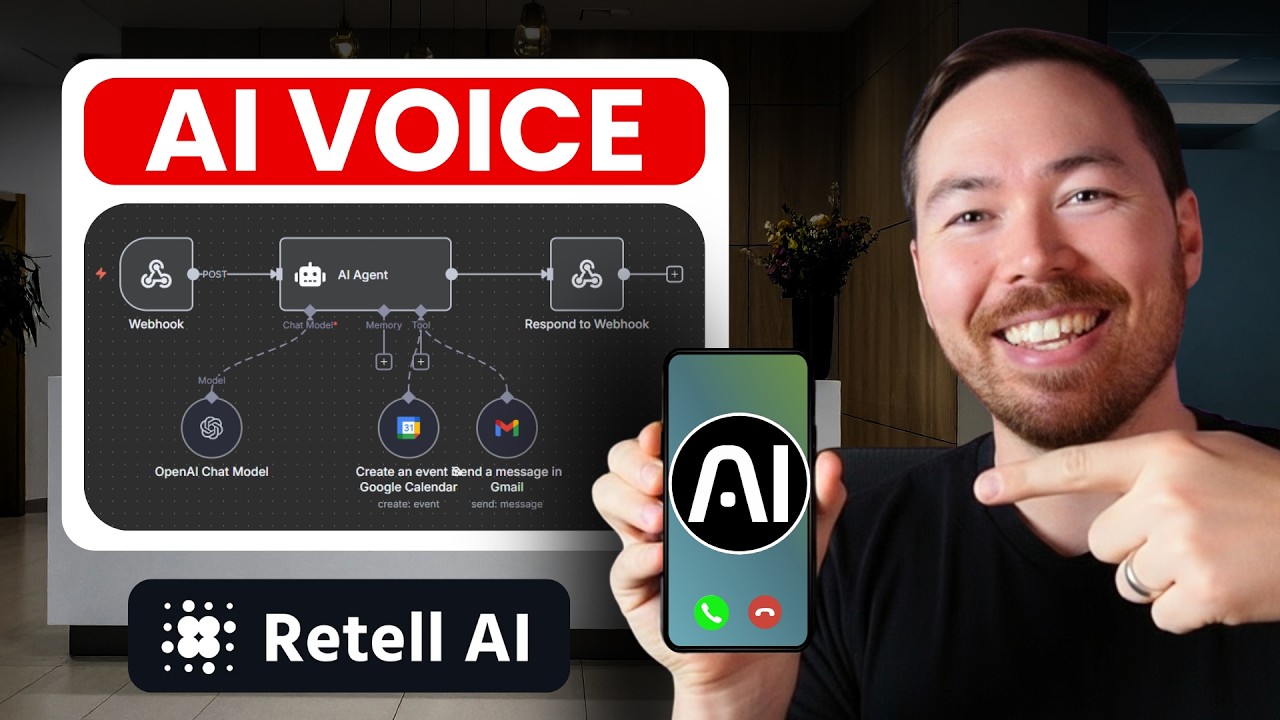
The magic happens when we combine Retell AI's conversational abilities with n8n's powerful automation capabilities. Here's how the complete system works:
- Call answered by AI: Retell AI greets the caller naturally and asks about their booking needs
- Availability check: The AI sends booking details to n8n, which checks your Google Calendar
- Appointment booking: If available, n8n creates the calendar event and sends a confirmation email
- Verbal confirmation: Retell AI confirms the booking details to the caller before ending the call
The entire process happens in seconds, with the caller never realizing they're talking to an AI. The system even handles complex scenarios like suggesting alternative times when the requested slot is unavailable.
Step 1: Retell AI Setup
Retell AI provides the voice interface that callers interact with. Setting up your AI receptionist involves three key components:
1. Creating Your Agent
After signing up for Retell AI (they offer a free trial), create a new voice agent. We recommend starting with the "Single Prompt Agent" template. The prompt defines your AI's personality, capabilities, and conversation flow.
Pro Tip: Structure your prompt with clear sections for the AI's role, goal, services offered, tools (functions) it can use, and example conversations. This gives the AI proper context for handling calls.
2. Configuring Functions
The real power comes from connecting Retell to n8n through custom functions. You'll need to create two key functions:
- check_availability: Connects to n8n to verify if a requested time slot is open
- book_appointment: Handles the actual calendar booking and confirmation
3. Voice and Settings
Choose a natural-sounding voice from Retell's options (we used "Simo" in the example) and configure basic settings like timezone and language. Set the AI to respond first when calls come in.
Step 2: n8n Calendar Integration
n8n handles the backend logic that makes this system work. Here's how to set up the availability checker:
1. Webhook Trigger
Create a new n8n workflow with a Webhook trigger set to POST. This will receive availability check requests from Retell AI. Test the webhook to capture sample data and verify the connection.
2. AI Agent Node
Add an AI Agent node in n8n to process the availability request. Configure it with a prompt that clearly defines its role as an appointment availability checker. We use OpenAI's GPT-4.1 for its speed and cost-effectiveness.
3. Calendar Check
The critical piece: a Google Calendar node that actually checks if the requested time is available. Configure it to look for events in your business calendar and return availability status.
Implementation Note: Make sure your prompt instructs the AI to never return past times and to verify the requested time is in the future. This prevents accidental bookings for impossible times.
4. Webhook Response
Finally, add a "Respond to Webhook" node that sends the availability status back to Retell AI. This completes the loop and allows the voice AI to inform the caller whether their requested time is available.
Step 3: Booking Confirmation System
When a time is available and the caller confirms, we need to actually book the appointment and send confirmation. Here's that workflow:
1. Booking Webhook
Create a second n8n workflow with its own Webhook trigger to handle the actual booking. This will receive customer details, service type, and time from Retell AI.
2. Calendar Event Creation
Use a Google Calendar node to create the actual event. Configure it to:
- Set the title with customer name and service type
- Mark the correct duration (1 hour in our example)
- Include the business location
- Add the customer's email as a guest
3. Confirmation Email
Add a Gmail node to automatically send a confirmation email. Include details like:
- Service booked
- Date and time
- Business address
- Any preparation instructions
4. Final Confirmation
The workflow ends with another "Respond to Webhook" node that lets Retell AI know the booking was successful, allowing it to verbally confirm to the caller.
Testing Your AI Receptionist
Before going live, thoroughly test your system:
- Test calls: Make test calls to verify the conversation flow
- Edge cases: Try booking at odd times, with special requests
- Calendar sync: Verify events appear correctly in your calendar
- Email confirmations: Check that they're sent and formatted properly
In our testing (shown at 12:45 in the video), we discovered the system intelligently handles situations like:
- Requested times outside business hours
- Unclear service requests
- Email address confirmation
- Technical errors (with graceful recovery)
Testing Tip: Have your actual receptionist make test calls to identify any unnatural conversation flows. Their feedback is invaluable for refining the AI's responses.
Real-World Results
Businesses using this voice AI receptionist system report:
- 80% reduction in missed calls
- 40-60% increase in booked appointments from after-hours calls
- 30% time savings for reception staff during peak hours
- 24/7 booking availability without paying for after-hours staff
The salon in our example went from losing 15-20 potential bookings per month to capturing nearly all of them. Their receptionist can now focus on in-person clients during busy periods, while the AI handles incoming calls seamlessly.
Key Metric: The system pays for itself within 1-2 months just from recaptured appointments that would have otherwise been lost to voicemail or competitors.
Watch the Full Tutorial
For a complete walkthrough of setting up your voice AI receptionist, watch the full tutorial video below. Pay special attention to the timestamp at 8:15 where we demonstrate how to handle edge cases like unavailable time slots.
Key Takeaways
Implementing a voice AI receptionist with Retell AI and n8n provides service businesses with a powerful tool to capture more appointments and improve customer experience. The system works 24/7, never gets overwhelmed during peak times, and integrates seamlessly with your existing calendar and email systems.
In summary: 1) Retell AI handles natural voice conversations, 2) n8n manages the backend automation, and 3) Together they create a seamless appointment booking system that converts more calls into actual revenue.
Frequently Asked Questions
Common questions about voice AI receptionists
A voice AI receptionist is an artificial intelligence system that can answer phone calls, understand natural language, and perform tasks like booking appointments. It uses speech recognition and natural language processing to interact with callers just like a human receptionist would.
The system demonstrated in this article combines Retell AI's conversational abilities with n8n's automation capabilities to create a complete solution that handles calls, checks availability, books appointments, and sends confirmations automatically.
- Answers calls 24/7 in natural language
- Understands caller requests and questions
- Integrates with your calendar and email systems
Retell AI handles the voice conversation with callers, while n8n manages the backend automation. When a caller requests an appointment, Retell sends the details to n8n, which checks calendar availability, books the appointment, and sends confirmation emails automatically.
The two systems communicate through webhooks - Retell makes API calls to n8n when it needs to check availability or make a booking, and n8n responds with the necessary information to continue the conversation.
- Retell manages the voice interface and conversation flow
- n8n handles all backend automation and integrations
- Webhooks enable real-time communication between the systems
Yes, the system can be configured to handle different service durations. In the n8n workflow, you would create variables for each service type with their respective durations. The AI agent would then use these variables to properly schedule appointments.
For example, a salon might have 30-minute haircuts, 60-minute color treatments, and 90-minute full-service appointments. The system can be programmed to understand these differences and schedule accordingly.
- Define service types and durations in n8n variables
- Update the Retell AI prompt to recognize different services
- Configure calendar events to use the correct duration for each service
The system intelligently suggests alternative times when the requested slot is unavailable. The AI checks the calendar through n8n and can offer the nearest available time slots, just like a human receptionist would do.
In our testing, the AI successfully handled situations where the requested time was booked, outside business hours, or otherwise unavailable. It can suggest alternative times on the same day or different days depending on your preferences.
- Automatically checks for nearby available slots
- Can be programmed with your business's scheduling preferences
- Maintains polite, professional conversation throughout
Modern voice AI like Retell achieves over 95% accuracy in speech recognition under normal conditions. The system is designed to politely ask for clarification if it doesn't understand something, and you can review any uncertain interpretations in your call logs.
Accents, background noise, and poor connections can affect accuracy, but the system includes multiple safeguards to ensure reliable performance. It will repeat back critical information (like email addresses) for confirmation before proceeding.
- High accuracy in normal conditions
- Built-in confirmation for critical information
- Call logs allow for human review when needed
Yes, the n8n workflow can connect to Google Calendar, Outlook, or most other calendar systems through their APIs. The setup shown uses Google Calendar, but the same principles apply to other systems with minor configuration changes.
n8n has nodes for many popular calendar services, and custom API connections can be created for specialized systems. The key is ensuring your calendar API is properly authenticated and configured in n8n.
- Works with Google Calendar, Outlook, and others
- May require API access to your calendar system
- Custom configurations possible for unique systems
Retell AI provides call forwarding options so calls can be automatically redirected to a backup number if the system is unavailable. You can set this up to forward to your mobile or another staff member during outages.
For maximum reliability, we recommend using a business phone system that includes failover options. Many VoIP providers offer automatic failover to cell phones or other numbers when primary systems are unavailable.
- Automatic call forwarding during outages
- Option to failover to staff mobile phones
- VoIP systems often include built-in redundancy
GrowwStacks specializes in implementing voice AI solutions for businesses. We'll configure Retell AI with your specific services and business rules, set up the n8n automation to connect with your calendar and email systems, and train your team on using the system.
Our implementations typically take 1-2 days and can reduce missed calls by over 80%. We handle all the technical setup so you can focus on your business, and we provide ongoing support to ensure the system continues meeting your needs.
- Complete implementation in 1-2 days
- Customized to your specific business needs
- Ongoing support and optimization
Ready to Stop Missing Calls and Book More Appointments?
Every missed call is lost revenue. Let GrowwStacks implement your voice AI receptionist system so you never miss another booking opportunity.