How to Build Your Own AI Assistant That Never Sleeps — ChatGPT + Calendly + Zapier
Tired of wasting hours on scheduling emails and meeting confirmations? This powerful automation combines three tools to handle your calendar, write personalized emails, and follow up with clients — all while maintaining your unique voice. Reclaim 5-7 hours per week without sacrificing professionalism.
The Scheduling Nightmare We All Face
Picture this: You've just wrapped up a promising discovery call with a potential client. They're excited to continue the conversation and ask, "When are you available next week?" What follows is the modern professional's version of email tennis - a back-and-forth exchange that can stretch across days as you try to align schedules.
Research from Calendly shows professionals waste an average of 8.8 hours per month just scheduling meetings. That's more than an entire workday lost to calendar coordination. The hidden cost? These fragmented time slots break your focus, leaving you mentally exhausted before the actual work begins.
The automation epiphany: What if your calendar could speak for itself? What if every booked meeting triggered a perfectly written confirmation email in your voice? That's exactly what we'll build using three tools that play to each other's strengths.
Calendly: Your 24/7 Scheduling Foundation
Calendly transforms your calendar into a self-service booking page. Instead of exchanging availability emails, you simply share a link showing your real-time open slots. Clients pick what works for them, and the meeting appears on both calendars instantly.
Here's why Calendly is the perfect foundation:
- Time zone intelligence: Automatically displays your availability in the viewer's local time
- Buffer times: Ensures you always have breathing room between meetings
- Custom questions: Collects essential info upfront (like meeting purpose or call-in details)
- Multiple event types: Different booking pages for consultations, interviews, or team syncs
At 1:35 in the video tutorial, we show how to configure Calendly to automatically block off focus time and lunch breaks, preventing back-to-back meeting fatigue.
ChatGPT: Your Tireless Email Writer
While Calendly handles scheduling, we still need to communicate meeting details. This is where ChatGPT becomes your always-available copywriter. Unlike generic templates, ChatGPT can generate emails that:
- Reference the client's name and meeting time dynamically
- Adapt tone based on meeting type (formal for corporate clients, casual for startups)
- Include personalized touches based on the booking form responses
- Provide relevant pre-meeting materials or preparation instructions
The key is crafting the right prompt. Here's an example we use at GrowwStacks:
Sample ChatGPT prompt: "Write a friendly but professional meeting confirmation email for [Client Name] who booked a [Meeting Type] on [Date] at [Time]. Mention we're excited to discuss [Custom Field: Meeting Purpose]. Include our Zoom link [Zoom URL] and ask them to reply with any pre-meeting materials. Sign off as [Your Name] from [Company]."
Zapier: The Magic Connector
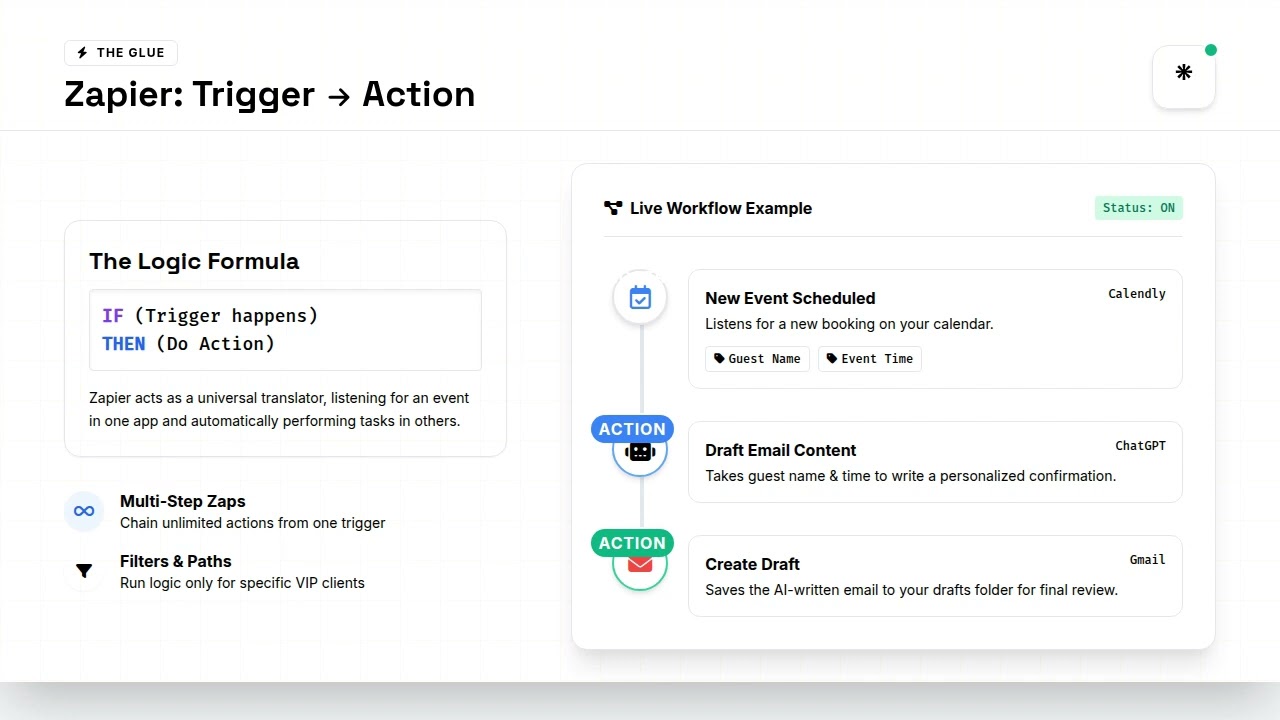
Zapier acts as the bridge between Calendly and ChatGPT, turning this from two separate tools into a seamless workflow. It operates on a simple principle: When X happens in App A, do Y in App B.
For our scheduling assistant, the Zap looks like this:
- Trigger: New event scheduled in Calendly
- Action 1: Send booking details to ChatGPT with our template prompt
- Action 2: Take ChatGPT's response and create a draft email in Gmail
- Optional Action: Send a Slack notification that a new meeting was booked
At 3:12 in the video, we demonstrate how to set up the Zap with conditional logic - for example, sending different email templates for first-time clients versus returning customers.
Step-by-Step Setup Guide
Step 1: Configure Your Calendly Event Types
Log into Calendly and create distinct event types for different meeting purposes. For each type:
- Set duration and availability rules
- Add custom questions to collect necessary info
- Enable calendar sync to avoid double-booking
Step 2: Craft Your ChatGPT Email Templates
In ChatGPT or your preferred AI writing tool:
- Write sample emails for each meeting type
- Identify dynamic fields (name, date, purpose, etc.)
- Save these as prompt templates in a document
Step 3: Build the Zapier Automation
In Zapier, create a new Zap with:
- Trigger: Calendly New Event
- Action: OpenAI/ChatGPT (plug in your prompt template)
- Action: Gmail Create Draft (using AI-generated content)
Pro tip: Add a 5-minute delay between booking and email creation to catch any immediate reschedules. At 4:50 in the video, we show how to implement this buffer.
Real-World Examples That Save Hours
Here's how businesses are using this automation to reclaim time:
Consulting firm: Reduced scheduling back-and-forth by 92% while maintaining personal touch in confirmations
Recruiting agency: Automates interview scheduling and sends candidates tailored prep materials based on role
Financial advisor: Saves 6 hours weekly by letting clients book review meetings directly, with automated compliance disclosures
Freelance designer: Uses different Calendly links for new clients (with questionnaire) vs. existing clients (quick check-ins)
Common Mistakes to Avoid
When setting up this workflow, watch out for these pitfalls:
- Over-automating the personal touch: Always review AI-generated emails before sending to clients
- Ignoring time zones: Double-check that Calendly is displaying availability correctly for international clients
- Using one-size-fits-all prompts: Create separate ChatGPT templates for different meeting types and client segments
- Forgetting to test: Book test meetings yourself to experience the full client journey
At 6:30 in the video, we demonstrate how to troubleshoot time zone issues that can derail an otherwise perfect automation.
Next-Level Automations to Try
Once you've mastered the basics, consider these advanced enhancements:
- Pre-meeting questionnaires: Automatically send a Typeform or Google Form 24 hours before the meeting
- CRM integration: Create new contacts in HubSpot or Salesforce when first-time clients book
- Payment collection: For paid consultations, connect Calendly to Stripe for automatic invoicing
- Post-meeting follow-ups: Trigger thank-you emails with next steps 1 hour after the meeting ends
Time multiplier effect: Each additional automation layer can save 2-3 more hours weekly. The system becomes more valuable as you expand it.
Watch the Full Tutorial
See the complete workflow in action, including how to handle edge cases like reschedules and cancellations. At 2:45 in the video, we demonstrate the exact ChatGPT prompt structure that generates the most natural-sounding emails.
Key Takeaways
This automation transforms one of the most tedious parts of professional life - meeting scheduling - into a seamless, nearly hands-off process. Here's what makes it powerful:
In summary: Calendly eliminates scheduling back-and-forth, ChatGPT writes personalized emails in your voice, and Zapier connects them seamlessly. Together, they create an AI assistant that works while you sleep, saving 5-7 hours weekly while actually improving client communication quality.
Frequently Asked Questions
Common questions about this topic
The biggest time-waster is the back-and-forth email chain trying to find a meeting time that works for both parties. Research shows professionals waste 8.8 hours per month just scheduling meetings.
Calendly eliminates this by letting clients book directly from your pre-set availability. The automation takes it further by handling all follow-up communication automatically.
- No more checking calendars across time zones
- Eliminates the "Does 3pm work?" email chain
- Automatically blocks buffer time between meetings
ChatGPT can dynamically insert client names, meeting details, and personalized context into emails while maintaining your brand voice. By feeding it a template with variables (like the guest's name and meeting time from Calendly), it generates unique, human-sounding emails for each booking.
The key is crafting a detailed prompt that includes your preferred tone, any standard information to include, and clear markers for dynamic content. Over time, you can refine these prompts to produce increasingly accurate outputs.
- Pulls names, dates, and custom fields from Calendly
- Adapts tone based on meeting type and client
- Can reference previous interactions if connected to your CRM
This workflow works exceptionally well for consultation calls, discovery sessions, interviews, and any recurring meeting type where you need to confirm details. It's less ideal for internal team meetings that require more complex coordination or last-minute changes.
The sweet spot is client-facing meetings where you want to maintain professionalism while reducing administrative overhead. Sales calls, onboarding sessions, and review meetings all benefit tremendously from this automation.
- Best for: Initial consultations, interviews, paid sessions
- Good for: Recurring check-ins, office hours
- Less ideal for: Emergency meetings, large team syncs
Yes, the Zapier workflow can be configured to create draft emails in Gmail for your review before sending. This maintains quality control while still saving you 90% of the drafting time. You can also set up approval steps for certain meeting types.
Many professionals start with full review, then transition to spot-checking as they gain confidence in the system. For high-value clients, you might always review, while letting routine confirmations send automatically.
- Option 1: Create drafts for manual review
- Option 2: Auto-send for low-risk meetings
- Option 3: Hybrid approach based on meeting type
Most professionals save 5-7 hours per week by automating meeting scheduling and follow-ups. For someone booking 10 meetings weekly, that's 260+ hours annually regained. The system pays for itself within days by freeing up high-value time.
The savings compound when you consider the mental energy preserved by not context-switching between scheduling tasks and deep work. Many users report feeling less fatigued at day's end after implementing this system.
- 5-15 minutes saved per meeting scheduled
- No more fragmented "scheduling brain"
- Reduced calendar management stress
Calendly handles rescheduling automatically through its interface, and you can set up additional Zapier triggers to send follow-up emails when reschedules occur. The system can even suggest alternative times based on your availability.
For the smoothest experience, enable Calendly's "Allow rescheduling" option and set reasonable notice periods (like 24 hours). The automation will update all records and communications without you lifting a finger.
- Clients can reschedule through the original booking link
- Automatically cancels the original calendar event
- Can trigger updated confirmation emails
Yes, all three tools (Calendly, ChatGPT, and Zapier) use enterprise-grade encryption and comply with major data protection standards. For highly sensitive meetings, you can configure the workflow to exclude certain details from AI processing.
Many legal and financial professionals use this system successfully by:
- Limiting what data gets passed to ChatGPT
- Using Calendly's HIPAA-compliant version if needed
- Setting up private Zapier connections
GrowwStacks specializes in building custom automation workflows that save time while maintaining your brand's personal touch. Our team will configure your Calendly-Zapier-ChatGPT integration, train your AI assistant with your brand voice, and handle all technical setup so you can start saving hours immediately.
We go beyond basic setup to create tailored solutions that match your specific business needs:
- Custom workflows: Designed for your meeting types and client segments
- Brand voice training: We teach ChatGPT to write like you
- Ongoing optimization: Regular tweaks to improve performance
Book a free consultation to discuss your specific scheduling needs and how automation can transform your workflow.
Ready to Reclaim 5+ Hours Every Week?
Every minute spent on scheduling is a minute not spent serving clients or growing your business. Our automation experts will build your perfect scheduling assistant so you can focus on what matters most.