Claude Code Agent Teams vs Subagents: Why You're Leaving 90% of AI Power Unused
Most developers using Claude's subagents don't realize they're working at just 10% capacity. With the new Agent Teams feature in Opus 4.6, you can unlock parallel processing, visible collaboration, and complex coordination that subagents simply can't match. Here's how to transform your AI workflow from sequential to simultaneous execution.
The Hidden Limitations of Subagents
If you're using Claude's subagents for your development workflow, you might think you're leveraging its full capabilities. The truth is more startling: you're likely leaving about 90% of Claude's potential power unused. Subagents operate invisibly, working in isolation without communicating with each other, then simply reporting back to the main terminal.
This architecture works fine for simple tasks like single file searches or basic retrieval operations. But for complex development workflows where different components need to coordinate, subagents create bottlenecks rather than breakthroughs. They force sequential execution when what you really need is parallel processing with real-time collaboration.
Key insight: Subagents are like having a team of developers working in separate soundproof rooms, while agent teams are like an open office where everyone can collaborate in real-time.
Agent Teams Explained: Parallel Processing Power
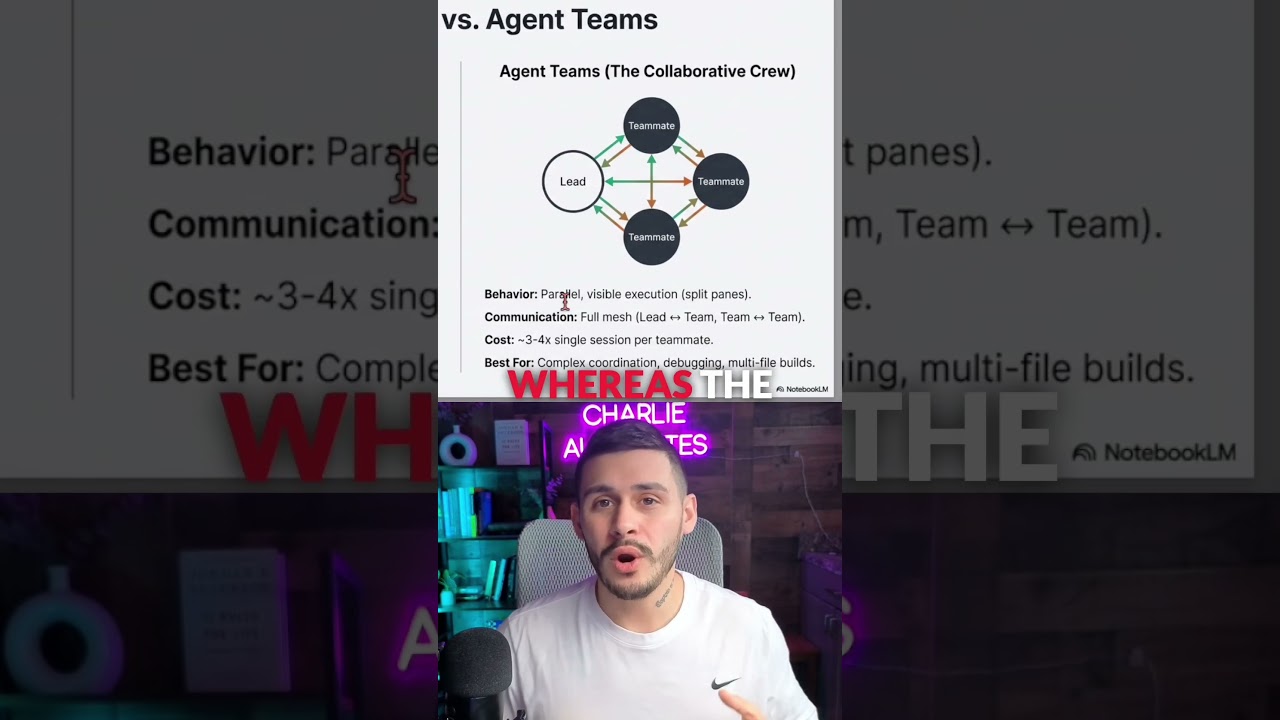
With the release of Claude Opus 4.6, agent teams revolutionize how developers interact with AI. Unlike subagents that work invisibly, agent teams open multiple terminals that communicate with each other while remaining visible to you. Each agent in the team has its own dedicated terminal where you can monitor progress and interject at any point.
The video demonstration shows this perfectly: a main terminal acts as the lead that you control, while multiple agent terminals work in parallel, all communicating with each other and the lead terminal. This architecture mirrors how human development teams actually work - with visibility, coordination, and the ability to course-correct in real-time.
Real-World Demo: Workspace Audit with 3 Agents
At the 1:15 mark in the video, you'll see a powerful example of agent teams in action. The setup uses iTerm2 with TMux to create a workspace audit with three team members working in parallel. Each agent has its own clearly visible terminal where you can watch the progress unfold and intervene if needed.
This demo highlights several key advantages over subagents: (1) real-time visibility into each agent's work, (2) the ability to manually adjust any agent's direction mid-process, and (3) natural coordination between agents as they complete interdependent tasks. The result is an audit that completes in a fraction of the time it would take with sequential subagents.
Implementation tip: For maximum visibility and control, run your agent teams in split pane mode rather than process mode. The video clearly shows why this approach delivers better results.
Process Mode vs Split Pane Mode
Agent teams offer two distinct operating modes, each with different advantages. Process mode runs everything in a single terminal where you shift up and down to navigate between teammates. This works well in VS Code but limits visibility. Split pane mode, demonstrated in the video using iTerm2, gives each agent its own visible terminal pane.
The choice between modes depends on your workflow complexity. For simple coordination, process mode may suffice. But for true parallel processing where you need to monitor multiple streams of work simultaneously, split pane mode is far superior. The video makes a compelling case that split pane should be your default approach whenever possible.
When to Use Agent Teams vs Subagents
Not every task requires the power of agent teams. The video explains that subagents remain ideal for simple, isolated tasks like file searches or single-file reading. They're lightweight and efficient for these purposes. Agent teams shine when you need complex coordination across multiple components or files.
A great example from the video: when building a project using the GST plugin, Claude can recommend whether to use subagents or agent teams based on whether the four phases are independent. If their files don't touch, parallel execution via agent teams delivers dramatically better results.
Implementation Tips for Maximum Efficiency
To get the most from agent teams, the video recommends several best practices. First, train Claude through your claw.md file to understand when to recommend parallel versus sequential execution. Second, use iTerm2 with TMux for the best split pane experience. Third, start with simpler workflows to build confidence before tackling complex coordination.
The video mentions an agent team playbook available in the creator's community that provides detailed setup instructions. This resource can help you avoid common pitfalls and implement agent teams effectively from day one. Remember that like any powerful tool, there's a learning curve - but the 90% performance gain is worth the investment.
Watch the Full Tutorial
Seeing agent teams in action makes all the difference. The video demonstration at 1:15 shows exactly how multiple terminals coordinate in real-time during a workspace audit. You'll see the clear advantages over subagents and understand why this approach can transform your development workflow.
Key Takeaways
Claude's agent teams represent a fundamental shift in how developers can leverage AI assistance. By moving from invisible, isolated subagents to visible, coordinated teams, you unlock up to 90% more of Claude's potential power. The ability to monitor and intervene in parallel processes transforms what's possible in your development workflow.
In summary: Use subagents for simple, isolated tasks but switch to agent teams for any complex coordination. Implement them in split pane mode for maximum visibility and control, and train Claude to recommend the right approach for each project phase.
Frequently Asked Questions
Common questions about this topic
Subagents work invisibly without communicating with each other, while agent teams operate in visible terminals that coordinate in real-time. Subagents are better for simple tasks like file searches, whereas agent teams excel at complex coordination tasks requiring parallel processing.
The video clearly shows how agent teams maintain visibility and allow intervention at any point, unlike subagents which operate as black boxes until they return results.
- Subagents: invisible, isolated, sequential
- Agent teams: visible, coordinated, parallel
- Choose based on task complexity
Use agent teams when working on complex projects with independent phases that don't share files. The video example shows a workspace audit with three team members working in parallel.
Agent teams are particularly valuable for development workflows requiring simultaneous execution across different codebases or components. They shine when you need visibility into multiple processes and the ability to coordinate between them.
- Complex projects with independent phases
- When visibility into parallel processes matters
- For coordination between different code components
Agent teams can run in process mode (single terminal with navigation) or split pane mode (multiple visible terminals). The video demonstrates split pane mode in iTerm2, which is recommended for better visibility and control over parallel processes.
Process mode works within VS Code by cycling through agents in one terminal. While functional, it lacks the at-a-glance visibility of split panes where you can monitor all agents simultaneously.
- Process mode: single terminal, good for VS Code
- Split pane: multiple terminals, recommended approach
- Choose based on your need for visibility
According to the video, developers using only subagents may be leaving up to 90% of Claude's potential power unused. Agent teams unlock this potential by enabling true parallel processing and inter-agent communication that subagents can't achieve.
The efficiency gains come from eliminating sequential bottlenecks. Where subagents must complete one task before starting another, agent teams can work on multiple tasks simultaneously while coordinating results.
- Up to 90% more efficient for complex tasks
- Eliminates sequential bottlenecks
- Enables true parallel processing
Yes, one of the key advantages shown in the video is the ability to interject on any agent terminal at any time. Each terminal in the team remains visible and controllable, unlike subagents which operate invisibly.
This means you can monitor progress across all agents simultaneously and step in to adjust course if any agent encounters an issue or needs redirection. The video clearly demonstrates this interactive capability at the 1:30 mark.
- Full visibility into each agent's work
- Ability to intervene at any point
- Real-time course correction
You'll need Claude Opus 4.6 or later and a terminal that supports split panes like iTerm2. The video mentions an agent team playbook that provides setup instructions and best practices for configuring your agent teams.
For the optimal setup shown in the video, you'll want to use iTerm2 with TMux to create the split pane environment. The playbook referenced in the video includes specific configuration tips to maximize your team's efficiency.
- Claude Opus 4.6+ required
- iTerm2 with TMux recommended
- Agent team playbook for best practices
The video explains that Claude can be trained to recommend the appropriate approach through prompt engineering. For independent tasks that don't share files, it will recommend parallel execution via agent teams.
By training Claude in your claw.md file (as mentioned in the video), you can teach it to analyze task requirements and suggest whether subagents or agent teams would be more effective. This helps automate the decision-making process.
- Train through prompt engineering
- Analyzes task independence
- Considers file sharing requirements
GrowwStacks helps businesses implement AI automation solutions including Claude agent team configurations. We can design custom workflows that leverage agent teams for your specific development needs, set up the optimal terminal environment, and train your team on best practices.
Our AI automation experts will ensure you're getting maximum value from Claude's capabilities. We'll analyze your workflows to identify where agent teams can provide the most benefit, implement the solution, and provide ongoing support to optimize performance.
- Custom agent team configurations
- Terminal environment setup
- Workflow analysis and optimization
Ready to Unlock Claude's Full Potential for Your Development Team?
Don't leave 90% of your AI assistant's power unused. Our automation experts will implement Claude agent teams tailored to your specific workflows, helping you achieve parallel processing and real-time coordination that subagents can't match.