Claude Code for Beginners: Your First Week Building with AI
You've heard the buzz - people with zero coding experience are building apps, automating workflows, and shipping real software using AI. Claude Code from Anthropic is revolutionizing how beginners approach development. This guide walks you through exactly what you need to know in your first week, from installation to your first real project.
What Is Claude Code?
Traditional coding assistants suggest one line at a time, leaving you to piece together the bigger picture. Claude Code represents a fundamental shift - it works like having a senior developer sitting next to you. You describe what you want in plain English, and Claude handles the implementation details while respecting your coding standards.
Since its February 2025 launch, Claude Code has seen explosive growth, reaching $1 billion in annualized revenue by November of that same year. It's available across multiple platforms including your terminal, VS Code, JetBrains IDEs, as a desktop app, and directly in your browser - making it accessible wherever you work.
Unlike traditional coding: With Claude Code, you're not writing code - you're describing outcomes. This fundamental shift makes software development accessible to non-programmers while dramatically increasing productivity for experienced developers.
Getting Started: What You Really Need
The barrier to entry for Claude Code is surprisingly low. Many beginners overestimate what they need to get started, delaying their progress unnecessarily. The reality? You likely already have everything required.
All you need is a computer (which you're using right now), a terminal (pre-installed on all operating systems), and a Claude subscription starting at just $20/month. No coding experience or computer science degree required. Installation takes about 5 minutes - you could be building your first project before your coffee gets cold.
The Key Concept: Think in Tasks, Not Code
The most important mindset shift for Claude Code beginners is moving from thinking about code implementation to describing desired outcomes. This is where many new users struggle initially, defaulting to old patterns of trying to write code themselves.
Instead of saying "write a function called getData that uses fetch," describe what you actually want: "I need to display a list of users from our API in a table." Claude handles the implementation details. You're the architect describing the blueprint; Claude is the builder who knows exactly how to construct it.
Prompting tip: The more clearly you describe the end result (including any specific requirements), the better Claude can deliver exactly what you need. Include details about data sources, user interactions, and visual preferences when relevant.
Your First Project: Building a Landing Page
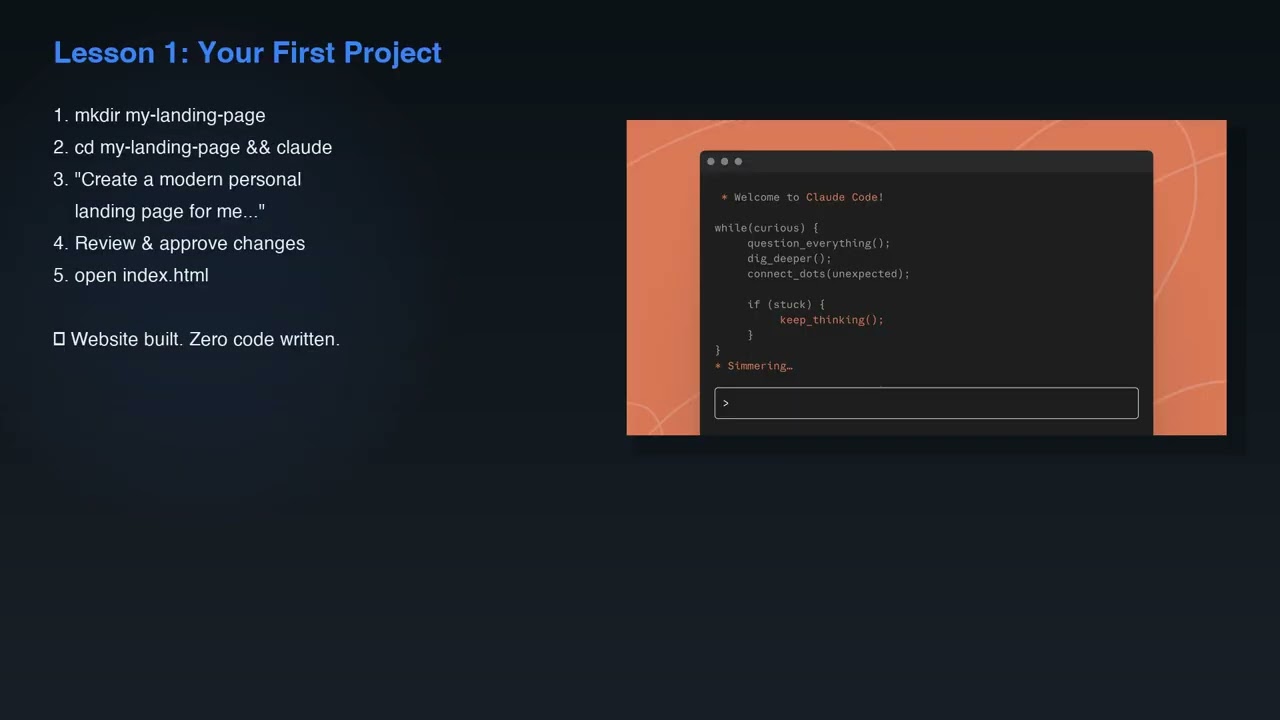
Let's walk through creating your first real project with Claude Code - a personal landing page with your name, bio, and social links. This practical example demonstrates how quickly you can go from idea to working implementation.
Open your terminal, create a new folder, navigate into it, and simply type "claude" to begin. Tell Claude you want to create a personal landing page. It will generate the necessary files (HTML, CSS, possibly JavaScript), show you the proposed changes, and ask for approval before implementing them. Open the result in your browser - you've just built a website without writing a single line of code.
Working With Existing Codebases
One of Claude Code's most powerful features is its ability to understand and modify existing projects. Beginners often feel intimidated by code they didn't write themselves, but Claude eliminates this barrier.
Navigate into any project directory and ask Claude, "What does this project do?" It will analyze the files and give you a clear, plain-English summary. From there, you can make changes that fit the existing style - like adding a dark mode toggle or new feature. Claude ensures your additions match the project's conventions and architecture.
Debugging with Claude Code
Debugging is where many beginners hit walls, spending hours trying to decipher error messages. Claude Code transforms this frustrating experience into a learning opportunity.
When you encounter an error, simply paste the message into Claude with a prompt like "Fix this error." Claude reads the stack trace, identifies the root cause, and proposes a solution. It can even write tests, run them, and fix any failures - all within a single prompt. This end-to-end debugging capability is revolutionary for beginners who would otherwise struggle to diagnose issues.
Memory and Multifile Projects
As your projects grow in complexity, maintaining consistency across files becomes crucial. Claude Code's memory system helps manage this complexity effortlessly.
The claude.md file in your project root contains your coding standards, architecture decisions, and common commands - Claude references this automatically. Claude also has automatic memory that saves useful patterns across sessions, learning your preferences over time. This creates a personalized development environment that improves with each project.
Common Beginner Mistakes to Avoid
While Claude Code dramatically lowers the barrier to development, beginners still make predictable mistakes that slow their progress. Being aware of these pitfalls helps you avoid them.
Don't ask for too much at once - break projects into discrete features. Use the /clear command between tasks to reset context. Avoid being overly specific about implementation details - describe outcomes instead. Always create a claude.md file and never blindly accept changes, especially when learning. For safety, carefully review commands involving deletions, database changes, or force pushes. When in doubt, ask Claude to explain what a command does before running it.
Safety first: Claude Code is powerful, but with great power comes great responsibility. Always review changes before accepting them, especially those affecting data or system configuration. There's never a reason to rush - take the time to understand what Claude is proposing.
Watch the Full Tutorial
For a complete walkthrough of Claude Code in action, including real-time examples of building a landing page (starting at 2:15 in the video) and debugging an error (4:30), watch the full tutorial below.
Key Takeaways
Claude Code represents a fundamental shift in how both beginners and experienced developers approach software creation. By focusing on outcomes rather than implementation details, you can build real, functional projects faster than ever before.
In summary: Claude Code makes software development accessible to anyone willing to learn its task-based approach. Start with simple personal projects, gradually tackle more complex applications, and always review changes carefully. With these fundamentals, you're ready to begin your coding journey with the most powerful AI assistant ever created.
Frequently Asked Questions
Common questions about Claude Code
Claude Code is Anthropic's agentic coding tool that works more like a senior developer than a traditional code assistant. Unlike tools that suggest one line at a time, Claude Code reads your entire project, plans the approach, edits multiple files, and runs commands while respecting your coding standards.
It launched in February 2025 and reached $1 billion in annualized revenue by November that same year, demonstrating its rapid adoption and effectiveness across industries.
- Understands entire projects, not just single files
- Respects your coding standards and preferences
- Available across multiple development environments
The requirements are surprisingly minimal, making Claude Code accessible to nearly everyone. You need just three things: a computer, a terminal (which comes pre-installed on all operating systems), and a Claude subscription starting at $20/month.
No prior coding experience or computer science degree is required. Installation takes about 5 minutes, meaning you could go from complete beginner to building your first project in less time than it takes to watch a tutorial video.
- Works on Mac, Windows, and Linux
- No specialized hardware required
- Available in browser for quick experimentation
The fundamental mindset shift is thinking in terms of tasks rather than code implementation. Instead of trying to write code and asking Claude to fix it, describe what you want to accomplish in plain English.
For example, say "I need to display a list of users from our API in a table" rather than trying to write the function yourself. You act as the architect describing the outcome, while Claude handles the implementation details. This approach leverages Claude's full capabilities while minimizing frustration.
- Focus on describing outcomes, not implementation
- Include relevant details about data sources and requirements
- Let Claude handle the coding patterns and best practices
Beginners should start with personal tools that solve immediate needs while building confidence with Claude Code. Simple projects like personal landing pages, expense trackers, or bookmark managers make excellent starting points.
After mastering these fundamentals, you can progress to automation scripts that handle repetitive tasks, then eventually tackle full-stack applications. The video demonstrates creating a complete personal landing page with name, bio, and social links in minutes - a perfect first project that delivers immediate results.
- Start with personal tools solving your own needs
- Progress to automation scripts as you gain confidence
- Eventually build full applications with database backends
Claude Code excels at analyzing and modifying existing projects, a task that typically intimidates beginners. Simply navigate to any project directory and ask "What does this project do?" - Claude will examine the files and provide a clear, plain-English summary.
This capability is particularly valuable for understanding legacy code or projects you didn't write yourself. You can then make style-appropriate modifications like adding features or fixing bugs, with Claude ensuring your changes match the project's existing conventions. It's like having the original developer available to explain their work.
- Provides clear explanations of unfamiliar code
- Ensures modifications match existing style
- Helps navigate complex project structures
Beginners often ask for too much at once, overwhelming both themselves and Claude. Breaking projects into smaller, discrete features yields better results. Another common mistake is being too specific about implementation details rather than focusing on outcomes.
Technical mistakes include forgetting to use the /clear command between tasks (which can confuse Claude's context) and not creating a claude.md file to establish coding standards. Most seriously, some beginners blindly accept changes without reviewing them, particularly dangerous when dealing with deletions, database modifications, or force pushes. Always review changes carefully, especially when learning.
- Break projects into smaller, manageable features
- Use /clear between unrelated tasks
- Always review proposed changes before accepting
Debugging with Claude Code transforms a traditionally frustrating process into a learning opportunity. When you encounter an error, simply paste the message into Claude with a prompt like "Fix this error." Claude reads the stack trace, identifies the root cause, and proposes a solution.
This capability extends beyond simple fixes - Claude can write tests to verify the solution, run those tests, and fix any failures, all within a single prompt. For beginners who would otherwise struggle to interpret error messages, this end-to-end debugging capability is revolutionary. You learn why errors occur while getting immediate solutions.
- Analyzes error messages and stack traces
- Proposes solutions with explanations
- Can write and run tests to verify fixes
GrowwStacks specializes in implementing Claude Code workflows and AI automation solutions tailored to your specific business needs. We help companies of all sizes leverage Claude Code to automate repetitive coding tasks, build custom tools, and accelerate development cycles.
Our team can design and deploy Claude Code integrations that work seamlessly with your existing systems and processes. Whether you need to automate documentation, streamline API development, or build internal tools, we create solutions that deliver measurable productivity gains from day one.
- Custom Claude Code workflows for your business
- Integration with existing systems and processes
- Free consultation to identify high-impact opportunities
Ready to Transform Your Development Process with Claude Code?
Every day without AI-powered development tools puts you at a competitive disadvantage. GrowwStacks can help you implement Claude Code solutions that deliver measurable results in weeks, not months.