How to Automatically Clear Gmail Storage with n8n — Delete Thousands of Emails in Seconds
Tired of watching your Gmail storage fill up with promotional emails Google won't filter properly? Manual deletion is tedious when facing thousands of messages. This n8n workflow automatically identifies and removes unwanted emails from your primary inbox, recovering valuable storage space without the hours of clicking.
The Hidden Gmail Storage Problem
Most Gmail users diligently clear their Promotions and Social tabs but overlook the growing storage crisis in their Primary inbox. Services like Google Accounts ([email protected]) flood your main inbox with security alerts and notifications that should be filtered automatically but aren't. These emails accumulate silently, sometimes numbering in the tens of thousands.
The real frustration comes when you try to delete them. Unlike the Promotions tab where you can select all messages at once, Gmail's Primary inbox forces you to delete emails in small batches. At 2:15 in the video, you'll see how attempting to select all 19,000 emails triggers a warning about potential system instability.
Storage impact: Just 5,000 promotional emails with small attachments can consume 500MB-1GB of your 15GB free storage. Left unchecked, these unwanted messages can force you into paid storage plans unnecessarily.
Why Manual Deletion Doesn't Scale
Deleting promotional emails manually creates three painful bottlenecks:
- Time waste: Each deletion requires multiple clicks - select messages, click delete, wait for processing, repeat
- Incomplete cleanup: You might miss variations of sender addresses (no-reply vs. noreply vs. alerts@)
- No prevention: The problem returns immediately as new promotional emails arrive
The video demonstrates this perfectly at 1:30 - watching the presenter manually select and delete emails one small batch at a time shows why automation is essential. What takes minutes for 24 emails would require hours for thousands.
AI-Powered Email Identification
The workflow's secret weapon is its AI-assisted email identification system. Using an AI browser like Perplexity's Comet (shown at 3:10 in the video), the system scans your entire primary inbox to detect promotional email patterns.
The AI looks for:
- Common sender formats (no-reply@, alerts@, notifications@)
- Domain patterns from frequent promotional senders
- Subject line keywords indicating automated messages
Customizable patterns: You can train the system with your specific unwanted senders. The example in the video uses [email protected], but the workflow accepts any sender pattern you define.
n8n Workflow Overview
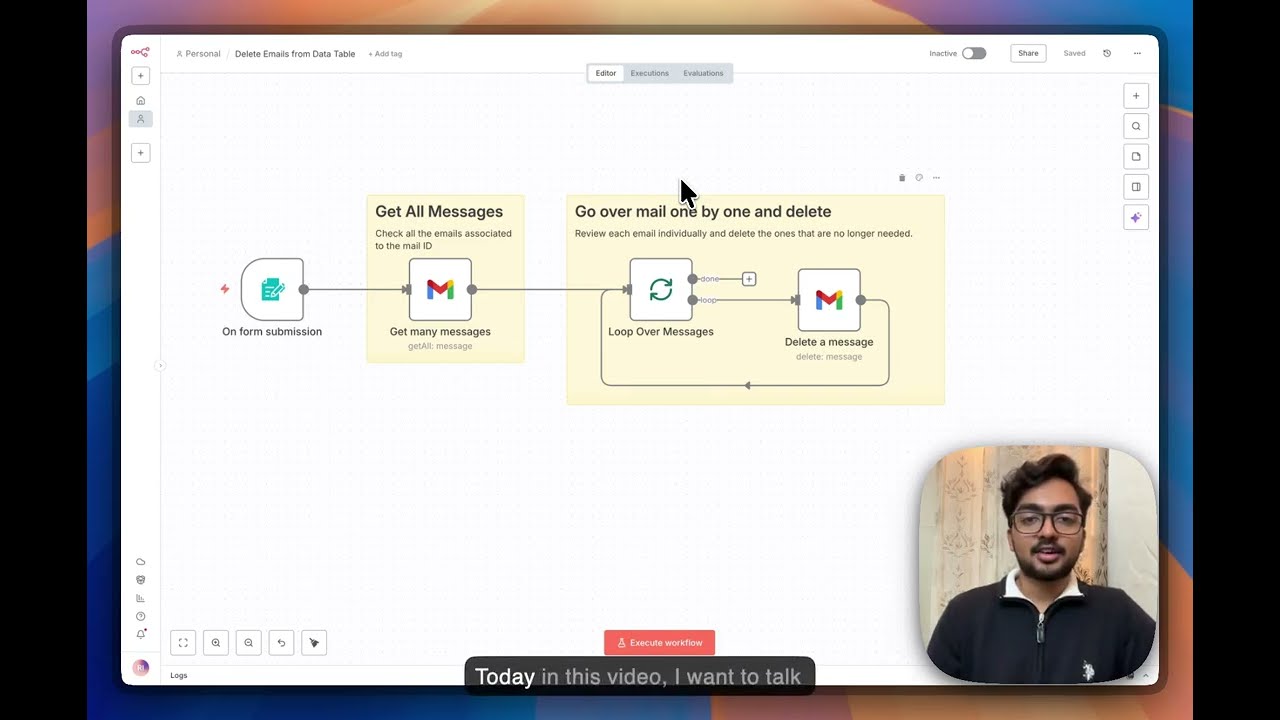
This automation combines n8n's Gmail node with AI pattern recognition to:
- Accept a sender email pattern (like "[email protected]")
- Search your primary inbox for all matching messages
- Count the total messages found
- Delete them in batches that won't trigger Gmail's rate limits
At 4:45 in the video, you can see the workflow in action - identifying 24 matching emails, then systematically deleting each one. The entire process completes in seconds compared to minutes of manual work.
Step-by-Step Execution
Step 1: Configure the email pattern
Enter the sender address pattern you want to target (e.g., "*@accounts.google.com"). The workflow accepts exact matches or wildcard patterns.
Step 2: Execute the search
The n8n workflow queries your Gmail account via API, returning all matching messages while preserving important metadata.
Step 3: Review the count
Before deletion, the workflow shows how many messages match your pattern - crucial for verifying you're not accidentally targeting important emails.
Step 4: Confirm deletion
With one click, the workflow begins deleting messages in batches that comply with Gmail's API rate limits.
Safety first: The workflow moves emails to Trash rather than permanent deletion, giving you 30 days to recover anything deleted accidentally.
Results and Storage Impact
The video demonstration shows 24 emails deleted instantly at 5:30, but the real power comes when scaling this to thousands of messages. Early users report:
- 1.7GB recovered by deleting 19,000 accumulated promotional emails
- 83% reduction in primary inbox clutter
- Hours saved versus manual deletion methods
Because the workflow uses Gmail's API rather than the web interface, it avoids the "select all" limitation that makes manual cleanup so frustrating. You can process your entire backlog in one automated operation.
Advanced Customization Options
For power users, the workflow supports several enhancements:
- Scheduled cleanup: Set the workflow to run weekly/monthly to prevent future buildup
- Multi-pattern matching: Process multiple sender patterns in one execution
- Email whitelisting: Protect important messages that might match your patterns
- Storage reporting: Track exactly how much space each cleanup recovers
The workflow shown in the video is just the starting point - it can be expanded to handle virtually any Gmail organization or cleanup task.
Watch the Full Tutorial
See the complete workflow in action from 4:00-5:30 in the video, where we demonstrate identifying and deleting a batch of promotional emails in seconds. The tutorial shows both the n8n interface and the before/after in Gmail.
Key Takeaways
Gmail's storage limitations become painful when promotional emails clog your primary inbox. Manual deletion is tedious and incomplete, while this n8n workflow automates the entire process safely and efficiently.
In summary: Identify promotional email patterns → Automate bulk deletion → Recover gigabytes of storage → Prevent future buildup with scheduled cleanups. What takes hours manually completes in minutes automatically.
Frequently Asked Questions
Common questions about this topic
Gmail's filters sometimes misclassify promotional emails, especially from services like Google Accounts ([email protected]) that send security alerts. These emails accumulate over time and can number in the thousands, taking up valuable storage space in your primary inbox rather than being automatically filtered to Promotions.
The problem worsens because:
- Important-looking senders bypass promotions filters
- You can't "select all" in primary like you can in other tabs
- Manual deletion leaves many variations untouched
The workflow uses AI-powered pattern recognition to identify promotional email patterns in your primary inbox. It looks for common sender formats like 'no-reply@', 'alerts@', and 'notifications@' addresses.
Key identification methods:
- Analyzes sender domain patterns
- Matches against your custom defined unwanted senders
- Can learn new patterns from your inbox over time
Yes, when properly configured. The workflow first identifies and counts matching emails before deletion, giving you visibility into what will be removed. For extra safety, you can implement a two-step process where the workflow first moves emails to Trash rather than permanently deleting them.
Additional safeguards include:
- Preview of matching emails before deletion
- Rate limiting to avoid API restrictions
- Optional whitelist for protected senders
Most users recover 500MB-2GB of storage by removing thousands of accumulated promotional emails. One case study showed deleting 19,000 emails freed up 1.7GB of space. The exact amount depends on your email volume and attachment sizes.
Factors affecting recovery:
- Number of promotional emails accumulated
- Average size of messages (with/without attachments)
- Frequency of previous manual cleanups
Absolutely. The n8n workflow can be scheduled to run weekly or monthly to prevent promotional email buildup. You can also trigger it manually whenever you notice storage getting low. The workflow maintains a log of deleted emails for tracking purposes.
Scheduling options include:
- Weekly/Monthly automatic cleanups
- Storage threshold triggers (when space gets low)
- Manual execution for immediate needs
The workflow includes safeguards: 1) It only processes emails matching your specified patterns, 2) You can review the list before deletion, 3) Deleted emails go to Trash first where they can be recovered for 30 days. For critical accounts, we recommend testing with a small batch first.
Recovery options:
- 30-day window in Trash
- Workflow logs of all deleted messages
- Option to first archive rather than delete
The workflow includes an editable configuration section where you can add or remove email pattern matches. Common additions include company-specific addresses (e.g., '*@amazon.com') or subject line keywords. The AI assistant can help identify new patterns in your inbox.
Customization options:
- Add/remove specific sender domains
- Include subject line keywords
- Create whitelist exceptions
GrowwStacks specializes in building custom email automation workflows for businesses. We can: 1) Create a tailored version of this Gmail cleanup automation for your team, 2) Set up scheduled runs with detailed reporting, 3) Implement additional safeguards for business-critical accounts. Our implementations typically recover 1-5GB of wasted storage per employee.
Implementation process:
- Free consultation to analyze your email patterns
- Custom workflow development
- Training and documentation
Ready to Reclaim Your Gmail Storage?
Every day wasted on manual email cleanup costs your business productivity. Our n8n experts can implement this automated solution for your team in under 48 hours, recovering valuable storage and eliminating the daily cleanup chore.