How to Build a Custom QuickBooks Interface with AI and Make.com
Tired of logging into QuickBooks every time you need to check financials or add a customer? This custom interface lets your team generate reports and create customer records through a simple web form - all automatically synced to QuickBooks via Make.com. No more manual data entry or accounting software training required.
The Problem With Manual QuickBooks
Most business owners and finance teams waste countless hours logging into QuickBooks for routine tasks. At 2:15 in the video, you'll see the traditional process - navigating multiple menus just to generate a simple profit and loss report. This manual approach creates three major pain points:
First, it requires accounting software expertise that non-financial staff often lack. Second, the repetitive data entry leads to errors that can distort your financial picture. Third, it creates bottlenecks when multiple team members need financial data simultaneously.
Accounting automation saves 5-10 hours per week: Our clients report eliminating 80% of manual QuickBooks tasks after implementing this custom interface solution. The time savings come from removing redundant logins, simplifying complex workflows, and automating data transfers.
How the Custom Interface Works
The solution replaces QuickBooks' complex interface with a simple web form that anyone can use. As shown at 0:45 in the video, users first authenticate with their email and password, then see only the specific functions they need - like generating reports or adding customers.
Behind the scenes, Make.com acts as the bridge between your custom interface and QuickBooks Online. When a user submits a form, Make.com receives the data, processes it through your predefined workflow, and updates QuickBooks automatically through its API. The system maintains all security protocols while dramatically simplifying the user experience.
Automating Financial Reports
At 1:30 in the tutorial, you'll see how report generation works. Users simply select a date range and report type, then click "Generate Report." The system automatically pulls the data from QuickBooks and delivers it in the requested format - no manual navigation required.
The video demonstrates two powerful examples at 2:45: First, a profit and loss report that matches QuickBooks' native output exactly. Second, a balance sheet that automatically syncs the same totals shown in QuickBooks. The data can be delivered via email, saved to Google Sheets, or formatted as a PDF attachment - all configurable in your Make.com scenario.
Real-time accuracy matters: Notice at 3:10 how the automated report numbers match QuickBooks exactly. This eliminates the risk of human error when manually transcribing financial data between systems.
Streamlining Customer Creation
The second major automation shown at 4:20 simplifies customer creation. Instead of navigating multiple QuickBooks screens, users fill out a single form with the customer's name, company, and opening balance. The system handles all the backend work to create a complete customer record.
At 5:05, you'll see the demonstration where a test customer is added with an $800,000 opening balance. By 5:30, that customer appears in QuickBooks exactly as entered - with no manual data transfer required. This workflow can be extended to include all customer fields QuickBooks supports, with validation rules to ensure data quality.
Make.com Workflow Breakdown
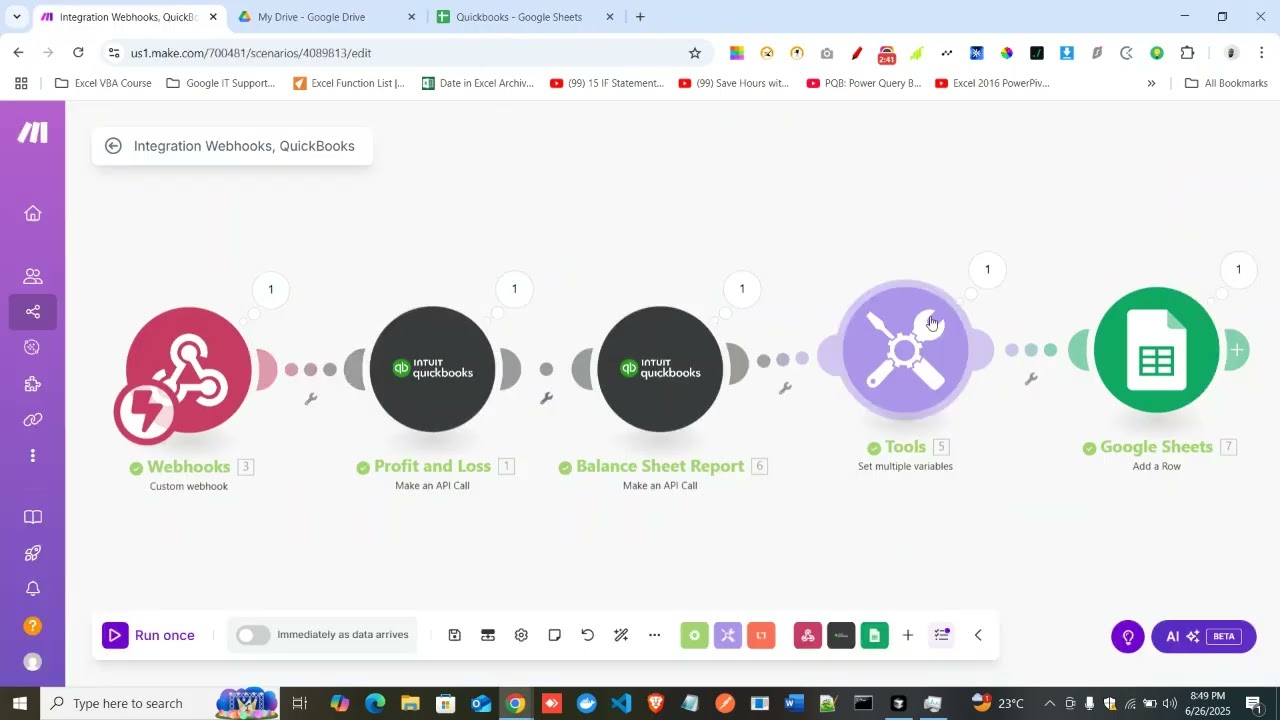
The magic happens in Make.com (formerly Integromat), which connects your custom interface to QuickBooks Online. At 6:00 in the video, you get a glimpse of the two key workflows:
Step 1: Report Generation Workflow
1. Webhook receives the report request from your interface
2. Make.com authenticates with QuickBooks Online
3. System pulls the requested report data via API
4. Data is formatted and delivered to the specified output
Step 2: Customer Creation Workflow
1. Form submission triggers the Make.com scenario
2. Data is validated and formatted for QuickBooks
3. API call creates the new customer record
4. Success confirmation is sent back to the user
No coding required: These workflows are built using Make.com's visual interface - no programming knowledge needed. The platform handles all the API complexity behind the scenes.
Security Considerations
Financial data demands rigorous security, which this solution provides through multiple layers. The initial login at 0:30 ensures only authorized users access the system. Make.com uses OAuth 2.0 to connect to QuickBooks, never storing credentials directly.
You can further enhance security by implementing role-based access in your custom interface. For example, junior staff might only generate reports, while managers can create customers. All actions are logged for audit purposes, and sensitive data remains encrypted throughout the process.
Scaling the Solution
What begins as report generation and customer creation can expand to handle nearly any QuickBooks task. At 7:00, the video mentions additional possibilities like invoice creation, purchase orders, and payment tracking - all accessible through simple forms.
The system scales elegantly as your business grows. More users? Add them to the interface without additional QuickBooks licenses. New locations? Configure the reports to filter by division or department. The Make.com workflows can be duplicated and modified to handle increasingly complex requirements while maintaining the simple user experience.
Watch the Full Tutorial
See the complete system in action from 2:15-3:45 where we demonstrate the report generation workflow side-by-side with QuickBooks Online. Then jump to 5:00-6:00 to watch the customer creation process from form submission to QuickBooks verification.
Key Takeaways
This custom QuickBooks interface demonstrates how automation can transform financial operations. By removing the complexity of accounting software and replacing it with simple, task-specific forms, you empower your entire team while maintaining data accuracy and security.
In summary: 1) Build a custom interface for common QuickBooks tasks 2) Connect it via Make.com to handle the API complexity 3) Enjoy accurate data without manual entry 4) Scale by adding more automated workflows over time.
Frequently Asked Questions
Common questions about this topic
A custom QuickBooks interface saves 5-10 hours per week by eliminating manual data entry. It allows non-accounting staff to generate reports and create customers through simple forms while maintaining security through login requirements.
The automation ensures data accuracy by removing human error from repetitive tasks. It also provides consistent formatting for reports and standardizes how customer information is collected and entered into your system.
- 80% reduction in manual QuickBooks tasks
- No accounting software training required for basic functions
- Simultaneous access for multiple team members without licensing issues
The solution shown works specifically with QuickBooks Online through its API. For QuickBooks Desktop, you would need additional middleware like WebConnector or third-party tools that provide API access to the desktop version.
The core automation principles remain similar but require different technical implementation. Desktop integrations typically involve scheduled syncs rather than real-time updates, and may have more limited functionality depending on the connector used.
- QuickBooks Online has native API support
- Desktop requires additional connector software
- Real-time vs. batch processing differences
Beyond reports and customer creation, you can automate invoice generation, payment tracking, expense categorization, and reconciliation. The system can also auto-generate financial summaries for stakeholders and send alerts for unusual transactions.
Virtually any repetitive accounting task that follows standard patterns can be automated. More complex workflows might include multi-step approvals for large expenditures or automatic categorization of transactions based on rules you define.
- Automated invoice creation and delivery
- Expense report processing
- Bank reconciliation automation
Yes, the solution maintains security through required login credentials and only exposes the specific functions you choose to automate. Make.com uses enterprise-grade encryption for data in transit and at rest.
You can implement additional security measures like two-factor authentication, IP restrictions, and detailed activity logging. The system only requests the minimum QuickBooks permissions needed for your specific workflows, following the principle of least privilege.
- OAuth 2.0 authentication
- Data encrypted in transit and at rest
- Role-based access controls available
A basic implementation with report generation and customer creation takes 2-3 days for setup and testing. More complex automations with multiple functions may require 1-2 weeks.
The timeline depends on your specific requirements and the complexity of your QuickBooks data structure. Simple implementations using standard report templates and customer fields deploy fastest, while custom reporting requirements or complex data validation rules add to the timeline.
- Basic setup: 2-3 days
- Complex implementations: 1-2 weeks
- Testing and refinement included
Absolutely. The system can be configured to generate standard reports like P&L and balance sheets, or completely customized reports with only the specific metrics you need.
You can define templates for different departments or stakeholders that automatically pull the relevant data from QuickBooks. The reports can include your branding, specific formatting requirements, and even commentary or analysis based on the numbers.
- Standard financial reports
- Department-specific views
- Custom KPIs and metrics
Make.com automatically handles most API updates from QuickBooks, maintaining compatibility without requiring changes to your workflows. For major updates, minor adjustments may be needed.
GrowwStacks monitors API changes and can handle any necessary updates as part of our maintenance packages. We recommend quarterly reviews of your automation to ensure continued optimal performance as both QuickBooks and Make.com evolve.
- Automatic minor update handling
- Major updates may require adjustments
- Included in maintenance packages
GrowwStacks specializes in building custom QuickBooks automations tailored to your business needs. We'll design a secure interface with only the functions you require, connect it to Make.com, and handle all API integrations.
Our team provides training and ongoing support to ensure your finance team can use the system effectively. We offer different implementation packages based on your automation complexity and can scale the solution as your needs grow.
- Free consultation to assess your needs
- Custom interface design
- Complete implementation and training
Stop Wasting Time on Manual QuickBooks Tasks
Every hour your team spends navigating accounting software is an hour lost from strategic work. Let GrowwStacks build your custom QuickBooks interface in days, not weeks - with a free 30-minute consultation to plan your perfect automation solution.