How I Built a Free SEO Dashboard That Replaces $300/Month Rank Trackers
Most SEO professionals waste hours manually checking rankings and hundreds on tools that only provide partial data. This n8n workflow pulls Google Search Console data directly into a custom dashboard with automated keyword tracking, traffic analysis, and client reporting - completely eliminating expensive tools.
The $300/Month SEO Tracking Problem
SEO professionals face a frustrating dilemma: either spend hours manually checking rankings in Google Search Console, or pay $300+/month for tools that often provide incomplete or delayed data. At 3:15 in the video, we see how most commercial tools limit keyword tracking to 100-200 terms, forcing painful prioritization decisions.
The bigger issue? These tools only show partial data from their own APIs, not the complete picture available in Google Search Console. You're paying premium prices for filtered information while the most accurate data remains freely accessible - if only you could visualize it effectively.
Key insight: Google Search Console provides all the data you need - the challenge is automating its collection, analysis, and presentation in a usable format without expensive middlemen.
Dashboard Features That Replace Paid Tools
This n8n workflow creates a comprehensive dashboard that outperforms commercial SEO tools in three critical areas:
- Real Google Search Console data: Pulls directly from BigQuery tables for 100% accuracy
- Unlimited keyword tracking: Configure as many keywords as needed in a simple spreadsheet
- Automated period comparison: Always shows current vs. previous period trends without manual work
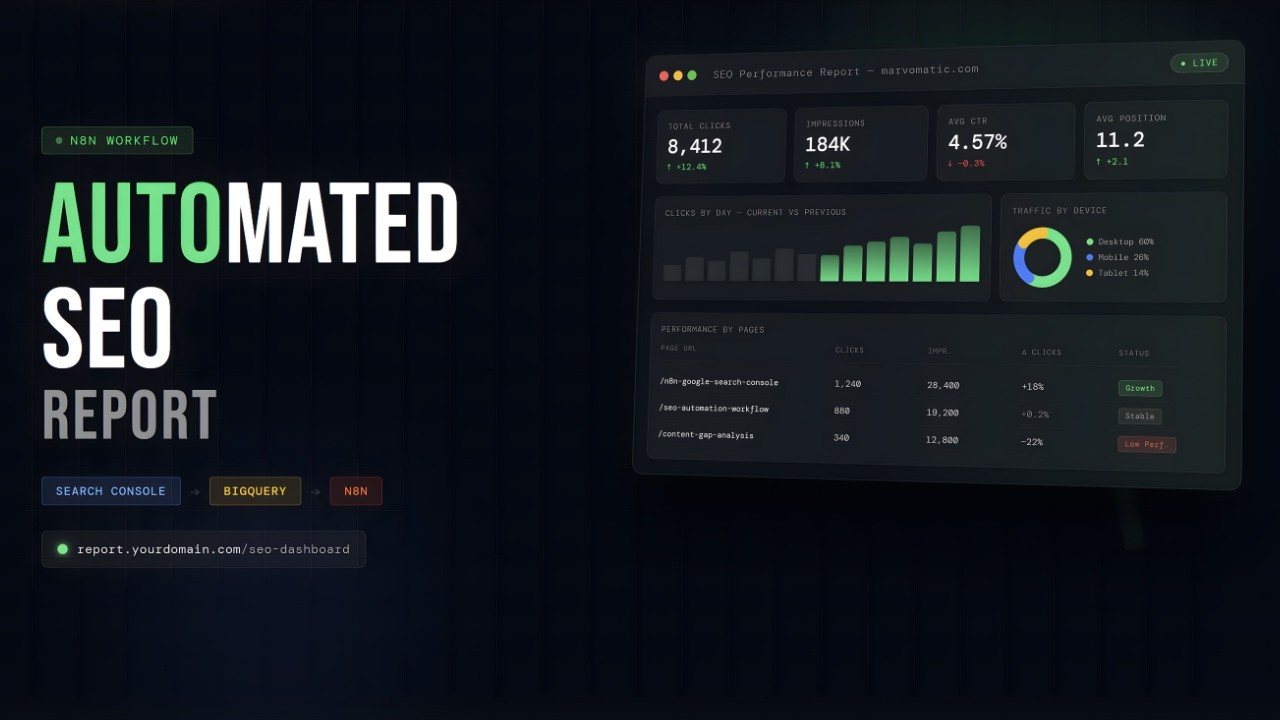
At 1:45 in the video, we see the dashboard's four main sections: overall traffic KPIs, device/country breakdowns, keyword position distribution, and most importantly - the "Performance by Pages" section that automatically identifies content losing traffic.
How the n8n Workflow Works
The workflow follows a clean architecture that makes it both powerful and maintainable:
- Webhook trigger: The dashboard URL activates the workflow
- Client configuration: Pulls settings from a spreadsheet (visible at 4:20)
- Data fetching: Runs BigQuery SQL to get Search Console metrics
- HTML generation: Code nodes transform data into visual elements
- Secure delivery: Cloudflare authentication protects access
Unlike commercial tools with rigid structures, this solution lets you customize every aspect - from which metrics to track to how they're displayed. At 6:30, we see how simple spreadsheet changes update the entire dashboard's branding and layout.
Unlimited Keyword Tracking Setup
The most powerful feature? Tracking unlimited keywords without paying per term. At 2:50 in the video, we see how to:
- Add keywords to the configuration spreadsheet
- Specify target countries and devices
- Let the workflow automatically track daily positions
The system uses BigQuery's Search Console data to monitor exact keyword positions, not estimates. At 3:45, we watch as adding "Google Search Console" to the spreadsheet immediately includes it in the next report - no API limits or additional costs.
Implementation tip: Create separate sheets for each client website to keep keyword tracking organized while using the same workflow for all.
Automated Traffic Analysis
The dashboard automatically answers critical SEO questions that normally require manual work:
- Which pages are losing traffic? (Automatically flagged as "Low Performers")
- How does mobile vs. desktop performance compare?
- Which countries drive the most valuable traffic?
- Is our keyword portfolio moving up or down overall?
At 5:10, we see how changing the "Category" filter to "Low Performer" instantly surfaces pages needing attention - complete with traffic change percentages and suggested actions.
Secure Client Access Implementation
Commercial tools charge per user seat. This solution uses Cloudflare's free tier to:
- Restrict dashboard access to approved emails
- Support Google authentication
- Protect against unauthorized usage
At 7:50 in the video, we see the authentication flow where clients sign in with Google, and only approved addresses gain access. This eliminates seat licensing costs while providing better security than most paid tools.
Cost Savings Breakdown
Let's compare this solution to commercial alternatives:
| Feature | Commercial Tool | n8n Solution |
|---|---|---|
| Keyword tracking limit | 100-200 keywords | Unlimited |
| Data freshness | 24-72 hour delay | Real-time |
| Client seats | $50+/user/month | Free |
| Annual cost | $3,600+ | $0 (after setup) |
The workflow pays for itself in 2 months compared to commercial alternatives while providing more accurate data and flexible reporting.
Watch the Full Tutorial
See the complete workflow in action, including how to configure keyword tracking (2:50 mark), set up client access (7:50), and customize the dashboard's appearance (6:30).
Key Takeaways
This workflow proves you don't need expensive tools for professional-grade SEO tracking. By connecting n8n directly to Google's data via BigQuery, you get:
- More accurate data than commercial tools
- Complete control over what's tracked
- Automated reporting that saves hours weekly
- Thousands in annual savings
In summary: Stop paying for SEO tools that limit your access to data you already own. This n8n workflow delivers better insights at zero ongoing cost.
Frequently Asked Questions
Common questions about this topic
The dashboard pulls data directly from Google Search Console via BigQuery, providing the most accurate search performance data available.
Unlike commercial tools that rely on their own APIs with limited sampling, this solution accesses the complete dataset Google provides about your website's search performance.
- Tracks impressions, clicks, and CTR with 100% accuracy
- Includes all countries and devices without sampling
- Updates in real-time when the dashboard is accessed
You configure keywords in a simple spreadsheet, and the workflow automatically tracks their positions daily across specified countries and devices.
The system queries Google Search Console data directly through BigQuery, giving you exact position tracking without the limitations of commercial tools.
- No artificial limits on keyword numbers
- Tracks positions historically for trend analysis
- Configurable by country/device combinations
Yes, the workflow includes Cloudflare authentication with Google sign-in, allowing you to restrict access to specific email addresses.
Each client receives a unique URL that generates their customized report when visited, with no manual intervention required on your part.
- Free user management via Cloudflare
- Google authentication for easy client access
- Email whitelisting for security
The dashboard updates in real-time whenever accessed, comparing the current period with the previous period automatically.
Unlike tools that only refresh daily or weekly, this solution always shows the latest available data from Google Search Console.
- No scheduled refreshes needed
- Always shows current vs. previous period
- Uses Google's most recent data
The dashboard provides traffic trends by device and country, keyword position distribution, and most importantly - identifies pages losing traffic.
The 'Low Performers' section automatically surfaces pages with declining performance, complete with metrics showing exactly how much traffic was lost.
- Device/country traffic breakdowns
- Keyword position trends over time
- Automated low performer detection
While powerful, the workflow requires configuring BigQuery tables and n8n nodes with specific SQL queries and HTML templates.
The complete setup includes data fetching, merging, HTML generation, and security layers - making it complex to implement from scratch without automation expertise.
- Requires BigQuery and n8n knowledge
- Needs proper security configuration
- Involves multiple integrated components
Yes, the workflow includes template configurations for colors, branding, and layout in an easy-to-edit spreadsheet.
You can modify company names, logos, color schemes, and even section ordering that automatically reflect in the generated reports.
- Brand colors configurable via spreadsheet
- Company logos and contact info editable
- Section ordering customizable
GrowwStacks specializes in building custom automation solutions like this SEO dashboard for agencies and marketing teams.
We'll handle the complete implementation including BigQuery setup, n8n workflow configuration, security implementation, and training - typically delivering a turnkey solution in 2-3 weeks.
- End-to-end implementation service
- Customized to your specific needs
- Includes training and documentation
Ready to Ditch Expensive SEO Tools?
Stop overpaying for limited data access. Let GrowwStacks build your custom SEO dashboard that pulls directly from Google Search Console - with unlimited keyword tracking and automated reporting.