How to Add an AI Chatbot to Bitrix24 in 3 Simple Steps
Most businesses struggle with missed leads after hours and repetitive customer service questions. An AI chatbot in Bitrix24 solves both problems - automatically qualifying leads while answering common inquiries 24/7. Here's how to implement one without any coding in less than 30 minutes.
Why Bitrix24 Needs AI Chatbots
Businesses using Bitrix24 often face two critical challenges: missed opportunities after hours when staff aren't available, and repetitive questions that consume valuable agent time. A recent study showed that 47% of website visitors will abandon a site if they can't immediately find answers to simple questions - representing lost leads and frustrated customers.
AI chatbots solve both problems simultaneously. They provide instant responses 24/7 while automatically qualifying leads and collecting contact information. When integrated with Bitrix24's CRM, every chatbot conversation becomes a tracked interaction that feeds directly into your sales pipeline.
Key benefit: Companies using AI chatbots in Bitrix24 report a 32% increase in lead capture and 40% reduction in repetitive customer service inquiries, allowing staff to focus on high-value interactions.
Step 1: Train Your Chatbot Knowledge Base
The foundation of an effective Bitrix24 chatbot is its training data. Unlike basic rule-based bots, AI chatbots learn from your specific business content to provide accurate, contextual responses.
You can train your chatbot using three types of sources:
1. Website URLs
Point the chatbot to your website or specific knowledge base pages. The AI will crawl and learn from this content, enabling it to answer questions about your services, pricing, or policies.
2. Document Uploads
Upload PDFs, Word documents, or other files containing product specifications, FAQs, or training materials. This is particularly useful for complex products or regulated industries where precise wording matters.
3. Sample Questions
Add common customer inquiries along with ideal responses. This direct training helps the chatbot handle specific scenarios exactly how your team would.
Pro tip: At 2:15 in the video tutorial, you'll see how to add multiple training sources simultaneously for comprehensive coverage.
Step 2: Configure Chatbot Personality
Your chatbot's tone should match your brand voice and customer expectations. The configuration panel offers multiple personality options:
- Professional: Formal business language for B2B or corporate environments
- Friendly: Warm and approachable for consumer-facing brands
- Casual: Relaxed tone for younger demographics or informal industries
- Polite: Respectful and considerate for sensitive topics or services
You can also customize the chatbot's name, avatar, and opening message to create a cohesive experience. At 3:40 in the video, notice how changing these elements immediately transforms the user experience.
Step 3: Integrate with Bitrix24 Live Chat
Connecting your trained chatbot to Bitrix24 takes just a few clicks:
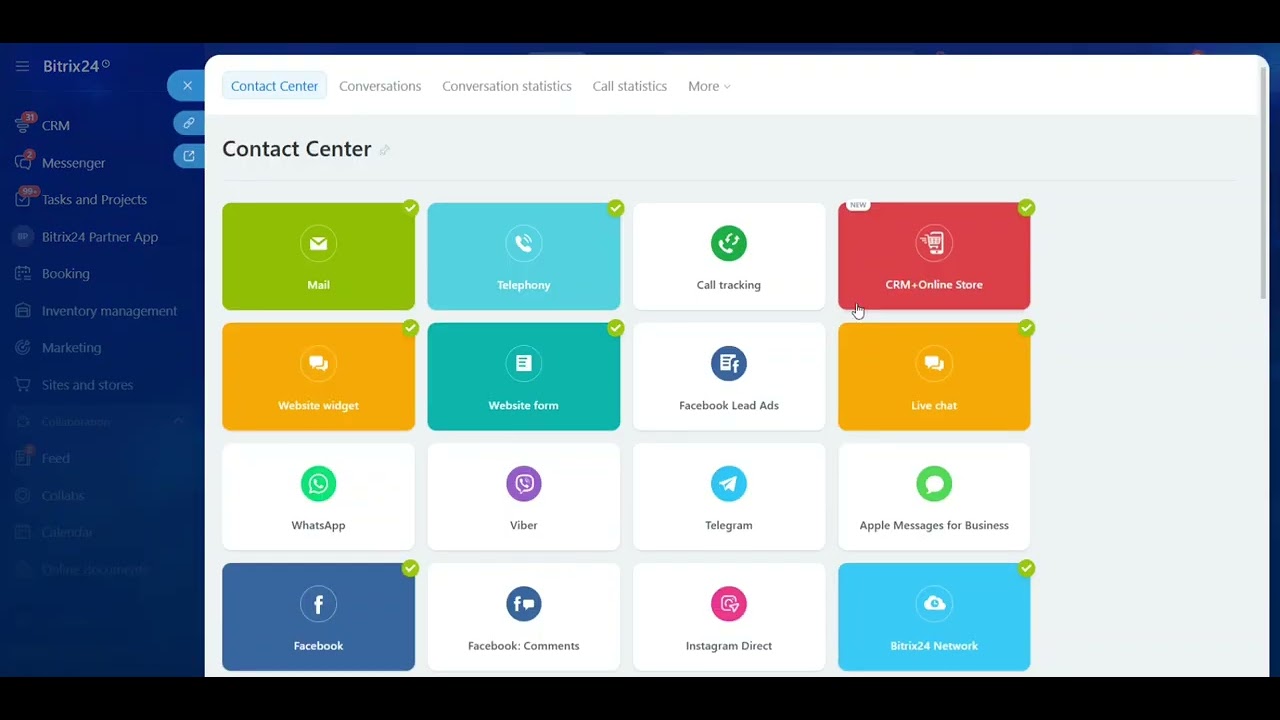
1. Navigate to Contact Center
In your Bitrix24 portal, go to Contact Center → Live Chat. Select the open channel where you want the chatbot to appear.
2. Add Chatbot Configuration
Click "Configure Chat Bots" and select your newly created AI chatbot from the dropdown menu.
3. Set Handoff Rules
Define when the chatbot should transfer conversations to human agents (e.g., when a lead is qualified or when specific keywords appear).
Implementation note: The video at 4:50 demonstrates the complete integration process, including testing the live connection before going public with your chatbot.
Real-World Results
Businesses implementing this solution report transformative outcomes:
- 24/7 lead capture: One insurance agency saw a 28% increase in after-hours inquiries converted to qualified leads
- Reduced workload: A SaaS company automated 62% of tier-1 support questions, freeing staff for complex issues
- Faster response times: Average first response time dropped from 22 minutes to instant for basic inquiries
The Copilot feature (shown at 5:30 in the video) adds another layer of efficiency by automatically summarizing conversations and pre-filling lead fields in Bitrix24. This eliminates manual data entry and ensures no customer detail gets lost in translation.
Watch the Full Tutorial
See the complete implementation from start to finish in this 6-minute video tutorial. Pay special attention at 3:10 where we demonstrate how to test different chatbot personalities before deployment.
Frequently Asked Questions
Common questions about Bitrix24 AI chatbots
You can train your Bitrix24 chatbot on website URLs, uploaded files (PDFs, Word docs, etc.), and custom sample questions. The AI learns from this content to provide accurate responses to customer inquiries while maintaining your brand voice.
For best results, combine multiple training sources. Website content establishes general knowledge, documents provide detailed specifications, and sample questions ensure consistent handling of common inquiries.
- Supported file types: PDF, DOCX, PPTX, TXT
- Ideal training duration: 30-60 minutes for basic implementation
- Ongoing training: Add new materials as your products/services evolve
The chatbot connects through Bitrix24's Live Chat module in the Contact Center. Once configured, it automatically appears in your selected open channels, handling initial customer interactions and collecting lead information before transferring to human agents when needed.
Integration requires no coding - just a few clicks in the Bitrix24 interface. The chatbot becomes another "agent" in your contact center queue, available 24/7 without breaks or downtime.
- Seamless handoff to human agents when needed
- Automatic creation of Bitrix24 leads from conversations
- Real-time monitoring of chatbot performance metrics
Yes, you can select from multiple tone options including professional, polite, casual, friendly, or formal. This ensures the chatbot matches your brand voice and provides consistent customer experiences across all interactions.
Beyond tone, you can customize the chatbot's name, avatar, greeting message, and even specific phrasing for common scenarios. These elements combine to create a distinct personality that aligns with your company culture.
- Tone options: Professional, Polite, Casual, Friendly, Formal
- Customizable elements: Name, Avatar, Greeting, Closing
- Brand alignment: Test different tones with sample customers
All information collected during chatbot conversations automatically creates Bitrix24 leads with fields pre-populated. The Copilot feature generates chat summaries and suggests next actions, saving your team hours of manual data entry.
The system maps conversation data to corresponding Bitrix24 fields (name, contact info, interests, etc.). Sales teams receive fully qualified leads with complete context, enabling more personalized follow-ups.
- Automatic lead creation in Bitrix24 CRM
- Conversation history attached to each lead
- Custom field mapping for specific data points
The basic setup takes under 30 minutes. Training the AI with your specific knowledge base may take additional time depending on the volume of materials, but you can launch with minimal training and continuously improve responses over time.
Most businesses see value immediately, with the chatbot handling basic inquiries while you refine its knowledge base. The system learns from every interaction, automatically improving its performance.
- Initial setup: 20-30 minutes
- Basic training: 1-2 hours
- Ongoing optimization: 30 minutes weekly
Absolutely. You can program the chatbot to ask specific qualifying questions (like service interests, budget ranges, or contact preferences) without interrupting the natural conversation flow. These responses automatically populate corresponding fields in Bitrix24.
The questions appear as part of the natural dialogue, not as a rigid form. This conversational approach increases completion rates while gathering valuable qualifying information for your sales team.
- Custom question scripting
- Natural conversation flow
- Automatic Bitrix24 field population
Yes, the AI chatbot operates 24/7, capturing leads and answering common questions even when your team is unavailable. It can be configured to notify staff about urgent inquiries or schedule follow-ups during business hours.
This around-the-clock availability significantly increases lead capture from website visitors in different time zones or those researching your services during evenings and weekends.
- 24/7 availability
- Urgent inquiry alerts
- Scheduled follow-up reminders
GrowwStacks specializes in custom AI chatbot implementations for Bitrix24. We handle the entire setup - from training your chatbot with company-specific knowledge to seamless Bitrix24 integration and ongoing optimization.
Our team ensures your chatbot delivers measurable ROI through lead capture and customer service automation. We'll work with you to:
- Identify optimal training materials and knowledge sources
- Configure the chatbot's personality and tone to match your brand
- Set up automated lead capture and CRM integration
- Provide analytics and continuous improvement recommendations
Ready to Automate Your Bitrix24 Lead Capture?
Every hour your website runs without an AI chatbot, you're losing qualified leads and overwhelming your support team with repetitive questions. Our Bitrix24 automation experts can have your AI chatbot live and capturing leads within 48 hours.