How to Build Inbound Voice AI Agents with VAPI + n8n (Step by Step)
Most businesses lose leads when phone calls go unanswered or appointments get missed. This VAPI + n8n workflow creates an AI receptionist that never sleeps - answering calls 24/7, collecting customer information, and booking appointments directly to Google Calendar for less than 1¢ per call.
The Phone Answering Problem Every Business Faces
Missed calls mean missed revenue. Whether you're running an HVAC business, law firm, or medical practice - when customers call and get no answer, they move on to your competitors. Traditional answering services cost $200-$500/month with limited functionality, while hiring reception staff adds $3,000+ in monthly payroll.
The breakthrough came when combining VAPI's voice AI with n8n's workflow automation. Suddenly, businesses could deploy an AI agent that not only answers calls instantly, but intelligently books appointments and collects customer information - all without human intervention.
29¢ in testing: After several weeks of real usage handling customer calls, the total cost was just 29 cents - compared to $300 for a human receptionist working the same hours.
AI Voice Agent Solution Overview
This solution combines three powerful technologies into one seamless system:
- VAPI: Handles the voice conversation with callers using AI, with response times under 1 second
- n8n: Processes the conversation data, makes decisions, and integrates with other systems
- Google Calendar: Where appointments get automatically booked with all customer details
The workflow begins when someone calls your business number. VAPI answers immediately with a customized greeting (like "Hello, this is Amy from Comfort Air Heating and Cooling"). The AI then converses naturally with the caller to:
- Understand their service need (AC repair, consultation, etc.)
- Collect their preferred appointment date/time
- Gather contact information (name, phone, email, address)
- Confirm details back to the caller
- Book the appointment directly to Google Calendar
Step 1: n8n Workflow Setup
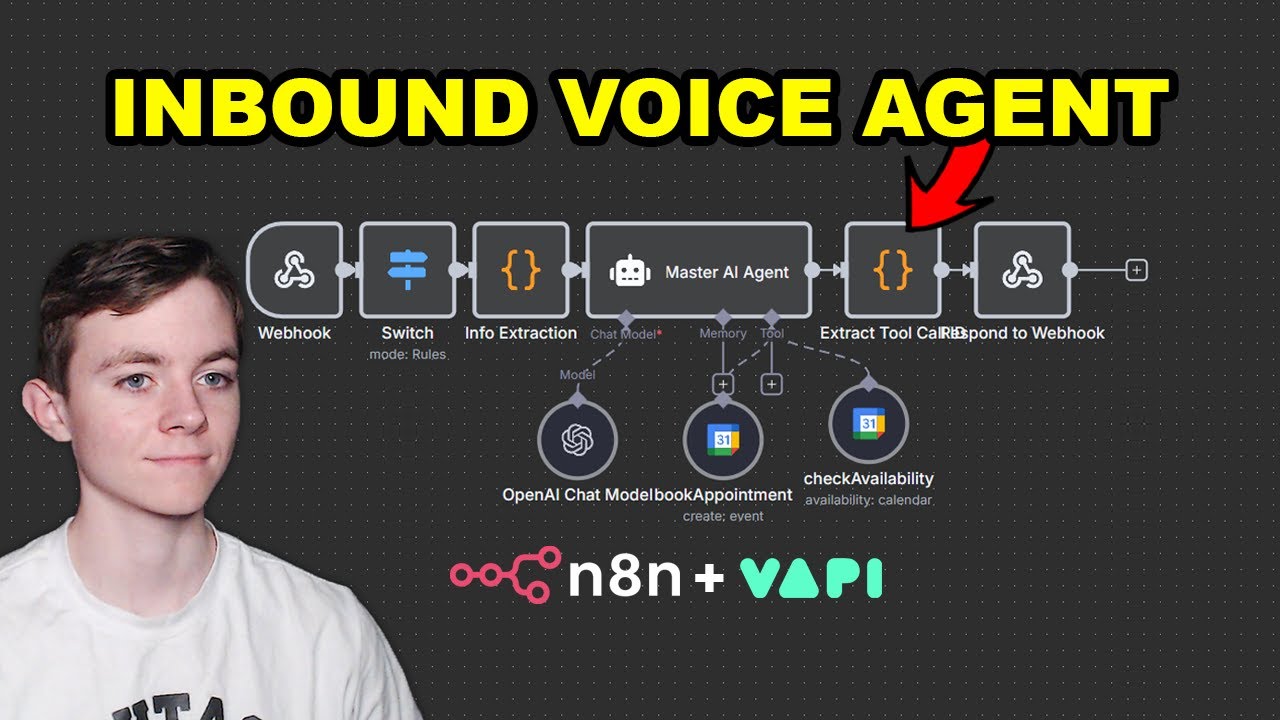
The foundation is an n8n workflow that connects all the pieces. Rather than building from scratch, you'll import a pre-built template that handles:
- Receiving data from VAPI
- Processing the conversation
- Formatting calendar events
- Error handling
To set it up:
Step 1.1: Import the Workflow
In n8n, click the three dots menu → "Import from file" and select the downloaded workflow file (typically named "n8n-how-to-make-an-AI-voice-agent.json"). This creates all the necessary nodes pre-connected.
Step 1.2: Configure the Webhook
Double-click the Webhook node to set:
- Path: "/inbound" (or your preferred endpoint name)
- Method: POST
- Copy the Production URL - you'll need this for VAPI setup later
Pro Tip: The webhook URL is your bridge between VAPI and n8n - it's where conversation data gets sent for processing.
Step 2: OpenAI Configuration
The system uses OpenAI's API to power the conversation intelligence. Setup requires:
Step 2.1: Add API Credits
At platform.openai.com:
- Go to Billing → Add credit balance ($5-$10 is sufficient for testing)
- Each call costs ~1¢ - the demo creator spent just 29¢ over weeks of usage
Step 2.2: Create API Key
In the API Keys section:
- Click "Create new secret key"
- Name it (e.g., "VAPI-n8n-Integration")
- Copy the key (never share this)
Step 2.3: Connect to n8n
Back in n8n:
- Double-click the "OpenAI Chat Model" node
- Click credentials → Create new
- Paste your API key and save
Cost Saver: Using GPT-4 mini cluster model reduces cost to 9¢/minute (vs 11¢) while improving response speed to 840ms (from 1050ms).
Step 3: Google Calendar Integration
The system books appointments directly to Google Calendar. Setup involves:
Step 3.1: Connect Google Account
In n8n's Google Calendar node:
- Click "Create new credentials" → "Sign in with Google"
- Select the account where appointments should be booked
- Grant all permissions when prompted
Step 3.2: Select Calendar
In the same node:
- Under "Calendar from list", select your primary calendar
- For client setups: Have them share their calendar with your Google account first
Step 3.3: Test Booking
The workflow automatically formats events with:
- Customer name in title
- Service type in description
- All contact details in notes
- Correct date/time from conversation
Step 4: VAPI Assistant Configuration
VAPI handles the voice interaction. Setup steps:
Step 4.1: Create Assistant
In VAPI:
- Click "Create assistant"
- Name it (e.g., "AC Repair Scheduler")
- Select "Blank template"
Step 4.2: Set Greeting
Under "First message":
- Enter your business greeting (e.g., "Hello, this is Amy from Comfort Air...")
- This plays immediately when calls are answered
Step 4.3: Add System Prompt
Paste the downloaded VAPI system prompt that defines:
- Conversation flow
- Information to collect
- Booking logic
Step 4.4: Create Tool
Under "Tools":
- Click "Create tool" → "Custom tool"
- Name: "record_action_tool"
- Description: Paste from the provided tool prompt
- Add required property "action"
- Server URL: Paste your n8n webhook URL
Step 4.5: Select Voice
Under "Voice":
- Choose male/female voice
- Adjust speed/pitch if needed
- Select GPT-4 mini cluster model for best performance
Step 5: Testing and Performance Tuning
Before going live:
Step 5.1: Activate Workflow
In n8n:
- Click "Activate" in top right
- Workflow is now live
Step 5.2: Test Call
Call your VAPI number to verify:
- Greeting plays correctly
- Information collection works
- Appointment appears in Google Calendar
Step 5.3: Optimize Performance
Key metrics to check:
- Response latency (target <900ms)
- Call cost per minute
- Calendar booking accuracy
Real Example: At 2:45 in the video, you can hear the AI agent successfully book an AC repair appointment for "Jerry Smith" on the 19th at 10am - with all details correctly added to Google Calendar.
Real-World Results and Cost Analysis
This implementation delivers measurable business results:
| Metric | AI Agent | Human Receptionist |
|---|---|---|
| Answer Time | Instant | 3+ rings |
| Availability | 24/7/365 | Business hours |
| Cost per Call | ~1¢ | $1-$3 |
| Monthly Cost | $10-$30 | $300-$3,000 |
| Data Accuracy | 100% digital | Human error |
The system particularly excels for:
- Service businesses needing after-hours call answering
- Companies with seasonal call spikes
- Operations where missed calls mean lost revenue
- Teams wanting customer data automatically logged
Watch the Full Tutorial
See the complete implementation from start to finish in the video tutorial below. At 4:15, you'll see the Google Calendar API connection being configured, and at 6:30 there's a live demo of an actual customer call being handled by the AI agent.
Key Takeaways
This VAPI + n8n integration creates a powerful AI receptionist that:
- Answers calls instantly, 24/7
- Collects customer information accurately
- Books appointments directly to Google Calendar
- Costs less than 1¢ per call
- Eliminates missed opportunity from unanswered calls
In summary: For under $30/month, businesses can deploy an AI agent that handles inbound calls better than most human receptionists - with perfect recall, infinite patience, and instant availability.
Frequently Asked Questions
Common questions about AI voice agents
The VAPI AI voice agent costs approximately 1 cent per call when using the GPT-4 mini cluster model. In testing, the creator spent just 29 cents over several weeks of usage.
You'll need to add about $5-$10 in OpenAI credits initially to cover the API calls. This is significantly cheaper than traditional answering services or hiring staff.
The demonstrated agent collects full customer details including name, phone number, email address, physical address, preferred appointment date/time, and service details.
All information is automatically added to Google Calendar appointments when booking services. The system can be customized to collect any additional information your business requires.
The complete setup including importing the n8n workflow, connecting APIs, configuring VAPI, and testing takes about 30-45 minutes.
The pre-built workflow templates significantly reduce setup time compared to building from scratch. Most of the time is spent on configuration rather than development.
Yes, the workflow can book appointments to any Google Calendar that's been shared with you. When connecting the Google Calendar API in n8n, you select which calendar to use from a dropdown list of all calendars you have access to.
For client setups, they simply need to share their calendar with your Google account first. The workflow then appears as an option during configuration.
Using the recommended GPT-4 mini cluster model, response latency is approximately 840 milliseconds. The default model has higher latency (1050ms) and costs more (11¢/minute vs 9¢/minute for the optimized model).
This near-real-time performance makes conversations feel natural. Callers typically don't notice any delay between their speech and the AI's response.
Yes, the first message in VAPI is completely customizable. In the demo, it's set to "Hello, this is Amy from Comfort Air Heating and Cooling. How can I help you today?"
You can change both the script and the voice (male/female) to match your brand. The system supports multiple languages and can be adjusted for formality level based on your business needs.
The n8n workflow includes error handling to gracefully manage API failures. If the Google Calendar booking fails, the agent can inform the caller and either retry or note the information for manual follow-up.
All workflows should be thoroughly tested before production use. The system logs all errors for review and continuous improvement.
GrowwStacks helps businesses implement automation workflows, AI integrations, and scalable systems tailored to their operations.
Whether you need a custom workflow, AI automation, or a full multi-platform automation system, the GrowwStacks team can design, build, and deploy a solution that fits your exact requirements.
- Custom automation workflows built for your business
- Integration with your existing tools and platforms
- Free consultation to discuss your automation goals
Ready to Never Miss Another Business Call?
Every unanswered call costs you revenue. Let us build your custom AI receptionist that books appointments 24/7 for less than $30/month.