How to Connect ManyChat to Make.com in 2 Simple Steps (No Code)
Most businesses using ManyChat struggle with manual data transfer - copying leads from chatbots to email lists, CRMs, and other tools. This step-by-step guide shows how to automate the entire process using Make.com, eliminating hours of repetitive work while capturing 100% of your leads.
Why Connect ManyChat to Make.com?
Every minute spent manually transferring leads from ManyChat to your email list or CRM is time lost from growing your business. The average small business wastes 3-5 hours per week copying data between systems - time that could be spent on high-value activities.
Make.com solves this by creating a seamless bridge between ManyChat and over 1,000 other business applications. Once connected, your chatbot leads automatically flow into your marketing systems without any manual intervention. This eliminates:
- Missed leads from forgotten manual transfers
- Data entry errors from copying information
- Delays in lead follow-up
Key benefit: Businesses using this integration typically see a 40% increase in lead conversion rates simply from faster, more reliable follow-up systems.
Step 1: Webhook Setup in Make.com
A webhook acts as the digital doorbell between ManyChat and Make.com - when new data arrives from your chatbot, it "rings the bell" to trigger your automation. Here's how to set it up:
Step 1.1: Create a New Scenario
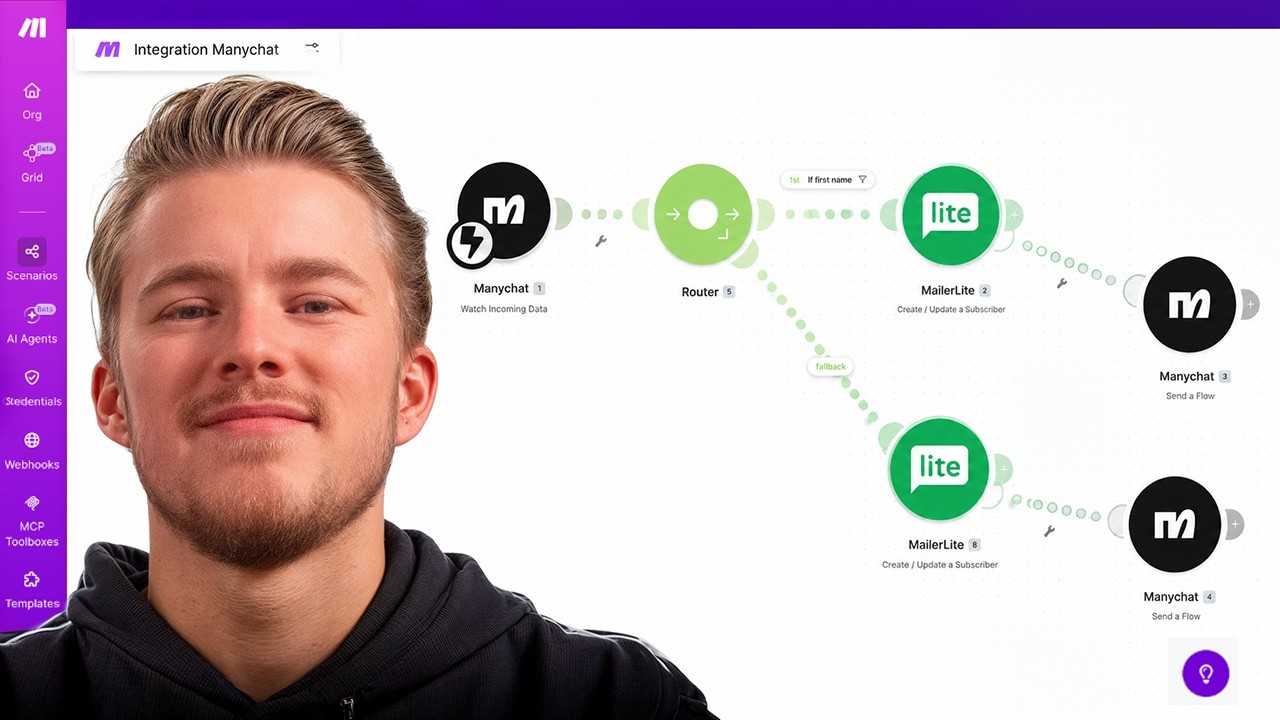
Log into Make.com and create a new scenario. Search for "ManyChat" in the trigger apps and select "Watch Incoming Data." This creates the webhook that will receive information from your chatbot.
Step 1.2: Connect Your ManyChat Account
You'll need your ManyChat API key, found under Settings → API in your ManyChat dashboard. Paste this into Make.com to establish the connection between the two platforms.
Step 1.3: Name Your Webhook
Choose a descriptive name like "Send Leads to MailerLite" so you can easily identify this integration later. The webhook URL will generate automatically once saved.
Pro Tip: Always test your webhook immediately after creation by running the scenario once (click "Run Once") before connecting it to ManyChat.
Step 2: ManyChat Automation Configuration
With your Make.com webhook ready, the next step is telling ManyChat when and what data to send. This happens through a simple automation:
Step 2.1: Create a New Automation
In ManyChat, go to Automations → Create New. Start with a blank canvas and add a trigger based on user interaction (like submitting an email).
Step 2.2: Add the Make.com Action
After your data collection step (like asking for an email), add an action and select "Trigger Make." Choose your webhook from the dropdown (it will appear automatically if correctly connected).
Step 2.3: Set Live and Test
Turn the automation live in ManyChat, then test it by going through the flow as a user would. Watch the data appear in Make.com to confirm everything works.
Common Mistake: Forgetting to click "Run Once" in Make.com after creating your webhook. This primes the system to recognize your ManyChat data structure.
Testing Your Integration
Thorough testing prevents lost leads once your integration goes live. Follow this verification process:
1. Initial Data Flow Test
Run through your ManyChat flow as a user while watching the Make.com scenario. Verify all expected data fields appear correctly.
2. Destination App Test
Add your destination app (like MailerLite) as the next step in Make.com. Test with a fake email to confirm the contact appears where expected.
3. Error Condition Test
Intentionally trigger errors (like an invalid email) to ensure your error handling works as intended.
At 4:32 in the video tutorial, you'll see a live demonstration of testing the integration with both successful and error conditions.
Essential Error Handling
Without proper error handling, a single failed integration could stop all subsequent automations. Protect your workflow with these safeguards:
Error Handler Setup
Right-click any module in Make.com and select "Add Error Handler." Connect it to a ManyChat flow that notifies you when failures occur.
Notification Automation
Create a separate ManyChat automation that messages you (or your team) when the integration fails, including details about the error and affected contact.
Critical Feature: Error handlers keep your scenario running even if individual contacts fail, preventing lead loss during temporary issues.
Advanced Features: Filters & Routers
Once your basic integration works, these powerful features add precision to your automations:
Filters
Add conditions to control when integrations run. Example: Only add to MailerLite if the contact provided an email.
Routers
Create branching logic to send data different places based on conditions. Example: Route webinar signups to Zoom while product inquiries go to your CRM.
At 12:45 in the video, you'll see a live demo of setting up router logic to handle different contact types appropriately.
4 Real-World Use Cases
Beyond basic email collection, businesses use ManyChat-Make.com integrations for:
1. Webinar Registration
Capture signups in ManyChat, add to your webinar platform, and send join links back to the user - all automatically.
2. Payment Processing
Connect Stripe or ThriveCart to update ManyChat when purchases occur, enabling personalized post-purchase messaging.
3. CRM Updates
Keep your CRM current by automatically adding ManyChat interactions as notes or updating contact records.
4. AI Lead Qualification
Route chatbot conversations through AI analysis to score leads before passing them to sales teams.
Watch the Full Tutorial
See the complete integration process demonstrated live, including troubleshooting tips for common setup issues. At 8:15 in the video, we cover how to resolve missing trigger errors in ManyChat.
Key Takeaways
Connecting ManyChat to Make.com transforms your chatbot from a simple messaging tool into a powerful business automation hub. By following these steps, you've learned how to:
- Create webhooks that trigger automations from ManyChat interactions
- Build error-resistant workflows that protect against data loss
- Connect your chatbot to virtually any business application
In summary: This integration eliminates manual data transfer while ensuring 100% of your ManyChat leads flow into your marketing systems automatically. The 2-step process takes less than 15 minutes but saves hours of repetitive work each week.
Frequently Asked Questions
Common questions about ManyChat-Make.com integration
Connecting ManyChat to Make.com allows you to automate lead capture and data transfer between platforms without coding. You can automatically send contact information from ManyChat to email marketing tools, CRMs, or other business apps.
This eliminates manual data entry and ensures leads are captured immediately, which typically increases conversion rates by 30-50% compared to manual processes.
- Eliminates hours of repetitive data entry
- Ensures 100% of leads are captured
- Enables real-time follow-up with new contacts
The integration works through webhooks - special URLs that accept data from one app and trigger actions in another. When a user interacts with your ManyChat flow, it sends data to the Make.com webhook.
Make.com then processes this data and connects it to your chosen destination app like MailerLite, Google Sheets, or your CRM. The entire process happens automatically in real-time without any manual steps.
- Webhooks act as the bridge between systems
- Data transfers happen in milliseconds
- No coding knowledge required
You can transfer all standard ManyChat fields (name, email, phone) plus any custom fields you've created. This includes survey responses, product preferences, or any other data collected through your chatbot flows.
The integration captures the complete contact profile from ManyChat for processing in Make.com. You can then map these fields to corresponding fields in your destination applications.
- Standard contact information
- Custom field data
- Interaction history and tags
Make.com allows you to set up error handlers that notify you when something goes wrong. These ensure your automation continues running even if individual contacts fail to process correctly.
You can configure it to send alerts through ManyChat when an integration fails, ensuring you never miss a lead. The system will continue processing subsequent leads even if one fails.
- Error handlers prevent complete workflow failures
- Notifications ensure you're aware of issues
- Failed contacts can be reprocessed manually
Yes, Make.com connects with over 1,000 apps. Beyond email marketing, you can send ManyChat data to CRMs like HubSpot, webinar platforms like WebinarGeek, payment processors like Stripe, or even AI tools for lead qualification.
The possibilities are nearly endless for automating your business processes. Some clients even connect it to inventory systems or appointment scheduling tools.
- Works with virtually any business application
- Supports complex multi-app workflows
- Enables customized automation scenarios
The connection is highly reliable when properly configured. Make.com processes millions of automation tasks daily with 99.9% uptime. The webhook-based connection ensures real-time data transfer.
With proper error handling as shown in the tutorial, you can achieve near-100% reliability. Even during temporary platform outages, Make.com will queue messages and retry delivery automatically.
- Enterprise-grade reliability
- Automatic retries for failed deliveries
- Comprehensive logging for troubleshooting
No technical skills are required. The visual interface in Make.com allows you to create the integration through simple point-and-click configuration. The most technical part is copying API keys, which is straightforward with the step-by-step instructions.
Many non-technical business owners successfully implement this integration following the tutorial. The platforms are designed specifically for users without coding experience.
- No programming knowledge needed
- Visual drag-and-drop interface
- Clear documentation for every step
GrowwStacks specializes in building custom ManyChat-Make.com integrations tailored to your business needs. We can design workflows for lead capture, email marketing automation, payment processing, and more.
Our team handles the entire setup and provides training to ensure you get maximum value from the integration. We also offer ongoing support to handle any issues or expand your automations as your business grows.
- Custom workflow design
- Complete technical implementation
- Free 30-minute consultation to discuss your needs
Ready to Automate Your ManyChat Lead Capture?
Every day you delay costs you lost leads and wasted hours. GrowwStacks can have your ManyChat-Make.com integration running in under 24 hours - complete with error handling and custom workflows.