How to Connect WhatsApp to n8n for AI-Powered Customer Service
Most businesses know they should respond to WhatsApp messages instantly - but between meetings, after-hours, and weekends, customers often wait hours or days for replies. This n8n workflow transforms WhatsApp into a 24/7 AI agent that understands questions, provides accurate answers, and logs every interaction automatically.
Why Automate WhatsApp Customer Service?
Customers increasingly prefer messaging over phone calls - WhatsApp sees 100 billion messages daily. Yet most small businesses handle these manually, creating bottlenecks during peak hours and leaving customers unanswered nights and weekends. The result? Missed sales opportunities and frustrated clients who switch to competitors.
This n8n solution solves three critical problems simultaneously: 1) Instant response to common questions 24/7, 2) Consistent, brand-aligned answers every time, and 3) Automatic logging of every customer interaction for follow-up and analytics.
Key stat: Businesses using WhatsApp automation see response times drop from hours to seconds while reducing customer service costs by 30-50%.
Workflow Overview
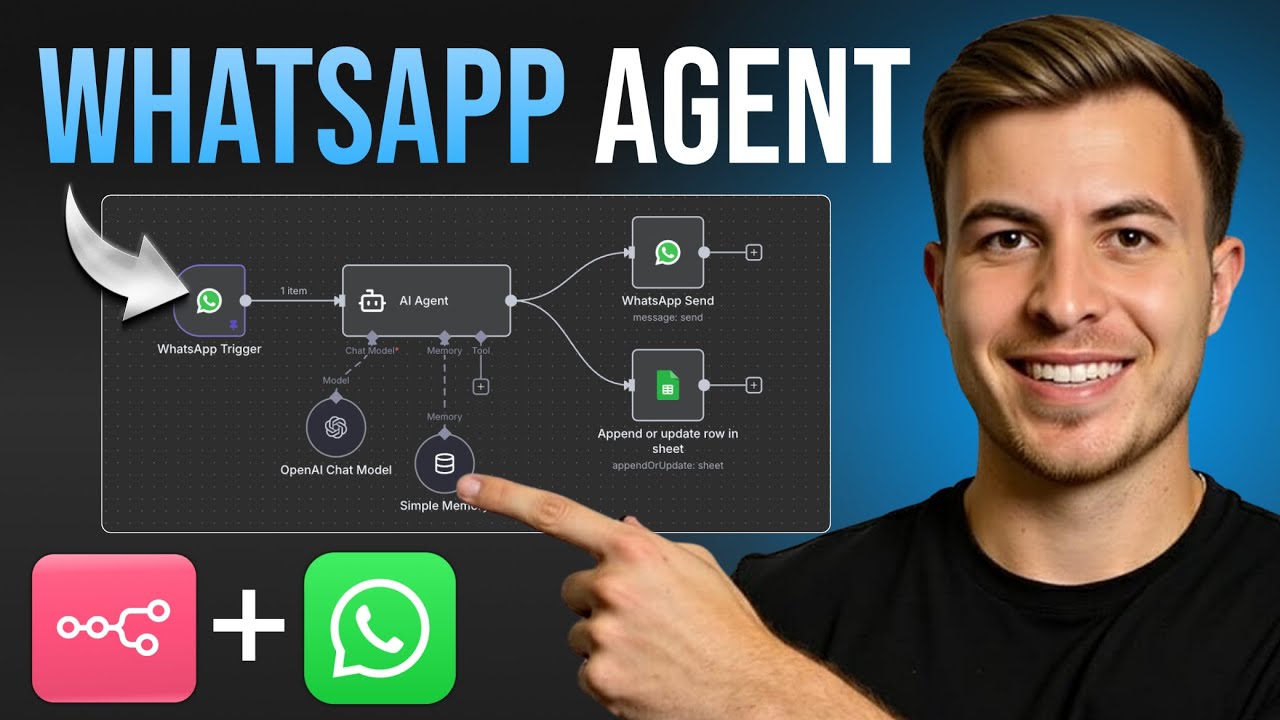
The complete system functions like a virtual customer service agent. When someone messages your WhatsApp business number:
- WhatsApp Trigger detects the incoming message
- AI Agent processes the text using GPT
- Google Sheets logs the conversation
- WhatsApp Send delivers the AI-generated response
Unlike basic chatbots, this workflow maintains conversation memory - it recalls previous messages in the thread, allowing for natural, contextual dialogues. At 2:47 in the video tutorial, you'll see how the memory system prevents the AI from getting confused when customers ask follow-up questions.
WhatsApp Trigger Setup
The foundation is connecting your WhatsApp Business account to n8n. This requires API credentials from Meta's developer portal:
Critical step: Never use personal WhatsApp numbers for automation. Create a dedicated business account through business.facebook.com to avoid limitations and potential bans.
Step-by-step credential setup:
- Create business portfolio in Meta Business Manager
- Register new app with WhatsApp permissions
- Copy Client ID and Client Secret to n8n
- Generate permanent access token
- Add your business phone number
The video shows exactly where to find each credential in the Meta interface. Pay special attention to the test number feature - it lets you verify the integration works before connecting your live number.
AI Agent Configuration
The AI agent acts as your digital employee - its personality and knowledge come from the system prompt. For a gym business example:
"You are a friendly and helpful receptionist for FedEx Gym. Business hours are... [detailed instructions]" Three configuration essentials:
- Session Memory: Tracks conversation history using WhatsApp message IDs
- Model Selection: GPT-4 provides best results but costs more than GPT-3.5
- Response Constraints: Limit answer length and enforce brand voice
At 5:12 in the tutorial, you'll see how changing just a few words in the prompt transforms the AI from formal to casual tone - critical for matching your brand personality.
Data Storage with Google Sheets
Every customer interaction gets logged automatically with:
- Timestamp (ISO 8601 format)
- Customer phone number
- Original question
- AI response
The Google Sheets integration serves three purposes:
- Compliance: Permanent record of all conversations
- Analytics: Identify frequent questions needing better answers
- Human follow-up: Flag complex issues for staff
The tutorial demonstrates how to map WhatsApp message data to specific spreadsheet columns - including converting timestamps to your local timezone.
Response Handling
The WhatsApp Send node delivers AI-generated answers back to customers. Key configuration points:
Anti-spam rule: WhatsApp requires customers message first before you can reply. The workflow includes error handling for this limitation.
Message formatting options:
- Text responses (most common)
- Quick reply buttons
- Media attachments (images/docs)
- Location sharing
At 8:30 in the video, you'll see the test message flow - sending from your personal phone to verify the automated response works correctly before going live.
Testing and Troubleshooting
Common issues and solutions:
| Problem | Solution |
|---|---|
| Messages not triggering | Verify webhook URL in Meta settings |
| AI responses too slow | Switch to GPT-3.5 or limit response length |
| Data not saving to Sheets | Check column name matching |
The workflow includes manual testing nodes that let you:
- Simulate incoming messages
- Pin test data for repeated runs
- Bypass WhatsApp's rate limits during development
Remember to test with real-world questions - not just "hello" - to ensure the AI handles your business context correctly.
Watch the Full Tutorial
See the complete setup process from start to finish in this 10-minute video tutorial. At 4:15, you'll get a crucial tip about configuring session memory that prevents confusing responses when customers ask follow-up questions.
Key Takeaways
This WhatsApp automation creates an always-available customer service agent that:
- Responds instantly to common questions
- Maintains conversation context
- Logs interactions for compliance
- Scales effortlessly with business growth
In summary: What used to require hiring additional staff can now be automated with n8n, saving thousands in labor costs while improving customer satisfaction scores.
Frequently Asked Questions
Common questions about WhatsApp automation
WhatsApp automation solves three major business problems: High-volume customer inquiries overwhelming small teams, after-hours support gaps, and inconsistent response quality.
The n8n workflow handles all three by providing 24/7 automated responses with AI-powered consistency while logging every interaction. This transforms WhatsApp from a time drain into a competitive advantage.
- 80% faster response times - from hours to seconds
- Eliminates repetitive answer fatigue for staff
- Creates searchable conversation archives
No coding is required. The visual workflow builder in n8n lets you connect WhatsApp to AI models and databases through a drag-and-drop interface.
The most technical step is copying API credentials from Meta's developer portal, which the video tutorial walks through step-by-step. Everything else happens through point-and-click configuration.
- No programming languages to learn
- Pre-built templates available
- Community support for troubleshooting
The workflow uses session-based memory tracking. Each WhatsApp conversation gets a unique session ID that persists through multiple messages.
This allows the AI to reference previous interactions, maintaining context like a human agent would. The memory window is configurable from 5 to 20 exchanges depending on your needs.
- Session IDs prevent context loss
- Adjustable memory length
- Optional long-term memory with databases
Yes, but Meta recommends using a separate number for API integrations. Personal numbers converted to business accounts may experience limitations.
The setup includes steps for adding new numbers or migrating existing ones with minimal downtime. Many businesses choose to keep their current number for human agents while routing automated inquiries to a dedicated line.
- Dual-number strategy recommended
- Number porting available
- Test numbers avoid disruption
The workflow includes escalation protocols. Unanswered questions get flagged in Google Sheets and can trigger email alerts or transfer to human agents.
You can configure multiple fallback responses based on confidence scores from the AI model. Common strategies include offering to have a human follow up or providing alternative contact methods.
- Escalation thresholds adjustable
- Human handoff options
- Continuous learning from unflagged questions
All data remains encrypted in transit and at rest. WhatsApp messages stay within Meta's encrypted channels, while Google Sheets data inherits Google Cloud's security.
The workflow doesn't store messages permanently in n8n - they're processed then immediately written to your controlled storage. For industries requiring HIPAA or GDPR compliance, additional encryption layers can be added.
- End-to-end encryption maintained
- No third-party data retention
- Compliance configurations available
Yes, the WhatsApp Business API supports images, videos, documents and location sharing. The workflow can be extended to process attachments.
For example, customers might send photos of products needing identification or PDF receipts for warranty claims. Each media type requires additional nodes in the n8n workflow to handle appropriately.
- Image recognition extensions
- Document text extraction
- Location-based responses
GrowwStacks builds custom WhatsApp automation solutions tailored to your business needs. Our team handles the complete setup - API connections, AI prompt engineering, workflow optimization and staff training.
We offer free consultations to design systems that reduce customer response times by 80% while cutting support costs. Our implementations include ongoing monitoring and adjustments as your business evolves.
- Free 30-minute consultation
- Industry-specific templates
- Ongoing performance optimization
Ready to Transform Your WhatsApp Support?
Every hour your team spends answering repetitive questions is time not spent growing the business. Let GrowwStacks build your custom WhatsApp automation that handles 50-80% of customer inquiries automatically.