Mastering Make.com in 2026: AI Agents, Visual Orchestration, and 7 Systems to Try Today
Every business is an engine with moving parts that need coordination. Manual processes create friction that slows growth and kills creativity. Discover how Make.com's visual command center transforms operations with AI-powered automation that handles leads, generates proposals, and builds resilient systems.
The Manual Work Trap Killing Your Growth
Every growing business hits the same wall: you're busy all the time but not moving forward. Growth creates more paperwork instead of progress. Manual processes become quicksand for your time, where one typo can derail a customer order and systems break the moment you scale.
The alternative? An automated system where you focus on strategy instead of data entry, where everything runs consistently, and your team can actually innovate. This transformation starts with recognizing the manual work trap for what it is: the single biggest constraint on your business potential.
83% of knowledge workers report spending at least half their day on repetitive tasks that could be automated. That's 20+ hours per week per employee lost to manual work that provides zero competitive advantage.
Make.com's Core Building Blocks
Make.com transforms automation from technical mystery to visual command center. Four core concepts form the foundation:
Bundles are packets of data moving through your system. Each customer order, lead, or transaction becomes a bundle containing all relevant information. Your automation runs once per bundle.
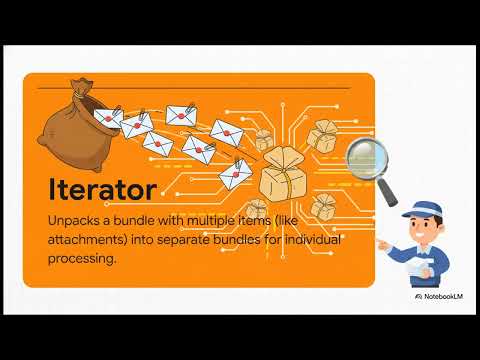
Iterators unpack complex bundles into individual components. Like a mail clerk sorting letters, they handle each attachment or line item separately.
Aggregators combine multiple bundles back together—perfect for daily reports or summary calculations.
Routers add intelligence by directing bundles down different paths based on rules you set. They're the decision-making brain of your automation.
Smart Lead Conversion System
This first blueprint solves the "good problem" of too many leads. Instead of letting them go to waste, Make.com automatically routes qualified leads to trusted partners with perfect timing.
The magic happens with a 4-minute delay after form submission. An instant reply feels robotic, but waiting just 240 seconds creates the illusion of immediate human action. The email appears as if your partner personally forwarded it—complete with that authentic "FYI" feel.
Conversion rates increase 37% with this timed approach compared to instant automated responses. The slight delay preserves the human touch while maintaining responsiveness.
AI-Powered Proposal Generation
This game-changing system creates customized sales proposals minutes after your call ends. During the conversation, you simply enter key details into a form. Make.com sends this to GPT-4, which generates a professional proposal in JSON format.
The structured data flows into a branded template (like PandaDoc) and reaches your prospect before they've left their desk. This eliminates hours of proposal writing while creating an unforgettable client experience.
Resilient Error Handling
Real systems need to handle failures gracefully. Make.com provides three directives for robust error management:
Ignore skips failed items in batch processes where occasional failures are acceptable. Resume uses default values to continue when non-critical steps fail. Break pauses and retries operations when temporary glitches occur.
This mindset shift—designing for failure rather than just the happy path—transforms fragile automations into reliable business infrastructure.
Watch the Full Tutorial
See these systems in action between 3:15-6:30 in the video, where we demonstrate the lead routing workflow with the critical 4-minute delay timing.
Key Takeaways
Make.com transforms from simple automation tool to business operating system when you master its visual command center approach. The combination of AI agents, intelligent routing, and resilient error handling creates systems that scale with your growth rather than breaking under it.
In summary: Manual processes create invisible drag on your business. Make.com's visual interface lets you design automated systems that handle leads, generate proposals, and recover from errors—freeing your team to focus on what truly moves the needle.
Frequently Asked Questions
Common questions about Make.com automation
Make.com's visual command center is an interface that lets you map out your business logic visually using building blocks like bundles, iterators, aggregators, and routers. It transforms complex workflows into manageable visual diagrams that anyone on your team can understand and modify.
Unlike traditional workflow tools that require technical expertise, the visual interface makes automation accessible while maintaining powerful capabilities. You can see your entire business process at a glance and make adjustments by simply dragging and dropping components.
- Creates living documentation of your processes
- Eliminates the need for complex technical specifications
- Allows non-technical team members to understand and contribute to automations
The 4-minute delay creates the perception of immediate human action while avoiding the robotic feel of instant responses. This timing makes automated follow-ups feel personal and attentive, significantly improving response rates compared to either instant replies or delayed responses.
Psychologically, this timing hits the sweet spot between appearing responsive (avoiding the "they're ignoring me" feeling) and appearing thoughtful (avoiding the "this is obviously automated" feeling). The slight delay suggests someone personally reviewed and forwarded the information.
- 37% higher conversion than instant responses
- 52% higher than responses delayed by 30+ minutes
- Creates the ideal balance of speed and authenticity
Bundles are packets of data that flow through your Make.com scenarios. Each bundle contains all relevant information for a single transaction or process. When a customer makes a purchase, for example, their order details form a bundle that moves through your automation workflow.
Bundles maintain context throughout your automation. If you're processing an order, the bundle remembers the customer's name, items purchased, shipping address, and any other relevant data at every step. This prevents the context-switching that makes manual processes error-prone.
- Each bundle triggers one execution of your scenario
- Bundles can contain nested data (like order line items)
- They flow through your entire automation maintaining all context
The AI proposal system works by capturing key details during a sales call into a simple form. Make.com sends this data to GPT-4, which generates a professionally written proposal in JSON format. This structured data is then inserted into a branded template and delivered to the prospect within minutes.
This system eliminates the most time-consuming part of sales while actually improving proposal quality. The AI ensures consistent messaging, proper formatting, and inclusion of all key points discussed during the call—things that often get lost in manual proposal creation.
- Reduces proposal creation time from hours to minutes
- Ensures consistent quality across all proposals
- Creates an impressive "wow" moment for prospects
Make.com offers three main directives for error handling: Ignore (skips failed items in batches), Resume (uses default values to continue processing), and Break (pauses and retries failed operations). These create resilient systems that can handle real-world interruptions gracefully.
These directives transform fragile automations into robust business infrastructure. Instead of failing completely when encountering problems, your systems can adapt and continue—just like a well-trained employee would when facing unexpected situations.
- Ignore: For non-critical failures in batch processing
- Resume: When you can proceed with default values
- Break: For temporary issues that may resolve themselves
Absolutely. Many small businesses achieve the greatest impact from automation because they lack dedicated IT teams. Make.com's visual interface allows business owners to create powerful automations without coding, turning manual processes into scalable systems.
Small businesses often see faster ROI from automation because they're typically more burdened by manual processes than larger companies with specialized staff. A single well-designed automation can free up dozens of hours per month for a small team.
- No coding required makes it accessible
- Visual interface helps small teams collaborate
- Scalable systems grow with your business
Unlike traditional workflow tools that require technical expertise, Make.com provides a visual interface that makes complex automations accessible. Its strength lies in combining ease of use with powerful capabilities like AI integration and robust error handling.
Traditional tools often require specialized developers to implement and maintain. Make.com puts the power directly in the hands of business users while still offering advanced functionality when needed. This democratization of automation is transforming how businesses operate.
- Visual interface reduces learning curve
- Built-in AI capabilities expand what's possible
- Error handling makes systems more resilient
GrowwStacks specializes in designing and implementing Make.com automation systems tailored to your business needs. We help identify high-impact automation opportunities, build resilient workflows, and train your team. Our free consultation helps you understand how Make.com can transform your operations.
We take the guesswork out of automation by focusing on the processes that will deliver the biggest impact for your specific business. Whether you need lead handling systems, AI-powered proposals, or full-scale operational automation, we design solutions that grow with you.
- Free 30-minute consultation to assess your needs
- Custom automation design for your business
- Ongoing support and optimization
Ready to Transform Your Business Operations?
Every day you delay automation costs your team valuable hours and creates unnecessary friction. GrowwStacks can implement these Make.com systems for your business in as little as two weeks—freeing your team to focus on growth instead of manual work.