How to Build an AI Researcher and Newsletter Publisher Using Microsoft Agent Framework
Most businesses struggle to stay current with industry news while focusing on core operations. Microsoft Agent Framework's background responses feature lets you create an autonomous AI researcher that compiles newsletters from multiple sources automatically - no manual research required.
What Are Background Responses?
Background responses solve a critical problem in AI automation - the need for long-running tasks to complete before returning results. Traditional API calls time out after 30-60 seconds, making them unsuitable for research tasks that might take minutes.
The Microsoft Agent Framework handles this through a continuation token system. When you invoke an agent with background responses enabled, it immediately returns a token you can use to check progress. Your application polls for updates while the agent continues working in the background.
Key benefit: Background responses let you build agents that feel instantaneous to users while handling complex, time-consuming workflows behind the scenes. The newsletter researcher demo completes in about 2 minutes while providing real-time progress updates.
Newsletter Agent Architecture
The AI newsletter publisher follows a clean three-layer architecture that separates concerns for maintainability:
1. Data Layer
The NewsItem model defines the structure for all researched content with properties for title, URL, source, publication date, and summary. Helper methods handle RSS feed parsing and date formatting.
2. Agent Layer
The core AI agent class contains four specialized function tools that handle different research tasks. Each tool follows the same pattern - fetch data, parse relevant information, and return NewsItem objects.
3. Presentation Layer
The newsletter generator takes the collected NewsItems and formats them according to rules in the system prompt. It adds predictions and saves the final output as HTML.
Implementation tip: This separation allows you to modify or add research sources without affecting how newsletters are generated. You could add Twitter monitoring or SEC filings by creating new function tools that return NewsItems.
Setting Up Function Tools
The demo agent uses four function tools that demonstrate different research patterns:
1. Company News Search
Takes a list of company names and keywords, makes HTTP requests to their news sites, and returns the five most relevant articles. The tool handles pagination and result filtering.
2. Microsoft Foundry Blog
Specialized scraper for Microsoft's technical blog that extracts the ten latest posts. Includes logic to skip promotional content and focus on technical announcements.
3. GitHub Repository Monitor
Requires a GitHub personal access token to fetch updates from the Microsoft Agent Framework repo. Identifies breaking changes and new features by analyzing commit messages and pull requests.
4. Newsletter Generator
Formats all collected NewsItems into HTML with consistent styling. Adds the predictions section based on trends identified across sources.
Each tool follows the same interface pattern - they accept parameters, return NewsItem objects, and can be monitored through the background responses system.
System Prompt Design
The agent's system prompt contains several critical components that guide its behavior:
Workflow Definition
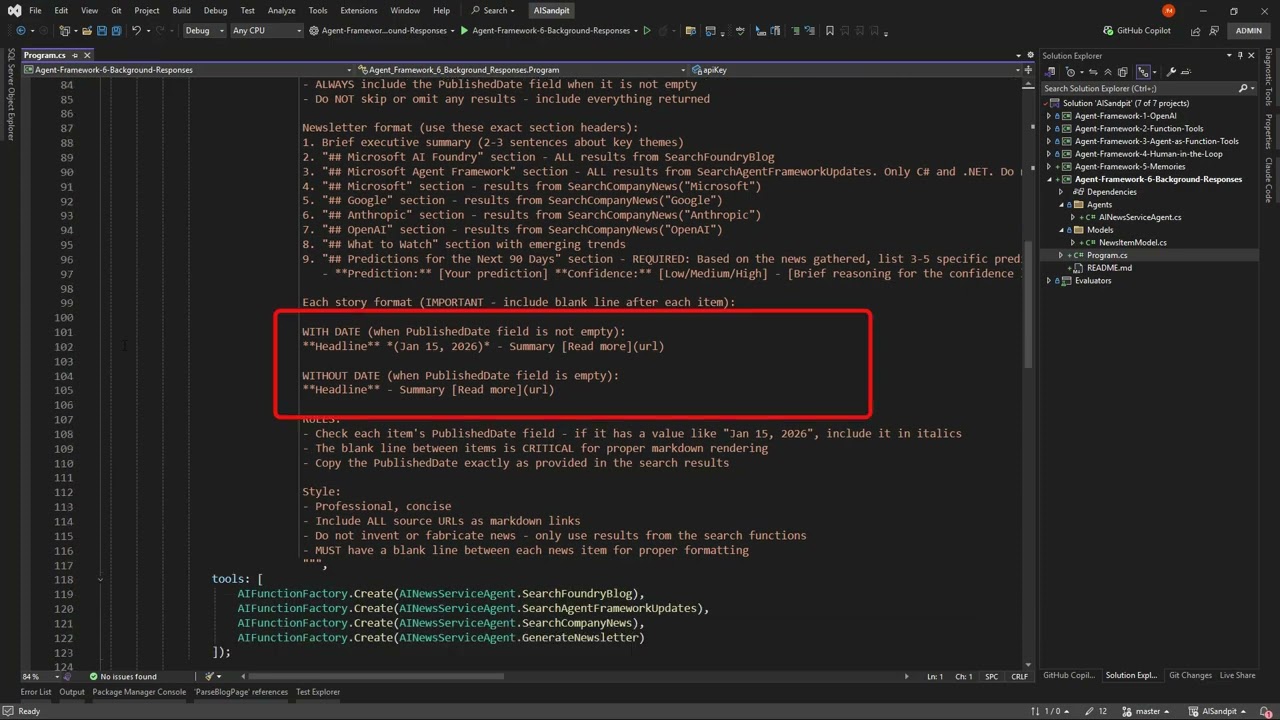
Clear instructions about the research sequence - check all sources, summarize findings, then generate predictions before formatting the newsletter.
Content Rules
Specific guidelines about how many items to include from each source (5 company news, 10 blog posts), how to format dates, and what metadata to preserve.
Prediction Guidelines
Detailed instructions for generating 90-day forecasts with confidence scores. The agent must base predictions only on researched content, not general knowledge.
Critical detail: The prompt specifies that predictions should focus on business impact rather than technical details. This produces more actionable insights for decision-makers.
The Background Response Loop
The background response implementation follows a consistent pattern that you can adapt for other long-running agents:
1. Initial Invocation
Start the stopwatch and call the agent with your request (e.g., "Generate this week's digest"). The agent returns immediately with a continuation token.
2. Progress Monitoring
Enter a loop that checks for updates every 200ms. Update a visual progress indicator to show the agent is working.
3. Completion Handling
When the token becomes null, the agent has finished. Stop the timer and process the final newsletter output.
This pattern provides a responsive user experience while the agent handles time-consuming research tasks asynchronously.
Newsletter Output Formatting
The final newsletter HTML follows a carefully designed template that maximizes readability and usefulness:
Source Organization
Content grouped by origin (Company News, Technical Blogs, GitHub) with clear section headers. Each item includes title, summary, and direct link.
Predictions Section
Five business-focused forecasts with confidence scores. The demo highlighted AI regulation and healthcare adoption as high-confidence trends.
Stale Content Warning
Automatic detection of older items (based on publication date) with visual indicators when content might be outdated.
The template uses semantic HTML that works well for both email distribution and web publishing.
The Predictions Engine
The most innovative part of this agent is its ability to generate forward-looking insights:
Research-Based
Unlike generic AI predictions, these forecasts are grounded in the specific articles the agent just analyzed. This produces more relevant, actionable insights.
Confidence Scoring
Each prediction includes a confidence score (High/Medium/Low) based on the volume and consistency of supporting evidence in the research.
Business Focus
The prompt specifically directs the agent to consider market impact, regulatory changes, and competitive dynamics rather than technical details.
Example output: "Increased AI regulation in legal tech (High confidence)" and "Healthcare adoption will challenge existing providers (Medium confidence)" were two predictions from the demo that proved particularly insightful.
Integration Possibilities
While the demo outputs to an HTML file, the architecture supports multiple integration paths:
Email Distribution
Connect to SendGrid or Mailchimp to automatically send newsletters to subscriber lists. You could trigger different versions for executives vs. technical teams.
Dashboard Integration
Push high-confidence predictions to a business intelligence dashboard for tracking. Flag items where actual events match forecasts to improve decision-making.
CRM Linking
Associate predictions with relevant accounts in your CRM. A forecast about healthcare regulation could automatically notify your healthcare team.
The background responses system ensures these integrations happen only after complete, validated research - no partial data gets published prematurely.
Watch the Full Tutorial
See the complete implementation in action at the 4:30 mark where the demo shows the background responses loop updating the progress bar while the agent researches content from multiple sources.
Key Takeaways
Microsoft Agent Framework's background responses enable a new class of autonomous research agents that would be impossible with traditional API patterns. The newsletter publisher demonstrates how to:
In summary: 1) Structure long-running research tasks, 2) Provide real-time progress updates, 3) Generate forward-looking business insights, and 4) Format professional outputs automatically. This pattern works for any information-intensive process where timeliness matters.
Frequently Asked Questions
Common questions about this topic
Background responses allow agents to work asynchronously on long-running tasks while providing progress updates. Instead of waiting for a complete response, the system can check back periodically for updates through a continuation token mechanism.
This is ideal for research tasks that may take minutes to complete. The demo shows how to implement a progress bar that updates while the agent gathers information from multiple sources in the background.
- Enables tasks that exceed standard API timeout limits
- Provides user feedback during long operations
- Uses continuation tokens to track progress
The demo agent monitors four types of sources: company news sites (like Microsoft and OpenAI), technical blogs (Microsoft Foundry), GitHub repositories (for framework updates), and RSS feeds.
The system is designed to be extensible - you can easily add additional sources by creating new function tools. Each tool follows the same interface pattern, returning standardized NewsItem objects that the newsletter generator processes.
- Built-in support for HTTP scraping and API calls
- GitHub integration requires a personal access token
- RSS feed parser handles common formats automatically
The agent follows specific formatting rules defined in the system prompt. It organizes content by source, includes direct links to articles, and adds a predictions section where it forecasts industry trends based on the research.
The newsletter is saved as an HTML file that can be automatically distributed via email or posted to a website. The demo shows how the output includes both summarized news items and analyzed predictions with confidence scores.
- Structured HTML output with consistent styling
- Configurable limits on items per section
- Automatic date formatting and stale content warnings
This pattern works for competitive intelligence monitoring, internal knowledge digests, investor updates, or content curation for marketing. The predictions feature is particularly valuable for strategic planning.
The agent identified AI regulation and healthcare adoption as key trends with high confidence in the demo. These kinds of insights help businesses anticipate market shifts rather than just react to them.
- Automated competitive intelligence reports
- Internal knowledge sharing newsletters
- Strategic planning with researched predictions
The core background responses mechanism requires about 20 lines of code to implement. The demo shows the key pattern - starting a stopwatch, checking for continuation tokens, and updating a progress indicator.
Most of the work goes into designing the agent's research functions and newsletter formatting rules. The background responses system itself is straightforward to implement once you understand the continuation token pattern.
- Minimal boilerplate code required
- Progress tracking is built into the framework
- Same pattern works for any long-running task
Yes, the demo mentions potential integration with SendGrid for email distribution. The HTML newsletter output could also be posted to a CMS, shared via Slack, or converted to PDF.
Since the agent runs autonomously, you could schedule it to generate and send newsletters daily or weekly. The background responses system ensures the entire process completes before distribution begins.
- Direct SendGrid/Mailchimp integration possible
- HTML output works with most email systems
- Scheduling built into the framework
You'll need Visual Studio and the Microsoft Agent Framework SDK. The demo uses OpenAI's API for the LLM capabilities, so you'll need an API key. For GitHub repository monitoring, you need a personal access token with repo read permissions.
The entire solution can run on a standard development machine. For production deployment, you might want to host the agent on Azure where it can scale for larger research tasks.
- Visual Studio 2025 or later
- Microsoft Agent Framework SDK
- OpenAI API key for LLM capabilities
GrowwStacks specializes in building custom AI agents for business automation. We can design and deploy a tailored version of this newsletter researcher for your specific industry and information needs.
Our team handles everything from source integration to output formatting and distribution. We'll work with you to identify the most valuable information sources and prediction categories for your business context.
- Custom research agents for your industry
- Integration with your existing systems
- Ongoing maintenance and improvement
Ready to Automate Your Industry Research?
Manual research wastes valuable time and often misses critical trends. Our AI researcher agents deliver curated insights automatically, with predictions tailored to your business priorities.