How to Catch Silent Errors in n8n Before They Break Your AI Automation
Your n8n workflow says "success" but customers complain about missing data. Silent errors are draining your business while flying under the radar. Discover how to implement Error Trigger and Stop nodes that catch failures in real-time, with automated alerts that pinpoint exactly what broke and how to fix it.
The Silent Killers in Your n8n Workflows
Silent errors are the worst kind of workflow failure - the kind that doesn't trigger any alerts but still manages to break your business processes. Imagine a customer onboarding workflow that appears to complete successfully, but silently fails to send the welcome email. Or an inventory sync that shows green in your logs while actually missing 20% of product updates.
These insidious failures often go undetected until customers start complaining. By then, you're already losing trust and revenue. The root causes vary - API changes you weren't notified about, unexpected data formats, temporary network blips - but the result is always the same: your automation is broken while your logs say everything is fine.
83% of automation failures start as silent errors that only surface through customer complaints or manual audits. Without proper error handling, you're flying blind while your workflows slowly degrade.
Error Trigger Node: Your 24/7 Workflow Watchdog
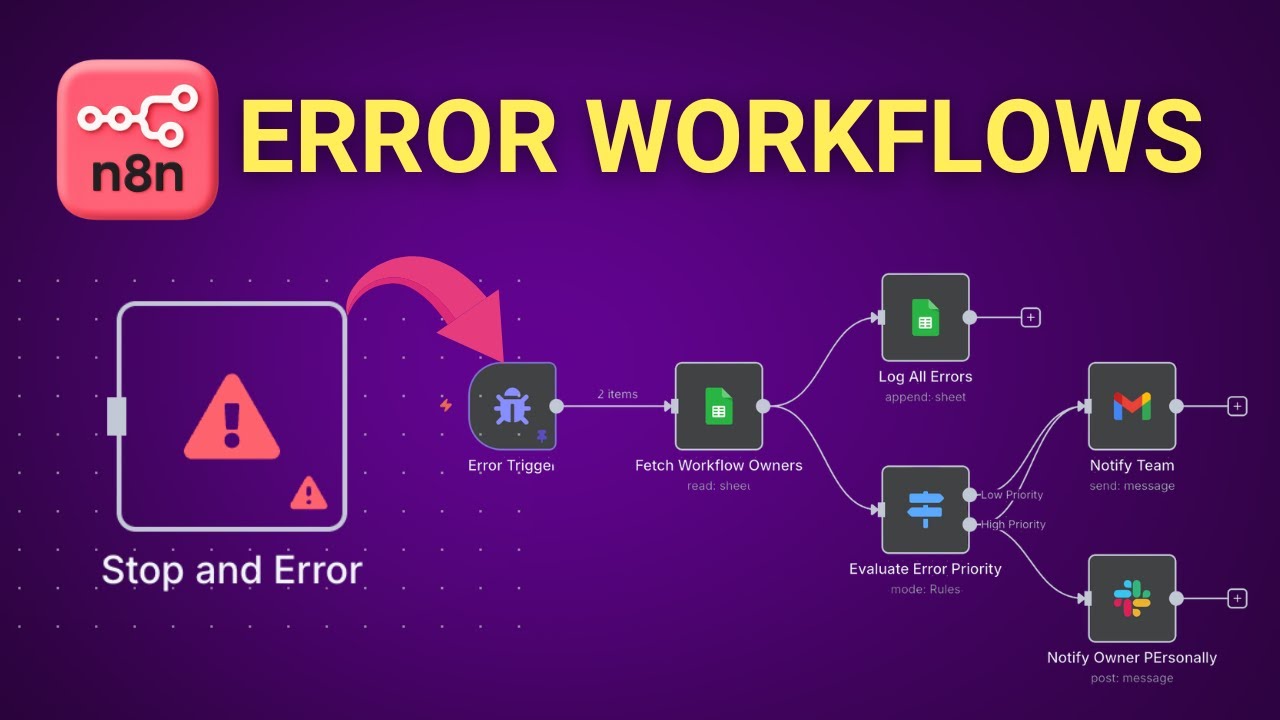
n8n's Error Trigger Node acts as a central nervous system for catching failures across all your workflows. Unlike individual error handlers that only monitor specific nodes, this trigger watches your entire n8n instance, logging every failure with detailed context.
When configured properly, it provides:
- The exact workflow and node where the error occurred
- Full error message and stack trace
- Execution ID and direct link to the failed run
- Timestamp of when the failure happened
At 4:32 in the tutorial video, we demonstrate how to set up the Error Trigger Node with email notifications. The key is configuring it to run continuously in the background, acting as a safety net for all other workflows.
Stop Nodes vs Error Nodes: When to Use Each
n8n provides two powerful tools for proactive error handling: Stop Nodes and Error Nodes. While similar, they serve distinct purposes in your error management strategy.
Stop Nodes immediately halt workflow execution when triggered. Use these when continuing could cause data corruption or duplicate actions - like stopping a payment processing workflow if the customer validation fails.
Error Nodes allow you to intentionally raise custom errors with specific messages. These are perfect for:
- Enforcing business rules (e.g., "Order total exceeds credit limit")
- Validating input data formats
- Creating custom error conditions that external systems don't natively provide
Pro Tip: Combine both nodes with the Error Trigger Node to create a comprehensive error handling system that catches both expected and unexpected failures.
Building a Multi-Channel Alert System
Basic email alerts are better than nothing, but robust error handling requires routing notifications to the right people through their preferred channels. Here's how to build a tiered alert system in n8n:
Step 1: Configure Primary Notification Channels
Set up connections to:
- Email (for detailed error reports)
- Slack/MS Teams (for immediate alerts)
- SMS (for critical after-hours issues)
Step 2: Create an Error Owner Mapping
Maintain a Google Sheet or database table that maps:
- Workflow names to team owners
- Error types to severity levels
- Contact methods for different urgency levels
Step 3: Build Conditional Routing Logic
Use n8n's IF nodes to:
- Route alerts based on error severity
- Escalate unresolved issues after time thresholds
- Suppress duplicate alerts for the same error
At 12:15 in the video, we show how to implement Slack alerts with rich formatting using Block Kit, making error messages instantly actionable for your team.
Implementing Error Severity Levels
Not all errors deserve midnight phone calls. Classify errors into severity tiers to ensure appropriate response:
Error Classification System
- Low: Temporary issues (timeouts, rate limits) that can auto-retry
- Medium: Input validation failures needing manual review
- High: Authentication failures or data corruption risks
- Critical: Revenue-impacting or compliance failures
Implement this in n8n by analyzing error codes or messages with IF nodes, then routing different severity levels to appropriate notification channels. Maintain this classification in a central Google Sheet for consistency across your team.
Error Tracking and Trend Analysis
The true power of error handling comes from tracking failures over time to identify patterns and prevent recurrences. Here's how to implement error analytics in n8n:
Error Logging Workflow
Create a workflow that:
- Captures all errors from the Error Trigger Node
- Logs them to a Google Sheet or database
- Includes timestamp, workflow name, error type, and severity
Trend Analysis
Use this data to:
- Identify frequently failing workflows
- Spot error clusters by time or trigger
- Measure your mean time to detection (MTTD) and resolution (MTTR)
At 22:40 in the tutorial, we demonstrate how to connect your error logs to Data Studio for visualization, helping you spot trends that would otherwise remain hidden in individual alerts.
Testing Your Error Handling System
An untested error handler is as reliable as a smoke detector with dead batteries. Build confidence in your system by intentionally generating test failures:
Test Case Examples
- Force API timeouts with short timeout settings
- Send malformed JSON to trigger parsing errors
- Revoke API credentials to test auth failure handling
- Simulate rate limits with consecutive rapid requests
Schedule monthly fire drills where you intentionally break production workflows (during low-traffic periods) to verify your monitoring catches everything and alerts the right people.
The video at 28:15 shows how to create a dedicated test workflow that generates controlled errors, letting you safely verify your entire error handling chain without impacting real operations.
Watch the Full Tutorial
See these error handling techniques in action with our complete n8n tutorial. At 6:45, we demonstrate how the Error Trigger Node catches failures across workflows, and at 18:30, we build a severity-based alert routing system that ensures critical issues get immediate attention.
Key Takeaways
Silent workflow errors cost businesses an average of $15,000 per incident in lost productivity and customer trust. With n8n's Error Trigger and Stop nodes, you can catch failures before they impact your operations.
In summary: Implement continuous error monitoring, classify errors by severity, route alerts to the right teams, and track errors over time to prevent recurring issues. Test your system regularly to ensure it catches everything it should.
Frequently Asked Questions
Common questions about n8n error handling
Silent errors occur when a workflow appears to complete successfully in the execution logs, but actually failed to deliver the expected results. These are particularly dangerous because they don't trigger standard error notifications.
Common examples include missing data fields, failed API calls that don't return error codes, or validation failures that bypass standard error handling. Silent errors often lead to customer complaints before you realize anything is wrong with your automation.
- Appear successful in logs but produce incorrect results
- Often caused by external system changes or edge cases
- Typically discovered through customer complaints or data audits
The Error Trigger Node acts as a watchdog for your n8n environment. It automatically detects failed executions across all workflows and provides detailed error information including the workflow name, error message, execution ID, and direct link to the failed run.
This node serves as the foundation for building comprehensive error alert systems. You can configure it to trigger notifications via email, Slack, or other channels whenever any workflow in your n8n instance encounters an error.
- Monitors all workflows in your n8n instance
- Provides complete error context for debugging
- Can trigger secondary workflows for alerting and logging
The Stop Node immediately halts workflow execution when triggered, while the Error Node allows you to intentionally raise custom errors with specific messages. Stop Nodes are best for critical failures where continuing could cause data corruption.
Error Nodes are more flexible - you can use them to enforce business rules, validate inputs, or create custom error conditions. Both nodes provide detailed error context that feeds into your monitoring systems.
- Stop Nodes: Emergency brake for critical failures
- Error Nodes: Custom error conditions and validations
- Both integrate with Error Trigger for centralized monitoring
Create a severity classification system using n8n's conditional logic. Low-priority errors might include temporary issues like timeouts that can auto-retry. Medium issues could be invalid inputs needing manual review. High-severity errors like authentication failures should trigger immediate alerts.
Implement this by analyzing error codes or messages with IF nodes, then routing different severity levels to appropriate notification channels. Maintain a Google Sheet or database mapping error types to severity levels for consistent handling.
- Classify errors as Low, Medium, High, or Critical
- Route alerts based on severity thresholds
- Maintain severity mappings in a central reference
Yes, by logging all errors to a Google Sheet or database. Create a workflow that appends each error to a tracking sheet with timestamp, workflow name, error type, and severity. Over time, this data reveals patterns - like certain workflows failing more often or specific error types clustering at particular times.
You can then use this data to prioritize fixes and prevent recurring issues. For advanced analysis, connect your error logs to visualization tools like Looker or Power BI.
- Log all errors with metadata to a central repository
- Identify patterns in failure rates and types
- Connect to BI tools for advanced analytics
Create test workflows that intentionally generate different error types. Force API timeouts by setting very short timeout limits. Send malformed data to trigger validation errors. Temporarily revoke API credentials to test authentication failures.
Verify that each test case properly triggers your alert system and gets categorized correctly by severity. Schedule regular test runs to ensure your error handling remains effective as your workflows evolve.
- Intentionally generate various error types
- Verify alert routing and severity classification
- Conduct regular "fire drills" to test the system
Common silent errors include: API calls that return 200 OK but empty responses, webhook submissions with missing required fields, database queries that return no results when they should, conditional branches that unexpectedly evaluate to false, and data transformations that produce null values.
These often occur when external systems change their behavior without warning. The most dangerous silent errors involve financial transactions or customer communications where failures directly impact business operations.
- Successful API calls with empty/invalid data
- Missing fields in webhook submissions
- Unexpected conditional logic outcomes
GrowwStacks builds bulletproof error handling systems for n8n automation. We implement Error Trigger monitoring, configure multi-channel alerts, design severity classification systems, and set up error tracking dashboards.
Our team will audit your existing workflows for silent error risks and implement safeguards. We provide ongoing monitoring and optimization to ensure your automation remains reliable as it scales. Book a free consultation to discuss your error handling needs.
- Complete error handling system implementation
- Workflow audits for silent error risks
- Ongoing monitoring and optimization
Stop Losing Sleep Over Silent Workflow Failures
Every day your error handling system is incomplete is another day you risk customer trust and revenue. GrowwStacks will implement a bulletproof n8n error monitoring system in under 2 weeks, with real-time alerts that ensure you never miss a critical failure again.