How to Automate Instagram Posts with n8n (0 to 43K Followers in 6 Months)
Most businesses struggle with consistent Instagram posting - creating content, writing captions, and remembering to post daily. This n8n workflow automates everything: it pulls videos from your library, generates AI-powered captions, and posts at optimal times - the exact system that grew an account from 0 to 43,000 followers in just 6 months.
The Problem With Manual Posting
Instagram's algorithm rewards consistency, but most businesses struggle to post daily. Between creating content, writing captions, and remembering to post at optimal times, manual posting becomes overwhelming. The result? Inconsistent posting schedules, missed opportunities, and stagnant follower growth.
This was exactly the challenge faced by the creator of this workflow. Despite having great content ready, the daily task of posting became a bottleneck. The solution? A completely automated system that handles everything from content selection to publishing - freeing up hours each week while dramatically increasing engagement.
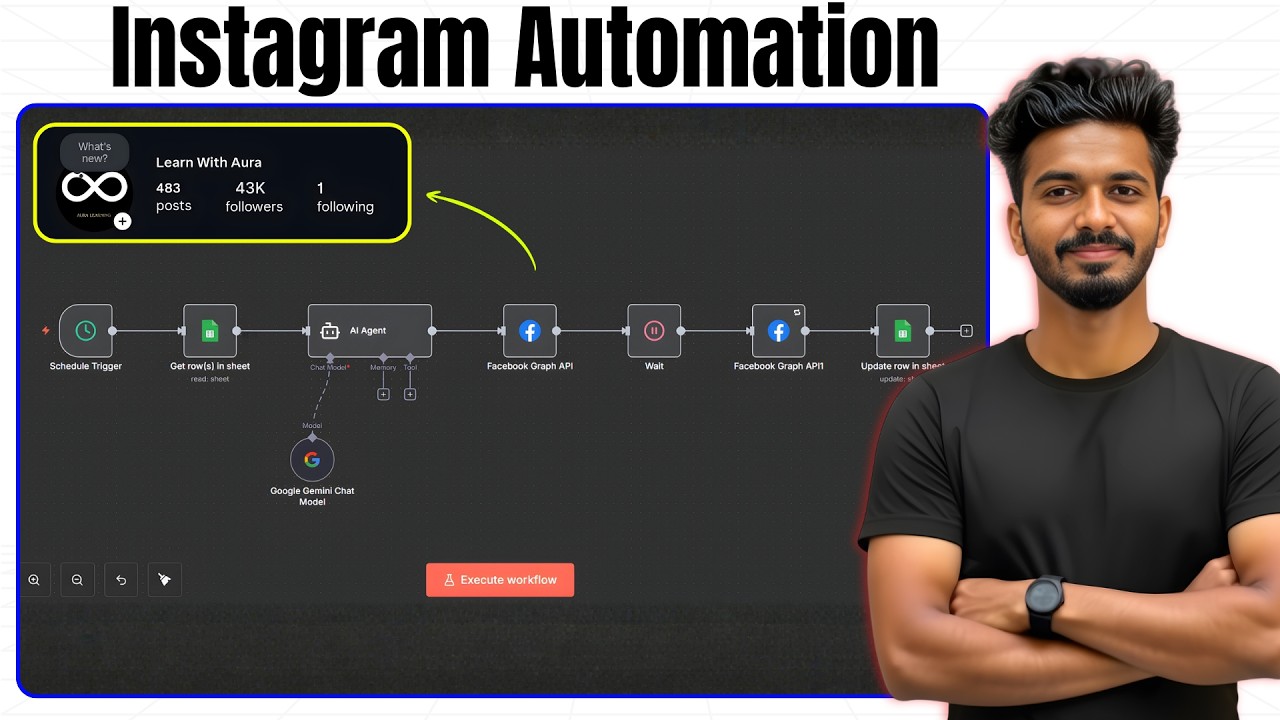
43,000 followers in 6 months: That's the growth achieved by switching from manual posting to this automated system. The workflow posted consistently twice daily, with AI-optimized captions, without any daily effort from the account owner.
Workflow Overview
This n8n workflow automates Instagram posting through six key components that work together seamlessly:
- Schedule Trigger: Sets the posting frequency (daily, weekly, etc.)
- Google Sheets: Stores video metadata and tracks posting status
- AI Agent: Generates SEO-optimized captions with relevant hashtags
- Cloudinary: Hosts videos with consistent naming conventions
- Facebook Graph API: Handles the actual Instagram posting
- Status Updater: Marks videos as posted to prevent duplicates
The entire process runs on autopilot once configured. At the scheduled time, n8n selects the next video, generates a caption, uploads the content, and updates tracking - all without manual intervention.
Setting Up Google Sheets
The Google Sheets setup is simple but critical for the workflow's success. Your sheet needs just three columns:
- File Name: Exact name of your video file (use underscores instead of spaces)
- Outline: One-line description of the video content (used for AI caption generation)
- Status: Blank initially, updates to "posted" after publication
File naming is particularly important. Spaces in filenames can cause issues with the automation, so always use underscores (e.g., "how_to_automate_instagram.mp4"). This ensures smooth integration between your video files, Google Sheets, and the Facebook API.
Configuring the Schedule Trigger
The schedule trigger determines when and how often your content posts. The workflow demonstrated in the video uses two daily triggers:
- 9:00 AM for morning visibility
- 6:10 PM for evening engagement
You can customize this based on your audience's active hours. n8n allows multiple triggers per workflow, meaning you could schedule posts for different times each day or vary posting frequency by day of the week.
Pro Tip: Always double-check your timezone settings in n8n. An incorrect timezone setting can cause posts to publish at unexpected times.
AI Caption Generation
The AI agent transforms your one-line video outline into compelling Instagram captions complete with hashtags. Using Google Gemini (free) or OpenAI, the system:
- Takes your video outline from Google Sheets
- Generates a natural-sounding caption
- Adds two highly relevant hashtags
The AI is instructed to maintain a social media expert creating engaging content. This produces captions that sound human-written while optimizing for Instagram's algorithm.
Video Upload Process
Cloudinary serves as the video hosting platform for this workflow. Key setup steps:
- Create a free Cloudinary account (25GB free storage)
- Set up a dedicated folder for your Instagram videos
- Configure upload settings to preserve original filenames
The workflow dynamically constructs video URLs by combining your Cloudinary account URL with the filename from Google Sheets. This ensures the correct video is always selected for posting.
Facebook Graph API Integration
Posting to Instagram requires connecting through Facebook's API. The process involves:
- Converting your Instagram account to a professional account
- Creating a Facebook page
- Linking your Instagram account to the page
- Generating an access token with the correct permissions
While this setup takes about 15 minutes, it only needs to be done once. The token lasts for 60 days and can be set to never expire.
Error Handling and Retries
The workflow includes robust error handling:
- 60-second wait between creating the post container and uploading
- Automatic retries if the initial upload fails
- Status tracking to prevent duplicate posts
This ensures your content posts reliably even if there are temporary API issues or network delays.
Watch the Full Tutorial
See the complete setup process in action, including how to connect all accounts and test the workflow (demonstrated at 4:30 in the video). The video shows real-time execution from Google Sheets to Instagram publication.
Key Takeaways
This Instagram automation workflow solves three critical problems for businesses: consistency, time savings, and algorithmic favor. By removing manual tasks, you ensure regular posting while freeing up hours each week for content creation and engagement.
In summary: The system that grew an account to 43K followers in 6 months requires just one-time setup, uses entirely free tools, and runs completely on autopilot. It's the ultimate solution for businesses serious about Instagram growth.
Frequently Asked Questions
Common questions about Instagram automation
No, this workflow requires a professional Instagram account connected to a Facebook page. Personal accounts don't have access to the Facebook Graph API needed for automation.
Converting to a professional account takes less than 5 minutes and provides access to valuable analytics and automation tools that aren't available to personal accounts.
- Professional accounts get access to Instagram Insights
- Ability to run ads and promotions
- Access to content scheduling tools
The core components are completely free. n8n offers a generous free tier, Google Sheets is free, and Cloudinary provides 25GB of free storage.
The only potential cost would be if you choose to use OpenAI instead of the free Google Gemini AI for caption generation. The entire setup can indefinitely without spending a dollar.
- n8n free tier supports up to 1000 executions/month
- Cloudinary's free plan includes 25GB storage
- Google Gemini API is currently free to use
The workflow supports all standard Instagram video formats including MP4 and MOV files up to 60 seconds long for Reels. The system automatically handles aspect ratios between 9:16 and 1:1.
For best results, upload videos in 1080p resolution with a frame rate between 24-60fps. The workflow maintains video quality during the transfer process.
- Supports MP4, MOV, and other common formats
- Automatically adjusts aspect ratios
- Maintains HD quality throughout process
The workflow can post up to 25 times per day (Instagram's limit) when configured with multiple schedule triggers. However, for optimal engagement, we recommend starting with 1-2 posts per day.
The example that grew to 43K followers posted once daily at 9:00 AM and again at 6:10 PM for maximum visibility during peak engagement hours.
- Technical limit: 25 posts/day
- Recommended: 1-2 quality posts/day
- Best times vary by audience location
This specific workflow is designed for Instagram feed posts and Reels. However, the same principles can be adapted for Stories by modifying the Facebook Graph API endpoint.
Stories automation requires additional parameters like story duration and interactive elements that would need to be configured in the n8n workflow.
- Current workflow: optimized for feed posts
- Can be modified for Stories
- Requires additional API parameters
The workflow includes built-in error handling with retry logic to accommodate temporary API issues. If Facebook/Instagram makes significant API changes, the workflow would need minor updates.
GrowwStacks maintains updated versions of all template workflows and provides free updates to clients when platform changes occur.
- Built-in retry logic handles temporary issues
- Minor updates may be needed for major API changes
- We provide free workflow updates for clients
Yes, you can manage multiple Instagram accounts by duplicating the Facebook Graph API nodes and using separate access tokens for each account.
The workflow can pull content from a single Google Sheet and distribute it across multiple accounts with unique captions tailored to each audience.
- Supports unlimited accounts
- Uses separate API tokens
- Centralized content management
GrowwStacks specializes in custom social media automation solutions. We'll configure this exact Instagram automation workflow for your business, connect all your accounts, train your team, and provide ongoing support.
Our team handles the technical setup so you can focus on creating great content. Book a free consultation to discuss your Instagram growth goals.
- Full workflow and implementation
- Account connection and testing
- Training and ongoing support
Ready to Automate Your Instagram Like a Pro?
Stop wasting time on manual posting and start growing your audience consistently. Our team will implement this exact automation system for your business, customized to your content and schedule.