NADN Automation Explained: How Trigger Nodes & JSON Structure Power Your Workflows
Most automation platforms feel like black boxes - data goes in, magic happens, results come out. But understanding how trigger nodes initiate workflows and how JSON structures connect services gives you real control over your automations. This tutorial breaks down the fundamental components that make NADN workflows tick.
What Are Trigger Nodes?
Every automation workflow needs a starting point - that's where trigger nodes come in. These specialized components wait for specific events to occur before kicking off your automated process. The form submission node demonstrated in the tutorial is one common example, activating whenever someone submits information through your interface.
Trigger nodes solve the fundamental problem of knowing when to begin processing. Without them, you'd have to manually start every workflow. With trigger nodes, your automations can respond instantly to events like form submissions, scheduled times, incoming emails, or webhook calls - making your systems truly reactive to business needs.
Key insight: The tutorial shows how the on-form submission trigger captures user input as JSON data, which then flows through the rest of the workflow. This pattern - trigger capturing data → processing → output - forms the backbone of most automation scenarios.
The JSON Foundation of Automation
JSON (JavaScript Object Notation) might seem technical, but it's simply a standardized way to structure data that both humans and machines can understand. In NADN automation, every node - including triggers - ultimately works with JSON data structures. This common language allows different services to communicate seamlessly within your workflows.
The tutorial demonstrates this clearly with the form output JSON shown on the right side of the interface. This structured data contains all the information submitted through the form, organized in key-value pairs that subsequent nodes can access and process. When you understand that every piece of data moving through your workflow is JSON-formatted, troubleshooting and building complex automations becomes much easier.
Working With Form Elements
The form elements section in the tutorial reveals how NADN constructs the user interface that collects input data. Each field you define in your form - text inputs, dropdowns, file uploads - translates directly to properties in the resulting JSON structure. This direct mapping between interface and data structure is what makes NADN so powerful for building automation that interacts with users.
While you can manually define each form element, the tutorial mentions a smarter approach: using AI tools to help generate the proper JSON structure. This is particularly helpful when dealing with complex forms or when you're still learning JSON syntax. The key is ensuring your form's JSON structure matches what your workflow and connected services expect to receive.
Making HTTP Calls in Workflows
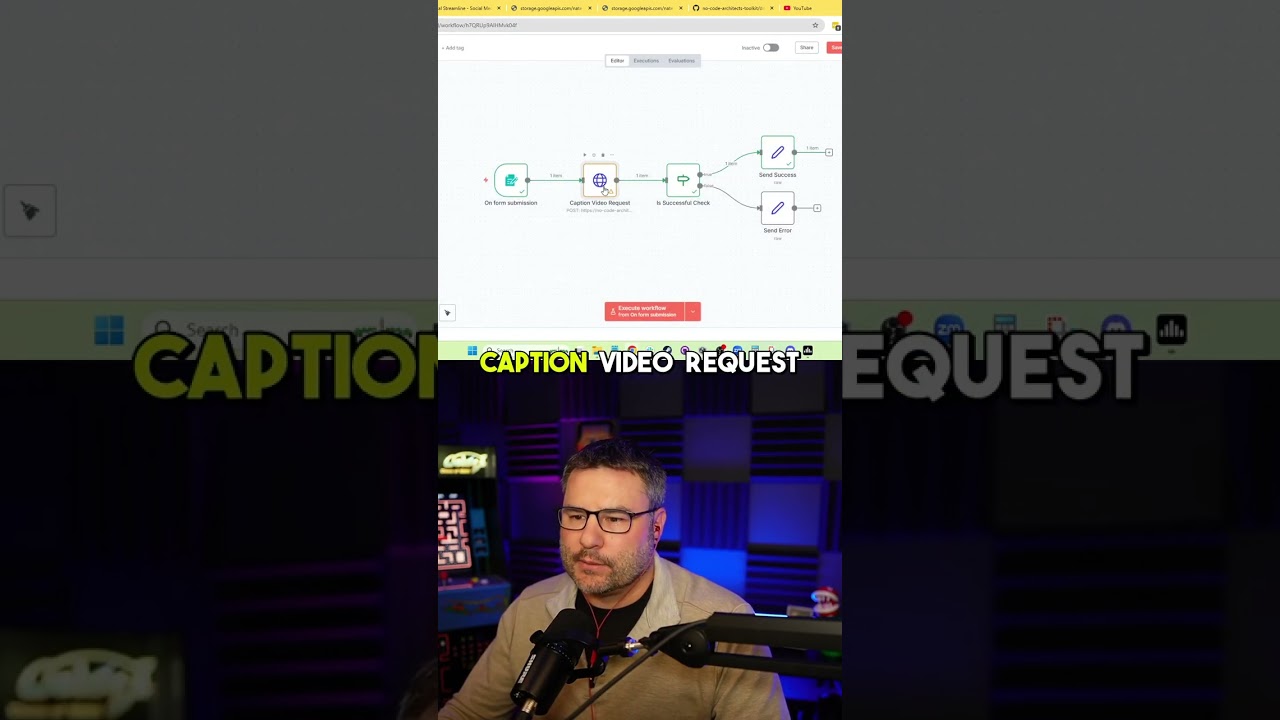
HTTP calls are how your NADN workflows communicate with external services and APIs. The tutorial shows a practical example where the workflow sends a carefully constructed JSON payload to a video captioning service. This payload includes all necessary information (with the API key removed for security in the demonstration) formatted exactly as the external service requires.
Building these HTTP calls involves three key components: the endpoint URL (where to send the request), the request headers (metadata about the request), and the request body (the actual JSON data being sent). Getting these elements right is crucial for successful API integrations, and the tutorial demonstrates how NADN provides clear interfaces for defining each part.
Pro tip: At 1:45 in the video, you can see how the JSON structure for the HTTP call mirrors the form input structure, showing how data flows through the workflow from trigger to final output.
Handling API Responses
After making an HTTP call, your workflow needs to handle the response appropriately. The tutorial demonstrates this with the success check that verifies the HTTP status code falls between 200 and 300 (the range indicating success). This type of response handling ensures your automation can react differently to successful calls versus errors.
The response JSON from the API contains the results of the operation - in this case, information about the captioned video. By inspecting this response data, your workflow can extract relevant information to pass along to the next steps or to end users. The tutorial shows how this data flows to the now data node, ready for further processing or notification.
Future Webhook Integration
While the current workflow ends with the now data node, the tutorial teases an important enhancement coming in a future episode: webhook integration. Webhooks allow your NADN workflows to push data directly to other systems in real-time, creating truly interconnected automation ecosystems.
In the video captioning example, a webhook would let the workflow notify the client application immediately when processing completes, rather than requiring the client to check for updates. This pattern is incredibly powerful for building responsive systems where multiple applications need to stay in sync. The promise of this future capability shows how NADN workflows can grow in sophistication as your automation needs evolve.
Watch the Full Tutorial
This article covers the key concepts from the NADN automation tutorial, but seeing the workflow in action brings everything together. The video demonstrates how the form submission trigger captures data, how that data transforms into an HTTP call, and how the workflow processes the API response - all in just 3 minutes.
Key Takeaways
Understanding trigger nodes and JSON structures transforms automation from magic to manageable. These fundamental components power every NADN workflow, allowing you to build systems that respond to events, process data, and connect services with precision.
In summary: Trigger nodes initiate workflows based on events, JSON structures standardize data flow between services, and HTTP calls connect your automation to powerful external APIs. Mastering these concepts gives you the foundation to build increasingly sophisticated automations.
Frequently Asked Questions
Common questions about this topic
A trigger node is what initiates a workflow in NADN automation. It's the starting point that kicks off your automated process when a specific event occurs, like a form submission.
The on-form submission node shown in the tutorial is one example of a trigger node that activates when someone submits data through your form interface. Different trigger types respond to different events, giving you flexibility in how your automations begin.
- Form submission triggers start workflows when users submit data
- Schedule triggers run workflows at specific times
- Webhook triggers respond to incoming HTTP requests
JSON (JavaScript Object Notation) is the fundamental data structure that powers NADN automation. All nodes in NADN are essentially JSON-defined structures that connect to each other and call various API services.
JSON provides a standardized way to format and transfer data between different services in your automation workflow. This consistency is what allows different platforms and tools to communicate effectively within your NADN workflows.
- Standardized format for data exchange
- Human-readable yet machine-processable
- Supported by virtually all modern APIs and services
HTTP calls in NADN workflows allow your automation to communicate with external services. As shown in the tutorial, you define the endpoint URL and the JSON structure containing your API key and request data.
The service processes this request and returns a response, which your workflow can then check for success (status codes 200-300) before proceeding with the next steps in your automation. This pattern enables integration with countless external services and APIs.
- Define endpoint URL and request method (GET, POST, etc.)
- Structure your request data as JSON
- Handle the response based on status codes and content
Common trigger nodes in NADN include form submission triggers, webhook triggers, schedule triggers, and email triggers. Each type activates your workflow based on different events occurring in your systems.
The tutorial demonstrates how the form submission trigger captures user input to start the video captioning workflow. Other triggers follow similar patterns but respond to different initiating events appropriate for various automation scenarios.
- Form triggers: User submits data
- Webhook triggers: External system calls your endpoint
- Schedule triggers: Specific time occurs
- Email triggers: New message arrives
You check HTTP call success in NADN by examining the status code in the response. As shown in the tutorial, successful calls return status codes between 200 and 300.
Your workflow can include conditional logic to handle successful responses differently from errors, ensuring your automation responds appropriately to different outcomes from external services. This validation step is crucial for building reliable automations.
- 200-299 status codes indicate success
- 400-499 codes indicate client errors
- 500-599 codes indicate server errors
Yes, AI can significantly help with building NADN JSON structures. The tutorial mentions using your favorite AI agent to assist in constructing the proper JSON format.
AI tools can generate sample structures, validate your JSON, and even suggest improvements based on the API documentation of the services you're connecting in your automation workflow. This assistance can dramatically speed up your development process.
- Generate sample JSON from API documentation
- Validate existing JSON structures
- Suggest optimizations for complex data models
After successful completion, workflows typically send their output to another node for further processing or notification. In the tutorial example, the success response goes to a now data node.
Future episodes will cover sending data via webhooks to client applications. This allows end users to receive the workflow results directly in their systems or interfaces, completing the automation loop from trigger to final output delivery.
- Store results in databases
- Send notifications to users
- Trigger additional workflows
GrowwStacks helps businesses implement NADN automation workflows tailored to their specific needs. Our team can design custom trigger nodes, build complex JSON structures for API integrations, and create complete automation systems.
We specialize in connecting disparate business tools through intelligent automation, saving you time on repetitive tasks while ensuring data flows accurately between systems. Our solutions scale as your business grows, adapting to your evolving automation requirements.
- Custom workflow design and implementation
- API integration expertise
- Ongoing support and optimization
Ready to automate your business processes with NADN?
Manual data entry and repetitive tasks cost your business hours every week. Our NADN automation experts can build custom workflows that save you time and reduce errors.