How to Replace ANY Text on a PDF Without Coding (n8n + PDF.co Integration)
Tired of manually editing PDFs every time details change? This no-code workflow automates text replacements in documents using n8n, PDF.co's API, and AI agents. Upload files via Google Drive, request changes through Slack, and let the system handle the rest—no Adobe Acrobat or coding skills required.
The PDF Editing Problem
Every business deals with PDF documents that need frequent updates—contract dates, invoice numbers, or contact details. Manual editing wastes hours each week, requiring specialized software and careful formatting checks. Even worse, distributed teams often end up with multiple document versions floating around email threads.
This workflow solves three core pain points: First, it eliminates manual PDF editing by automating text replacements through API calls. Second, it maintains version control by processing documents through a centralized system. Third, it enables non-technical team members to request changes through simple Slack messages.
Time savings: What typically takes 15-20 minutes per document (downloading, editing, re-uploading) becomes a 30-second Slack request that executes automatically in the background.
Workflow Overview
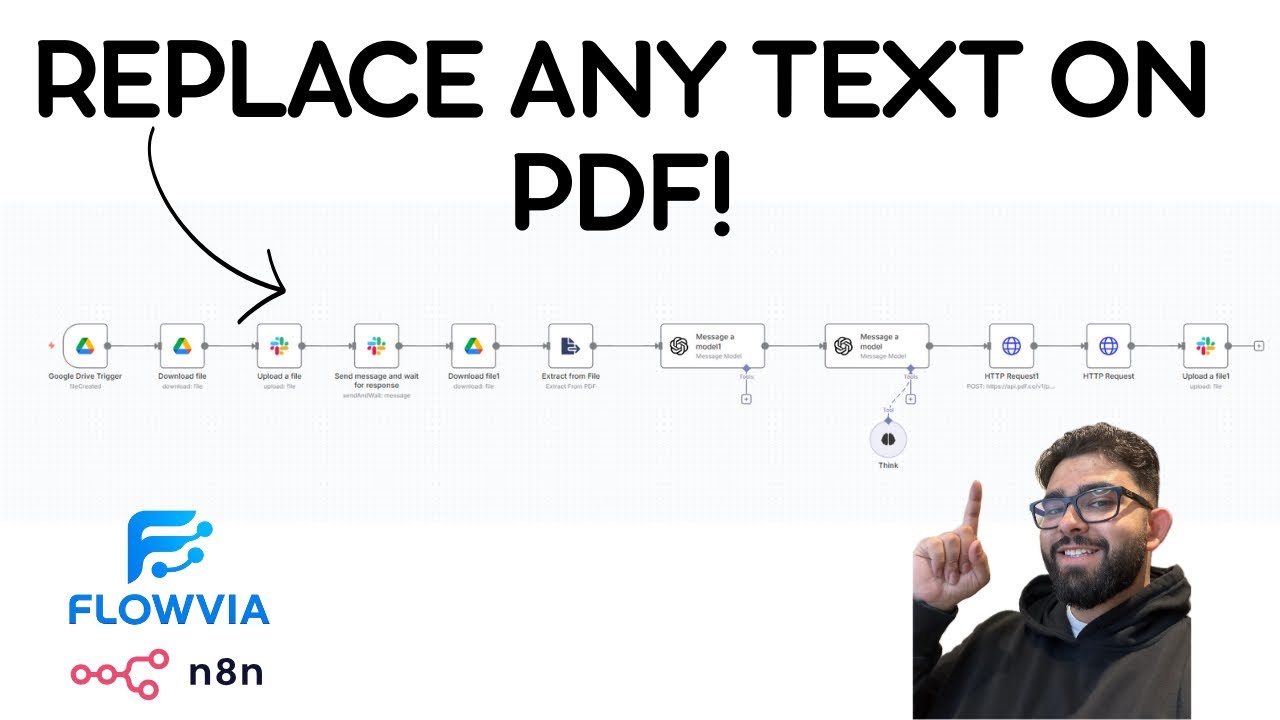
The complete system requires just six main components working together: Google Drive for document storage, Slack for change requests, n8n as the workflow engine, PDF.co's API for text replacement, and two AI agents for processing logic.
Here's how data flows through the system: (1) A user uploads a PDF to a designated Google Drive folder, triggering the workflow. (2) n8n downloads the file and shares it via Slack for review. (3) The requester submits change instructions in natural language. (4) The first AI agent extracts all text and structures the document content. (5) The second AI agent converts change requests into PDF.co's API format. (6) PDF.co processes the edits and returns the updated file. (7) The final document gets shared back via Slack.
Setting Up Google Drive Trigger
The workflow begins when a new PDF arrives in your Google Drive folder. In n8n, configure the Google Drive trigger to watch for file creations in your designated folder (e.g., "Document Editing"). Use the "Watch for file created" event type rather than polling to get instant notifications.
Critical implementation detail: When setting up the file download step, always reference files by their dynamic ID rather than static names. Scroll past the initial folder IDs in n8n's parameter list until you see the actual document name—the ID above it is what you need. This ensures the workflow processes newly uploaded files rather than repeatedly editing the same document.
Slack Integration for Change Requests
After downloading the PDF, the workflow uploads it to a Slack channel using the "Upload a file" node. Configure this to use the binary data property (usually named "data") and target your document processing channel. The key is matching the binary property name to what n8n receives from Google Drive.
For change requests, use Slack's "Send message and wait for response" node configured with free-text input. This creates an interactive message where users can type natural language instructions like "Change PO number to 1234 and sales rep to Trump". The workflow pauses here until receiving the response, ensuring synchronous processing despite the asynchronous nature of Slack.
AI-Powered Text Extraction
The first AI agent receives both the original PDF text (extracted using n8n's "Extract from file" node) and the Slack change request. Configure the OpenAI node with instructions like: "You're an intelligent bot that extracts data from text. Structure the document content and identify which elements need replacement."
Pro tip: Use ChatGPT to generate the JSON schema for your specific document types. Upload a sample PDF to ChatGPT and ask for a suggested JSON structure—this gives you a perfect template to paste into your n8n AI agent configuration. The agent outputs structured data while preserving all original content for the next processing step.
PDF.co API Integration
The second AI agent transforms the structured data into PDF.co's API format. It creates a JSON payload specifying search strings and their replacements using PDF.co's "Search and Replace with Text" endpoint. The payload includes the Google Drive file URL and properly escaped search/replace strings.
Configure the HTTP Request node to call PDF.co's API with: Method=POST, URL=https://api.pdf.co/v1/pdf/edit/replace-text, Content-Type=application/json, and the generated payload in the body. Authentication uses an API key in the x-api-key header. PDF.co returns a URL to download the processed file—use another HTTP Request node to fetch it.
Free tier: PDF.co provides 10,000 free credits—enough for ~300-400 document edits before needing to upgrade.
Testing the Workflow
Test with a sample PDF containing identifiable fields like "PO Number: 9461" and "Sales Rep: Ferris". After uploading to Google Drive, check that Slack receives the file. Submit a change request like "Change PO to 1234 and sales rep to Trump". Within minutes, you should receive the updated PDF with "PO Number: 1234" and "Sales Rep: Trump" while all other content remains unchanged.
For advanced testing, try edge cases: multiple replacements in one request, special characters in text, or fields that span multiple lines. The AI agents handle these gracefully when properly configured with example payloads from PDF.co's documentation.
Watch the Full Tutorial
See the complete workflow in action at 4:32 in the video, where we demonstrate changing both a PO number and sales rep field in under 90 seconds. The tutorial shows how AI agents structure the JSON payload automatically based on natural language requests.
Key Takeaways
This workflow demonstrates how to combine n8n's automation power with specialized APIs like PDF.co to solve real business document challenges. By adding AI agents into the mix, we've created a system that understands natural language requests while maintaining precise technical execution.
In summary: (1) Trigger workflows from Google Drive uploads, (2) Use Slack for human-in-the-loop approvals, (3) Leverage AI to bridge natural language and technical APIs, (4) Process documents through PDF.co's specialized editing endpoints, (5) Maintain version control through centralized automation.
Frequently Asked Questions
Common questions about PDF text replacement automation
This workflow works with any PDF containing editable text, including invoices, contracts, reports, and forms. The system extracts text content using PDF.co's API and replaces specified strings while maintaining the original document formatting.
It's particularly effective for documents with consistent field names like PO numbers, dates, or contact information. Scanned PDFs (image-based) require OCR preprocessing which PDF.co also supports through separate endpoints.
- Works with text-based PDFs (not scanned images)
- Maintains original formatting and layout
- Ideal for documents with labeled fields
No coding is required. The workflow uses n8n's visual interface and pre-built nodes for Google Drive, Slack, and PDF.co integration. AI agents handle the JSON payload generation automatically based on natural language requests.
The most technical step involves configuring API authentication headers for PDF.co, which follows standard documentation. Our team provides pre-configured workflow templates that only require adding your API keys and Slack/Google credentials.
- Visual workflow builder requires no coding
- AI agents handle technical JSON formatting
- Basic API key configuration is the most technical step
PDF.co provides 10,000 free credits initially, which translates to approximately 300-400 document edits depending on file size and complexity. Their pricing model charges about 30 credits per text replacement operation.
For high-volume needs, paid plans start at $29/month for 50,000 credits. Enterprise plans with unlimited processing are available for organizations processing thousands of documents monthly.
- 10,000 free credits on signup
- ~30 credits per text replacement
- Scalable paid plans available
Yes, the workflow can be adapted for Telegram, Microsoft Teams, or email approvals. The key requirement is having a messaging platform that integrates with n8n. Slack is shown in this example because of its robust API and interactive message components.
For email-based approvals, you would use n8n's email trigger to watch for replies containing change instructions. The AI agents would then parse these emails similarly to how they process Slack messages in the current workflow.
- Microsoft Teams integration available
- Telegram bot alternative
- Email-based approval flows possible
The workflow includes error handling that notifies requesters via Slack if specified text strings aren't found in the document. The AI agent can suggest alternative phrasing or similar text matches from the extracted content.
Failed replacements don't consume PDF.co credits, and the original document remains unchanged. The system logs all failed attempts with timestamps and requested changes for audit purposes.
- Automatic requester notifications
- Alternative text suggestions
- No charges for failed replacements
PDF.co processes files via encrypted API calls and doesn't store documents permanently. For HIPAA or compliance-sensitive materials, we recommend adding a step to redact sensitive information before processing.
All Slack communications can be configured to use your organization's private channels. Enterprise customers can use PDF.co's on-premise solution for complete data control without cloud processing.
- End-to-end encryption
- Optional on-premise deployment
- Automatic document deletion after processing
Yes, the AI agent structures JSON payloads to process unlimited text replacements in a single operation. During testing, we successfully processed documents with 47 distinct text replacements in under 90 seconds.
The system maintains an audit trail of all changes made to each document version. Bulk replacements are particularly efficient since they only require one API call to PDF.co rather than multiple sequential operations.
- Unlimited replacements per document
- Single API call for bulk changes
- Complete change history tracking
GrowwStacks specializes in custom n8n workflow implementations for document processing automation. We'll configure this PDF replacement system to match your specific document types, approval workflows, and security requirements.
Our team handles the entire setup including API integrations, error handling, and user training—typically delivering complete solutions in 2-3 weeks. We provide ongoing support and can scale the system as your document processing needs grow.
- Custom workflow design
- End-to-end implementation
- Ongoing support and scaling
Automate Your PDF Workflows Today
Stop wasting time manually editing documents. Let GrowwStacks build this exact PDF automation system for your business—customized to your document types and approval processes.