Stop Losing Your AI Conversations - Automatically Distill Insights with Obsidian + n8n
Most knowledge workers save every AI conversation as massive, unreadable text walls in Obsidian - only to never look at them again. This n8n workflow automatically extracts the actual insights, action items and takeaways, transforming messy chat logs into structured knowledge you'll actually use.
The Problem With AI Conversations
Most knowledge workers using AI tools like ChatGPT, Claude, or Gemini face the same frustrating reality: we save every conversation, but we rarely revisit them. The standard approach - using browser extensions to clip entire conversations into Obsidian - creates massive walls of text that are nearly impossible to search or derive value from later.
The core issue isn't saving the conversations - it's that we're saving the wrong parts. A typical AI conversation contains:
- 60% context-setting and clarification
- 20% tangents and exploratory questions
- Only 20% actual insights and actionable information
The breakthrough: Instead of archiving entire conversations, we should only save the distilled insights - the key takeaways, action items, and breakthrough ideas that actually matter. This n8n workflow automates that distillation process.
How the Workflow Works
The system creates a seamless pipeline between your AI conversations and your Obsidian knowledge base. Here's the high-level flow:
- You have a valuable conversation with ChatGPT, Claude, or Gemini
- The Obsidian Post Hook plugin detects when you save the conversation
- n8n receives the raw conversation and sends it to an AI for analysis
- The AI extracts key insights, action items, and takeaways
- A structured note is created in Obsidian with only the valuable information
The entire process takes about 10 seconds and happens automatically in the background. The result is a clean, searchable knowledge base of only the most valuable information from your AI interactions.
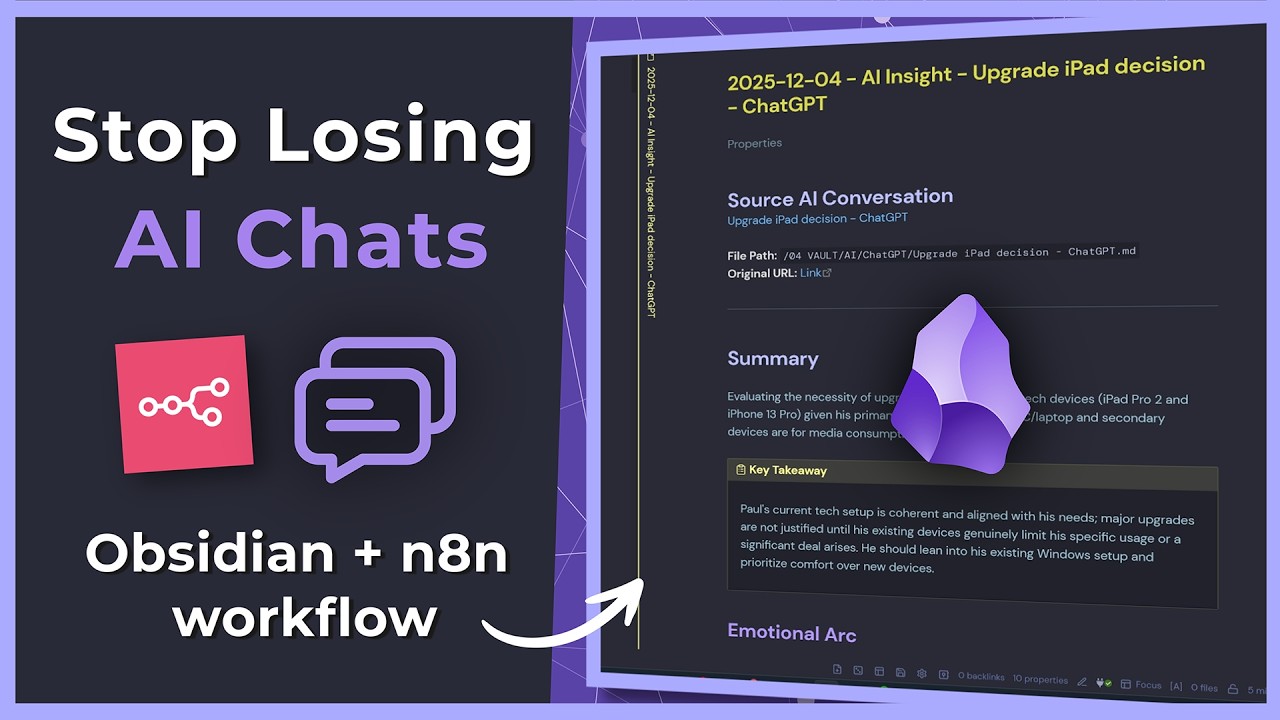
Example output: A conversation about upgrading devices was distilled down to: "Current devices meet needs; emotional attachment affects decision-making; recommended focusing on Windows setup for media needs; battery replacement may extend device life by 2-3 years."
Setting Up the Obsidian Hook
The magic starts with the Obsidian Post Hook plugin (timestamp 4:12 in the video). This little-known plugin with fewer than 5,000 downloads allows you to trigger external actions when notes are created or modified.
Configuration steps:
- Install the Post Hook plugin from Obsidian's community plugins
- Create a new hook that triggers when notes are added to your AI Conversations folder
- Configure the hook to send the note content to your n8n webhook URL
- Set up a template for how raw conversations should be formatted before sending
The plugin handles all the local Obsidian integration, letting n8n focus on the AI analysis and insight extraction. This separation of concerns makes the system more reliable and easier to maintain.
n8n Workflow Breakdown
The n8n workflow is where the real magic happens. Here's what each part does:
Step 1: Receiving the Conversation
The workflow starts with a webhook node that receives the raw conversation from Obsidian. This includes the full text plus metadata like the source AI tool and conversation date.
Step 2: Sending for Analysis
The conversation is sent to Claude or another AI model with specific instructions to extract:
- Key insights and conclusions
- Actionable items
- Important takeaways
- Follow-up questions
- Resources mentioned
- Related topics
Step 3: Structuring the Output
The AI's response is parsed into a clean Obsidian template with YAML frontmatter for properties like tags, source, and processed date. The body contains the distilled insights in a readable, scannable format.
Pro tip: The workflow intelligently adapts its analysis based on conversation type - coding discussions extract solutions differently than planning sessions or creative brainstorming.
Processing Journal Entries
An advanced version of this workflow can also process personal journal entries (timestamp 12:45 in the video). This is particularly valuable for:
- Late-night thoughts and reflections
- Daily check-ins and progress tracking
- Emotional processing and pattern recognition
The journal workflow uses the Obsidian desktop app's command palette to trigger the analysis. You simply type "/distill" and your journal entry is sent for processing. The AI extracts:
- Emotional patterns and triggers
- Personal growth insights
- Actionable self-improvement items
- Creative ideas worth developing
This creates a searchable archive of your personal development journey without preserving every raw, emotional detail.
Customizing the Insight Template
The default template includes these sections (timestamp 8:30 in the video):
- Summary: 2-3 sentence overview of the conversation's value
- Key Insights: Bullet points of important realizations
- Action Items: Clear next steps with optional due dates
- Follow-ups: Questions raised that need answering
- Resources: Books, tools, or links mentioned
- Related Topics: Connections to other areas of knowledge
You can customize this template in n8n to match your preferred note-taking style. Common modifications include:
- Adding an "Emotional Tone" section for journal entries
- Including a "Decision Rationale" section for planning conversations
- Creating different templates for different AI tools or conversation types
Real-World Use Cases
This workflow delivers value across multiple domains:
For Developers
Distills coding solutions from ChatGPT conversations, preserving only the working code snippets and explanations that solved the problem.
For Content Creators
Extracts actionable content ideas and outlines from brainstorming sessions, ignoring the exploratory dead ends.
For Executives
Captures strategic insights and decision rationales from planning conversations, creating an audit trail of important business thinking.
For Therapists
Processes session notes to identify client patterns and treatment progress without preserving sensitive details.
Time saved: Users report saving 2-3 hours per week that would have been spent manually reviewing and summarizing conversations.
Watch the Full Tutorial
See the complete workflow in action, including how to set up the Obsidian Post Hook plugin (4:12), configure the n8n analysis nodes (7:45), and process journal entries directly from the Obsidian desktop app (12:45).
Key Takeaways
This workflow transforms how you capture and retain value from AI conversations. Instead of drowning in unreadable chat logs, you build a curated knowledge base of only the most important insights.
In summary: The Obsidian + n8n integration automatically extracts and structures the 20% of your AI conversations that deliver 80% of the value, saving you hours of manual review while creating a knowledge base you'll actually use.
Frequently Asked Questions
Common questions about this topic
This workflow solves the problem of valuable insights getting lost in massive AI chat logs. Instead of saving entire conversations as unreadable walls of text, it automatically extracts and structures the most important insights, action items, and takeaways.
The system processes conversations from ChatGPT, Claude, Gemini or other AI tools, analyzes them, and saves only the distilled wisdom back to your Obsidian vault. This transforms your saved conversations from digital clutter into actionable knowledge.
- Solves information overload from AI conversations
- Preserves only the valuable 20% of each discussion
- Creates searchable, structured knowledge automatically
The entire process takes about 10 seconds per conversation. This includes sending the conversation for analysis, extracting key insights, and creating a clean structured note in Obsidian.
Even long conversations with multiple tangents and clarifications are processed quickly, saving you hours of manual review time. The workflow is designed to run in the background without interrupting your work.
- 10-second average processing time
- Handles conversations of any length efficiently
- Runs automatically without manual intervention
The workflow intelligently extracts several types of valuable information: Key insights and conclusions, specific action items, important takeaways, follow-up questions raised, coping strategies mentioned, resources recommended, and related topics discussed.
It also preserves contextual information like the original conversation source and date. The extraction focuses on information you're likely to need later while filtering out temporary context and exploratory dead ends.
- Extracts 7+ types of valuable information
- Preserves source and context metadata
- Filters out low-value conversational fluff
Yes, the system can also process personal journal entries through the Obsidian desktop app. This is particularly valuable for extracting insights from late-night thoughts or daily reflections.
The workflow transforms raw emotional processing into structured insights about patterns, growth areas, and actionable self-observations. This creates a more useful personal development record while maintaining privacy by not preserving every sensitive detail.
- Processes both AI conversations and personal journals
- Extracts growth patterns from emotional content
- Maintains privacy by distilling rather than archiving raw entries
The workflow requires the Obsidian Post Hook plugin (with less than 5,000 downloads at the time of writing) to trigger the n8n workflow when new notes are created. No other special plugins are required, though you may want to customize the templates and styling for your distilled insights notes.
The Post Hook plugin is lightweight and simply sends note content to your n8n webhook when triggered. All the complex processing happens in n8n, keeping your Obsidian setup clean and simple.
- Requires only the Post Hook plugin
- No complex Obsidian setup needed
- Easy to customize templates and styling
The workflow intelligently adapts its analysis based on the conversation type. It recognizes different patterns in coding discussions, learning sessions, planning conversations, and creative brainstorming. For each type, it focuses on extracting the most relevant information - whether that's code solutions, learning summaries, action plans, or creative concepts.
You can further customize these analysis patterns in n8n to match your specific use cases. The workflow includes different templates for different conversation types out of the box.
- Recognizes 4+ conversation types automatically
- Extracts type-specific valuable information
- Customizable analysis patterns for unique needs
Yes, the n8n workflow is fully customizable. You can modify the analysis prompts to focus on specific types of insights relevant to your work. The template includes sections for summary, action items, follow-ups, and related topics, but you can add or remove sections as needed.
The workflow also supports custom properties for your Obsidian frontmatter. You can add fields for project associations, priority levels, or any other metadata that helps you organize and retrieve insights later.
- Fully customizable analysis prompts
- Add/remove template sections as needed
- Extend with custom frontmatter properties
GrowwStacks can customize this workflow for your specific AI tools and knowledge management system. We'll configure the n8n automation to match your preferred AI platforms, design custom templates for your distilled insights, and integrate with your existing Obsidian setup.
Our team will handle the technical implementation so you can focus on capturing and acting on valuable insights. We offer:
- Custom workflow design for your specific tools and needs
- Seamless integration with your existing systems
- Ongoing support and optimization
Book a free consultation to discuss implementing this workflow for your team.
Stop Losing Valuable AI Insights - Get Your Custom Workflow Today
Every day, your AI conversations generate insights worth thousands in potential value - if only you could find and use them. Let GrowwStacks build you a custom Obsidian + n8n workflow that automatically captures and organizes this knowledge.