How to Sync LinkedIn Messages to Clarify CRM with Zapier & Kondo
Lost track of important LinkedIn conversations buried in your inbox? This Zapier integration automatically syncs every message to Clarify CRM - complete with contact details, company info, and full conversation history. Never miss a follow-up again.
The LinkedIn CRM Problem
Most sales teams and founders waste hours each week manually copying LinkedIn messages into their CRM. Important conversations get buried in your inbox, follow-ups slip through the cracks, and you have no centralized record of your outreach history.
The challenge is compounded because LinkedIn doesn't provide email addresses for most connections. Without this critical information, it's impossible to properly track relationships in your CRM or connect conversations to the right company records.
83% of sales professionals say they lose track of important LinkedIn conversations because they don't have a system to automatically log them in their CRM.
How the Integration Works
This Zapier workflow solves the LinkedIn-CRM disconnect by combining Kondo's LinkedIn integration with Clarify's flexible API. Here's the complete flow:
- Kondo captures LinkedIn messages and sends them to Zapier via webhook
- Zapier looks up contact details using Apollo.io (or another data provider)
- The system structures the data using GPT for consistent formatting
- Zapier creates a complete contact record in Clarify CRM
- The conversation history is added as an activity comment
- The contact is added to a designated list for easy filtering
The entire process happens automatically whenever you receive or send a LinkedIn message (or manually when you choose specific conversations to sync).
Setting Up the Kondo Webhook
Kondo acts as the bridge between LinkedIn and your automation workflow. At 1:45 in the video, you can see the exact webhook configuration:
- Navigate to Kondo's webhook settings
- Create a new webhook for "Clarify Message Sync"
- Set the trigger type based on your preference (manual or streaming)
- Enter your Zapier webhook URL
- Configure the body data to include message content and sender details
Manual vs. Streaming: Manual sync gives you control by requiring a button click to transfer messages. Streaming automatically syncs every new message - great for comprehensive history but may create more CRM records than you need.
Configuring Zapier Steps
The Zapier workflow contains several critical steps to transform raw LinkedIn messages into structured CRM data:
Step 1: Capture the Webhook
Set up a Zapier webhook trigger to receive data from Kondo. This captures the LinkedIn message content, sender information, and conversation history.
Step 2: Look Up Contact Details
Since LinkedIn rarely provides email addresses, the workflow makes an API call to Apollo.io (or another data provider) to enrich the contact record. At 3:12 in the video, you can see the exact Apollo request configuration.
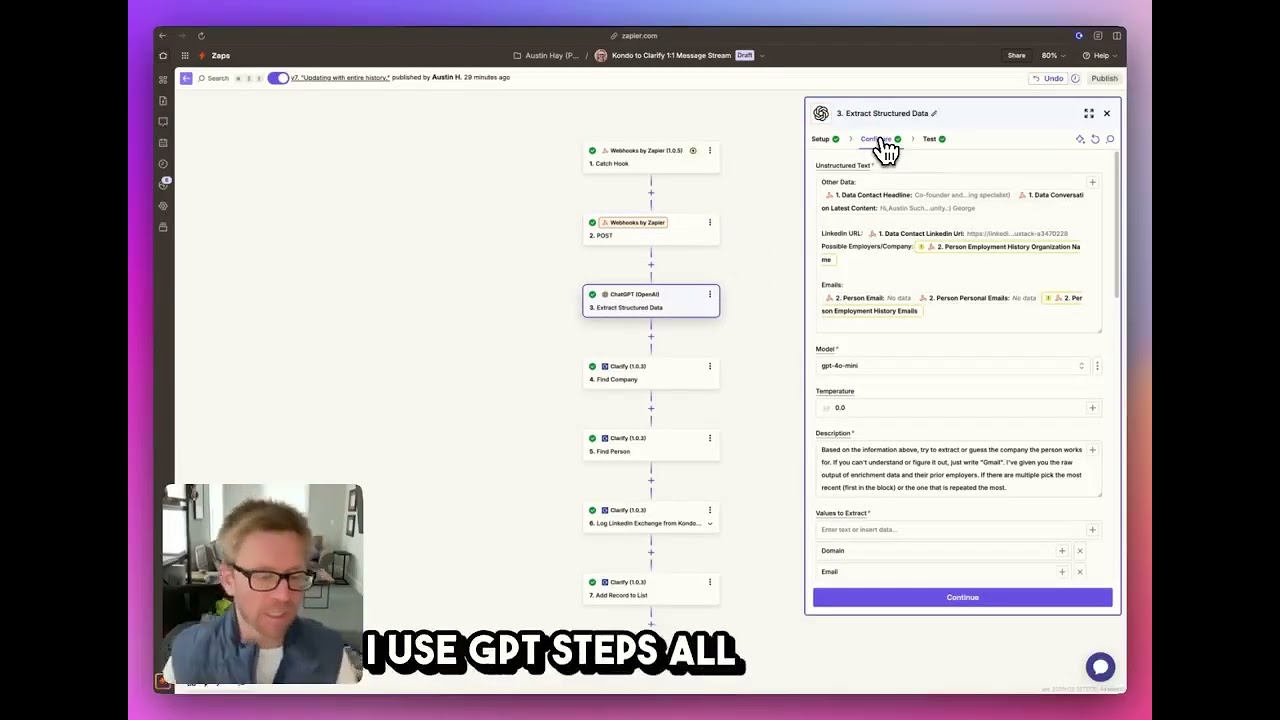
Step 3: Structure Data with GPT
A GPT step extracts key information like company name, domain, and likely email pattern from the available data. This ensures consistent formatting before creating the CRM record.
Enriching Contact Data
The most valuable part of this integration is how it transforms sparse LinkedIn data into complete CRM records. Here's what gets added automatically:
- Contact Information: Name, LinkedIn profile URL, and (when available) email address
- Company Details: Company name and domain extracted from the LinkedIn profile
- Conversation History: Complete message thread with timestamps
- Context: Notes about where/how you connected (useful for follow-ups)
At 4:30 in the video, you can see how GPT helps structure this information even when some fields are missing from the original LinkedIn data.
Creating Clarify Records
With enriched contact data, the workflow creates complete records in Clarify CRM:
- First, it checks if the contact already exists to avoid duplicates
- If new, it creates a person record with all available details
- It associates the contact with the correct company (creating it if necessary)
- Finally, it adds the LinkedIn conversation as an activity comment
This creates a complete timeline of your interactions right within the contact record - no more digging through LinkedIn to remember what you discussed.
Organizing with Lists
The final step adds each synced contact to a designated list in Clarify (like "LinkedIn Outreach - "). This provides several benefits:
- Easy Filtering: Quickly find all contacts sourced from LinkedIn
- Campaign Tracking: Group contacts by specific outreach initiatives
- Follow-up Management: Create targeted sequences for LinkedIn connections
At 5:50 in the video, you can see how lists make it simple to manage hundreds of LinkedIn-sourced contacts without losing track of important relationships.
Watch the Full Tutorial
See the complete integration in action from start to finish. The video walks through each configuration step in Kondo, Zapier, and Clarify - including how to handle edge cases when contact information isn't available.
Key Takeaways
This integration solves one of the biggest pain points for sales professionals - keeping track of important LinkedIn conversations. By automatically syncing messages to Clarify CRM, you gain:
- Complete visibility into your LinkedIn outreach history
- Structured contact records with enriched data
- Time savings from eliminating manual data entry
- Better follow-up consistency with all context in one place
In summary: This Zapier workflow turns scattered LinkedIn conversations into organized CRM records automatically - saving hours per week while improving relationship tracking.
Frequently Asked Questions
Common questions about this topic
Syncing LinkedIn messages to Clarify CRM eliminates manual data entry and ensures all your conversations are organized in one place. This gives you complete visibility into your LinkedIn outreach history and makes it easy to track conversations with prospects.
The integration automatically creates CRM records with message history, company information, and contact details when available. This transforms scattered LinkedIn conversations into actionable CRM data that your whole team can reference.
- Saves 5+ hours per week on manual data entry
- Creates complete contact records with conversation context
- Makes follow-ups more consistent with all history visible
Yes, the same Zapier workflow can be adapted to work with other CRMs like HubSpot, Salesforce, or Pipedrive. The key components are Kondo for capturing LinkedIn messages and Zapier for connecting to your CRM.
The exact steps would vary based on your CRM's API and field structure. Some CRMs may require additional data transformation steps to match their expected input formats.
- Works with any CRM that has a Zapier integration
- May require adjustments to field mappings
- Similar benefits for tracking LinkedIn conversations
The workflow includes a step to look up contact information using Apollo.io when LinkedIn doesn't provide an email address. Apollo can often find professional email addresses based on the person's name and company.
If you don't have Apollo, you could substitute with another data provider or use GPT to extract likely email patterns from available information. The system will still create CRM records with LinkedIn profile links even when email isn't available.
- Uses Apollo.io to find missing emails
- Fallback to LinkedIn profile URLs when email isn't found
- Still creates complete CRM records regardless
Manual sync requires clicking a button to transfer messages to your CRM, giving you control over which conversations get logged. This is ideal when you only want to sync important conversations rather than every message.
Streaming mode automatically syncs every new LinkedIn message in real-time. This works best for comprehensive conversation history but may create more CRM records than you actually need for sales tracking.
- Manual: Selective control with button click
- Streaming: Automatic real-time sync
- Choose based on your workflow needs
The workflow extracts company names from LinkedIn profiles and matches them to existing company records in Clarify CRM. It uses GPT to clean and standardize company names for accurate matching.
When available, it also captures website domains to ensure proper company identification. This maintains clean data relationships between contacts and their organizations in your CRM.
- Standardizes company names for clean matching
- Captures domains when available
- Links contacts to correct company records
Yes, the Zapier workflow includes a final step to add contacts to static lists in Clarify. This lets you categorize contacts by source (like LinkedIn outreach) or campaign for easy filtering later.
You could also modify the workflow to add contacts to dynamic lists based on criteria like company industry, message content, or other attributes extracted from the LinkedIn data.
- Adds to static lists by default
- Can be configured for dynamic lists
- Great for organizing by campaign or source
The email lookup success rate depends on your data provider. Apollo.io typically finds valid emails for 60-80% of LinkedIn profiles when configured correctly, especially for people who list their current company.
The system is designed to gracefully handle cases where email isn't found by still creating complete CRM records with the available information. You'll always have the LinkedIn profile URL as a fallback contact method.
- 60-80% success rate with Apollo
- Degrades gracefully when email isn't found
- Maintains LinkedIn profile as contact method
GrowwStacks specializes in building custom CRM integrations like this LinkedIn-to-Clarify sync. We handle the complete setup so you can start syncing conversations immediately.
Our team will configure the Kondo connection, build the Zapier workflow, set up data enrichment, and ensure reliable sync to Clarify CRM. We can also customize the integration to match your specific sales workflow and data requirements.
- Complete technical implementation handled for you
- Customized to your specific CRM and workflow
- Ongoing support and optimization
Stop Losing Track of Important LinkedIn Conversations
Every day you don't automate this process, you're losing valuable relationship data and wasting time on manual data entry. Let GrowwStacks build this LinkedIn-to-CRM sync for you - fully configured and ready to use in 48 hours.