Turn Telegram into Your Personal AI Assistant with n8n & Gemini
Imagine having an AI assistant in your pocket that understands both text and voice messages, references your business documents, and provides intelligent responses - all through Telegram. This n8n workflow combines messaging convenience with powerful AI capabilities, eliminating the need for multiple apps and manual lookups.
How the Telegram AI Assistant Works
Most business owners struggle with information overload - important documents get buried in Google Drive, customer inquiries come through multiple channels, and responding to everything manually eats up valuable time. This n8n workflow solves these problems by creating a unified AI assistant that lives in Telegram, the messaging app you already use daily.
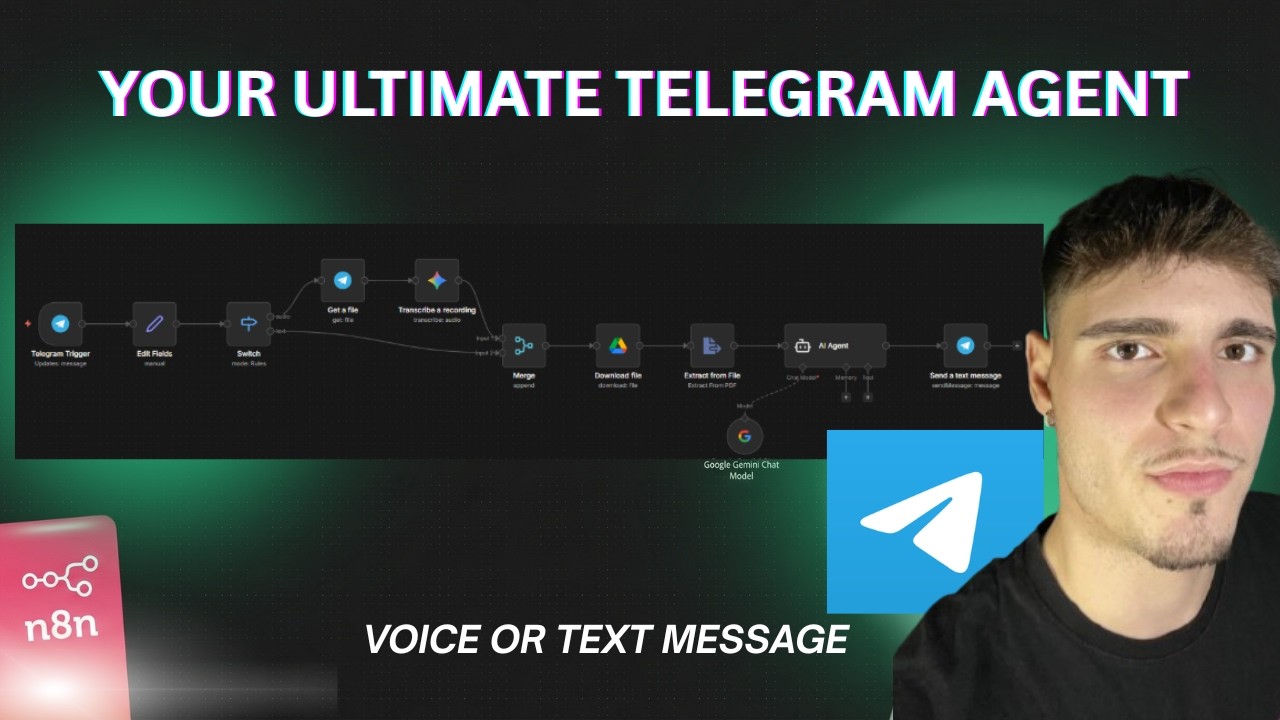
The system follows a clear logic flow: When a message arrives (text or voice), it's routed appropriately. Voice messages get transcribed, then both text and transcribed content are sent to Gemini AI along with relevant documents from Google Drive. The AI generates a response based strictly on the provided materials, ensuring accurate, document-specific answers.
Key benefit: This creates a 24/7 AI assistant that gives consistent, documented answers to common questions - perfect for customer support, employee onboarding, or personal knowledge management.
Setting Up the Telegram Bot
The foundation of our AI assistant is a Telegram bot that receives and responds to messages. Creating this bot takes just minutes through Telegram's BotFather interface. You'll get an API token that connects your n8n workflow to Telegram's messaging system.
In n8n, we use the Telegram trigger node to detect incoming messages. The critical configuration is enabling "download images or files" - this allows the workflow to receive and process voice messages. We also clean up the incoming data to focus only on the message content, making the workflow easier to maintain.
Pro tip: Name your bot descriptively (like "AcmeSupportBot") and give it a clear profile picture - this builds trust with users who will interact with your AI assistant.
Handling Text vs. Voice Messages
One of the most powerful features of this system is its ability to handle both text and voice messages seamlessly. Many automation solutions force users to adapt to the system's limitations, but this workflow adapts to how users naturally communicate.
The n8n switch node routes messages differently based on their type. Text messages go straight to the AI processing stage, while voice messages first pass through Gemini's speech-to-text transcription. This happens automatically - users don't need to specify whether they're sending text or voice, making the assistant more intuitive to use.
Integrating Gemini AI
Google's Gemini AI powers both the speech-to-text transcription and the intelligent responses in this workflow. The free tier of Gemini provides more than enough capacity for most small business use cases, making this an affordable AI solution.
For voice messages, we use Gemini's audio transcription capability. The binary audio file from Telegram is sent directly to Gemini, which returns accurate text transcription. For the response generation, we configure Gemini with strict instructions to only answer based on the provided documents - this prevents hallucinations and ensures accurate information.
Implementation note: The system prompt is where you define the AI's personality and limitations. A well-crafted prompt like "Act as a document-specific assistant" ensures reliable, on-brand responses.
Connecting Google Drive Documents
The real magic happens when the AI can reference your actual business documents. This workflow connects to Google Drive to access PDFs, Word files, or other documents that contain the information your assistant needs to reference.
n8n's Google Drive node downloads the specified file, then extracts the text content. This text becomes part of the context sent to Gemini AI, allowing it to provide answers based on your specific documents rather than general knowledge. For businesses, this means accurate answers from your SOPs, product manuals, or policy documents.
Building the AI Response System
The heart of the workflow is the AI agent that generates responses. This isn't just a simple chatbot - it's a document-specific assistant that combines the user's question with your reference materials to produce accurate, useful answers.
The agent node in n8n brings together several components: the user's message (original text or transcribed voice), the extracted document text, and the system instructions that guide how Gemini should respond. The agent handles the complex AI interaction behind the scenes, returning a clean response that gets sent back to Telegram.
Testing and Publishing the Workflow
Before going live, it's crucial to test all message paths - text, voice, and various document queries. n8n's execution viewer lets you inspect exactly what happens at each step, making debugging straightforward.
Once tested, publishing the workflow makes it live - the Telegram bot will now automatically process all incoming messages. The workflow continues running in the background, requiring no manual intervention unless you need to update documents or modify the AI's instructions.
Scalability: This same workflow can support thousands of users simultaneously, making it suitable for businesses of any size. The only limit is your n8n instance's capacity.
Watch the Full Tutorial
See the complete workflow in action, including the crucial BotFather setup at 3:15 and the Gemini API configuration at 7:40. The video demonstrates both text and voice message processing, showing exactly how the AI generates document-specific responses.
Key Takeaways
This Telegram AI assistant workflow demonstrates how n8n can transform everyday tools into powerful business solutions. By combining Telegram's accessibility with Gemini's AI capabilities and your business documents, you create a 24/7 assistant that improves customer service and internal knowledge sharing.
In summary: 1) Create a Telegram bot via BotFather 2) Set up n8n to handle text/voice messages differently 3) Integrate Gemini for transcription and responses 4) Connect Google Drive for document reference 5) Configure the AI agent with strict document-based response rules 6) Test thoroughly before publishing.
Frequently Asked Questions
Common questions about this topic
This automated Telegram assistant can handle both text and voice messages, transcribe voice notes, reference documents from Google Drive, and provide intelligent responses using Gemini AI.
It acts as a document-specific assistant that only answers based on the provided reference materials, ensuring accurate information delivery without hallucinations or off-topic responses.
- Processes both text and voice messages seamlessly
- References your specific business documents
- Provides consistent, documented answers 24/7
No coding is required. The entire workflow is built visually using n8n's drag-and-drop interface.
You'll need basic technical skills to connect the services (Telegram, Google Drive, Gemini API) but no programming knowledge. The most complex part is crafting effective AI prompts, which we can help with.
- Visual workflow builder - no code needed
- Basic API key management required
- Prompt engineering guidance available
When a voice message is received, the workflow first downloads the audio file, then uses Gemini's speech-to-text capability to transcribe it.
The transcribed text is then processed exactly like a regular text message through the AI response system. Users don't need to do anything special - they can just send voice messages naturally.
- Automatic voice message downloading
- Accurate AI-powered transcription
- Seamless integration with text processing
Yes, n8n supports extracting text from various file types including Word documents, Excel files, and plain text files.
The workflow can be easily modified to handle different document formats stored in Google Drive. You can even combine multiple document types in a single knowledge base for the AI to reference.
- Supports PDF, DOCX, XLSX, TXT formats
- Can combine multiple document types
- Easy to modify for new formats
Telegram bots can handle thousands of simultaneous users. The main limitations would be your n8n instance's capacity and Gemini API quotas.
For business use, you may want to upgrade to n8n's paid plans for higher throughput. We can help you estimate capacity needs based on your expected usage.
- Telegram itself scales well to thousands of users
- n8n cloud plans offer higher message throughput
- Gemini API has generous free tier limits
You control the AI's behavior through the system prompt in the Gemini node. This lets you specify exactly how the AI should respond, what tone to use, and how strictly it should adhere to the reference documents.
We help clients craft effective prompts that match their brand voice and information accuracy requirements. Small prompt changes can dramatically improve response quality.
- System prompt controls tone and accuracy
- Can specify formal/informal voice
- Adjustable strictness for document adherence
n8n supports hundreds of integrations. You could add Notion for knowledge base lookup, Slack for team notifications, or CRM systems to log customer inquiries.
The workflow can be extended to trigger actions in other apps based on the Telegram interactions. For example, you could create support tickets or log frequent questions for analysis.
- Notion, Confluence for knowledge bases
- Slack, Teams for team alerts
- CRM systems for customer tracking
GrowwStacks specializes in building custom automation solutions like this Telegram AI assistant for businesses. We handle the complete implementation from start to finish.
Our team will configure the Telegram bot, connect your Google Drive documents, optimize the AI prompts for your specific needs, and ensure the workflow runs reliably at scale. We also provide maintenance and updates as your needs evolve.
- End-to-end implementation service
- Customized for your documents and brand
- Ongoing support and optimization
Ready to Deploy Your 24/7 AI Assistant?
Manual responses and document lookups waste valuable time and lead to inconsistent information. Let us build you a customized Telegram AI assistant that handles inquiries automatically, references your exact documents, and frees up your team for higher-value work.