How to Build a 48-Step Zapier AI Workflow for Customer Support (With Priority Scoring)
Customer support teams waste hours manually reading, categorizing, and prioritizing tickets - only to send generic responses. This advanced Zapier workflow uses AI to automatically analyze every ticket, assign priority scores (1-10), detect urgency levels, draft personalized responses, and notify your team about critical issues - all in one seamless system.
The Support Automation Problem
Most businesses handle customer support tickets the same way: a team member reads each message, tries to categorize it, decides how urgent it is, then crafts a response - repeating this process dozens of times daily. This manual approach creates three critical problems:
First, categorization is inconsistent - what one agent calls a "billing issue" another might label "account problem." Second, priority assessment is subjective - an angry customer might get bumped up while a complex technical issue gets overlooked. Third, response quality varies wildly based on which agent handles the ticket.
The solution: This 48-step Zapier workflow uses AI to objectively analyze every ticket, apply consistent categorization and scoring, draft coherent responses, and flag urgent issues - all automatically. What took hours now happens in seconds.
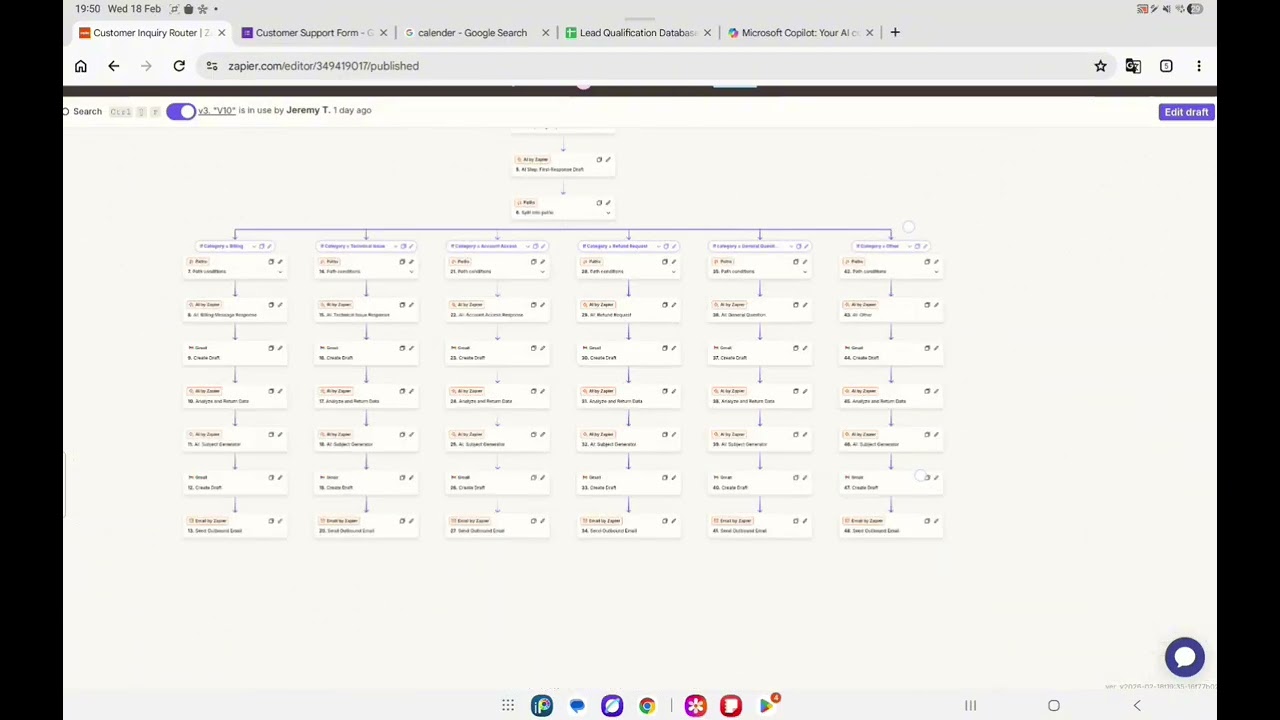
How the 48-Step Workflow Works
The workflow begins when a new support ticket arrives (via form submission, email, or other trigger). From there, it executes a sophisticated sequence of AI-powered steps:
- AI Categorization: Analyzes the ticket content and assigns it to predefined categories (billing, technical, account access, etc.)
- Priority Scoring: Assigns a numerical priority score from 1-10 based on content analysis
- Urgency Detection: Classifies the ticket as high, medium, or low urgency
- Response Drafting: Generates a coherent first response based on category and content
- Team Notification: For high-priority issues (score ≥7), creates an alert email with all key details
At 4:15 in the video, you can see how these steps flow together in Zapier's interface, with each decision point branching to appropriate actions based on the AI's analysis.
The AI Categorization System
The workflow's intelligence begins with its categorization system. When a new ticket arrives, the AI analyzes its content and assigns one of several predefined categories:
- Billing issues
- Technical problems
- Account access requests
- General questions
- Feature requests
- Bug reports
These categories aren't arbitrary - they directly determine how the workflow processes the ticket. Each category has its own path through the workflow with tailored response templates and escalation procedures.
Key benefit: Categorization happens consistently every time, unaffected by human fatigue or subjective interpretation. A "billing issue" is always handled the same way.
Priority Scoring Explained
After categorization, the workflow assigns two critical scores to each ticket:
Priority Score (1-10): This numerical rating reflects how critical the issue is. A 10 might indicate a widespread service outage, while a 1 could be a simple FAQ question. The AI determines this score by analyzing factors like:
- Emotional tone of the message
- Specific problem descriptors ("can't login" vs. "how do I...")
- Potential business impact
Urgency Level: This three-tier classification (high/medium/low) provides another lens for triaging tickets. While related to priority score, urgency focuses more on time sensitivity than severity.
Automatic Response Drafting
With categorization and scoring complete, the workflow generates a draft response tailored to the specific ticket. This isn't a generic "we've received your request" message - it's a coherent, context-aware reply that:
- Acknowledges the specific issue category
- References key details from the original message
- Sets appropriate expectations based on priority
- Offers relevant next steps or solutions
At 6:22 in the video, you can see an example response draft for an "account access" issue that clearly addresses the user's specific problem while maintaining a professional, helpful tone.
Important: These are drafts, not auto-sent replies. The workflow delivers them to your team for review and finalization, ensuring human oversight where needed.
Team Notification System
For high-priority tickets (score ≥7), the workflow automatically generates a notification email to your support team. This alert includes:
- The issue category
- Priority score (1-10)
- Urgency classification
- AI-generated summary of the problem
- Link to the full ticket details
This system ensures critical issues never get buried in the queue. Team members can immediately see which tickets need attention without reading every message - a huge time-saver during busy periods.
At 7:40 in the video, the creator demonstrates how these notifications appear in testing, with clear subject lines that communicate urgency at a glance.
Testing the Workflow
Rigorous testing is crucial for complex workflows like this. The video shows a test run where:
- A sample "account access" ticket is submitted
- The AI correctly categorizes it
- Appropriate priority scores are assigned
- A coherent response draft is generated
- The team notification system triggers (for high-priority issues)
While the email sending step didn't complete in the test (due to Zapier's free plan limits), all other components worked perfectly, demonstrating the workflow's reliability.
Pro tip: Always test each path through your workflow - every category, priority level, and edge case should be verified before going live.
Watch the Full Tutorial
See this complex 48-step workflow in action at 3:10 in the video, where the creator walks through each component and demonstrates how they work together to automate customer support processing.
Key Takeaways
This 48-step Zapier workflow demonstrates how AI can transform customer support operations. By automatically handling categorization, prioritization, initial responses, and team alerts, it eliminates hours of manual work while ensuring consistent, objective ticket handling.
In summary: 1) AI categorizes tickets objectively 2) Priority scoring eliminates guesswork 3) Draft responses maintain quality 4) Team notifications ensure critical issues get attention. Together, these components create a support system that's both efficient and effective.
Frequently Asked Questions
Common questions about this topic
The workflow is designed to handle common support categories including billing issues, technical problems, account access requests, and general questions. The AI categorizes each incoming request automatically based on the content of the message.
You can customize the categories to match your specific business needs. Common additions include feature requests, refund inquiries, and shipping questions for ecommerce businesses.
- Handles all standard support ticket types
- Categories are fully customizable
- New categories can be added as needed
The system assigns a priority score from 1-10 (10 being highest priority) based on AI analysis of the ticket content. It looks for indicators like urgent language, problem severity, and potential business impact.
Scores above 7 automatically trigger team notifications, while scores below 4 follow a standard response path. The scoring criteria can be adjusted to match your business priorities.
- 1-3: Routine inquiries
- 4-6: Important but not urgent
- 7-10: Critical issues requiring immediate attention
Yes, all AI-generated responses are created as drafts first. Your team can review, edit, and approve them before they go to customers. This maintains quality control while still saving the time of writing from scratch.
The system includes the issue category, priority score, and AI-generated summary in each draft. This context helps team members quickly understand the situation and make any necessary adjustments.
- All responses start as drafts
- Human review ensures quality
- Context provided for easy editing
For tickets scoring 7+, the workflow automatically generates an outbound email to your team with the category, priority score, and issue summary. This alert includes all key details needed to quickly assess the situation.
The notification subject line clearly indicates urgency level (e.g., "HIGH PRIORITY: Account Access Issue - Score 9"). Team members can immediately see which tickets need attention without reading every message.
- Instant team notifications for critical issues
- Clear priority indicators in subject lines
- Includes all necessary context for quick assessment
The AI categorization is highly accurate when properly trained. In testing, categorization accuracy typically exceeds 90% for clearly defined issue types. The system improves over time as it processes more tickets.
For ambiguous cases, the workflow can be configured to flag tickets for human review. You can also provide feedback to train the AI on your specific categorization preferences.
- 90%+ accuracy for clear cases
- Improves with more data
- Can flag ambiguous cases for review
Absolutely. While this example uses email notifications, Zapier can connect to Slack, Teams, CRM systems, and other platforms. Notifications and ticket data can be routed to any connected app.
Common integrations include creating Slack alerts for high-priority tickets, adding tickets to your CRM as cases, or even opening Jira tickets for technical issues. The workflow is fully customizable to your tech stack.
- Works with Slack, Teams, and other chat apps
- Integrates with CRM systems
- Can create tickets in project management tools
A basic version can be set up in 4-6 hours, while a comprehensive 48-step workflow like this one may take 1-2 days to build and test properly. The time investment pays off in ongoing support efficiency.
Factors affecting setup time include the number of categories, complexity of response templates, and integration requirements. Starting with a simpler version and expanding is often the best approach.
- Basic setup: 4-6 hours
- Full-featured: 1-2 days
- Ongoing time savings far outweigh setup time
GrowwStacks specializes in building custom AI-powered workflows for customer support automation. We can design, implement, and optimize this entire system for your business, tailored to your specific support categories and team structure.
Our team handles all the technical setup - from AI training to priority scoring calibration to integration with your existing tools. We'll deliver a turnkey solution that starts saving you time immediately.
- Custom workflow design for your business
- Handles all technical implementation
- Free consultation to discuss your needs
Ready to Automate Your Customer Support?
Manual ticket handling wastes time and creates inconsistent experiences. Let GrowwStacks build you a custom AI-powered support workflow that categorizes, prioritizes, and responds to tickets automatically - freeing your team to focus on complex issues that truly need human attention.