How Zapier + MCP Gives You AI Portability Across Claude, ChatGPT and More
Most businesses using multiple AI systems struggle with inconsistent behavior and security risks. The MCP layer solves this by acting as a secure bridge between your AI tools and business data while maintaining strict permission guardrails.
The MCP Security Layer Explained
Businesses using multiple AI systems face a critical challenge: maintaining consistent security policies across Claude, ChatGPT, and other platforms. Without centralized controls, each AI connection becomes a potential security vulnerability.
The Multi-Connection Protocol (MCP) solves this by acting as a secure middleware layer. As shown at 0:45 in the video, MCP provides a single point where you define what actions each connected AI can perform - whether that's Claude, ChatGPT, or other systems.
Key benefit: MCP lets you change AI providers without rebuilding your entire workflow. Your business rules, data connections, and permission structures remain intact regardless of which AI system you're using.
Achieving True AI Portability
Vendor lock-in is a major concern with AI adoption. Many businesses find themselves tied to a single AI provider because their workflows and integrations are built specifically for that platform.
MCP breaks this dependency by standardizing how different AI systems connect to your business tools. Whether you're using Claude today and switch to another AI tomorrow, your core automation architecture remains unchanged.
Implementation tip: Store your AI skills and business rules separately from any specific AI system. This "decoupled" approach gives you maximum flexibility to adopt new AI technologies as they emerge.
Setting Permission Guardrails
One of the most powerful features of MCP is its ability to enforce precise permission controls. At 1:15 in the tutorial, you can see how the system prevents connected AIs from performing unauthorized actions.
For example, you might allow Claude to draft emails but not send them, or let it read CRM data but not make changes. These guardrails apply consistently across all connected AI systems.
- Action restrictions: Block specific capabilities like sending messages or modifying records
- Data access: Limit which databases or tables the AI can query
- Approval workflows: Require human review for sensitive operations
Centralizing Your AI Skills
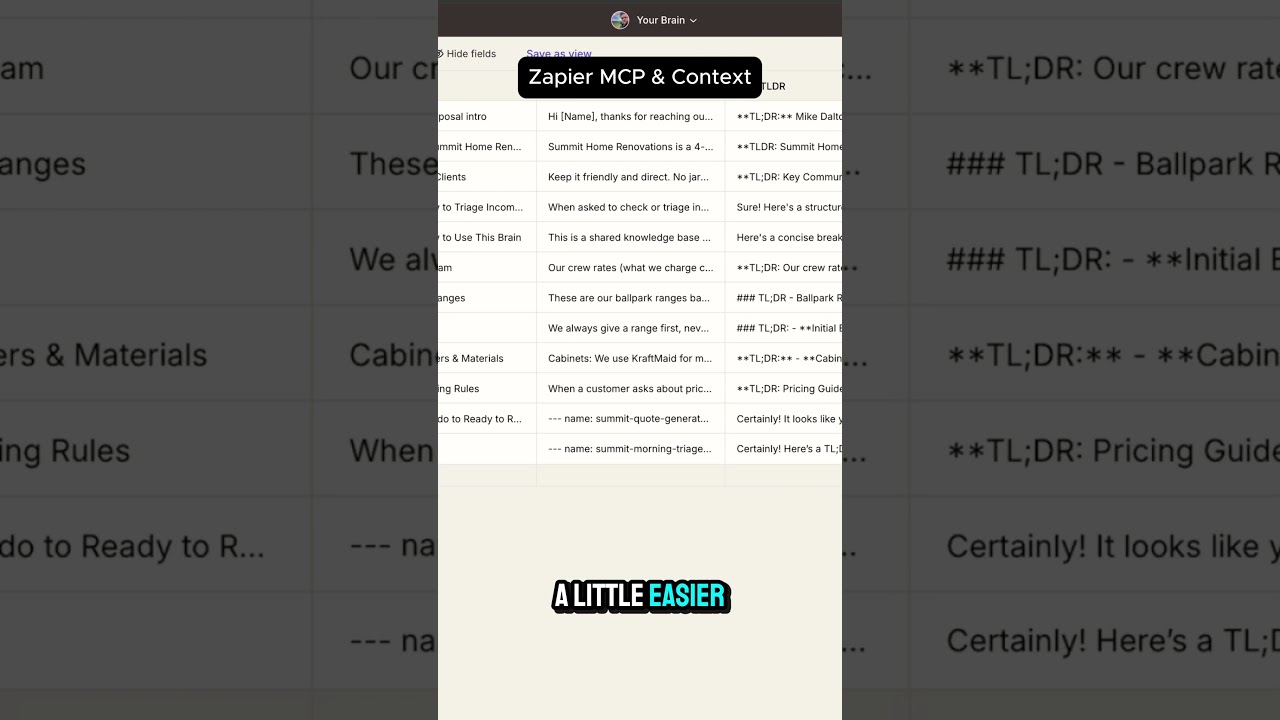
Maintaining consistent AI behavior across multiple systems is challenging when skills and knowledge are scattered. The video demonstrates how MCP solves this by centralizing your AI skills in a structured table.
At 1:45, you can see how skills are organized with columns for title, content, and tags. This structure makes it easy to:
- Share skills across different AI systems
- Update skills in one place
- Organize skills by type or category
Pro tip: Include not just technical skills but also business context - how your company handles quoting, project management, and other operational details.
Leveraging Zapier's 8000+ Tools
MCP becomes even more powerful when combined with Zapier's extensive integration ecosystem. At 2:00 in the video, you can see how Zapier provides access to thousands of business tools while MCP maintains security controls.
This combination gives you:
- Access to Zapier's entire app directory
- Centralized permission management via MCP
- The ability to mix and match tools for different AI systems
For example, you might allow Claude to access your CRM but not your accounting system, while giving ChatGPT different permissions.
Simple Connection Process
Connecting an AI system to MCP is surprisingly simple, as demonstrated at 2:30 in the tutorial. The process typically involves:
- Opening the AI system's settings
- Browsing available connections
- Selecting Zapier/MCP
- Configuring the desired access level
Once connected, the AI system can immediately start using your centralized skills and business rules while respecting the permission guardrails you've established.
Adding Business Context
The real power of MCP emerges when you enrich it with your specific business knowledge. As shown at 2:45, you can include details like:
- Company-specific processes
- Preferred tools and workflows
- Industry terminology
- Customer service protocols
This context ensures all your AI systems operate with consistent understanding of how your business works, regardless of which platform you're using at any given time.
Watch the Full Tutorial
See the complete MCP setup process in action, including how to connect Claude and configure permission guardrails (demonstrated at 1:15). The video also shows practical examples of centralized skill management and business context integration.
Key Takeaways
The MCP approach fundamentally changes how businesses can adopt and switch between AI systems. By decoupling your workflows from specific AI providers, you gain flexibility while maintaining security.
In summary: MCP gives you AI portability through centralized security controls, permission guardrails, and skill management - all while leveraging Zapier's vast integration ecosystem.
Frequently Asked Questions
Common questions about this topic
MCP (Multi-Connection Protocol) is a security layer that lets you connect to multiple AI systems like Claude and ChatGPT while maintaining centralized control over permissions.
It acts as guardrails, determining what actions each connected AI can perform and what data it can access. This prevents vendor lock-in and ensures consistent behavior across different AI platforms.
- Centralized permission management
- Consistent behavior across AI systems
- Reduced vendor lock-in risk
MCP allows you to switch between different AI systems without rebuilding your workflows. Your centralized skills, business rules, and data connections remain consistent whether you're using Claude, ChatGPT, or other AI platforms connected through the MCP layer.
This means you can adopt new AI technologies as they emerge without starting from scratch each time.
- Preserved workflows when changing AI providers
- Consistent skill and knowledge access
- Future-proof architecture
MCP can restrict specific actions like sending emails, accessing certain databases, or modifying records. For example, you could allow an AI to draft emails but not send them, or let it read CRM data but not make changes.
These restrictions apply uniformly across all connected AI systems, ensuring consistent security policies regardless of which platform you're using.
- Action-based restrictions
- Data access controls
- Approval workflow requirements
Skills can be stored in a centralized table with columns for title, content, and tags. The MCP makes these skills available to all connected AI systems, ensuring consistent knowledge and behavior across different platforms.
This approach eliminates the need to rebuild skills for each new AI system you adopt.
- Structured skill storage
- Tag-based organization
- Automatic distribution to connected AIs
Yes, MCP integrates with Zapier's ecosystem, allowing you to connect AI systems to business tools while maintaining security controls. You can selectively enable which Zapier connections each AI can access through the MCP interface.
This gives you the breadth of Zapier's integration options while keeping enterprise-grade security.
- Full Zapier integration support
- Selective connection enabling
- Consistent permission enforcement
Connecting an AI to MCP is simple. In Claude's settings, you browse connections, search for Zapier, and authorize the MCP link. The process typically takes less than a minute once you have your MCP configured.
This ease of connection makes it practical to switch between AI systems as your needs evolve.
- Standardized connection process
- Minimal configuration required
- Rapid deployment
MCP provides three key benefits: 1) Consistent AI behavior across platforms, 2) Centralized control over AI permissions, and 3) The ability to switch AI providers without rebuilding integrations. This reduces vendor lock-in and improves operational flexibility.
These advantages translate to lower costs, reduced risk, and greater agility in adopting new AI technologies.
- Reduced vendor lock-in
- Lower switching costs
- Improved security posture
GrowwStacks specializes in building secure AI automation systems with MCP architecture. We can design and implement your MCP layer, connect it to your preferred AI systems and business tools, and train your team on maintaining the system.
Our implementations typically reduce AI integration time by 60-80% compared to DIY approaches while ensuring enterprise-grade security and scalability.
- Custom MCP configuration
- AI system integration
- Team training and support
Ready to Implement Secure AI Portability?
Don't let vendor lock-in or security concerns limit your AI potential. Our team will design and deploy your MCP solution with the right guardrails for your business.