Zapier Paths: The Secret to Smart Google Form Logic (Pro Guide)
Most businesses waste hours manually sorting form responses - routing signups, leads, and requests to different teams. With Zapier Paths, you can automate this entire process, creating intelligent workflows that instantly route submissions based on user selections. No coding required.
What Are Zapier Paths?
Zapier Paths solve a critical automation challenge: how to handle different form responses differently without creating multiple separate workflows. Traditional automation treats all form submissions the same, forcing you to manually sort responses after collection.
Paths introduce conditional logic directly into your Zapier workflows. When a form is submitted, Paths analyze the responses and direct the workflow down specific branches based on your rules. This means one form can trigger completely different automation sequences depending on what the respondent selected.
Key benefit: Paths reduce workflow complexity by up to 80% compared to maintaining separate Zaps for each response type. One intelligent workflow replaces what would normally require multiple disconnected automations.
Real-World Use Cases
While our tutorial demonstrates course signups, Zapier Paths work for countless scenarios where you need to route form responses differently. Here are three powerful applications:
1. Lead Qualification
Route sales leads to different reps based on product interest, company size, or geographic location. High-value leads get immediate follow-up while others enter nurturing sequences.
2. Event Management
Automatically assign attendees to session tracks, meal preferences, or hotel blocks based on their RSVP responses. Send personalized confirmations with only relevant details.
3. Customer Support
Triage support tickets by urgency and department. Critical issues page on-call staff while general inquiries route to your help desk queue.
Pro tip: Combine Paths with Zapier's Delay feature to create timed follow-up sequences. For example, wait 3 days after sending course information before checking if the lead needs additional help.
Setting Up Your First Path
Let's walk through creating a basic path system for our Google Forms course signup example. At 2:15 in the video tutorial, we begin configuring the three paths for different course types.
Step 1: Create Your Google Form
Build a form with a multiple-choice question about course interests. Make sure to use clear, distinct options that will map directly to your paths.
Step 2: Set Up Your Zapier Trigger
Create a new Zap with "Google Forms" as the trigger app and "New Response" as the trigger event. Connect your form and test the connection.
Step 3: Add Paths
From the Zapier editor, click the "+" button and select "Path" from the Flow Control options. Repeat to create all needed paths (we created three in our example).
Important: Name your paths descriptively (e.g., "AI Course Path") rather than generic labels like "Path A." This makes maintenance much easier as your workflow grows.
Advanced Path Configuration
Once you've mastered basic paths, these advanced techniques can handle more complex scenarios:
Nested Paths
Add secondary paths within primary paths to create decision trees. For example, after routing AI course signups differently based on whether they selected beginner or advanced topics.
Fallback Paths
Designate a default path for responses that don't match any conditions. This catches edge cases and ensures no submissions slip through.
Multi-Condition Paths
Combine multiple criteria using AND/OR logic. For instance, route to route premium customers differently, you might check both their subscription level and account age.
Performance note: While Zapier allows up to 30 steps per workflow, complex paths with many conditions can approach this limit. For enterprise-scale systems, consider using SubZaps (covered next).
Testing and Troubleshooting
Proper testing ensures your paths route submissions correctly before going live. Here's a proven method:
1. Test Each Path Individually
Use Zapier's test mode to trigger each path with sample data. Verify the correct actions occur for each response type.
2. Check Edge Cases
Test unexpected responses like blank fields or combinations you didn't explicitly account for. Ensure they either match a condition or route to your fallback path.
3. Review Execution Logs
Zapier provides detailed logs showing exactly which path was taken and why. These invaluable for debugging when conditions don't evaluate as expected.
Common pitfall: Remember that Google Forms multiple-choice responses must match exactly (including capitalization) unless you use "contains" instead of "exactly matches" in your conditions.
Scaling With SubZaps
As shown at 14:30 in the video, SubZaps let you to break complex workflows into manageable while maintaining clean separation between different paths.
When to Use SubZaps
- Your workflow approaches Zapier's 30-step limit
- Different paths require completely different sets of actions
- You want to reuse common path logic across multiple Zaps
Implementation Tips
1. Create a master Zap that handles just the routing logic
2. Create separate SubZaps for each major path branch
3. Use the "Call SubZap" action to invoke your specialized workflows
Enterprise benefit: Large organizations can use SubZaps to create standardized automation modules different departments can mix and match while maintaining central oversight.
Best Practices
After implementing paths for dozens of clients, we've identified these key lessons:
1. Document Your Logic
Maintain a simple diagram or table mapping form responses to paths and actions. This becomes invaluable when modifying workflows months later.
2. Build in Monitoring
Add a step that logs all path decisions to a spreadsheet or database. This helps identify when conditions need adjustment.
3. Plan for Changes
Form options evolve over time. Structure your paths so adding new response types doesn't require rebuilding the entire workflow.
Pro tip: Reserve one path for "other" responses that don't match your current conditions. Review these periodically to identify new patterns that need automation.
Watch the Full Tutorial
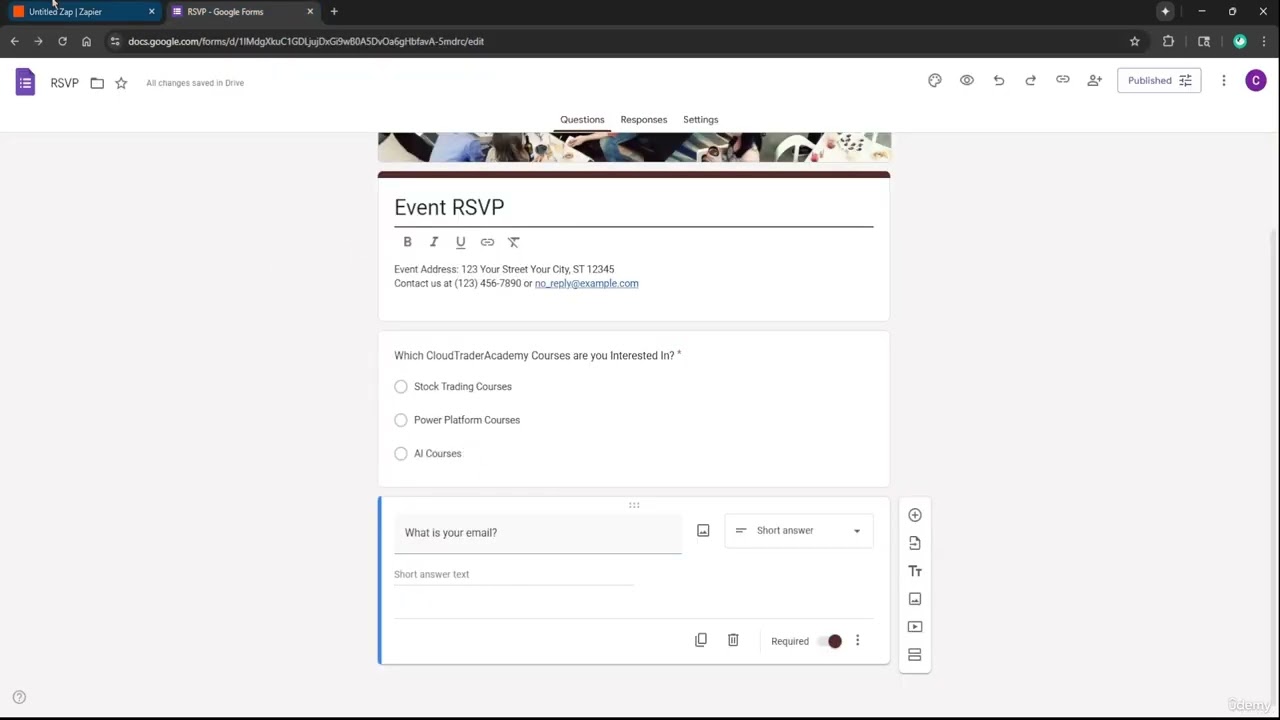
See the complete walkthrough of building this automation, including the key moment at 6:45 where we configure the path conditions for our course signup example.
Key Takeaways
Zapier Paths transform static form processing into intelligent routing systems that adapt to each respondent's needs. By implementing the techniques covered here, you can:
In summary: Zapier Paths let you replace manual form sorting with automated, rules-based routing that scales effortlessly as your response volumes grow. One well-designed workflow can handle dozens of distinct processing paths while being easier maintain than multiple separate Zaps.
Frequently Asked Questions
Common questions about this topic
Zapier Paths are conditional logic branches that let you create different workflow routes based on form responses or other triggers. When a Google Form is submitted, Paths analyze the responses and direct the workflow down specific branches based on your rules.
For example, if someone selects 'AI courses' in a form, you can route them to a specific Slack channel while sending 'stock trading course' respondents elsewhere. This happens automatically without manual intervention.
- Paths reduce workflow complexity by up to 80% compared to maintaining separate Zaps
- Each path can have completely different actions and follow-up sequences
- Works with any form platform Zapier supports, not just Google Forms
You can create multiple paths in a single Zapier workflow, with each path having its own conditions and actions. While there's no hard limit to the number of paths, Zapier does enforce a 30-step maximum per workflow.
For complex scenarios, you can use SubZaps to break your workflow into manageable chunks while maintaining logical separation between different response types. This approach lets you effectively create hundreds of paths across interconnected workflows.
- Best practice is to limit to 5-7 main paths per workflow for maintainability
- Nested paths count toward your 30-step limit
- SubZaps don't count against your main workflow's step limit
Zapier Paths support several condition types including text matching (exact or contains), numerical comparisons, date checks, and boolean logic. For Google Forms specifically, you'll most often use text matching against multiple choice responses.
The 'exactly matches' condition is particularly useful for ensuring precise routing based on form selections. You can also combine multiple conditions using AND/OR logic to create more sophisticated routing rules.
- Text conditions: exactly matches, contains, does not contain
- Numerical conditions: greater than, less than, between
- Special conditions: is present, is not present
Yes, Zapier allows you to create nested paths where secondary conditions branch off from primary paths. This hierarchical approach lets you handle complex decision trees.
For instance, after routing a form response down the 'AI courses' path, you could add another path that checks if the respondent provided an educational email address for special follow-up. This creates a decision tree that gets more specific at each level.
- Nesting helps organize complex logic into manageable chunks
- Each nest level can have its own set of actions
- Deep nesting may impact workflow performance
Zapier provides comprehensive testing tools for paths. You can manually trigger test runs with sample data for each path, review execution logs to verify which path was taken, and see exactly how your conditions evaluated.
The platform also lets you test individual steps within paths to ensure all actions work as intended before going live. We recommend testing each path with at least 2-3 sample responses to verify all possible matching scenarios work correctly.
- Test mode lets you simulate specific response types
- Execution logs show exactly why each path was/wasn't taken
- Test both matching and non-matching responses
You can designate a fallback path that runs when no other conditions are met. This acts as a catch-all for unexpected responses or edge cases. Without a fallback, unmatched responses simply won't trigger any actions.
Best practice is to always include a fallback path that at minimum logs unhandled responses for review. This helps identify when your form options have changed or when new response patterns emerge that need automation.
- Fallbacks prevent "silent failures
- Can notify admins of unhandled responses
- Provides visibility into needed workflow updates
Absolutely. While we focused on Google Forms in this guide, Zapier Paths work with any form platform Zapier supports, including Typeform, JotForm, and Microsoft Forms. The same conditional logic principles apply regardless of the form source.
The key is ensuring your trigger provides the response data needed for your path conditions. Most modern form tools provide this data in a structured way that Zapier can easily evaluate against your routing rules.
- Works with 100+ form applications
- Some platforms may structure response data differently
- Testing is crucial when switching form platforms
GrowwStacks specializes in building custom automation workflows using Zapier and other platforms. Our team can design intelligent form processing systems that automatically route responses to the right teams, trigger personalized follow-ups, and integrate with your CRM.
We'll handle everything from initial consultation to implementation, ensuring your automated workflows save time while improving response handling. Our experts will analyze your specific needs and recommend the most efficient path structure for your use case.
- Free 30-minute consultation to assess your needs
- Custom workflow design and implementation
- Ongoing support and optimization
Ready to Transform Your Form Processing?
Manual form sorting wastes valuable time and leads to missed opportunities. Let GrowwStacks will design a custom Zapier Paths solution that automatically routes responses based on your business rules.