
The Inbox That Consumes 3 Hours of Every Professional's Day
For executives, sales professionals, and customer-facing teams receiving 100+ emails daily, the inbox has become one of the most significant drains on productive time in the modern workplace. Research consistently shows that knowledge workers spend 2–3 hours per day on email management — sorting through spam and promotional content to find what matters, reading messages to assess urgency, drafting replies to repetitive customer questions, and checking back repeatedly throughout the day to catch anything important. That's 15+ hours weekly, or 750+ hours annually, spent on a task that is almost entirely mechanical and interruptive.
The hidden cost is compounding. The constant inbox checking required to avoid missing important messages creates attention fragmentation that destroys the extended focus blocks needed for strategic work. Every inbox check — even one that finds nothing important — costs 20–23 minutes of cognitive recovery before deep work resumes. For professionals checking email 15–20 times daily, the productivity loss from context switching alone rivals the direct time spent in the inbox. And critically, despite all this time investment, important messages still get buried under spam and missed — with real consequences for customer relationships and revenue.
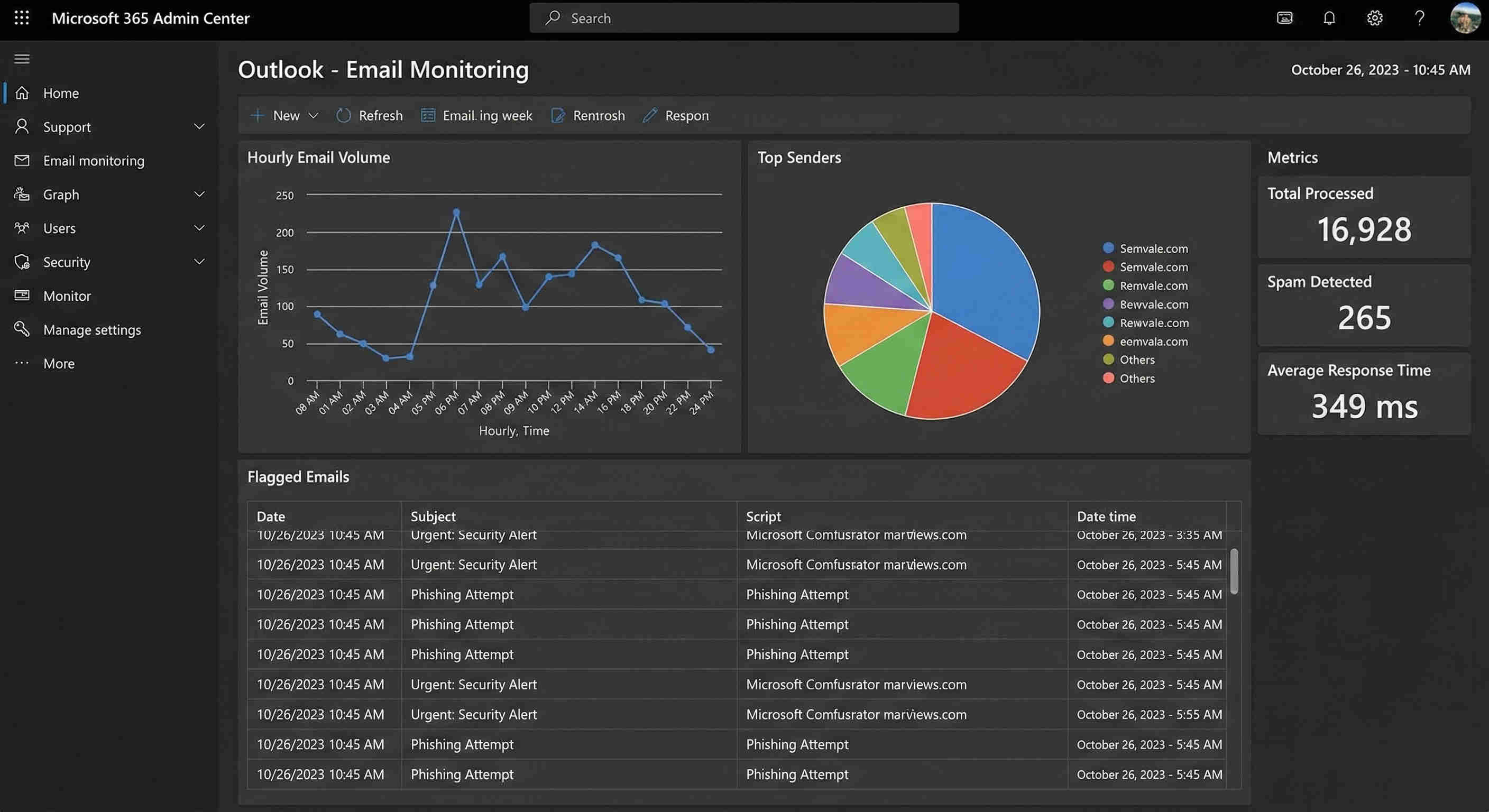
Building the Email Intelligence Layer: Every Message Classified, Drafted, and Organised Without Opening the Inbox
GrowwStacks engineered a complete inbox automation built around one design principle: the professional should only interact with their inbox when there is a specific action that requires human judgment — reviewing a draft reply before sending. Every other inbox task — sorting spam, organising emails into folders, deciding whether a message needs a reply, and drafting that reply — is handled by the automation.
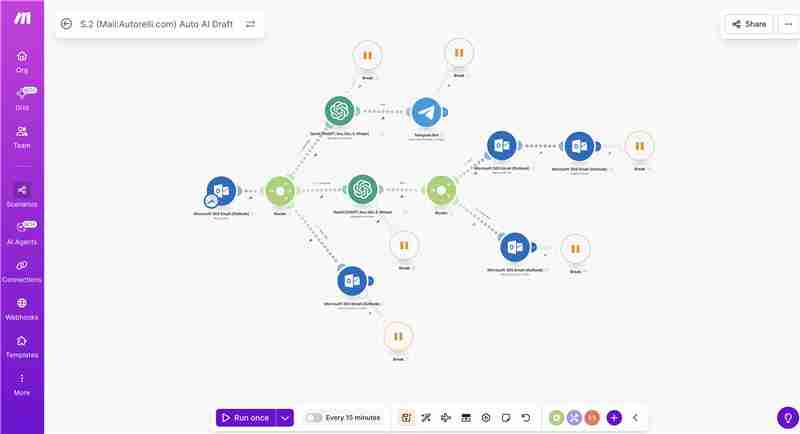
The system uses Microsoft Outlook's watch module to capture every incoming email instantly, an AI classification layer to determine the correct processing path for each message, a custom ChatGPT Assistant trained on the business's specific knowledge to generate contextual draft replies for customer-facing emails, and Telegram notifications to alert the user to important messages without requiring inbox checking. The result is a professional who receives a Telegram notification when something needs their attention, opens Outlook to find a draft reply already written, reviews it, and sends with one click — while every other email has already been sorted, organised, and filed.
From Incoming Email to Organised Inbox and Drafted Reply: The Complete Flow
The system executes across eight automated steps covering every possible email type and processing path. Here's the complete sequence:
- Outlook inbox monitoring: The Make.com watch module monitors the Microsoft Outlook inbox continuously, capturing every new incoming email with complete content — sender name and address, subject line, full body text, timestamp, and any attachments metadata. The trigger fires the moment a new message arrives, ensuring no email sits unprocessed in the inbox.
- AI email classification: The captured email content is analysed by AI to determine which of four categories it belongs to — "Requires Reply" (customer inquiries, business questions, messages needing a response), "Junk/Spam" (phishing, unsolicited mass email, obvious spam), "Professional" (business communications, invoices, industry communications for reference), or "Promotional" (legitimate marketing emails, newsletters, offer emails). Classification accuracy is tuned during implementation against your specific email patterns.
- Reply generation path — Requires Reply: Emails classified as requiring a response are routed to the custom ChatGPT Assistant, which has been trained on the business's specific knowledge during setup — services offered, pricing, business hours, policies, common FAQs, and the professional's communication tone and style. The Assistant generates a complete, contextual reply that addresses the sender's specific question while incorporating accurate business information. The reply is professional, on-brand, and specific — not a generic acknowledgement.
- Draft saving to Outlook: The AI-generated reply is saved directly to the Outlook Drafts folder via API, pre-addressed to the sender with the correct subject line and reply formatting. The professional opens the draft, reads the AI reply, makes any edits they want, and sends with one click. Human review remains the final step before any email leaves the inbox — preserving oversight while eliminating the composition effort.
- Telegram notification: The moment a draft reply is saved, a Telegram notification is sent to the professional's phone or desktop. The notification includes the sender's name, email subject, a preview of the message content, and a preview of the AI-generated draft reply. This allows the professional to assess urgency and priority from their phone without opening Outlook — and to decide when to review and send the draft based on their current task rather than having their workflow interrupted by inbox checking.
- Junk processing path: Emails classified as junk or spam are automatically moved to the Outlook Junk folder without any manual interaction. The inbox never shows the spam — it's already gone by the time the professional next opens their email. No manual sorting, no accidental clicks on phishing links, no time spent reading subject lines to decide whether something is spam.
- Professional and promotional organisation: Professional emails (business communications for reference) are moved to a designated "Professional" folder. Promotional emails from legitimate sources (newsletters, retailer offers) are moved to a "Promotional" folder. Both are preserved and accessible but kept out of the primary inbox, which remains reserved for messages that need active attention.
- AI-sent tracking: When the professional reviews and sends a draft reply, the sent email is moved to a designated "Sent by AI" folder. This provides a complete audit trail of every automation-generated response — enabling periodic quality reviews, pattern analysis, and accountability without manual tracking.
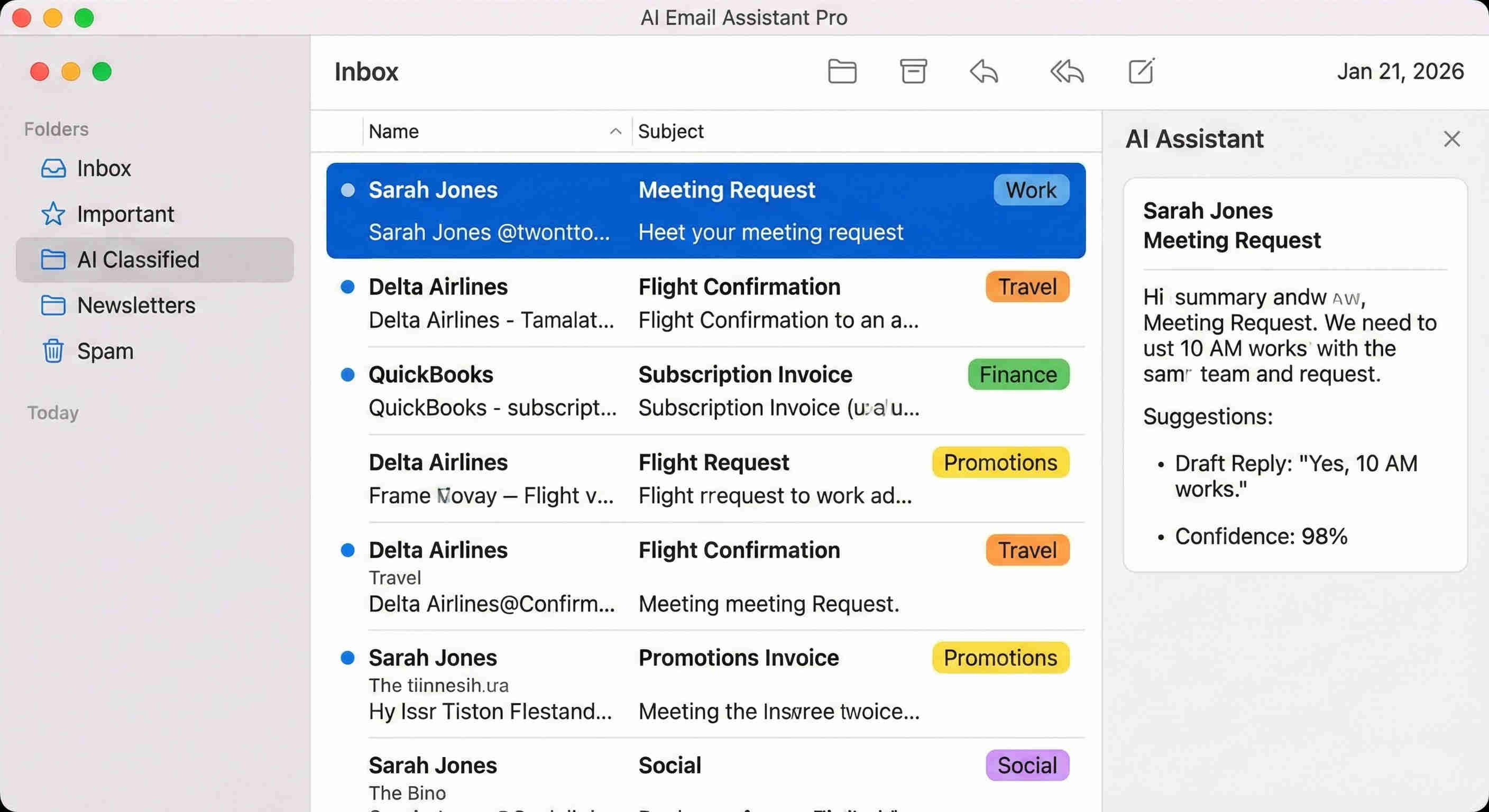
💡 The business-training step that makes the difference between a generic AI reply and a professional one: Generic ChatGPT replies to customer emails are immediately recognisable as AI-generated — they're accurate about general topics but miss specific business details (your exact hours, your specific service packages, your pricing structure, your policies). The custom ChatGPT Assistant is trained during implementation on the business's specific knowledge base, which means replies include correct details, accurate pricing, and the professional's actual communication style. The quality difference between a trained and untrained assistant is the difference between a reply that requires rewriting and one that requires only a read-through before sending.
What This System Does That Manual Inbox Management Can't
Business-Trained ChatGPT Assistant
A custom AI agent trained specifically on the company's services, hours, pricing, policies, FAQs, and communication tone — generating professional, accurate draft replies that address the sender's actual question with correct business information. Delivers reply quality impossible with generic AI and eliminates manual drafting for the repetitive inquiries that consume the most inbox time.
Intelligent Email Classification
AI analyses every incoming message to determine its category and route it to the correct processing path — draft generation, junk filing, professional organisation, or promotional storage. Eliminates 80% of inbox management time by handling the sorting and routing decisions that currently require manual attention for every single message.
Automated Draft Reply Saving
AI-generated responses are saved directly to the Outlook Drafts folder pre-addressed and formatted — enabling one-click review and sending without rewriting from scratch. Maintains human oversight as the final quality gate while eliminating 90% of the manual composition effort that currently consumes hours of daily writing time.
Telegram Instant Notifications
Sends priority alerts for important emails with message summary and draft reply preview — keeping professionals informed without constant inbox checking. Eliminates the attention fragmentation of 15–20 daily inbox checks by consolidating all important email alerts to a single, controlled notification channel that the professional can check at chosen moments.
Automated Folder Organisation
Every email is automatically moved to its correct folder — junk to spam, professional to reference, promotional to offers, AI-processed to the AI-sent audit trail — maintaining a clean, organised inbox structure without manual dragging or sorting. The primary inbox only contains messages that have passed through the classification layer and require active attention.
Multi-Route Intelligent Processing
A four-path routing system handles every email category with the appropriate automated response — reply generation, spam filtering, folder organisation, or promotional storage — processing hundreds of daily messages without human intervention. The system scales to any inbox volume without degradation in classification accuracy or response quality.
The System in Action
.png?updatedAt=1768978200411)
Before vs. After: What Changes When the Inbox Manages Itself
Before: Professionals spent 2–3 hours daily manually sorting 100+ emails to separate important messages from spam, reading each email to assess whether and how to respond, drafting replies to repetitive customer questions from scratch, and checking the inbox 15–20 times per day to avoid missing anything critical. Important messages were regularly buried under junk and missed. The constant inbox monitoring created attention fragmentation that prevented sustained focus on strategic work. Email management was experienced as a source of chronic stress and overwhelm.
After: Every incoming email is classified, processed, and routed automatically before the professional opens their inbox. Customer inquiry emails have a draft reply already written and waiting in Drafts. Spam has already been moved to Junk. Professional and promotional emails are already filed in the correct folders. Telegram notifications alert the professional to the specific emails that need their attention, with a reply preview included, so they can assess urgency without opening Outlook. The professional's inbox interaction is reduced to reviewing draft replies — a 35-minute daily task versus a 3-hour one — while important emails now receive faster, higher-quality responses than the manual process produced.
Implementation: Live in 8 Weeks
- Business knowledge compilation: The first step is documenting the complete knowledge base that the ChatGPT Assistant will be trained on — company services and product details, pricing structure, business hours, location, policies, return/cancellation terms, common FAQs and their correct answers, and the professional's preferred communication tone and sign-off style. This compilation session typically takes 2–3 hours with the client and produces the foundation for a trained assistant that generates accurate, on-brand replies from day one.
- ChatGPT Assistant configuration: The custom ChatGPT Assistant is created and trained with the compiled business knowledge base. Reply generation prompts are engineered to produce professional, contextual responses that address the sender's specific question, include relevant business details, and maintain the correct tone. Response templates are configured for the most common inquiry types. The assistant is tested across a sample of real customer email scenarios before production deployment.
- Outlook integration and classification: The Microsoft Outlook account is connected via Make.com with proper API permissions for reading incoming emails and creating draft responses. The classification logic is built with the four routing paths — Requires Reply, Junk, Professional, Promotional — with classification criteria tuned to the specific email patterns of the client's inbox. Routing accuracy is tested against a representative sample of historical emails before going live.
- Reply and notification workflow: The ChatGPT Assistant integration is connected to the reply generation path. The Outlook Draft API module is configured to save AI-generated replies correctly pre-addressed. The Telegram bot is created and the notification format is configured with the email summary and draft preview layout. Folder movement logic is built for all four email categories including the AI-sent audit trail. The complete reply workflow is tested end-to-end.
- Organisation and deployment: The Outlook folder structure is created — Professional, Promotional, Junk (existing), and Sent by AI. Automated folder movement rules are configured and tested for each classification category. Comprehensive end-to-end testing covers various email types, classification edge cases, and reply quality across different inquiry types. The professional is trained on the Telegram notification workflow and the draft review process. Monitoring dashboards are configured before production deployment.
The Right Fit — and When It Isn't
This solution delivers maximum value for executives managing high email volumes, sales professionals handling customer inquiries, customer success teams, consultants, business owners, and any professional receiving 50+ daily emails where a significant portion are either customer inquiries requiring similar answers, spam requiring filtering, or reference emails requiring organisation rather than response.
Two practical notes: the system is built on Microsoft Outlook — professionals using Gmail or Apple Mail require a platform-adapted version which we build on request. Additionally, the quality of the ChatGPT Assistant's draft replies depends directly on the completeness of the business knowledge base compiled during implementation — the more thoroughly services, policies, and FAQs are documented, the more accurate and useful the generated drafts will be. For businesses with highly complex or technical inquiry types requiring nuanced expertise, the drafts serve best as structured starting points that a professional refines rather than one-click sends. We calibrate expectations on this during discovery based on the inquiry types most common in the specific inbox.