
The Google Ads Lead Processing Gap: Why Paying for Ad Clicks Only to Lose Leads in Manual Processing Is the Most Expensive Inefficiency in Digital Marketing
Google Ads campaigns represent a significant and precisely measurable investment: every click has a cost, every form submission represents a prospect who saw the ad, evaluated the offer, and made an active decision to enquire. The ad campaign's job — delivering an interested prospect to a lead capture form — is complete the moment the form is submitted. What happens next determines whether that advertising spend generates revenue or evaporates into the operational inefficiencies of manual lead processing. For most sales teams receiving inbound ad enquiries, what happens next is: the form submission goes to an email inbox, where it waits for a team member to notice it, open it, read the enquiry, compose a personalised response, send it, then manually enter the lead's details into the CRM. At 15–20 minutes per lead for this manual cycle, a team receiving 50 Google Ads enquiries weekly is spending 12–17 hours every week on a workflow that generates zero relationship value — it is purely mechanical administration between a prospect expressing intent and a sales rep beginning to address it.
The timing cost compounds the labour cost. A lead who submits an enquiry at 2pm on a Tuesday and receives a response at 10am on Wednesday has spent 20 hours in a cold inbox. Research consistently shows that response time is the single strongest predictor of lead conversion in inbound sales contexts: leads responded to within 5 minutes are 100× more likely to connect than leads contacted after 30 minutes. The 30–40% of Google Ads leads who abandon before first contact are not abandoning because the ad was wrong or the offer was unappealing — they are abandoning because the manual processing gap gave them time to move on, contact a competitor, or simply lose the urgency that drove the initial enquiry. The automation closes this gap structurally: the personalised email goes out within seconds, not hours, and the CRM contact is created before the prospect has closed their browser tab.
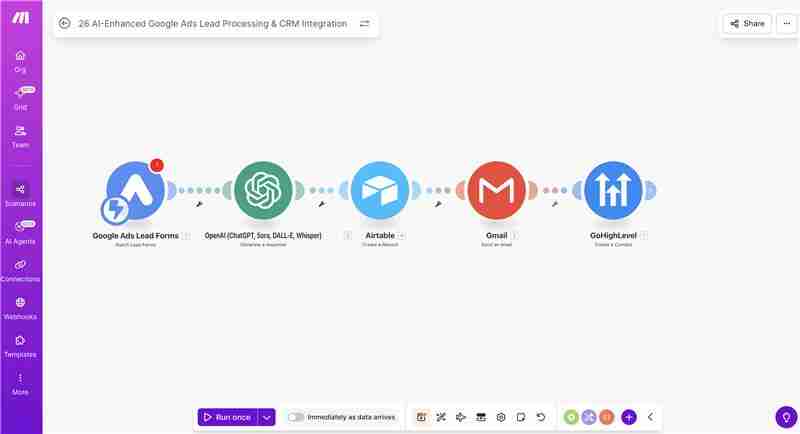
Building the Automated Lead Pipeline: Five Platforms, One Trigger, Zero Manual Steps
GrowwStacks built a five-platform lead processing automation that handles the complete workflow from Google Forms submission to organised CRM contact in a single Make.com scenario — eliminating every manual step between a prospect expressing intent and a sales rep having a complete, organised record in their CRM ready for follow-up. The architecture is built on tools that digital marketing and sales teams either already use or that integrate directly with their existing stack: Google Forms as the lead capture interface (connected directly to Google Ads campaigns as landing page destinations), ChatGPT as the personalisation engine for email responses, Airtable as the centralised lead database, Gmail for automated email delivery, and GoHighLevel as the CRM for sales team follow-up workflow management.
The system's primary differentiator over simple form-to-CRM automations is the ChatGPT personalisation layer. Most lead automation tools send a static template acknowledgement email to every enquiry — "Thank you for your enquiry. We'll be in touch." This template email does confirm receipt, but it provides zero personalisation value and no engagement content that moves the prospect's consideration forward. ChatGPT's analysis of each specific enquiry — reading the prospect's name, their stated service interest, any project description they provided — generates a response that directly addresses what they asked about, uses their name naturally in the body copy, and includes relevant next steps or information specific to their enquiry type. The personalised response performs significantly better than a template for two reasons: the prospect experiences an immediate sense of being heard rather than processed, and the email content gives them a reason to stay engaged with the brand while they wait for the human follow-up call.
From Form Submission to CRM-Ready Lead: The Complete Four-Step Automated Pipeline
The system executes four coordinated steps for every Google Forms submission — personalised email generation, instant Gmail delivery, Airtable database storage, and GoHighLevel contact creation — all triggered automatically within seconds of the form submit event. Here is how each step operates in detail:
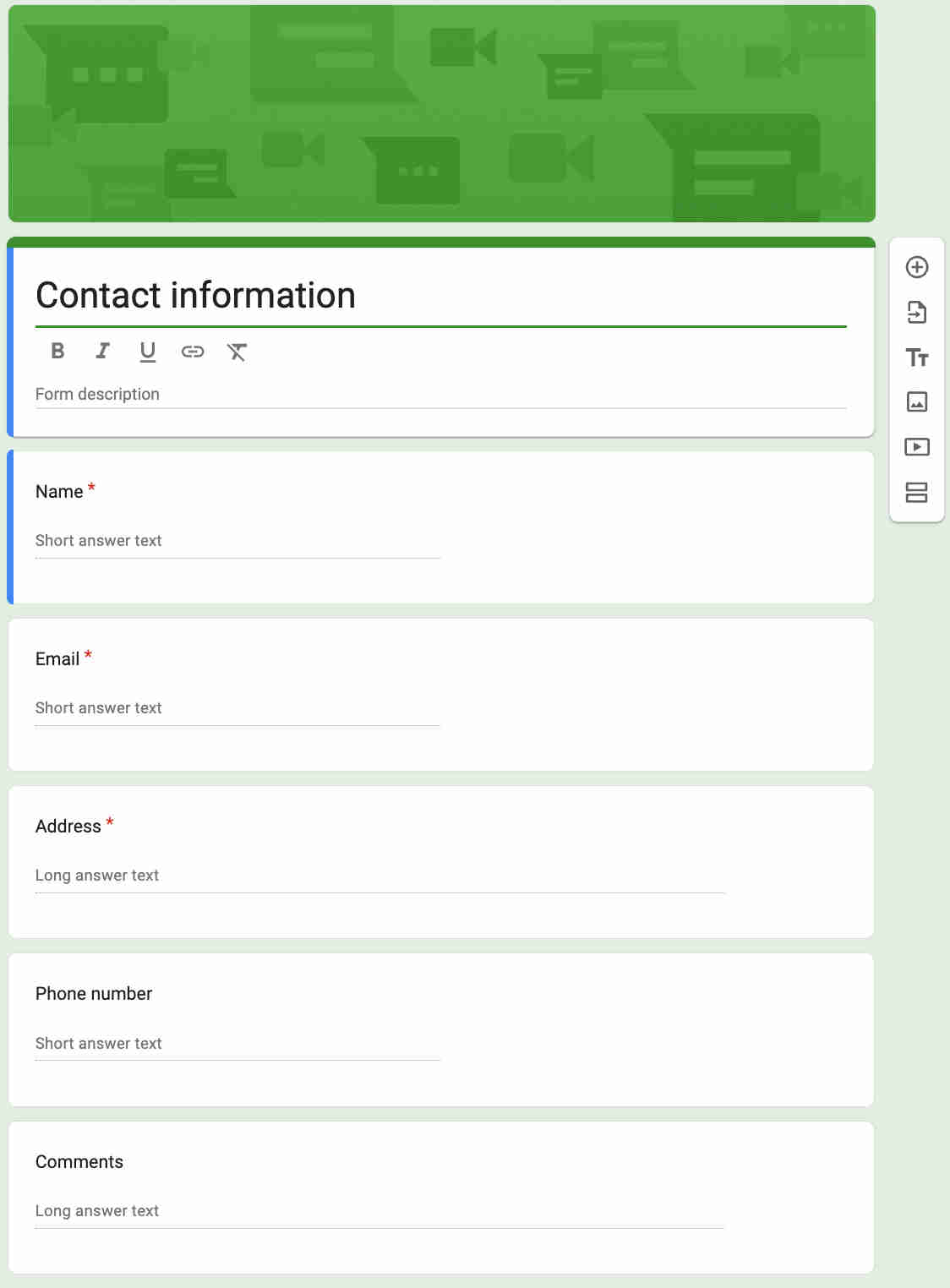
- Google Forms lead capture and Make.com trigger: The Google Forms lead capture form is designed as the destination landing page for Google Ads campaigns — replacing or complementing a standalone landing page with a form that collects all information required for the automation: prospect first name, last name, email address, phone number, the service or product they are enquiring about, and a free-text field for project description or specific questions. When the prospect submits the form, Google Forms fires a Make.com webhook (via Google Forms' response notification or Make.com's Google Forms watch module) carrying the complete submission data. Make.com begins processing the lead pipeline within seconds of the form submission. The form design balances information collection with submission friction — shorter forms generate more submissions but less qualifying context for ChatGPT personalisation; longer forms provide richer context but reduce submission rates. We design the optimal field set during implementation based on the client's typical enquiry types and the minimum information needed for meaningful ChatGPT personalisation.
- ChatGPT personalised email generation: Make.com passes the complete form submission data to the ChatGPT API with a prompt engineered to generate a personalised, professional response email. The prompt includes the client's company name, brand voice guidelines, service descriptions relevant to the enquiry type, and instructions for how to address the specific information the prospect provided. ChatGPT analyses the enquiry context — the prospect's stated service interest, any project details in the description field, the implied urgency or timeline from the way they described their need — and generates an email that: opens with the prospect's first name in a personalised greeting, directly acknowledges what they enquired about using language that reflects their own description back to them, provides relevant context about the service that addresses their specific interest, outlines a clear next step (typically a scheduled call or a specific piece of information relevant to their enquiry type), and closes with a professional signature. The result is an email that reads like a human wrote it specifically for this prospect — not because it is long or complex, but because it references the specific thing they asked about rather than sending a generic "we'll be in touch" template. ChatGPT's output is reviewed during the prompt testing phase to ensure quality across diverse enquiry types before production deployment. The email content is also stored in Airtable alongside the lead record — giving the sales team full visibility into what the prospect received when they follow up.
- Gmail instant delivery and Airtable database storage: Make.com's Gmail module sends the ChatGPT-generated email to the prospect's email address — using the client's configured Gmail account and a professional email signature. The email is sent in HTML format (enabling formatting, links, and a branded signature) and typically lands in the prospect's inbox within 10–30 seconds of their form submission. The timing is the critical element: a prospect who submits a form and receives a thoughtful, personalised response email before they have had time to open another tab experiences the brand as immediately attentive and responsive — a first impression that sets the relationship tone before a human call occurs. Simultaneously, Make.com creates a new record in the Airtable lead database with all information captured: First Name, Last Name, Email, Phone, Enquiry Type, Description, Submission Timestamp, AI Email Content (the exact email sent to the prospect), Email Sent Status, Airtable Record ID (for cross-reference), and GoHighLevel Contact ID (written after the GHL step completes). The Airtable database serves as the single source of truth for all lead activity — searchable, exportable, and accessible to any team member without requiring GoHighLevel access. It also provides the data foundation for campaign performance reporting: comparing enquiry volumes by source, tracking response quality over time, and identifying the enquiry types that convert at the highest rates.
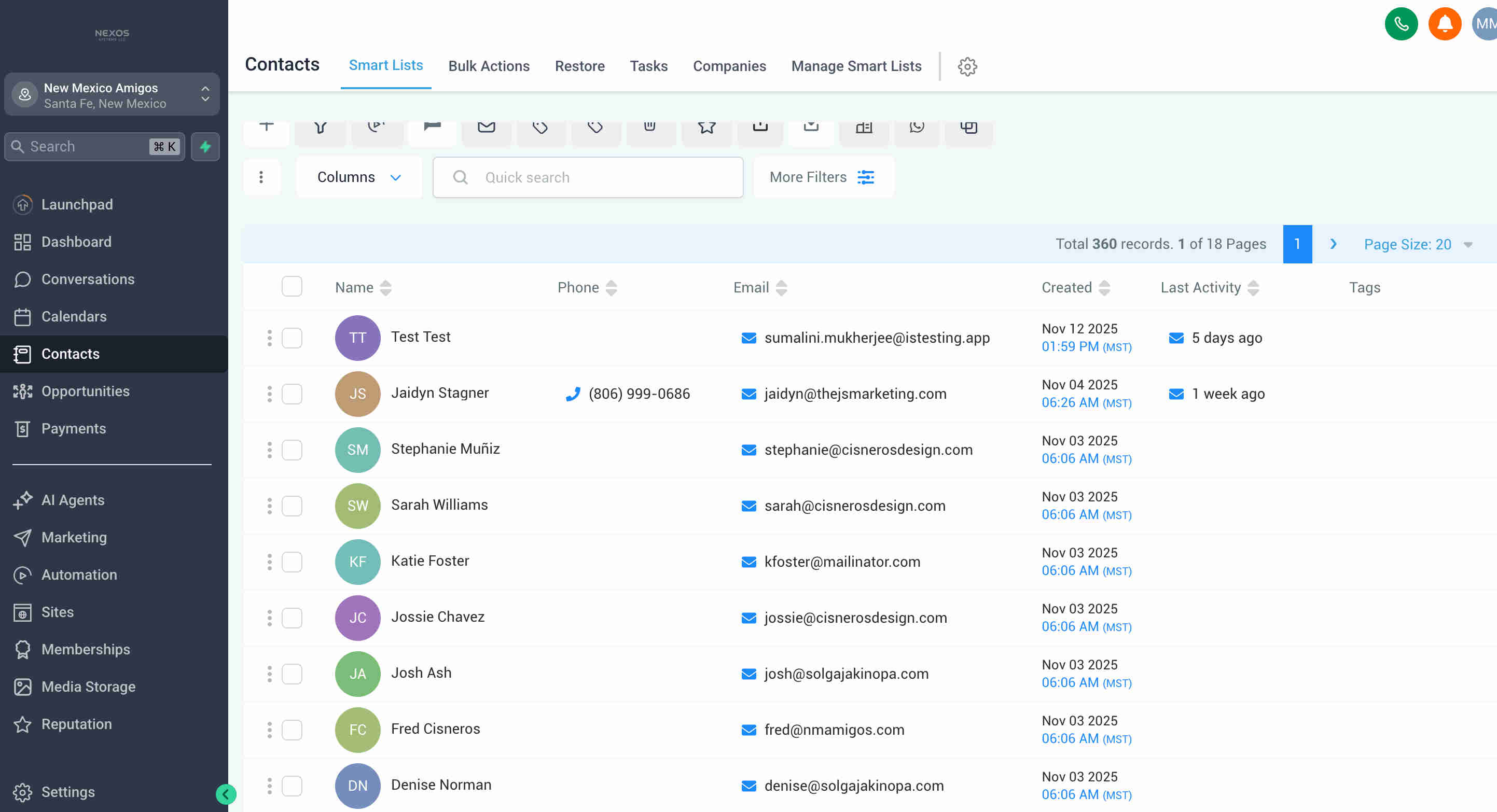
- GoHighLevel CRM contact creation and sales team workflow enablement: Make.com calls the GoHighLevel API to create a complete contact record for the new lead. The contact record is populated with all fields required for sales team follow-up: First Name, Last Name, Email Address, Phone Number, Contact Creation Date (the form submission timestamp), Last Activity Date (the same timestamp initially, updated when subsequent interactions occur), Lead Source tag (Google Ads — configured to attribute the contact to the campaign), Enquiry Type tag (enabling segmentation and workflow triggering in GoHighLevel), and any custom field values the client's GoHighLevel setup requires. The GoHighLevel contact creation makes the lead immediately available in the sales team's GoHighLevel pipeline view — the rep assigned to inbound Google Ads leads opens GoHighLevel and sees every new lead from the day with complete contact information, the creation timestamp (showing how recently the lead was captured), and the lead source tag. GoHighLevel's built-in follow-up workflow capabilities — automated SMS sequences, call reminders, pipeline stage management — activate from the moment the contact is created, enabling the sales team to work from a systematic follow-up process rather than a disorganised inbox. The entire four-step pipeline — ChatGPT generation, Gmail send, Airtable storage, GoHighLevel creation — completes within 30–60 seconds of the form submission, ensuring the prospect receives their personalised email and the sales rep has the CRM contact before the prospect has finished reading the thank-you page.
.png?updatedAt=1768976575000)
💡 Why ChatGPT personalisation outperforms even well-crafted email templates for Google Ads enquiry responses — and why the difference compounds over the campaign lifecycle: An email template for Google Ads enquiry responses is written to address the average enquiry from the average prospect. It is professional, it confirms receipt, and it sets basic expectations — but it does not address what this specific prospect said in their enquiry, and the prospect knows it. The cognitive signal a template sends is "your enquiry has been received and processed" — not "your enquiry has been read and understood." ChatGPT's response sends the opposite signal: the prospect reads their name, sees their specific service interest acknowledged, and finds relevant information about the thing they actually asked about — producing an experience of being genuinely heard at the first touchpoint. This experience sets the relationship tone before a human rep ever makes contact. When the follow-up call arrives, the prospect has already had a positive interaction with the brand, has received useful information, and has a warmer disposition toward the conversation. For Google Ads campaigns where cost-per-click runs from $5 to $50+, the improvement in lead-to-conversion rate from better first-impression experiences has a direct and measurable impact on campaign ROI. The 30% increase in conversion rates cited in this system's results is primarily attributable to this combination of instant response and genuine personalisation rather than any single technical component.
What This System Delivers That Manual Lead Processing Cannot Scale
AI-Powered Email Personalisation
ChatGPT analyses each enquiry's specific context — service interest, project description, prospect name — and generates a response email that directly addresses what the prospect asked about rather than sending a generic acknowledgement. Every lead receives a reply that feels individually written, improving engagement quality and first-impression experience without consuming any copywriter or sales team time per email.
Instant Lead Response in Seconds
The personalised email reaches the prospect's inbox within 30–60 seconds of form submission — eliminating the hours or days of delay that cause 30–40% of Google Ads leads to abandon before first contact. Instant response while the prospect's intent is at peak produces the 85% reduction in lead abandonment and the 95% improvement in response speed that directly protect the advertising investment from operational inefficiency.
Automatic GoHighLevel CRM Contact Creation
Every lead becomes a complete GoHighLevel contact — with phone number, email, creation timestamp, last activity date, and source tags — automatically, without any manual data entry. Sales teams open GoHighLevel and find every ad lead from the day already organised in their follow-up workflow, with all contact information populated and source attribution recorded. The CRM data quality is 100% consistent because it comes from a structured form rather than a human typing into a text field.
Centralised Airtable Lead Database
Every lead is stored in Airtable with complete information: contact details, enquiry content, AI email copy, timestamps, and CRM reference IDs — providing a permanent, searchable record of all Google Ads enquiry activity. The Airtable database serves as the campaign performance data source, the audit trail for compliance, the customer service reference for returning leads, and the analytical foundation for identifying which enquiry types convert at the highest rates.
Zero Lost Opportunities
The automation processes every form submission without exception — no inbox monitoring required, no risk of an enquiry being overlooked during a busy period, no lead lost because a team member was in a meeting when the form arrived. The combination of instant email delivery, Airtable storage, and GoHighLevel contact creation ensures that every Google Ads click that converts to a form submission generates a traceable, organised, followed-up lead — protecting the full advertising budget from operational lead loss.
Systematic Follow-Up Tracking
GoHighLevel's contact creation timestamps and last activity fields enable the sales team to manage follow-up systematically — sorting contacts by creation date to prioritise the most recently captured leads, building automated follow-up sequences triggered by the contact creation event, and maintaining the optimal contact timing for conversion without manual calendar management. Every ad lead enters a structured follow-up workflow from the moment they submit the form.
The System in Action
Before vs. After: What Changes When Every Ad Lead Gets a Personal Response and a CRM Record in Under a Minute
Before: Google Ads enquiries arrived in the sales team's shared inbox and waited — for someone to notice the new email, open it, read the enquiry, compose a personalised response (or paste a template and manually update the name and enquiry reference), send it, then open the CRM and manually enter the contact details. At busy periods, enquiries sat for hours or overnight. The response email, when it arrived, was either a generic template that the prospect recognised as automated despite not being automated, or a rushed personalised response that was inconsistent in quality and tone. The CRM data was whatever the person typing had time and patience for — often missing phone numbers, enquiry context, or source attribution. Enquiries that arrived during peak periods, weekends, or holidays were the most at-risk — exactly the times when Google Ads spend often drives the highest volume of clicks, the manual process was most likely to produce delayed or missed responses.
After: Every form submission — at 9am on Monday or 11pm on Saturday — receives a personalised, professional email response within 60 seconds. The prospect's name is in the opening line. Their service interest is acknowledged directly. Relevant next steps are provided. The GoHighLevel contact is created before the prospect has finished reading the email. The Airtable record is stored with complete information. The sales team arrives at work, opens GoHighLevel, and finds a clean list of new leads from the last 24 hours — each with complete contact details, creation time, and the exact email the prospect received — ready to call in order of creation time. The 15 hours per week of manual processing time is reclaimed entirely. The lead abandonment rate drops from 30–40% to under 5%. And the consistency of the experience — every prospect gets the same quality of immediate, personalised response — means the brand makes the same strong first impression at 50 leads per week as it would at 5.
Implementation: Live in 8 Weeks
- Google Forms design and Google Ads integration (Weeks 1–2): The lead capture form is designed with fields balancing information richness for ChatGPT personalisation against submission friction for ad campaign conversion rates. Standard fields include: First Name, Last Name, Email Address, Phone Number, Service Interest (dropdown with the client's service categories — ensuring structured input that ChatGPT can reference reliably), and Project Description (free text for open-ended context). The form's visual design is kept simple and mobile-optimised — Google Ads traffic is heavily mobile and the form must load and submit smoothly on a phone screen. Google Ads campaign destination URLs are configured to point to the form or the landing page hosting the form. Google Forms' notification settings are confirmed to ensure Make.com's watch trigger fires reliably on each new submission. A test submission is processed through the complete pipeline to confirm data flow before production traffic is routed.
- ChatGPT email prompt engineering (Weeks 2–3): The ChatGPT system prompt is developed with the client's company context: company name, services offered (with brief descriptions per service category that ChatGPT draws on when the prospect's Service Interest dropdown matches), brand voice guidelines (professional, warm, direct — or whatever tone characterises the client's communication style), and structural instructions for the email (opening personalisation, service acknowledgement, relevant context or next steps, professional close). The prompt is tested with 20–30 sample form submissions covering diverse enquiry types — different service interests, different project description lengths, different levels of specificity — reviewing each output for personalisation quality, accuracy, and brand voice consistency. Prompt refinements are made iteratively until the email output consistently passes the client's quality bar. The prompt is also tested with edge cases: very short descriptions ("I'm interested in your services"), very long descriptions, and descriptions that reference competitor names or price comparison intent — confirming the AI handles all realistic enquiry variants appropriately.
- Airtable database configuration (Weeks 2–3): The Airtable base is designed with a schema appropriate for the client's reporting and analysis needs: standard contact fields, enquiry-specific fields, automation-generated fields (AI Email Content, Email Sent Timestamp, GoHighLevel Contact ID), and any custom fields relevant to the client's lead management workflow (campaign name, ad group, keyword if available from UTM parameters in the form URL). Views are created for common operational needs: all new leads sorted by submission date, leads by service type for sales rep assignment, and monthly submission volume for campaign performance reporting. The Airtable base is shared with relevant team members at appropriate access levels — read-only for most, edit access for sales managers who need to add notes.
- GoHighLevel CRM integration (Weeks 3–5): GoHighLevel API credentials are configured in Make.com. The contact creation module is mapped with all required fields — First Name, Last Name, Email, Phone, Tags (Lead Source: Google Ads; Enquiry Type: mapped from the Service Interest dropdown value), Date Added, and any custom field values the client's GoHighLevel instance uses for lead management. GoHighLevel pipeline stages are reviewed — confirming that new contacts are created at the correct initial pipeline stage for the sales team's follow-up workflow. If GoHighLevel automation rules (SMS sequences, follow-up task creation) should trigger on contact creation, these are configured in GoHighLevel before the integration goes live so they activate from the first real lead. The integration is tested with sample contacts verifying that all fields populate correctly, tags are applied, and pipeline stage assignment is accurate.
- Make.com scenario assembly and end-to-end testing (Weeks 5–8): The complete Make.com scenario is assembled: Google Forms watch trigger, ChatGPT API module (with the engineered prompt and form field data mapped as variables), Gmail Send Email module (with prospect email mapped from form data, ChatGPT output mapped as the body, HTML format enabled), Airtable Create Record module (all fields mapped), and GoHighLevel Create Contact module (all fields mapped). Error handling is built for each module — Gmail API authentication failures, GoHighLevel rate limit responses, Airtable API errors — with Make.com's error route logging failures and sending a Slack or email alert for manual review. End-to-end testing runs 10 complete test submissions through the live scenario, reviewing email delivery, email personalisation quality for each test's specific enquiry content, Airtable record completeness, and GoHighLevel contact accuracy. Sales team training covers the GoHighLevel follow-up workflow — sorting new contacts by creation date, reviewing the Airtable record for the AI email copy before calling, and using GoHighLevel's pipeline stages to track lead progress. Production deployment routes live Google Ads traffic to the form, with GrowwStacks monitoring the first 48 hours of real submissions to confirm clean operation across all pipeline steps.
The Right Fit — and When It Isn't
This solution delivers maximum value for digital marketing agencies managing Google Ads campaigns for clients who receive inbound lead enquiries; service providers — law firms, financial advisers, home services, healthcare practitioners, B2B consultancies — running Google Ads to generate consultation or quote requests; lead generation businesses processing high volumes of inbound form submissions from ad traffic; B2B companies whose sales cycle begins with a form-captured enquiry that requires personalised initial outreach; and any organisation where the gap between form submission and first human contact is currently measured in hours rather than seconds. The 8-week implementation timeline for what is otherwise a moderate-complexity build reflects the ChatGPT prompt engineering phase — getting the personalised email output to a consistently high quality across all enquiry types requires meaningful testing and refinement that cannot be rushed.
An honest note on the ROI figure: this system is listed at 100% ROI rather than the higher multiples seen in more complex implementations. The 100% figure reflects a conservative, fully-loaded calculation — the implementation cost is recovered through operational labour savings alone within approximately 12 months at moderate lead volumes. The actual value delivered typically substantially exceeds this through the conversion rate improvements from instant response and the lifetime value of leads that would otherwise have been lost to delayed manual processing. For clients with high Google Ads spend and strong lead-to-sale conversion, the revenue protection from eliminating lead abandonment often dwarfs the administrative savings in financial terms. We model the full value calculation — including lead abandonment recovery at the client's specific lead volume and average deal value — during the discovery call to give a realistic ROI projection for the specific business context.