
The Content Production Bottleneck: Why Multi-Platform Social Media Demands More Creative Capacity Than Most Marketing Teams Have
Maintaining an active, visually consistent social media presence across Facebook, Instagram, and LinkedIn requires a content production volume that outpaces the capacity of most marketing teams — particularly when those teams are also responsible for strategy, community management, paid media, and analytics. The creative production chain for a single social post involves multiple handoffs and skill sets: a strategist defines the message, a copywriter writes platform-appropriate captions (three versions for three platforms with meaningfully different tones and formats), a designer creates or sources a visual (either commissioning original artwork, navigating stock photo licences, or adapting an existing asset), and someone handles the publishing mechanics across three separate platform interfaces. At 2–3 hours per post across the full chain, a team targeting one post daily across all three platforms is committing 10–15 hours weekly to a production workflow before a single word of strategy, community response, or campaign optimisation is written.
The platform-specific reformatting problem is underappreciated in its time cost. The same post idea genuinely requires different caption treatment across platforms — not because of arbitrary preference, but because the audiences, algorithmic signals, and content conventions are meaningfully different on each. Instagram rewards visual-first storytelling with concise, engaging captions and relevant hashtag clusters. LinkedIn rewards professional insight and thought leadership with longer-form captions that demonstrate expertise. Facebook rewards conversational, engagement-inviting posts that generate comment activity. Writing three genuinely platform-appropriate captions from one idea takes a skilled copywriter 30–45 minutes. Multiplied across a full content calendar, the reformatting work alone represents a substantial portion of the weekly creative time budget — time that the AI pipeline eliminates entirely.
Building the Two-Phase AI Content Pipeline: Generate, Review, and Publish — All From Google Sheets
GrowwStacks built a two-phase social media content automation that separates content generation (Phase 1) from content publication (Phase 2) — preserving the brand quality control that comes from human review while eliminating the creative production labour that human review was previously mixed with. The distinction matters: this is not a fully autonomous publish-without-review system. Every piece of AI-generated content passes through a human approval gate before it goes live — ensuring brand standards are maintained while the AI handles the mechanical production that previously consumed the creative team's capacity.
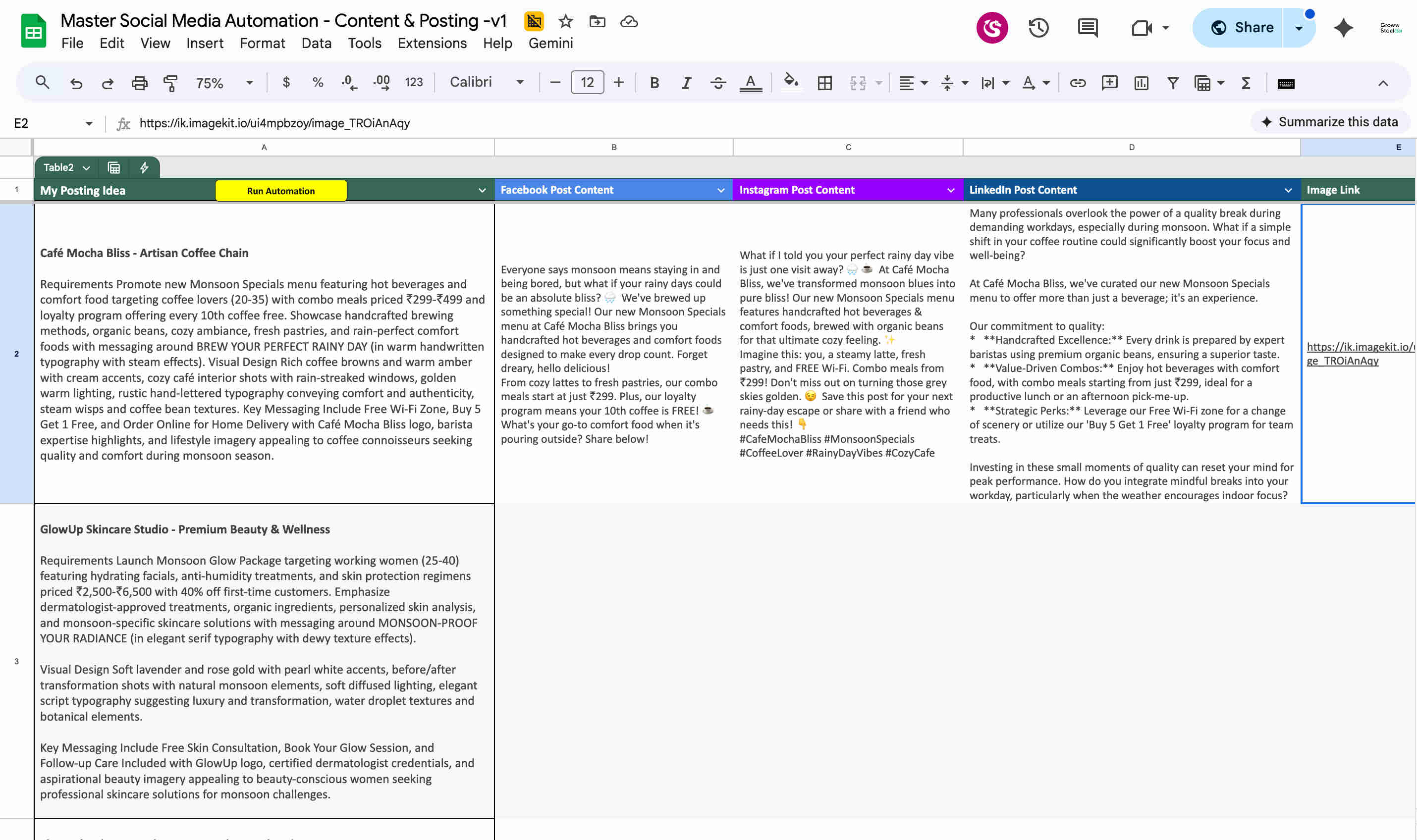
Phase 1 transforms a post idea into a complete, review-ready content package in minutes: Gemini AI produces three platform-specific captions with genuine tone differentiation rather than minor rephrasing. The Nano Banana AI image model generates a unique custom image conceptually matched to the post idea — a purpose-built alternative to stock photo libraries that produces original visuals rather than recycled imagery. ImageKit hosts the generated image at a permanent, publicly accessible URL — solving the image hosting problem that often requires manual file management when images are generated outside a platform's native tools. All outputs populate back into the Google Sheets row automatically. Phase 2 converts a human approval action (changing the status dropdown to "Approved" and clicking the "Approve & Create Post" button) into simultaneous publication across Facebook, Instagram, and LinkedIn — with Make.com handling the platform API calls and returning the final status to the Sheets row.
From Post Idea to Live Multi-Platform Content: The Complete Two-Phase Automated Pipeline
The system operates in two distinct phases — content generation and content publication — each triggered independently from the Google Sheets dashboard via custom Apps Script buttons. Here's how each phase and each component operates in detail:
- Phase 1 — Content generation trigger (Run Automation button): The team enters a post idea in the Post Idea column of the Google Sheets content dashboard — anything from a single sentence describing the topic to a more detailed brief with specific messaging requirements. Clicking the "Run Automation" button fires a Google Apps Script function that calls a Make.com webhook URL via UrlFetchApp, passing the post idea text and the row identifier. Make.com's Phase 1 scenario receives the webhook trigger and begins processing the content generation pipeline. The Apps Script button eliminates the need for team members to access Make.com directly — the entire content generation process is triggered from the familiar spreadsheet interface without requiring any knowledge of the automation platform. Multiple rows with different post ideas can be queued in the spreadsheet and processed in batch by running the automation for all pending rows simultaneously.
- Gemini AI three-platform caption generation: Make.com calls the Gemini AI API three times — once for each target platform — with prompts engineered to produce genuinely platform-appropriate captions rather than minor variations of the same text. The Facebook prompt instructs Gemini to produce a conversational, community-focused caption with an explicit engagement hook (a question, a relatable observation, or an invitation to share an opinion) that reflects Facebook's algorithm preference for posts generating comment activity. The Instagram prompt instructs Gemini to write a visually complementary caption that supports rather than leads the image — concise, emotionally engaging, with a relevant hashtag cluster (8–15 hashtags mixing broad reach tags with niche-specific ones). The LinkedIn prompt instructs Gemini to write a professional, insight-led caption that opens with a thought or observation relevant to the business audience, develops the post idea's key message with substance, and closes with a professional call-to-action or question that invites peer commentary. All three captions are generated from the same post idea brief, with Gemini adapting the messaging frame, tone, length, and structural approach for each platform's distinct audience and algorithmic context.
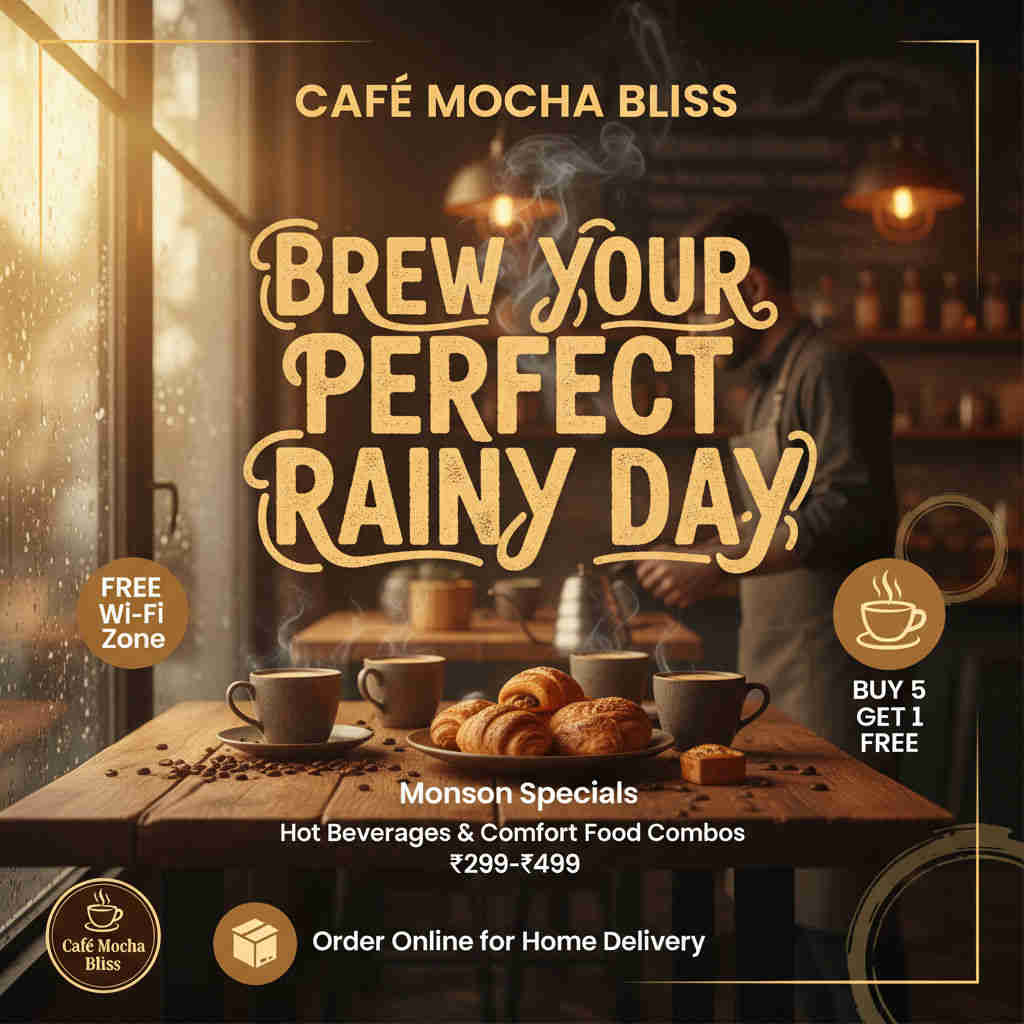
- Nano Banana AI image generation: Simultaneously with or following the caption generation, Make.com calls the Nano Banana AI image model API with an image generation prompt derived from the post idea. The Nano Banana recent model produces a unique image conceptually matched to the post topic — eliminating the stock photo search that would otherwise consume 15–30 minutes per post navigating photo libraries, evaluating licence terms, and finding an image that doesn't look immediately generic. The image generation prompt is engineered during implementation to produce images appropriate for professional brand social media use: avoiding the specific artefacts that AI image models can produce (uncanny faces, distorted text, impossible geometry), matching the visual tone the brand establishes in its content guidelines, and producing compositions that work across the different aspect ratios each social platform prefers. The model returns the generated image data which Make.com passes directly to the ImageKit upload step.
- ImageKit upload and permanent URL generation: Make.com uploads the Nano Banana-generated image to the client's ImageKit account via the ImageKit API — storing the image in a permanent cloud repository with a public, stable URL. ImageKit's CDN-backed hosting ensures the image URL remains valid and loads quickly from any geographic location, solving the image hosting problem that arises when images are generated locally (on a developer's machine or a temporary cloud environment) and need to be made accessible to social platform APIs that require a public URL to embed images in posts. The ImageKit API returns the permanent public URL for the uploaded image, which Make.com passes to both the Google Sheets update step (for team review) and the Phase 2 publishing step (for social platform posting). ImageKit's asset management also provides the client with a searchable library of all AI-generated images used across their social posts — accessible for repurposing, archiving, or campaign retrospective review.
- Google Sheets content population and review status: After all generation steps complete, Make.com calls the Google Sheets API to update the post idea's row with all generated content: the Facebook caption in the Facebook Caption column, the Instagram caption in the Instagram Caption column, the LinkedIn caption in the LinkedIn Caption column, and the ImageKit image URL in the Image Link column. The Status column is updated from "Pending" to "Ready for Review." The team member responsible for content review opens the Google Sheets dashboard, reads each platform's generated caption in their respective columns, clicks the ImageKit URL to preview the generated image, and makes any editorial adjustments directly in the cells if any caption requires refinement. This review step is the quality control gate that maintains brand standards — the AI-generated content is the draft, not the final product, and the team's editorial review is where brand voice, accuracy, and message quality are confirmed before anything is published.
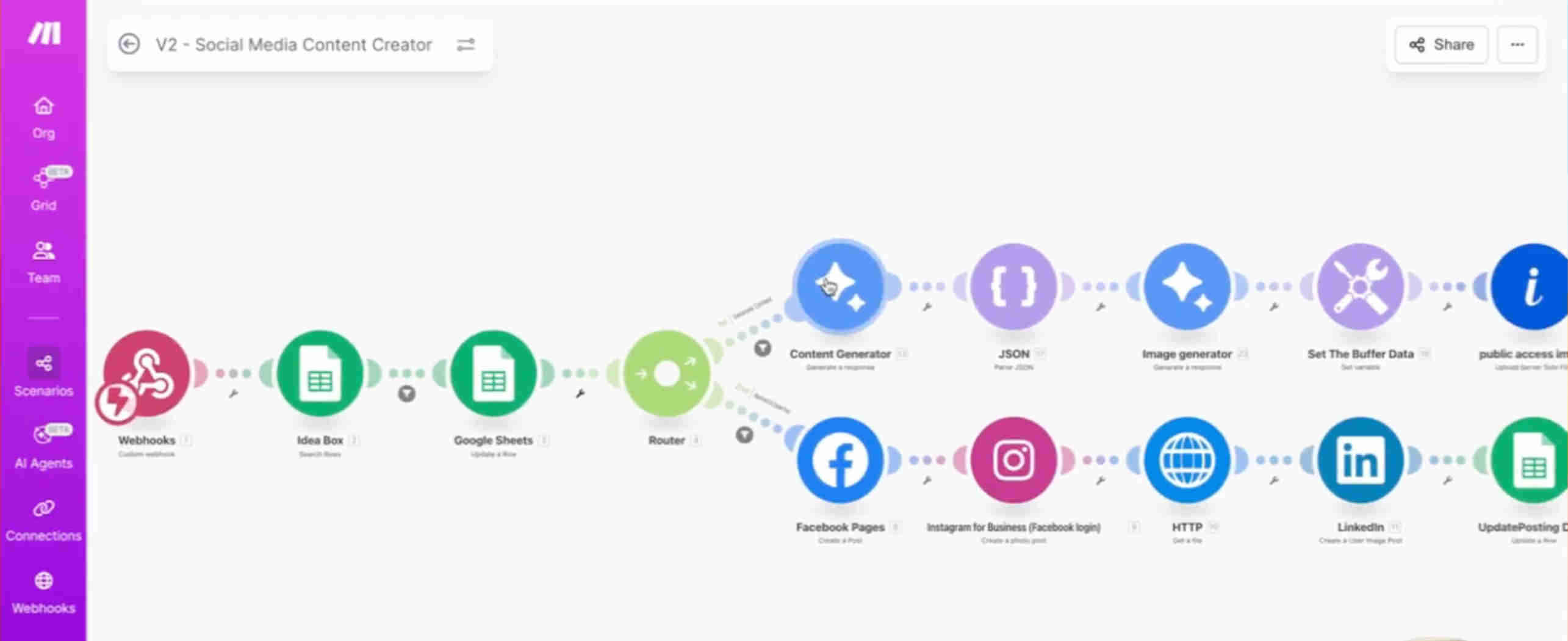
- Phase 2 — Approval and simultaneous multi-platform publishing: When the reviewing team member is satisfied with the content, they change the Status dropdown from "Ready for Review" to "Approved" and click the "Approve & Create Post" button. The Apps Script function fires the Phase 2 Make.com webhook with the row identifier. Make.com's Phase 2 scenario retrieves the approved row's captions and image URL from Google Sheets, then activates three simultaneous publishing routes: the Facebook route calls the Facebook Graph API with the Facebook caption and ImageKit image URL to publish to the connected Facebook Page; the Instagram route calls the Instagram Graph API (via Meta Business Suite) with the Instagram caption and image URL to publish to the connected Instagram Business profile; the LinkedIn route calls LinkedIn's UGC Posts API with the LinkedIn caption and image URL to publish to the connected LinkedIn company page or personal profile. All three API calls execute in parallel — the post goes live on all three platforms within seconds of the approval action. Make.com updates the Google Sheets status to "Posting Done" after confirming all three publishes have completed, completing the workflow audit trail.
💡 Why the two-phase generate-then-review architecture produces better business outcomes than fully autonomous publishing: Fully autonomous social media publishing — where AI generates and publishes without human review — optimises for speed at the cost of brand control. Social media posts represent the brand publicly; a factual error, a tone misjudgement, or a contextually inappropriate image generates real reputational risk that a 30-second review step prevents entirely. The two-phase architecture captures 85% of the time saving of full automation (the creative production labour is eliminated) while retaining 100% of the brand quality control benefit (nothing publishes without human approval). The review step is not the bottleneck it might appear — reviewing three pre-generated captions and an image link in a Google Sheet takes 60–90 seconds per post, compared to 2–3 hours of creative production per post in the manual workflow. The team's time investment is reduced by 85% while their control over output quality remains complete. This architecture is particularly valuable for regulated industries, premium brands, and organisations where the social media brand voice is a significant differentiator — where the cost of publishing a substandard post exceeds the efficiency benefit of removing the review step.
What This System Delivers That Manual Content Production and Full-Automation Tools Cannot Match
AI-Generated Custom Images via Nano Banana
The Nano Banana recent AI model generates a unique image for every post idea — eliminating stock photo library navigation, licence management, and the generic visual quality that makes stock photography immediately recognisable in feeds. Each post gets an original visual specifically conceptualised from the post idea brief, differentiating the brand's content from the sea of identical stock imagery that populates most managed social accounts.
Platform-Optimised Captions via Gemini AI
Gemini AI generates three genuinely distinct captions from a single post idea — each calibrated to its platform's audience expectations, algorithmic signals, and format conventions. Facebook gets community engagement hooks, Instagram gets visual storytelling with hashtag clusters, LinkedIn gets professional insight-led copy. The differentiation is genuine rather than cosmetic, producing platform-native content that performs better than cross-posted generic captions reformatted for length.
Built-In Review and Approval Workflow
Generated captions and image links populate directly into Google Sheets for team review before any content is published — maintaining the brand quality control that fully autonomous publishing removes. Teams can edit generated captions in the Sheets cells, replace the image URL with a manually selected alternative, or regenerate content entirely, before triggering publication. The review step takes 60–90 seconds per post and prevents the reputational risk of publishing AI-generated content without editorial oversight.
One-Click Multi-Platform Simultaneous Publishing
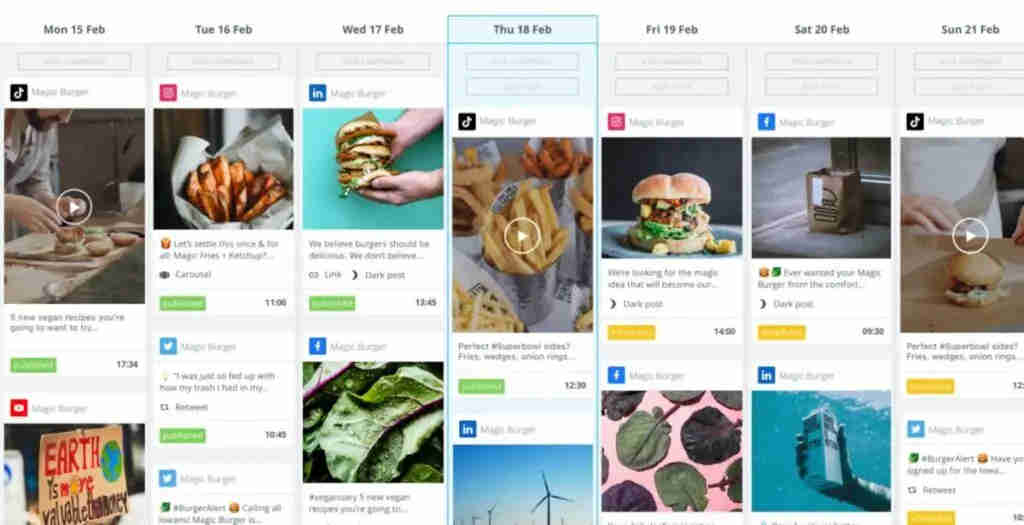
The "Approve & Create Post" button publishes to Facebook, Instagram, and LinkedIn simultaneously via their official APIs — no manual platform logins, no sequential posting, no copy-pasting between interfaces. All three platforms receive their platform-specific caption and the same AI-generated image at the same moment, ensuring consistent cross-platform timing without the manual overhead that three separate publishing sessions would require.
Spreadsheet Control Buttons
Custom Google Apps Script buttons embedded directly in the Google Sheets dashboard trigger both workflow phases — "Run Automation" for content generation and "Approve & Create Post" for publishing — without requiring team members to access Make.com. Non-technical marketing team members manage the entire content pipeline from the familiar spreadsheet interface they already use, eliminating the platform-switching and technical knowledge barrier that typically restricts automation tool access to technical staff.
ImageKit Permanent Cloud Image Hosting
Generated images are uploaded to the client's ImageKit account and served via ImageKit's CDN — providing permanently accessible, geographically distributed image URLs that social platform APIs can reliably embed. Eliminates the broken image link problem that arises when images are hosted on temporary or access-restricted URLs, and provides a searchable asset library of all AI-generated social media images for retrospective review, repurposing, and brand archive management.
The System in Action
Before vs. After: What Changes When AI Produces the Content and One Click Publishes It Everywhere
Before: The social media content production workflow required multiple specialists and multiple hours per post. A strategist or marketing manager defined the message, a copywriter wrote the caption and then manually rewrote it for each platform's tone and format requirements, a designer either created original artwork (time-intensive) or navigated stock photo libraries for a visual that didn't look recycled (still 20–30 minutes per post for a good image). Someone then logged into Facebook, Instagram, and LinkedIn separately to upload, format, and publish the post on each platform — three login sessions, three sets of upload mechanics, three opportunities for formatting errors. At 2–3 hours per post across the full chain, a team producing 5 posts per week was spending 10–15 hours on content production before addressing any other marketing responsibility. Posting consistency depended on this entire chain completing without breakdowns — a busy designer, a travelling copywriter, or an unexpected priority meant posting gaps and the algorithmic distribution penalties that followed.
After: A single marketing team member spends 2 minutes per post entering the idea in Google Sheets and clicking "Run Automation." Minutes later, three platform-specific captions and a custom AI-generated image populate into the same row. The reviewer spends 90 seconds reading the captions, previewing the image, making any editorial tweaks, and clicking "Approve & Create Post." All three platforms go live simultaneously. The team's total time investment per post is under 5 minutes — compared to 2–3 hours previously. At 5 posts per week, the team's content production time drops from 10–15 hours to under 30 minutes, reclaiming the equivalent of two full working days weekly for strategy, community engagement, campaign optimisation, and the higher-value marketing activities that actually require human expertise. The content quality improves simultaneously — Gemini captions are consistently platform-appropriate, and Nano Banana images are consistently original and conceptually relevant — without the quality variance that comes from different copywriters and designers handling different posts under time pressure.
Implementation: Live in 3 Weeks
- Google Sheets template and Apps Script button setup (Week 1): The Google Sheets content dashboard is built with the complete column schema: Post Idea, Facebook Caption (populated by automation), Instagram Caption (populated by automation), LinkedIn Caption (populated by automation), Image Link (populated by automation), Status (dropdown: Pending / Ready for Review / Approved / Posting Done / Error), Notes (optional editorial notes field), and Published URLs (populated with platform post URLs after successful publication). Data validation rules are applied to the Status dropdown. Google Apps Script is written for two button functions: the "Run Automation" function that calls the Make.com Phase 1 webhook URL with the row's post idea and row identifier via UrlFetchApp, and the "Approve & Create Post" function that calls the Phase 2 webhook URL with the row identifier. The two buttons are created as drawing objects in the spreadsheet and assigned to their respective Apps Script functions. The spreadsheet is shared with the full marketing team and tested by triggering both functions with sample webhook endpoints to confirm the Apps Script → Make.com communication works correctly before Make.com workflows are built.
- AI content generation configuration (Week 1–2): The Gemini AI API connection is established in Make.com. Three distinct caption generation prompts are engineered — one per platform — incorporating the client's brand voice guidelines, tone descriptors, caption length targets, and any platform-specific conventions (hashtag count for Instagram, maximum LinkedIn caption length, Facebook engagement invitation style). The prompts are tested with 10–15 diverse post idea samples across the topics the client's content calendar typically covers, reviewing caption quality and platform-appropriateness for each output. The Nano Banana API is integrated with image generation prompts engineered to produce brand-appropriate visuals — with style guidance (photorealistic vs. illustrated, colour palette preferences, compositional conventions) matched to the client's existing visual identity. ImageKit is connected via API with the client's ImageKit account credentials, and upload functionality is tested by generating sample images and confirming successful hosting and public URL accessibility.
- Make.com Phase 1 and Phase 2 scenario development (Week 2–3): Phase 1 scenario is built: Webhook module receives the Run Automation trigger with post idea and row ID, Gemini AI module generates Facebook caption, a second Gemini AI module generates Instagram caption, a third generates LinkedIn caption (three separate module calls ensuring each caption receives its platform-specific prompt without bleed from other platform instructions), Nano Banana module generates the custom image, Make.com downloads the image binary from Nano Banana's response URL, ImageKit Upload module uploads the image binary and receives the permanent public URL, Google Sheets Update Row module writes all four generated values (three captions + image URL) to the correct row using the row ID, and updates Status to "Ready for Review." Phase 2 scenario is built: Webhook module receives the Approve & Create Post trigger with row ID, Google Sheets Get Row module retrieves the approved row's caption and image URL values, Router module activates three parallel routes, Facebook route calls the Facebook Graph API with Facebook caption and ImageKit URL, Instagram route calls the Instagram Graph API with Instagram caption and ImageKit URL, LinkedIn route calls LinkedIn UGC Posts API with LinkedIn caption and ImageKit URL, Google Sheets Update Row module writes final status "Posting Done" and platform post URLs after all three publish calls complete. Error handling modules capture API failures per platform without aborting successful routes.
- Social platform API authentication and end-to-end testing (Week 3): Facebook Page API authentication is established via Meta Business Suite OAuth with pages_manage_posts and pages_read_engagement permissions. Instagram Business account is connected through the same Meta Business Suite flow with instagram_basic and instagram_content_publish permissions. LinkedIn is authenticated via OAuth 2.0 with w_member_social (personal profile) or w_organization_social (company page) scope. Each platform connection is tested independently with a live test post before the end-to-end scenario test. Comprehensive end-to-end testing runs 5–10 real post ideas through both phases — reviewing generated caption quality for each platform, image generation appropriateness, ImageKit hosting confirmation, Google Sheets population accuracy, approval workflow trigger verification, and simultaneous publication confirmation on all three platforms. The Status flow is validated through all states (Pending → Ready for Review → Approved → Posting Done). Any prompt refinements based on test output are made before production activation. Team training covers the content dashboard workflow: entering post ideas, reviewing generated content, making editorial adjustments, and triggering publication.
The Right Fit — and When It Isn't
This solution delivers maximum value for marketing teams maintaining active presence across Facebook, Instagram, and LinkedIn who are currently bottlenecked by creative production capacity rather than strategic ideas; digital marketing agencies managing social content for multiple clients who need to scale output without proportional headcount growth; brand managers at organisations where social media consistency is a significant brand equity driver; e-commerce businesses requiring high-frequency product and lifestyle content across visual-first platforms; and content creators or personal brand operators managing business social channels alongside their primary creative work. The 3-week implementation makes this one of the fastest-payback content automation builds available, with ROI beginning from the first week of production use as creative hours are reclaimed immediately.
Two calibration notes for realistic expectations: first, Gemini AI captions and Nano Banana images are drafts that benefit from human editorial review — the built-in approval step exists precisely because AI-generated content requires oversight to maintain brand standards and factual accuracy. Teams that expect to bypass the review step and publish fully autonomously should assess whether their brand's risk tolerance supports that approach for public social media content. Second, this system produces single-image posts and platform-native text — it does not currently produce video content, carousel sequences, or Stories formats. For brands whose social strategy depends heavily on video Reels, Stories, or multi-image carousels, the single-image post pipeline handles the portion of the content calendar where static posts are appropriate, and a complementary system is needed for video-format content. We scope the full content format requirements during the discovery call to recommend the right architecture for the complete content mix.