
The WhatsApp Support Bottleneck: Why Manual Responses at Scale Always Break Customer Experience
WhatsApp has become the default customer communication channel for businesses across e-commerce, services, and direct sales — particularly in markets where WhatsApp penetration exceeds email and phone in daily usage. Customers expect WhatsApp to behave like a real-time conversation: they send a message and expect a reply within minutes, not hours. The problem is that this expectation is set by the platform itself — WhatsApp's user experience creates an implicit promise of responsiveness that manual support operations structurally cannot keep at scale. A support team fielding 200+ WhatsApp messages daily — product questions, order status enquiries, policy questions, complaints, and purchase enquiries — cannot maintain sub-minute response times across the full volume while also handling escalations, managing the CRM, and performing every other function of a customer service role.
The compounding problems are predictable: delayed responses during peak hours frustrate customers who message with purchase intent and switch to a competitor while waiting; after-hours messages go unanswered until the next business day, losing time-sensitive sales and allowing dissatisfaction to fester overnight; different agents give different answers to the same questions, creating inconsistency that undermines trust; and agents handling the same questions repeatedly burn out while the genuinely complex issues — the ones that actually require human judgement — receive the same rushed attention as the "what are your opening hours?" messages that an AI could answer perfectly. Scaling by hiring more support staff is the obvious response but the most expensive one — and it doesn't fundamentally solve any of these problems, it just adds headcount to the same broken manual process.
Building the Intelligent WhatsApp Support Engine: Context-Aware AI Responses With Full Conversation Memory
GrowwStacks built a WhatsApp support automation that goes significantly further than a simple auto-responder. The critical architectural decision is the conversation memory layer: using Make.com's Data Store to persist the complete interaction history for every customer phone number, the system provides ChatGPT with the full context of all previous exchanges — not just the current message — before generating each response. This is the difference between a chatbot that feels robotic (every message treated as isolated) and one that feels genuinely intelligent (responses that reference previous questions, pick up ongoing conversations, and don't require the customer to repeat themselves).
The 360dialog WhatsApp Business API integration provides the official, policy-compliant channel for receiving and sending WhatsApp messages at scale — handling the webhook reception, message delivery, and API rate management that a direct WhatsApp integration requires. The intelligent router in Make.com checks whether an existing thread ID exists in the Data Store for the incoming sender — directing returning customers through the conversation continuation path (full history loaded into ChatGPT context) and new customers through the initialisation path (business knowledge base loaded as context). ChatGPT receives whichever context package is appropriate and generates a natural, brand-consistent response that the 360dialog API delivers back to the customer's WhatsApp chat within seconds of their message.
From Customer Message to Delivered WhatsApp Reply: The Complete Eight-Step Automated Workflow
The system processes every incoming WhatsApp message through eight automated steps — from webhook receipt to delivered reply and conversation record update — in seconds. Here's the complete flow:
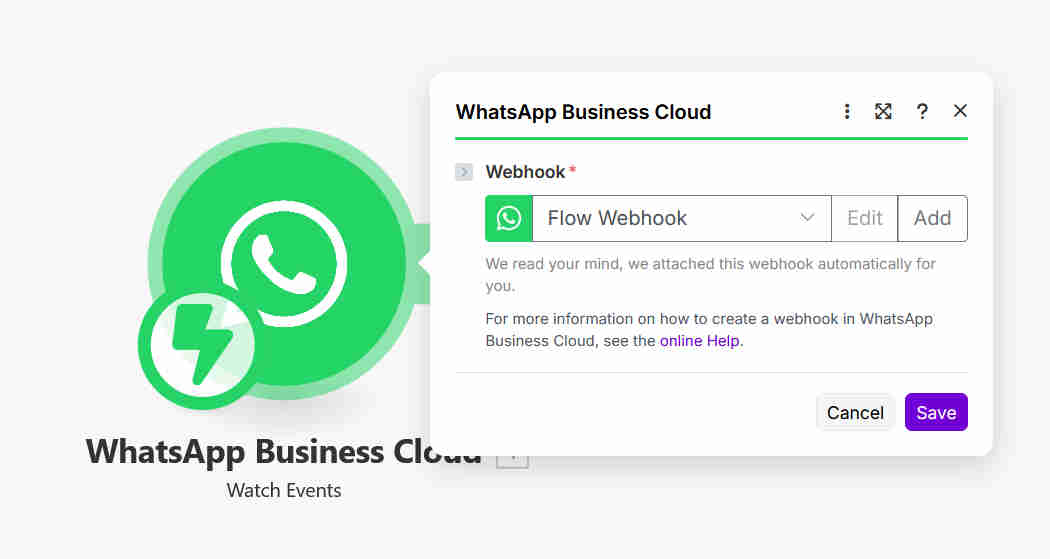
- WhatsApp message reception via 360dialog webhook: When a customer sends a WhatsApp message to the business number, 360dialog's webhook immediately fires a notification to the Make.com scenario — containing the message text, the sender's phone number, a timestamp, and the WhatsApp message ID. This event-driven trigger fires within seconds of message delivery, ensuring the response pipeline initiates immediately rather than waiting for a scheduled check. The 360dialog integration provides the official WhatsApp Business API connection — ensuring compliance with WhatsApp's business messaging policies, handling delivery receipts, and managing the API rate limits and session windows that govern WhatsApp Business messaging.
- Data Store context retrieval: The incoming sender's phone number is used to query the Make.com Data Store — searching for any existing conversation record associated with that customer. The Data Store search returns either the customer's complete conversation history (all previous messages and bot responses stored as a structured thread) or a null result indicating this is a first-time contact. This query result determines which processing path the router directs to, and it provides the raw context data that will be passed to ChatGPT in the response generation step.
- Intelligent thread routing: The Make.com router module evaluates the Data Store query result — specifically checking whether an existing thread ID is present for the sender. If a thread exists, the workflow routes to the conversation continuation path. If no thread exists, the workflow routes to the new conversation initialisation path. This routing decision is the architectural mechanism that enables the bot to behave like a coherent conversational agent rather than a stateless FAQ responder — every returning customer's experience is informed by everything they've previously discussed with the bot.
- Existing conversation path — context loading: For returning customers, the complete conversation history is retrieved from the Data Store and formatted as a structured message array — the standard format for providing conversation context to the ChatGPT API. This history includes every previous customer message and every previous bot response, in chronological order, giving ChatGPT the full context to understand where the conversation stands, what the customer has already been told, and what follow-up questions or escalations are relevant. ChatGPT can reference previous exchanges explicitly ("As I mentioned earlier regarding your order…") and avoid re-explaining information already covered.
- New conversation path — knowledge base initialisation: For first-time contacts, a new thread ID is created and the ChatGPT context is initialised with the business knowledge base — the system prompt containing all structured business information: product catalogue details, pricing, policies, shipping and returns information, FAQ answers, escalation triggers, and brand voice guidelines. This system prompt is developed and refined during implementation to give ChatGPT comprehensive knowledge of everything the business wants communicated to customers, ensuring the first response to a new customer is as well-informed as the response to a returning customer with full conversation history.
- ChatGPT response generation: The customer's current message, combined with either the conversation history or the knowledge base system prompt, is sent to the ChatGPT API. ChatGPT generates a natural, personalised response that directly addresses the customer's specific question — drawing on the business knowledge where relevant, referencing conversation context where applicable, and maintaining the brand voice configured in the system prompt. The response is structured for WhatsApp's messaging format — conversational in length, without excessive formatting, written as a natural reply rather than a formal document. For complex queries that exceed the bot's knowledge scope or require human judgement, the ChatGPT prompt includes escalation instructions — the bot recognises these scenarios and responds with an appropriate message indicating that a human agent will follow up.
- Instant WhatsApp reply delivery via 360dialog: The ChatGPT-generated response text is passed to the 360dialog API send message module, which delivers it to the customer's WhatsApp chat using the sender's phone number from the original webhook. The reply appears in the customer's conversation thread within seconds of their original message — maintaining the real-time conversation feel that WhatsApp users expect. Delivery confirmation is returned by the 360dialog API and logged in the Make.com execution record.
- Data Store conversation update: The complete exchange — customer message, timestamp, and bot response — is written back to the Data Store, updating the customer's conversation thread with the new entries. For new conversations, the thread is created with the first exchange and the assigned thread ID. For returning customers, the new messages are appended to the existing thread. This update ensures that every subsequent message from the same customer arrives with a complete, current conversation history available for ChatGPT context — maintaining the coherent multi-turn conversation experience across any number of sessions and any gap in time between them.
.png?updatedAt=1768983101378)
💡 Why conversation memory is the critical differentiator between a useful bot and a frustrating one: The single most common customer complaint about chatbots is that they make you repeat yourself. Every time the customer sends a new message, the stateless bot treats it as a fresh conversation — forcing the customer to re-establish context, re-explain their situation, and re-answer questions they've already answered. This experience is actively worse than no bot at all, because it creates the appearance of engagement without delivering the value of it. The Data Store conversation memory architecture changes this fundamentally: a returning customer asking "what's the status?" after previously discussing their order receives a response that directly references their order, their previous questions, and the answers already given — exactly as a human agent who had read the conversation history would respond. This coherence is what produces the 90% customer satisfaction improvement: customers experience the bot as genuinely helpful rather than frustratingly mechanical.
What This System Does That Manual WhatsApp Support Cannot
ChatGPT Natural Intelligence
Generates natural, personalised responses that address the customer's specific question using conversation context and business knowledge — eliminating the robotic auto-responder feel that degrades customer experience. Handles unlimited concurrent conversations with consistent quality, brand voice, and accuracy impossible for human teams at scale, across every product, policy, and process question the business receives.
Conversation Memory
Data Store maintains the complete interaction history for every customer — enabling coherent multi-turn conversations where ChatGPT references previous exchanges and avoids forcing customers to repeat themselves. Transforms the chatbot experience from isolated FAQ responses to genuine ongoing dialogue, producing the 90% customer satisfaction improvement that stateless bots cannot achieve.
Instant Response Delivery
Complete pipeline from webhook receipt to delivered WhatsApp reply executes within seconds — providing the real-time responsiveness that WhatsApp users expect and that manual support teams cannot maintain under volume. Eliminates the minutes-to-hours delay that causes purchase-intent customers to disengage, capturing the response-window that determines conversion for time-sensitive enquiries.
Intelligent Thread Routing
Router module checks for existing conversation threads and directs to the appropriate processing path — full history load for returning customers, knowledge base initialisation for new contacts. Ensures every interaction receives the correct context package, maintaining conversation coherence across multiple sessions and any gap in time between customer messages without requiring the customer to re-establish their situation.
Business Knowledge Base
ChatGPT accesses the comprehensive business knowledge base — products, pricing, policies, shipping, returns, FAQs, and process information — generating accurate, consistent responses to every standard inquiry. Eliminates the answer variation that occurs when different human agents handle the same question, maintaining 100% consistency in information quality and preventing customer confusion from conflicting responses.
24/7 Availability
The system operates continuously — nights, weekends, public holidays — providing instant intelligent support at every hour without breaks or staffing costs. Captures after-hours sales enquiries that previously went unanswered until the next business day, prevents customer frustration from overnight wait times, and ensures the business's WhatsApp channel delivers the responsive experience customers expect regardless of time zone or working hours.
The System in Action
.png?updatedAt=1768983101443)
.png?updatedAt=1767703301728)
Before vs. After: What Changes When WhatsApp Support Runs Itself
Before: Customer service teams spent 30–40 hours weekly manually responding to WhatsApp messages — reading each incoming query, locating the relevant answer across product documentation, policies, and order systems, composing a personalised reply, and sending it. Response times varied from minutes to hours depending on team workload and time of day. After-hours messages went unanswered until the following morning — often losing the customer entirely to a competitor who responded faster. Different agents gave inconsistent answers to the same questions. High-volume periods caused backlogs that pushed response times to unacceptable lengths. And scaling required hiring additional support staff, adding headcount costs without solving the structural problem.
After: Every WhatsApp message receives an intelligent, personalised, brand-consistent reply within seconds — at 2am on a Sunday with the same quality as 9am on a Tuesday. The support team's 40-hour weekly WhatsApp workload reduces to 8 hours of supervision and escalation handling — reviewing the small percentage of conversations that require human judgement while the bot handles the 85% of enquiries that follow standard patterns. Customer satisfaction improves measurably from instant responsiveness. After-hours enquiries convert at the same rate as business-hours ones. And the business can triple its WhatsApp volume without any incremental support cost — the automation handles 10 concurrent conversations or 10,000 with identical speed and quality.
Implementation: Live in 8 Weeks
- 360dialog WhatsApp setup: A 360dialog account is created and the business's WhatsApp Business number is registered and connected to the 360dialog API. The webhook endpoint is configured in 360dialog to point to the Make.com scenario — this is the connection that routes every incoming customer message to the automation pipeline. The API credentials for both receiving (webhook verification) and sending (outbound message delivery) are configured and tested with sample messages to confirm the full send-receive cycle works correctly. WhatsApp Business API compliance requirements — including the 24-hour session window rules and opt-in requirements for marketing messages — are reviewed and the implementation is configured to operate within the official messaging policy framework.
- Knowledge base development: The business knowledge base is the most content-intensive part of the implementation — requiring comprehensive documentation of everything the bot should be able to answer. This includes product and service descriptions, pricing and availability information, ordering and payment processes, shipping policies and timelines, returns and refund procedures, common FAQ answers, business contact information and operating hours, and escalation triggers (the specific query types that should be routed to a human agent). The knowledge base is structured as a ChatGPT system prompt — formatted to give the model clear, organised information it can reference when generating responses. This prompt is tested across the full range of expected customer query types and refined until response accuracy is consistently high.
- Data Store schema configuration: The Make.com Data Store is designed with the schema required for conversation thread management: a unique identifier per customer (typically the phone number), the thread ID, the conversation history as a structured array of message objects (each with role, content, and timestamp), and any customer metadata captured during previous interactions. The search and retrieval logic is implemented to efficiently query by phone number, and the write logic is tested to correctly append new messages without corrupting existing thread data. Data retention policies are configured per the business's requirements.
- ChatGPT integration and prompt engineering: The OpenAI API is connected to Make.com and the ChatGPT prompt architecture is engineered: the system prompt incorporating the complete business knowledge base, the conversation history format for returning customers, and the escalation handling instructions. The prompt is tested across 20–30 representative customer query scenarios — product questions, order enquiries, complaints, policy questions, ambiguous messages, and escalation-triggering situations — with the response quality assessed and the prompt refined iteratively. Fallback handling is implemented for query types the bot cannot answer confidently — directing customers to contact the team directly rather than generating a potentially inaccurate response.
- Complete workflow assembly, testing, and deployment: The full Make.com scenario is assembled connecting all components: 360dialog webhook trigger, Data Store query, router module, both conversation paths (continuation and new thread), ChatGPT generation, 360dialog send reply, and Data Store update. Error handling is added for API failures, rate limit hits, and malformed message payloads. Comprehensive end-to-end testing is conducted with real WhatsApp messages across all scenario types — first message, returning customer continuation, escalation trigger, and edge cases. The support team is briefed on the escalation handling process and how to manage the conversations routed for human follow-up. The production scenario is deployed with Make.com monitoring for execution success rates, and performance dashboards are configured for ongoing conversation quality review.
The Right Fit — and When It Isn't
This solution delivers maximum value for e-commerce businesses handling high volumes of product and order enquiries via WhatsApp, service providers fielding repetitive FAQ and booking questions, customer success teams managing standard account enquiries, sales organisations qualifying inbound leads on WhatsApp, and any business receiving 50+ WhatsApp messages daily where a significant proportion follow recognisable question patterns. The 80% support workload reduction is most impactful for teams where WhatsApp volume is actively limiting their capacity to handle complex enquiries — the bot removes the repetitive baseline volume, freeing the team's time for the conversations that genuinely require human judgement.
Two important deployment notes: the system handles a wide range of standard customer service scenarios excellently, but there is a category of conversations that benefit from human involvement — highly emotional complaints, complex multi-party order disputes, scenarios requiring account access or payment adjustments, and sensitive situations where tone management is critical. During implementation, clear escalation triggers are defined in the ChatGPT prompt so the bot correctly identifies these scenarios and routes them to the human team rather than attempting to resolve them. Most businesses find that approximately 85% of WhatsApp volume is handled fully by the bot, with 15% escalated — achieving the core workload reduction while maintaining human oversight for the interactions that genuinely require it. Additionally, the 360dialog WhatsApp Business API integration operates within WhatsApp's official business messaging framework, which requires a verified WhatsApp Business account — the setup process includes WhatsApp's business verification, which we guide clients through as part of the implementation.