
The Support Request Black Hole: Why Email-Based Facilities and IT Management Fails at Scale
In most organisations with 100+ employees, internal support requests — a broken air conditioner, a laptop that won't connect to the network, an administrative form that needs processing — flow through email or verbal communication to a concierge desk or IT helpdesk. This works at small scale but deteriorates rapidly as headcount grows. Emails get lost in shared inboxes. Verbal requests are forgotten. The same issue gets reported by three different employees, creating duplicate work. Requests that need to be routed to a specific team get sent to the wrong person and sit until someone notices. Employees who submitted a request two days ago have no way to know whether anyone is working on it without sending a follow-up email that itself may go unread.
The visibility problem is the most operationally damaging consequence. Without a centralised tracking system, managers have no reliable picture of what's open, what's overdue, who is handling which requests, or where the bottlenecks are. They can't identify whether the maintenance team is overwhelmed while IT has capacity, or whether a specific type of issue is recurring with unusual frequency. Support performance is managed by impression rather than data — which means process improvements are reactive rather than proactive, and accountability for missed commitments is difficult to establish. For employees sitting in an office with a broken AC or a non-functional laptop, the experience of submitting a request and hearing nothing is a significant driver of workplace dissatisfaction that is entirely preventable with the right system.
.png?updatedAt=1767681087381)
Building Inside Microsoft 365: A Complete Request Lifecycle System With Zero Third-Party Dependencies
GrowwStacks built a complete service request management system using only tools that most enterprise organisations already pay for through their Microsoft 365 licences — Power Apps for the employee-facing portal and manager dashboards, SharePoint as the secure backend database, Power Automate for intelligent routing and notification workflows, and Microsoft Teams for real-time technician and manager notifications. No external helpdesk software. No additional SaaS licence costs. No data leaving the organisation's Microsoft 365 tenant. No IT governance exceptions required.
The design philosophy was to make the correct behaviour easier than the incorrect behaviour for every user type. For employees, submitting a structured request through the portal is faster than composing an email — two minutes versus five. For approvers, acting on a Teams notification card is faster than processing an email chain. For technicians, updating request status in the portal is the path of least resistance because it triggers the requester notification automatically. And for managers, the analytics dashboard replaces the need for weekly status meetings to determine what's open and overdue.
From Request Submission to Resolved Ticket: The Complete Lifecycle
The system manages every request through seven automated stages — from initial submission through resolution and feedback collection — without any step falling through the cracks. Here's the complete flow:
- Employee request submission: Employees access the Power Apps portal through any browser or the Teams app (where it can be pinned as a tab for immediate access). The submission form presents category selection — Facility (AC, plumbing, electrical, cleaning), IT (hardware, software, network, access), or Administrative (forms, approvals, procurement) — followed by location, issue description, urgency level (Low/Medium/High/Critical), and an optional attachment field for photos or supporting documents. The form is designed for two-minute completion — faster than composing a support email, which encourages adoption over the old email habit.
- SharePoint record creation: On submission, the Power Apps form writes a structured record to the SharePoint backend with all submitted fields plus automatically captured metadata — submitter name and department (from Microsoft 365 identity), submission timestamp, and initial status of "Submitted." Each request receives a unique ticket number for reference. The SharePoint list is the single source of truth for all request data, visible to approvers and managers in real-time and auditable for compliance purposes.
- Power Automate intelligent routing: A Power Automate flow triggers on the new SharePoint record, evaluates the request category, and routes to the appropriate team channel in Microsoft Teams. Facility requests post to the Maintenance team channel; IT requests post to the Technical Support channel; Administrative requests post to the Admin team channel. The routing logic is configurable — additional subcategories or location-based routing rules can be added without rebuilding the workflow architecture.
- Approver assignment via Teams: The Teams notification arrives as an adaptive card — a rich, interactive message showing all request details with action buttons built in. The approver can view the full request, see the submitter's details, and assign the request to a specific technician from a dropdown of available team members — all without leaving Teams. The assignment action updates the SharePoint record, changes the status to "Assigned," and triggers a notification to the assigned technician. For requests requiring manager authorisation before assignment (configurable by category or cost threshold), an approval step is inserted before the technician assignment.
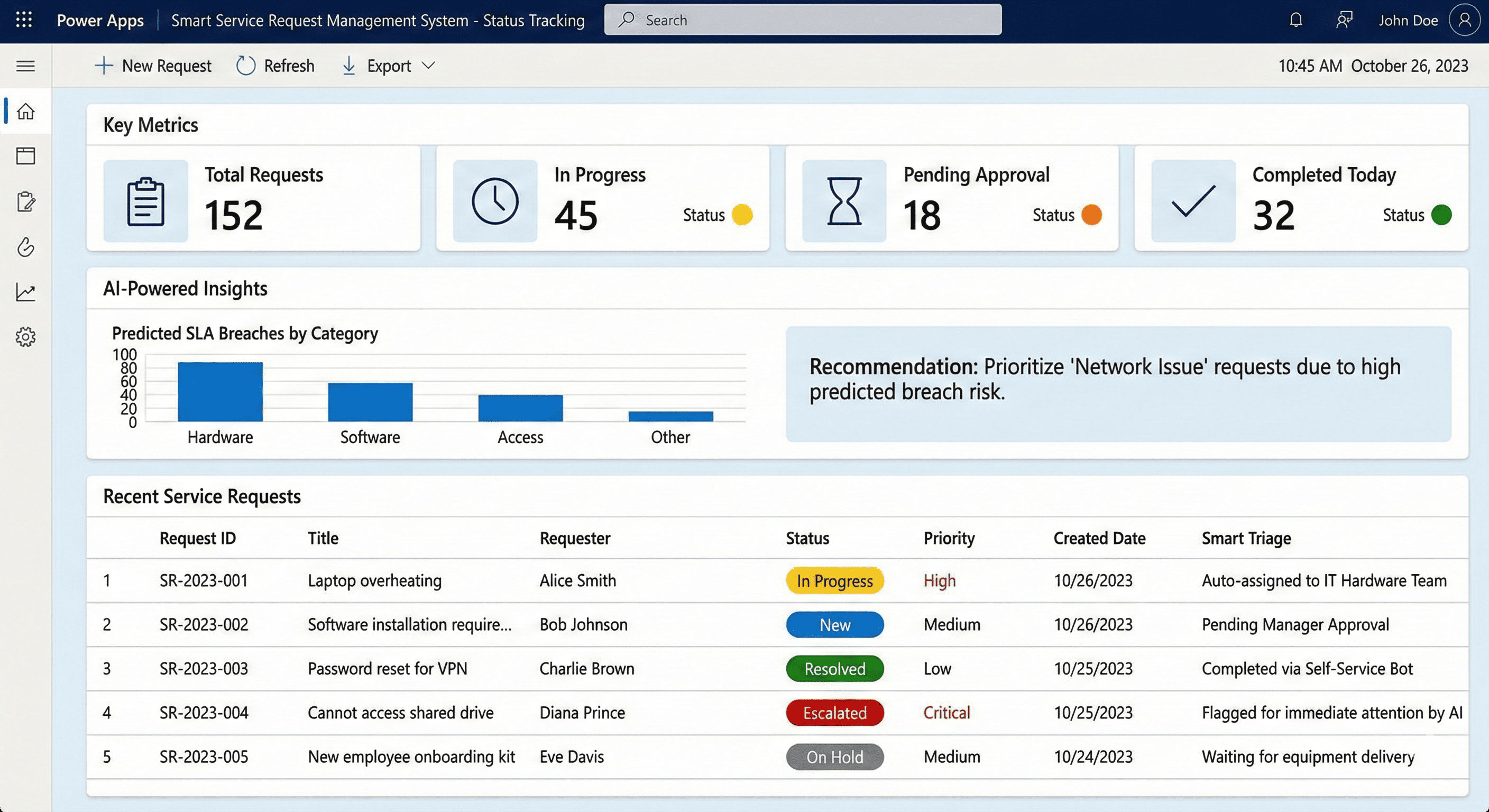
- Real-time status tracking and technician updates: The assigned technician receives a Teams notification with a direct link to the portal record. As they work the request, they update the status — In Progress, Awaiting Parts, Pending Information — and each status change triggers an automated email to the original requester, keeping them informed without them needing to follow up. The portal displays the complete request timeline: submission time, assignment time, each status change with timestamp, assigned technician name, and expected completion date. Employees can view their own open and historical requests at any time through the portal without emailing anyone for a status update.
- Completion recording and feedback: When the technician marks the request as Complete, the SharePoint record is updated with the resolution timestamp and resolution notes. An automated email to the requester confirms the completion and includes a brief satisfaction feedback link — a 1–5 star rating and optional comment. Feedback responses are stored in SharePoint alongside the original request, enabling per-category and per-technician satisfaction analysis. The resolution time (from submission to completion) is automatically calculated and stored for analytics purposes.
- Escalation and overdue handling: A scheduled Power Automate flow runs daily checking for requests that have exceeded their SLA turnaround time by category (configurable — e.g., Critical requests overdue after 2 hours, High after 4 hours, Medium after 24 hours). Overdue requests trigger escalation notifications to the relevant team manager in Teams and update the request status to "Overdue" in the portal, making them visible in the manager's dashboard with colour-coded urgency indicators. This systematic escalation replaces the informal chasing that managers currently do manually.
💡 The Microsoft 365-native advantage: Most organisations looking at service request management instinctively reach for dedicated helpdesk software — ServiceNow, Freshdesk, Zendesk — which introduces new licences, new training requirements, new data security reviews, and new integration projects to connect with the Microsoft 365 environment the organisation already uses. Building natively within Power Apps, SharePoint, Power Automate, and Teams means employees interact with a system that looks and feels like the Microsoft products they already use daily, IT governance approval is straightforward because data never leaves the Microsoft 365 tenant, and the implementation cost is a fraction of commercial helpdesk software because there are no recurring per-seat licence fees.
What This System Does That Email-Based Support Management Can't
Intelligent Request Routing
Power Automate analyses the request category and automatically directs facility issues to the maintenance team, IT problems to technical support, and administrative needs to the admin team — eliminating the manual sorting and incorrect assignments that consume concierge desk time. Requests reach the correct team within seconds of submission without any human routing decision required.
Complete Status Tracking
The portal displays the full request lifecycle — submission timestamp, assignment details, in-progress updates, expected completion, and actual resolution time — visible to both the requester and management in real-time. Eliminates the constant status inquiry emails that currently consume support team time, replacing them with self-service visibility that employees can access at any moment.
Microsoft Teams Integration
Adaptive card notifications delivered directly in Teams workspaces include all request details and interactive action buttons — enabling approvers to assign technicians and technicians to update status without leaving Teams. Keeps all support communication within the collaboration platform the team already uses, eliminating platform switching and email overload for support personnel.
Secure Microsoft 365 Deployment
The complete system operates within the organisation's existing Microsoft 365 environment — Power Apps, SharePoint, Power Automate, and Teams — without any third-party tools or data leaving the tenant. Meets enterprise data security, compliance, and IT governance requirements automatically while leveraging existing Microsoft licences with no additional software costs.
Performance Analytics Dashboard
Comprehensive metrics showing open vs. fulfilled requests, average turnaround time by category, technician workload distribution, overdue items, and employee satisfaction scores — giving managers the data to optimise support operations, make capacity decisions, and hold teams accountable to SLAs. Replaces the impression-based management that manual processes require with systematic, evidence-based oversight.
Multi-Level Approval Workflows
Configurable approval hierarchies for requests requiring manager authorisation before technician assignment — supporting complex organisational structures with customisable routing rules, delegation logic, and escalation paths. The workflow architecture accommodates different approval requirements by category, cost threshold, or location without requiring parallel processes or manual override procedures.
The System in Action
.png)
.png)
Before vs. After: What Changes When Support Requests Have a Systematic Home
Before: Employees submitted support requests via email to a shared inbox or verbally to a concierge desk — with no confirmation, no tracking, and no visibility into whether anyone was working on their issue. Requests were manually sorted and routed, introducing errors and delays. The same issues were reported multiple times by different employees, creating duplicate work. Managers had no reliable picture of what was open or overdue. Status inquiry emails generated additional work for the support team. Employees sitting in broken environments for days — waiting for an AC repair, a laptop replacement, or an administrative approval — experienced measurable satisfaction decline. And when accountability for missed commitments was needed, there was no audit trail to reference.
After: Every request submitted through the portal creates a timestamped, uniquely identified record that is immediately routed to the correct team, visible to the requester in real-time, and tracked through every stage until completion. Employees receive automatic status updates without asking. Managers open the analytics dashboard and see exactly what's open, what's overdue, who owns what, and how performance compares to SLAs — without calling anyone for a status update. The support team works from a structured, prioritised queue rather than a shared email inbox. No request is ever lost or forgotten because every record persists in SharePoint until explicitly resolved.
Implementation: Live in 8 Weeks
- Requirements gathering and system design: The discovery phase maps the organisation's existing support request categories — typically facility, IT, and administrative, with subcategories specific to the organisation's operations. Approval hierarchies are documented for each category. SLA turnaround time commitments are established for each urgency level. The data fields required for each request type are identified. Power Apps UI mockups are designed and reviewed with stakeholder representatives before development begins, ensuring the portal meets the specific needs of the organisation's employee population.
- SharePoint database and Power Apps development: The SharePoint lists are configured with all required columns — request details, status, assignment, timestamps, feedback, and unique identifiers — with appropriate column types and validation rules. The Power Apps portal is built with separate views for employees (submit and track own requests), technicians (view assigned requests and update status), approvers (manage team queue and assign), and managers (full analytics and all-requests visibility). User permissions are configured through Microsoft 365 security groups, ensuring employees see only their own requests while managers have team-wide access.
- Power Automate workflow configuration: The routing workflows are built for each request category with configurable trigger conditions. Approval flows are implemented for categories requiring manager sign-off — using Power Automate's approval action that delivers an approval request directly to the approver's Teams and email with accept/reject capability. Assignment notification flows fire when a request is assigned, delivering the adaptive card to the technician in Teams. Status change flows trigger requester email notifications at each lifecycle transition. Escalation flows are scheduled to run daily and flag overdue items. All flows include error handling and retry logic for reliability.
- Teams integration and email templates: Teams channels for each support category are configured with the Power Automate posting integration. Adaptive cards are designed with the correct layout and action buttons for approver and technician interactions. Email templates are created for each notification type — submission confirmation, assignment notification, in-progress update, and completion alert — branded to the organisation's communication standards. Bidirectional sync between portal actions, Teams responses, and email replies is tested end-to-end across all request types and workflow paths.
- Testing, training, and deployment: Comprehensive end-to-end testing covers all request categories, routing paths, approval workflows, status transitions, escalation triggers, and analytics accuracy across a range of simulated scenarios. User training is conducted separately for employees (15-minute portal walkthrough), approvers (30-minute approval workflow session), technicians (20-minute status update and Teams integration session), and managers (45-minute analytics dashboard and administration session). A phased rollout is typically recommended — deploying to one department or floor first for two weeks before organisation-wide launch, enabling adjustment of routing rules or SLA thresholds based on real usage before full deployment.
The Right Fit — and When It Isn't
This solution delivers maximum value for corporate offices, educational institutions, healthcare facilities, manufacturing plants, government agencies, and any organisation with 100+ employees managing facility, IT, and administrative support requests through unstructured email or verbal processes. The Microsoft 365 native architecture makes it particularly well-suited for organisations with existing Microsoft 365 licences that are already committed to the Microsoft ecosystem but haven't yet built the internal capability to develop Power Platform solutions themselves.
Two practical scoping notes: the system is designed for internal employee support requests — facilities, IT, and administrative support within an organisation. It is not designed for external customer-facing support ticketing, which has different privacy, authentication, and communication requirements better served by dedicated customer service platforms. Additionally, the system's value scales with employee headcount — for organisations under 50 employees, the overhead of maintaining the portal structure may exceed the efficiency gains; the sweet spot is 100+ employees with consistent weekly request volumes across multiple support categories.