
The SMS Nurture Coordination Problem: Why Multi-Stage Text Campaigns Break Down at Scale Without Automation
SMS remains one of the highest-engagement communication channels available to marketing and sales teams — open rates above 90%, average response times measured in minutes rather than hours, and zero inbox competition from the volume of email that modern professionals filter aggressively. The challenge is not getting SMS messages read; it is executing a systematic, multi-touch nurture sequence at scale without spending the majority of a marketing team's week on manual coordination. A 10-stage nurture campaign for 200 leads requires 2,000 individual message sends over a period of weeks, each timed to the correct delay interval from the previous send, each tracked for delivery confirmation, and each recorded against the individual recipient's sequence progress. That operational complexity makes systematic SMS nurture practically impossible through manual management — and forces most teams to abandon multi-stage sequences in favour of occasional one-off blasts that miss the compounding engagement benefit of consistent sequential touchpoints.
Three specific failure modes emerge when teams attempt to manage SMS drip campaigns manually. First, the delay coordination failure: without automated scheduling, sending the correct follow-up message at the correct interval requires maintaining a manual calendar of individual recipient send dates — a spreadsheet management burden that becomes unmanageable above 30–50 active recipients. Second, the delivery visibility failure: manually sending messages provides no systematic visibility into which messages delivered, which failed, and which remain undelivered — creating follow-up gaps where leads who didn't receive a message are treated as non-responsive when the message never reached them. Third, the analytics failure: without a structured tracking system, there is no way to identify which message in the sequence produces the highest engagement, which delay intervals are optimal, or which recipient segments respond differently — leaving the team unable to optimise the campaign over time.
Building the Automated SMS Nurture Engine: Twilio Delivery + Apps Script Intelligence + Google Sheets as the Complete Campaign OS
GrowwStacks built a three-layer SMS automation architecture that handles every operational component of a multi-stage nurture campaign — scheduling, delivery, tracking, and analytics — within Google Workspace tools the team already uses, without requiring a dedicated SMS marketing platform subscription. Twilio provides enterprise-grade SMS delivery with delivery status webhooks — the professional sending infrastructure that supports volume, compliance, and delivery reporting at a pay-per-message cost far below SMS marketing platform monthly subscriptions. Google Apps Script provides the automation intelligence — the custom code that manages enrollment logic, calculates delay intervals, checks daily for messages due, calls the Twilio API, processes delivery status webhooks, and updates all tracking records. Google Sheets serves as the complete campaign operating system — recipient management, message template library, delivery log, and performance dashboard all in a single spreadsheet workbook that the team accesses through a familiar interface with no new software to learn.
The architecture's significant practical advantage over dedicated SMS marketing platforms is cost structure and control. Enterprise SMS platforms charge monthly subscription fees that scale with contact list size — often $200–$1,000+ per month for lists above a few thousand contacts. The Twilio + Apps Script + Google Sheets system charges only Twilio's per-message rate (typically $0.0079 per message in the US) with no platform subscription overhead, making the per-campaign cost purely proportional to messages sent. The Apps Script code is fully owned and customisable by the client — message templates, delay intervals, recipient management logic, and analytics views can all be modified directly without waiting for a platform vendor to add a feature or paying for a higher subscription tier.
From Enrollment to Completed Nurture Sequence: The Complete Automated Pipeline
The system manages the full lifecycle of every recipient's 10-stage nurture journey — from initial enrollment through final sequence message — through automated scheduling, Twilio delivery, status tracking, and real-time analytics updates. Here's how each component operates:
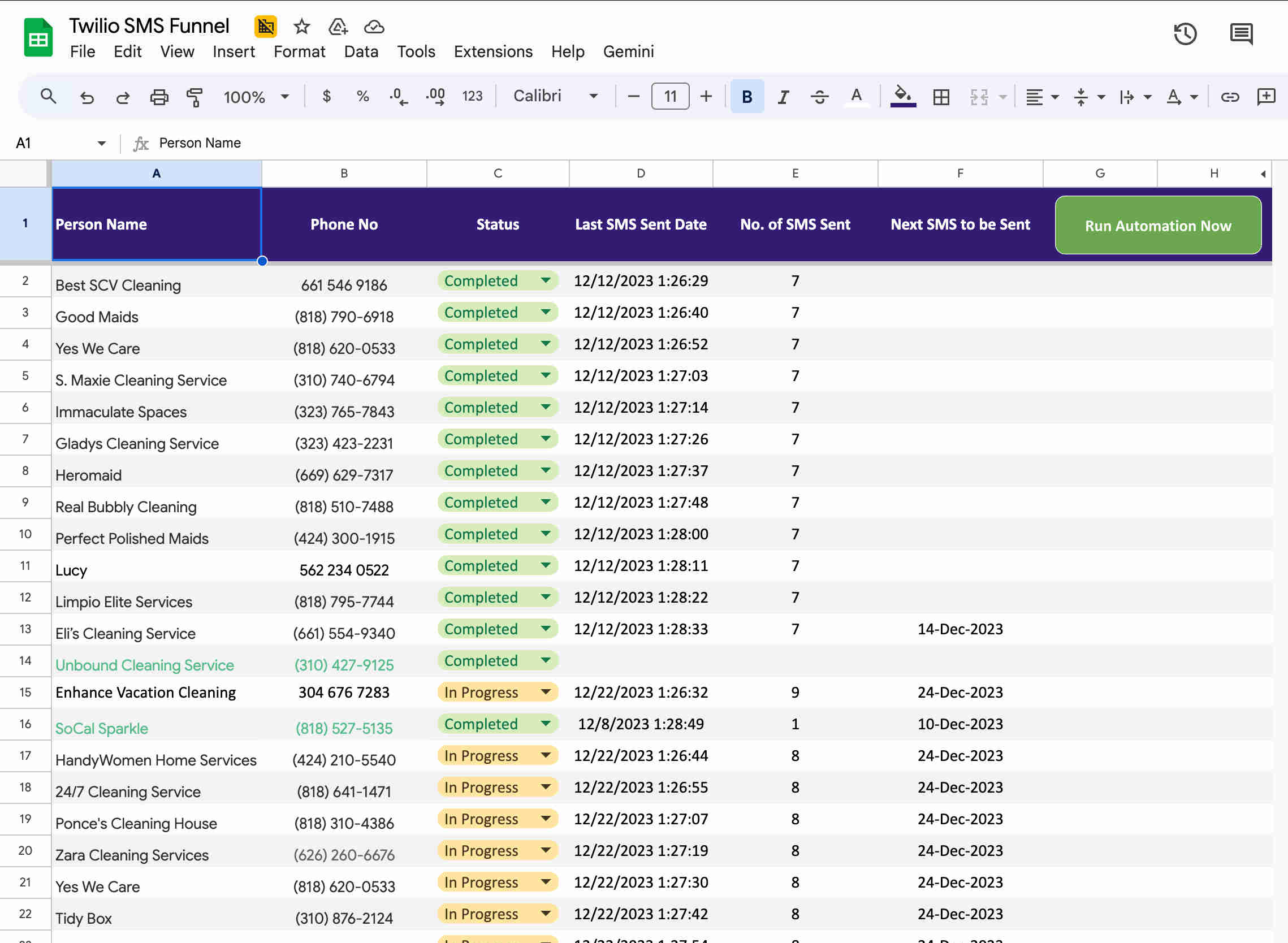
- Recipient enrollment and Day 0 first message: New recipients are added to the Google Sheets recipient list with their name and phone number. The enrollment is triggered by setting the Status column to "Active" — either manually for individual enrollments or via a batch update for bulk campaign launches. The Apps Script onEdit trigger fires when the Status field changes to Active: it immediately calls the Twilio API to send the first message template (Message 1 of the 10-stage sequence) to the recipient's phone number, retrieves the Twilio message ID returned by the API, and records the send in the message log with the timestamp, recipient name, phone number, template number, message ID, and initial delivery status. The recipient sheet row is then updated with the messages sent count (now 1), the last send date and time (the current timestamp), and the next send date (current date plus the configured Day 0 to Day 1 delay interval). The Day 0 immediate send ensures no time is wasted between enrollment and the first brand touchpoint — the recipient hears from the campaign within seconds of being added.
- Daily scheduled message check and sequence delivery: A Google Apps Script time-based trigger runs once daily at the configured send time (typically mid-morning in the target time zone). The trigger function reads all Active recipients from the recipient sheet and checks each one's Next Send Date against the current date. Recipients whose Next Send Date is today or earlier (having accumulated a delay overrun due to any day the trigger ran but the recipient wasn't yet due) are processed for their next message. For each eligible recipient, the function retrieves the appropriate next template from the message template sheet — determined by the recipient's current Messages Sent count, which maps directly to the template number (Messages Sent = 1 means Template 2 is next). The function calls the Twilio API to send the template message, retrieves the message ID, and proceeds to update all tracking records. This daily trigger approach means the sending cadence is automatic — once a recipient is enrolled, they progress through all 10 message stages at precisely the configured intervals without any manual action required for any individual send.
- Intelligent delay calculation and sequence progression: The delay between each message stage is configurable per stage — enabling nurture sequences with variable cadence rather than fixed uniform spacing. Early stages might use shorter delays (Day 0, Day 2, Day 4) to establish frequent initial contact when lead interest is highest, while later stages extend the interval (Day 7, Day 14, Day 21) as the nurture moves into longer-term relationship maintenance. After each message send, the Apps Script calculates the next send date by adding the configured stage-specific delay to the current timestamp and writing the result to the Next Send Date column. A recipient who has received 3 of 10 messages with their next stage configured for a 5-day delay will have a Next Send Date 5 days from today — which the daily trigger will detect and process automatically when that date arrives. Recipients who have completed all 10 stages are automatically marked as "Complete" in the Status column and excluded from subsequent daily trigger checks.
- Twilio delivery status tracking via webhook: When Twilio delivers (or fails to deliver) a message, it sends a delivery status update to the configured webhook URL — an Apps Script web app endpoint that receives the status callback. The webhook handler processes the incoming Twilio status payload: extracting the message ID (used to match the status update to the correct log record), the delivery status (queued, sent, delivered, failed, or undelivered), and any error code for failed deliveries. The matching log record in the message log sheet is updated with the final delivery status — replacing the initial "sent" status recorded at send time with the confirmed delivery status returned by Twilio. The recipient sheet is simultaneously updated if the delivery indicates a problem: failed or undelivered status can trigger a flag in the recipient row alerting the team to review the phone number or follow up through an alternative channel. This real-time status tracking transforms delivery visibility from zero (no confirmation that the message reached anyone) to complete (every message's final delivery state is recorded per recipient per stage).
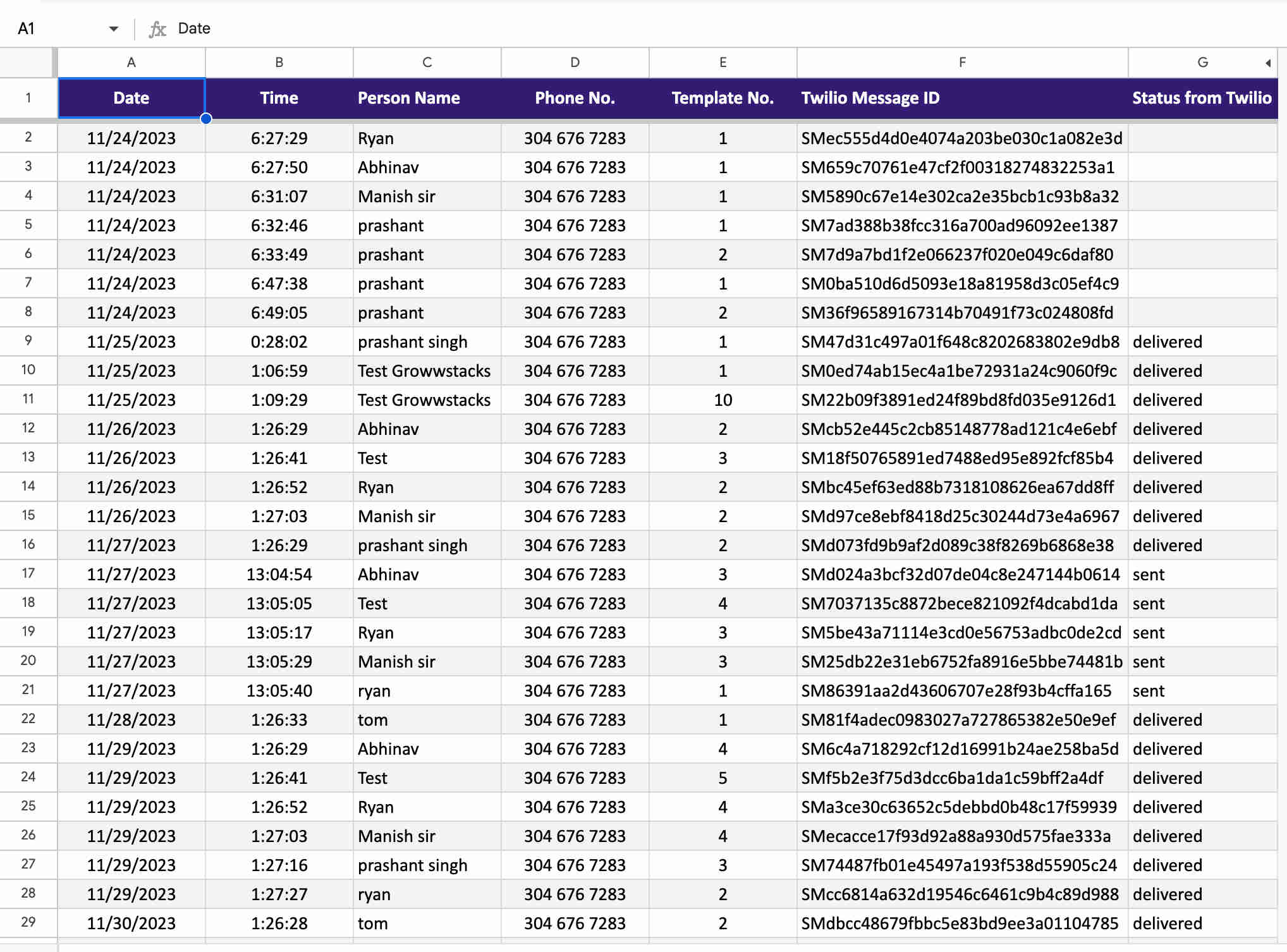
- Comprehensive message logging: Every message send — regardless of outcome — is recorded as a new row in the message log sheet. The log captures: send timestamp (the exact date and time the Twilio API was called), recipient name, phone number, template number (1–10 indicating which sequence stage was sent), Twilio message SID (the unique identifier returned by the Twilio API, used for status webhook matching), initial status at send time, and final delivery status once the Twilio webhook is received. The complete log enables: troubleshooting any specific delivery failure by examining the Twilio message SID and associated error code, auditing the full history of messages sent to any specific recipient, analysing which template stages have the highest delivery rates versus failure rates, and maintaining a compliance record of all SMS sends if required by industry regulations (TCPA in the US, for example). The log is append-only — each send adds a new row — producing a permanent, searchable history of the entire campaign's activity.
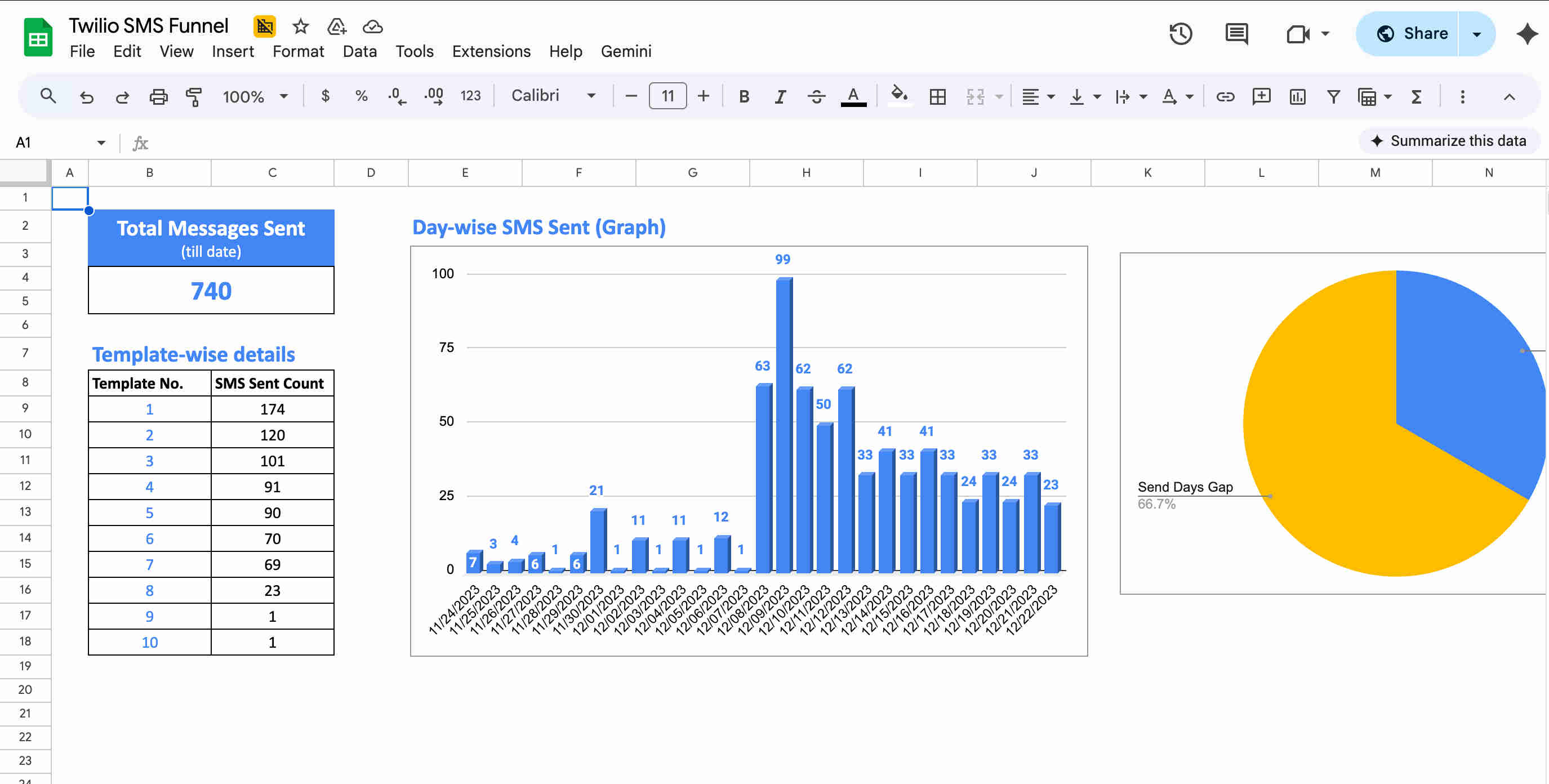
- Real-time performance analytics dashboard: A dedicated dashboard sheet in the Google Sheets workbook uses formula-driven calculations (COUNTIF, SUMIF, pivot-table-style aggregations) to display real-time campaign performance metrics that update automatically as new data is written to the log and recipient sheets. Dashboard metrics include: total messages sent across the campaign, messages sent per template stage (showing where the active recipient population is concentrated in the sequence), date-based sending volume (messages sent per day — revealing campaign growth trends and daily volume patterns), recipient status distribution (Active vs. Complete vs. flagged recipients), delivery rate (delivered vs. sent ratio), and failure rate with error category breakdown. These analytics enable continuous campaign optimisation: identifying which message stages have unusually high failure rates (suggesting phone number quality issues in the enrolled segment), which send dates produced the highest volume (useful for capacity planning), and overall funnel progression rates through all 10 stages.
💡 Why Google Apps Script + Twilio outperforms dedicated SMS marketing platforms for systematic nurture at scale — the cost structure advantage in practice: Dedicated SMS marketing platforms (Klaviyo SMS, Attentive, Postscript, SimpleTexting) charge subscription fees that scale with list size: a 5,000-contact list typically costs $200–$500/month on these platforms before per-message costs. The Twilio + Apps Script + Google Sheets system has zero subscription overhead — Google Apps Script is free within Google Workspace (which the team already pays for), and Twilio charges only per message sent ($0.0079/message in the US). For a campaign sending 3 messages per month per 1,000 active contacts, the Twilio-only cost is $23.70/month versus $200–$500 on a platform subscription. At 5,000 contacts, the monthly Twilio cost is $118.50 versus a platform subscription that typically exceeds $500/month. The annual saving is $4,600–$9,000+ for a 5,000-contact list — a saving that directly funds the 4-week implementation cost within the first 6–12 months of operation. The tradeoff is the Apps Script custom code required to build the automation logic — which GrowwStacks provides as part of the implementation rather than the team building it themselves.
What This System Enables That Manual SMS Campaign Management Cannot Sustain
10-Stage Automated Nurture Sequence
Automated delivery of all 10 configurable message templates throughout the nurture funnel — with each stage sending at precisely the configured delay interval from the previous send, per recipient. Executes sophisticated multi-touch campaigns with a consistency and precision that is impossible to replicate manually: every recipient receives every stage at exactly the right time regardless of list size, without any manual scheduling action required per send.
Intelligent Delay Management
Configurable per-stage delay intervals (2, 3, 5 days, or custom) calculated automatically from each recipient's last send timestamp. The daily Apps Script trigger checks all active recipients against their scheduled next send date — sending the correct next-stage message for anyone due that day without any manual calendar management. Different delay patterns can be configured for early versus late funnel stages, enabling aggressive early nurture followed by lower-frequency long-term relationship maintenance in the same sequence.
Complete Delivery Status Tracking
Twilio's delivery webhook returns the final status of every sent message — delivered, failed, or undelivered — and the Apps Script webhook handler writes the result to both the message log and the recipient sheet in real time. Provides 100% delivery visibility that manual sending cannot offer: every undelivered message is flagged, every failed number is identified, and the overall delivery rate is calculable from the log data rather than estimated or assumed.
Complete Message Audit Log
Every message send generates an append-only log entry with timestamp, recipient, phone number, template stage, Twilio message SID, and delivery status — creating a permanent, searchable campaign record. Enables troubleshooting any specific delivery issue, auditing the complete communication history with any individual recipient, analysing stage-by-stage delivery performance, and maintaining compliance documentation for industries with SMS communication record requirements.
Real-Time Analytics Dashboard
Formula-driven dashboard sheet aggregating total messages sent, per-stage template distribution, date-based sending volume, delivery vs. failure rates, and individual recipient sequence progress — updating automatically as the campaign runs without any manual reporting compilation. Identifies which sequence stages have delivery anomalies, which send dates produce the highest volume, and how the active recipient population is distributed across all 10 stages at any moment.
Google Apps Script with Zero Platform Cost
Custom automation logic built in Google Apps Script — free within Google Workspace — handles all enrollment triggers, delay calculations, scheduled daily sending, Twilio API calls, webhook processing, and logging without any external automation platform subscription. The script is fully owned and modifiable: message templates are editable directly in the Sheets template library, delay intervals are configurable without code changes, and the entire campaign logic is transparent and adjustable by the team or by GrowwStacks.
The System in Action
Before vs. After: What Changes When the Entire Nurture Sequence Runs Itself
Before: Marketing and sales teams attempting multi-stage SMS nurture faced an operational coordination burden that typically caused campaigns to collapse at 3–5 stages — far short of the 10-touch sequences that research consistently shows produce the highest conversion rates. Maintaining proper delay intervals across 50+ active recipients required dedicated manual calendar management. Delivery visibility was zero: messages were sent but whether they reached recipients was unknown unless a recipient replied. Recipient data was scattered across multiple spreadsheets with no consistent structure, making it impossible to determine who was at what stage. And performance analytics required manual compilation that consumed additional hours with results that were always behind the campaign's actual state. The operational overhead of manual SMS campaign management consistently exceeded the bandwidth available to teams simultaneously managing other marketing and sales activities.
After: The marketing team's ongoing involvement in SMS campaign operations reduces to two activities: enrolling new recipients (a single status field change in the recipient sheet) and reviewing the dashboard (a minute-long check to confirm the campaign is progressing normally). The daily trigger handles all scheduling decisions, the Twilio API handles all message delivery, the webhook handler handles all status recording, and the dashboard formulas handle all analytics compilation — automatically, every day, for every active recipient in the sequence simultaneously. A team that previously managed 30 active nurture recipients manually can run 300 recipients through a 10-stage sequence with less operational effort than the 30-recipient manual campaign required. The sophistication ceiling that manual management imposed — limiting practical nurture to 2–3 stages at meaningful scale — is removed entirely: 10 stages, properly timed, consistently delivered, completely tracked.
Implementation: Live in 4 Weeks
- Twilio account setup and phone number configuration (Week 1): A Twilio account is created or the client's existing Twilio account is reviewed. A dedicated Twilio phone number (or short code for high-volume campaigns above 1,000 daily messages) is provisioned for the campaign — using a local long code for lower-volume campaigns or a toll-free number for higher-volume sends that require additional deliverability trust. The Twilio Account SID and Auth Token are retrieved and stored securely for Apps Script integration. The Twilio messaging service is configured with the sending number, and initial test messages are sent to confirm delivery through the Twilio console. TCPA compliance requirements are reviewed — confirming opt-in documentation, message content compliance, and STOP keyword handling (Twilio handles STOP replies automatically, preventing further messages to opted-out numbers). Rate limits and daily sending capacity are assessed against the target campaign volume.
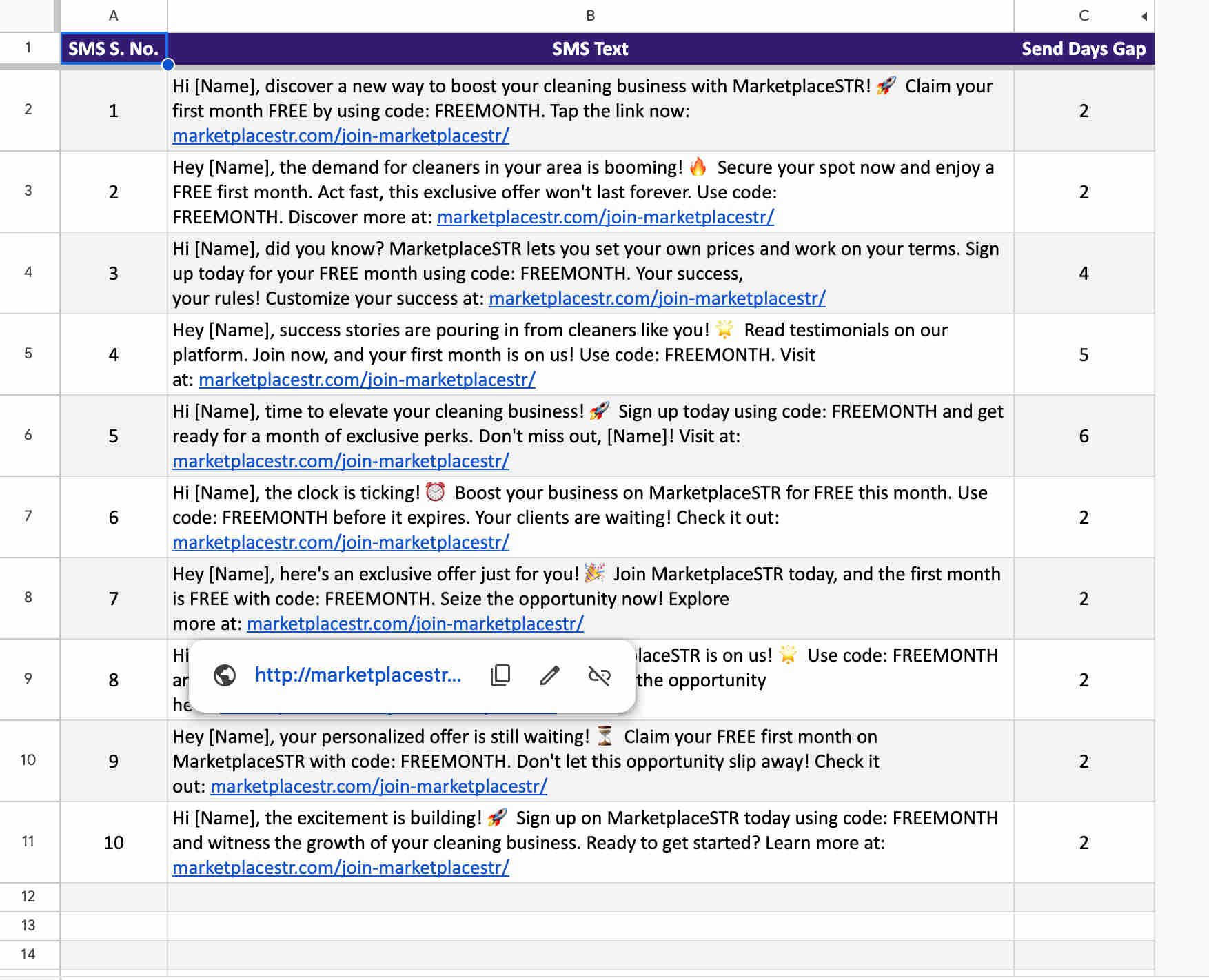
- Google Sheets workbook structure design (Week 1–2): The Google Sheets workbook is built with four sheets serving distinct functions. The Recipient Sheet contains: Name, Phone Number, Status (Pending/Active/Complete/Error), Messages Sent (count, 0–10), Last Send Date/Time, and Next Send Date — with data validation on the Status column and conditional formatting highlighting recipients approaching their next send date. The Template Sheet stores all 10 message templates in numbered rows — Template 1 through Template 10 — with each template's full SMS text in a single cell that the Apps Script references by row number. Templates are editable directly in the sheet without any code change. The Message Log Sheet has columns for: Timestamp, Recipient Name, Phone Number, Template Number, Twilio Message SID, Initial Status, and Final Delivery Status. The Dashboard Sheet contains formula-driven aggregations pulling from the log and recipient sheets — total messages sent (COUNTA of log rows), messages per template (COUNTIF by template number), daily send volume (COUNTIF by date), delivery rate (delivered count / total sent), and a summary table of recipient status distribution.
- Google Apps Script development (Weeks 2–3): The core Apps Script codebase is developed with five primary functions. The enrollment function is triggered by the onEdit event on the recipient sheet's Status column — firing when Status changes to "Active," calling sendMessage() for Template 1 immediately, and updating the recipient row with the initial tracking data. The sendMessage() function accepts recipient row data, retrieves the appropriate template text from the template sheet, calls the Twilio REST API using UrlFetchApp with the account SID and auth token for authentication, receives the Twilio response containing the message SID and initial status, calls logMessage() with the full send details, and calls updateRecipient() to write the new tracking data to the recipient row. The calculateNextSendDate() function accepts the current date and the current template number and returns the next send date based on the configured delay array — allowing different delays between different stages. The daily trigger function (registered as a time-based trigger running once per day) iterates all Active recipients, compares each one's Next Send Date to today, and calls sendMessage() for any recipient due. The Twilio webhook handler is a doPost() web app function that receives Twilio's status callback, extracts the message SID and final status from the POST body, finds the matching log row by SID using a lookup, and updates the Final Delivery Status column. All functions include error handling with try/catch blocks that write error details to the log rather than silently failing.
- Trigger and webhook configuration (Week 3): The Apps Script project is deployed as a web app (for the Twilio webhook handler) — setting execution as the client's Google account and access to Anyone (required for Twilio's POST request to reach the endpoint). The web app URL is copied and registered in the Twilio console as the status callback URL for the sending phone number — confirming that Twilio will POST delivery status updates to the endpoint. The time-based daily trigger is registered in the Apps Script trigger management panel — scheduling the daily message check function to run at the configured send time. The onEdit trigger for enrollment is verified as a Simple Trigger (automatically active for the spreadsheet). A manual test of the complete flow is conducted: a test recipient is enrolled in the recipient sheet, the enrollment function fires and sends Template 1 via Twilio, the log records the send, the trigger is manually run to simulate the next day's check, and the Twilio console is checked to confirm the delivery status webhook was received and processed.
- Comprehensive testing and production deployment (Week 4): End-to-end testing covers the complete recipient journey: multiple test recipients are enrolled simultaneously, the sequence progression through all 10 templates is validated by accelerating the Next Send Date values to trigger multiple sends in quick succession, delivery status webhook processing is confirmed for delivered and failed scenarios, dashboard formula accuracy is verified against known log data, and edge cases are tested (recipient who completes all 10 stages is correctly marked Complete, failed delivery is correctly flagged in the recipient sheet, re-enrollment of a completed recipient resets the count correctly). Performance documentation is prepared covering: how to add new recipients (Sheets row + Status set to Active), how to edit message templates (direct Sheets cell edit), how to change delay intervals (update the delay configuration in the Apps Script constants), how to read the analytics dashboard, and how to troubleshoot a failed delivery using the message SID. The production campaign is activated with the first real recipient batch, and the team monitors the first 48 hours of sends to confirm all components are operating as expected before the system runs fully unattended.
The Right Fit — and When It Isn't
This solution delivers maximum value for marketing teams nurturing leads through multi-stage text sequences, sales organisations following up prospects at systematic intervals, e-commerce businesses running customer re-engagement or post-purchase nurture campaigns, real estate agents maintaining contact with buyer and seller prospects over extended timelines, service providers sending appointment reminders and follow-up sequences, and any organisation requiring systematic high-volume SMS communication where manual coordination is the current bottleneck. The 4-week implementation timeline and moderate complexity rating make this accessible for small and mid-sized teams that need sophisticated SMS nurture capability without enterprise-level technical resources — the Google Workspace foundation means most teams already have the infrastructure required.
Two important calibration notes: the system is built specifically for outbound SMS nurture to opted-in recipients — TCPA (US) and equivalent regulations in other jurisdictions require documented opt-in consent before marketing SMS can be sent, and compliance with these regulations is the client's responsibility for their recipient list. The Apps Script + Twilio architecture handles the sending and tracking mechanics compliantly (including honouring STOP replies via Twilio's built-in STOP handling), but the opt-in documentation and consent records for enrolled recipients must exist before the campaign launches. For teams with very high daily send volumes (above 1,000 messages per day consistently), the Apps Script daily trigger model should be assessed for processing time — very large recipient lists may require batch processing or a migration to a more scalable trigger architecture, which we design accordingly during the discovery call.