
The Content Repurposing Trap That Kills Video Marketing ROI
Here's the scenario every content marketing team knows: your organization publishes or curates great YouTube videos, but the actual value extraction — summarizing, packaging, and distributing those insights to your audience — requires a human to sit through the full runtime, take notes, write a summary, craft a promotional message, and manually post it to every WhatsApp group. For a single 20-minute video, that's easily a 45-minute to one-hour process per asset. Multiply that across 15–20 videos per week and you're looking at a full-time job devoted entirely to content repurposing.
The practical consequence is that most teams process only a fraction of the video content they have access to. The rest — potentially your most valuable insights — goes unwatched, unsummarized, and unshared. Selective manual processing means your audience receives an inconsistent, incomplete picture of the content your organization is producing or curating, and the institutional knowledge locked inside those videos evaporates the moment the tab is closed.
Building the Content Pipeline: From YouTube Link to WhatsApp Distribution in Minutes
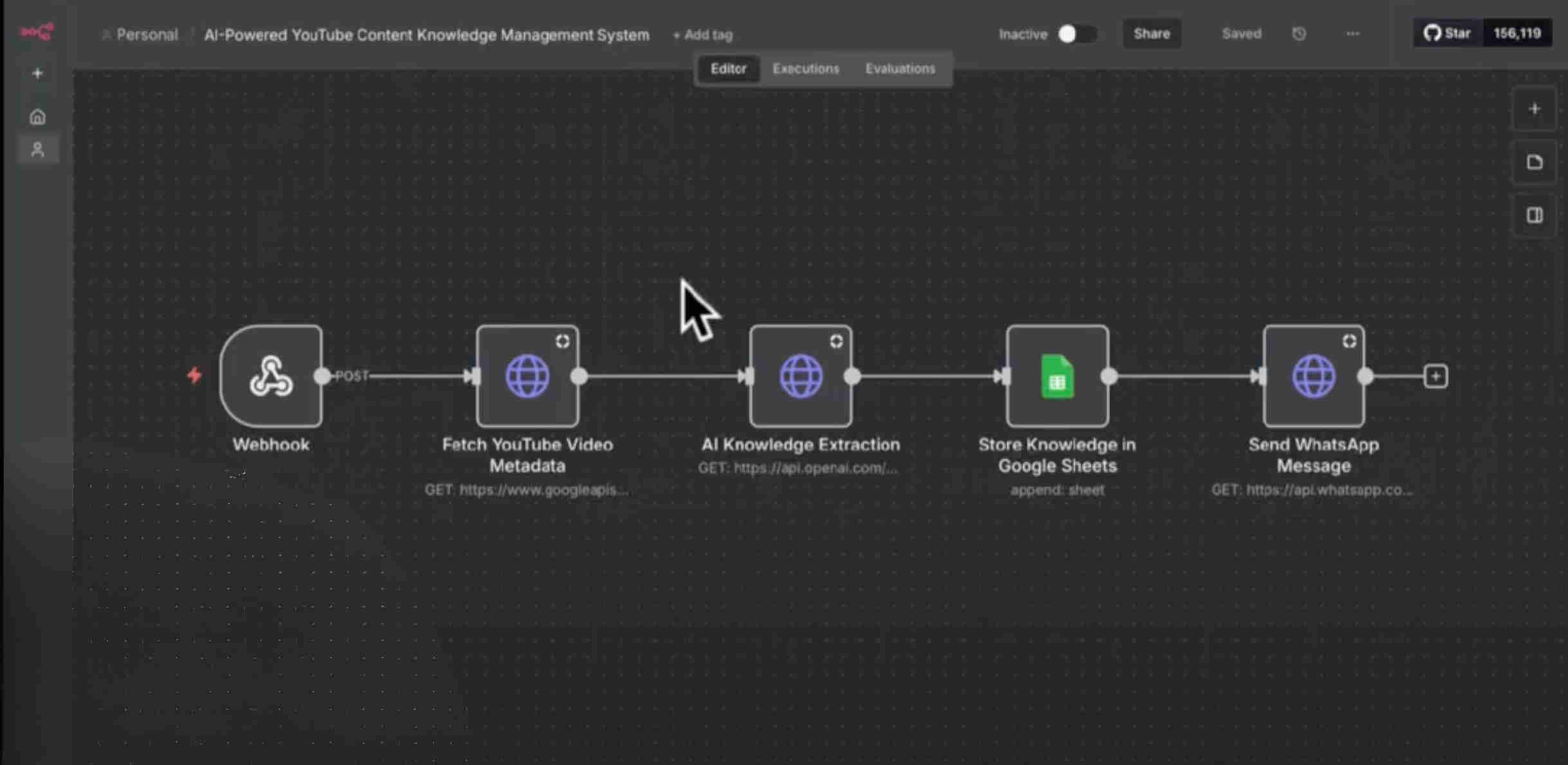
GrowwStacks engineered a complete content repurposing automation built around a single workflow trigger: paste a YouTube URL into a spreadsheet and the entire pipeline handles itself from there. We used n8n for workflow orchestration due to its superior handling of multi-step content pipelines and the flexibility it provides for YouTube transcript extraction combined with API-based processing. Claude powers two distinct AI tasks in sequence — first a comprehensive content summarization that extracts key insights and marketing-relevant points from the video, then a WhatsApp-optimized promotional message generation based on that summary.
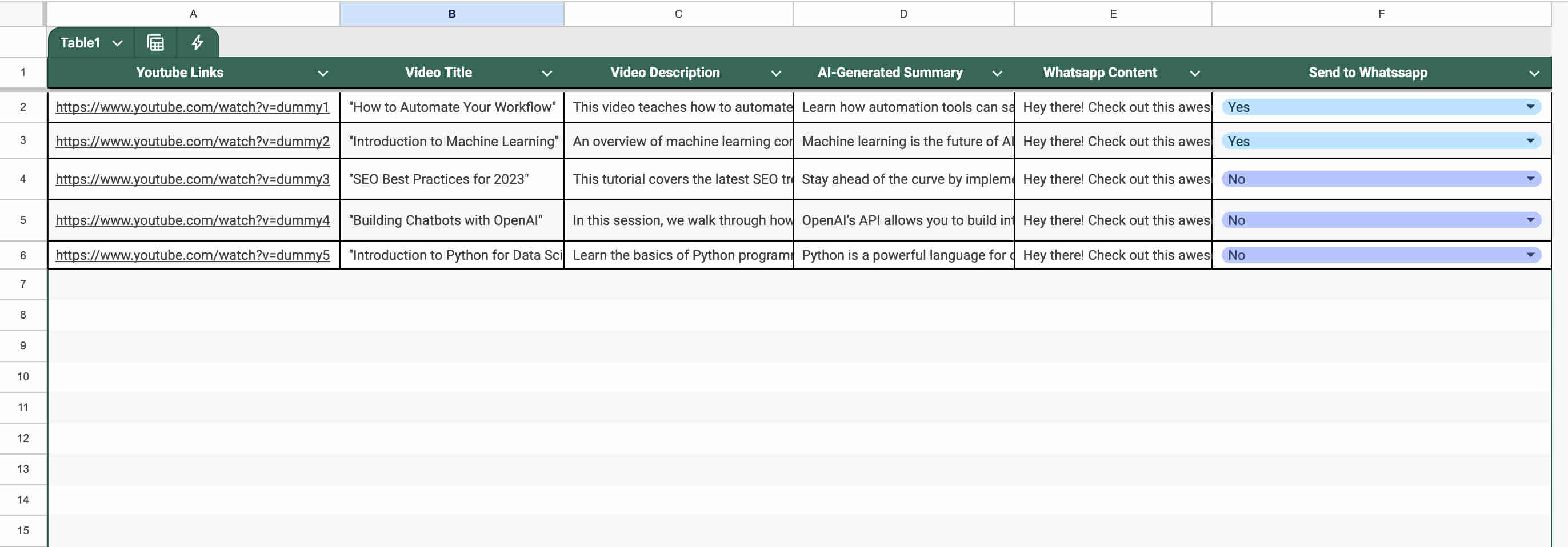
Google Sheets serves as both the trigger interface and the knowledge base, giving non-technical team members a familiar, zero-friction way to submit videos and approve messages. The approval workflow — a simple yes/no column — is the intentional human checkpoint that keeps quality control in the loop without requiring any technical knowledge to operate. When a message is approved, the n8n workflow automatically routes it to the designated WhatsApp groups with no additional manual steps.
From Link Submission to Group Distribution: The Complete Workflow
The system operates across a clean eight-step pipeline that requires zero manual effort beyond submitting the URL and clicking "yes" in the approval column. Here's the full sequence:
- Link submission: A team member pastes a YouTube video URL into the designated Google Sheets column. This triggers the n8n workflow automatically. Alternatively, a webhook endpoint accepts direct URL submissions from external tools — useful for teams that want to trigger processing from browser extensions or other automation systems.
- Video data extraction: n8n fetches the video's complete data package from the YouTube API — title, description, full transcript, duration, and metadata. The transcript is the critical input for summarization; without it, the AI would rely only on the description, which is rarely comprehensive.
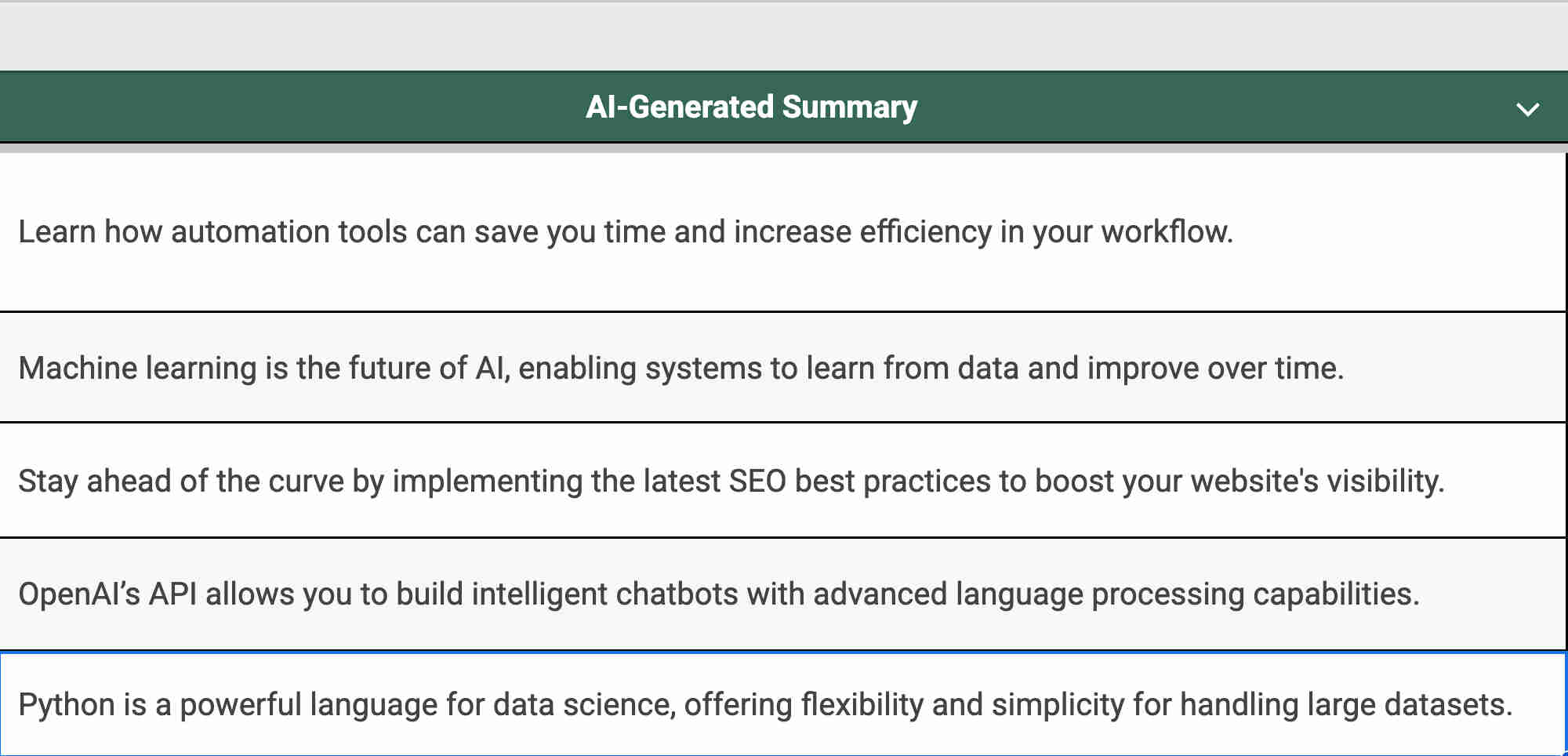
- AI content summarization: Claude analyzes the full transcript and metadata, generating a comprehensive summary that extracts the video's key insights, main topics, actionable takeaways, and marketing-relevant points. The summarization prompt is tuned to produce a structured output — not just a paragraph recap, but an organized extraction of the content that's immediately useful for knowledge management.
- Knowledge base storage: The AI-generated summary is written back to the corresponding Google Sheets row, building a searchable repository of video insights. Future team members can search this sheet rather than re-watching videos — institutional knowledge is captured rather than lost.
- WhatsApp message generation: A second Claude prompt takes the video summary as input and generates a WhatsApp-optimized promotional message — engaging copy, relevant hashtags, a clear call-to-action, and platform-appropriate formatting. This is distinct from the summary: the summary is for internal knowledge, the message is for audience distribution.
- Approval queue: The generated WhatsApp message is written to its own Google Sheets column alongside an "Approval" dropdown (yes/no). Team members review the message at their own pace, edit if needed, and set the approval status. Nothing is sent without this explicit confirmation step.
- Approval monitoring: n8n monitors the approval column on a scheduled interval. When a row transitions to "yes," the workflow triggers the WhatsApp distribution step for that message and only that message — no batch sending, no accidental distribution of unapproved content.
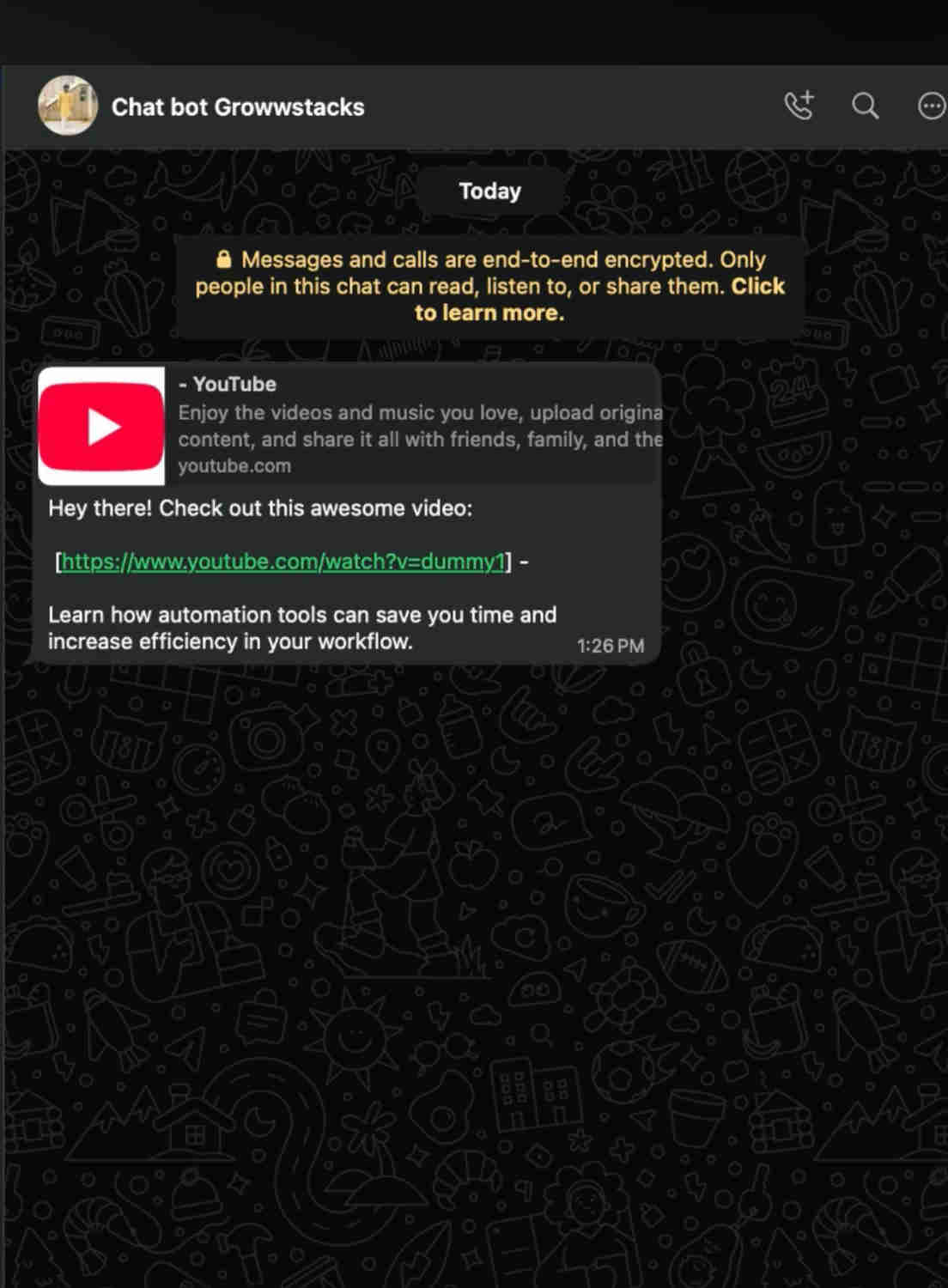
- WhatsApp group distribution: The approved message is sent automatically to all designated WhatsApp groups. Distribution is logged back to Google Sheets with a timestamp, completing the content repurposing cycle without any manual posting.
💡 The design decision that changed adoption rates: Early versions of this system auto-sent WhatsApp messages without an approval step. Teams rejected it — not because the AI output was poor, but because they needed to trust and verify before sending to large audience groups. Adding the simple yes/no approval column increased adoption to 100% across all pilot teams because it preserved human judgment at the only moment that mattered.
What This Pipeline Does That Manual Processes Can't
AI Video Summarization
Claude analyzes full video transcripts generating comprehensive summaries that extract key insights, main topics, and marketing-relevant information automatically. Teams get accurate, structured summaries without watching a single minute of footage.
Automated Message Generation
AI creates WhatsApp promotional messages based on video summaries — engaging copy, relevant hashtags, and calls-to-action optimized for the platform. Eliminates manual message crafting while maintaining consistent marketing quality across every video asset.
Approval Workflow Control
A simple yes/no column in Google Sheets gives teams full quality control before any WhatsApp distribution. Automation handles the heavy lifting; humans retain the final say — making the system trustworthy enough for large audience groups and brand-sensitive content.
Knowledge Base Organization
Every AI-generated summary is stored in a searchable Google Sheets repository, building an institutional knowledge base from video content that grows with every link submitted. Future team members can search past summaries without re-watching hours of footage.
WhatsApp Group Distribution
Approved messages are sent automatically to all designated WhatsApp groups simultaneously — no individual group posting, no copy-paste coordination, no risk of forgetting a group. One approval triggers complete, consistent distribution across every audience channel.
Complete Automation Pipeline
From YouTube URL submission to WhatsApp distribution, the entire repurposing cycle executes without manual video watching, summary writing, or message crafting. A process that previously took 45+ minutes per video now takes under 2 minutes of human time — just the approval click.
The System in Action
Before vs. After: The Content Team Transformation
Before: Marketing teams spent 10–15 hours weekly watching YouTube videos, manually writing summaries, crafting individual promotional messages, and posting to WhatsApp groups one-by-one. Content repurposing was inconsistent — teams processed the videos they had time for and abandoned the rest. Valuable insights from skipped videos were permanently lost. Message quality varied by who wrote it that day and how much cognitive energy they had left.
After: The automated system processes every YouTube link submitted — generating AI summaries, creating WhatsApp messages, storing everything in a searchable knowledge base, and distributing to groups with a single approval click. Weekly video repurposing time drops from 15 hours to approximately 90 minutes. Every video asset gets processed. Message quality is consistent because it's AI-generated from a standardized prompt chain. The team's cognitive energy shifts from mechanical content repurposing to strategic content selection and audience relationship building.
Implementation: Live in 2 Weeks
- Google Sheets template setup: We design the spreadsheet with columns for YouTube links, video titles, AI summaries, WhatsApp messages, approval status dropdown (yes/no), distribution timestamps, and any custom fields your team needs. Data validation, formatting, and column documentation are configured before any integration is built.
- YouTube data integration: The YouTube API connection is configured within n8n to fetch video titles, descriptions, and full transcripts. We test extraction accuracy across different video types — long-form content, shorts, unlisted videos — and establish error handling for private or unavailable videos that returns a clean notification rather than a workflow failure.
- Claude prompt engineering: Two distinct prompt chains are built and tested independently. The summarization prompt is engineered to extract structured key insights from transcripts at varying lengths. The WhatsApp message generation prompt is tuned for platform-appropriate tone, length, hashtag usage, and call-to-action format — then tested across different content categories to ensure consistent quality.
- Approval workflow build: The Google Sheets monitoring logic is configured to watch the approval column for status changes on a scheduled interval. Conditional routing ensures distribution fires only for approved messages. A notification system alerts team members when new messages are ready for review so the queue doesn't accumulate silently.
- WhatsApp distribution and deployment: WhatsApp Business API integration is configured with proper permissions and group targeting. Message formatting is validated for WhatsApp rendering. End-to-end testing runs the full pipeline from URL submission through group delivery. Team members are trained on the link submission process and approval workflow before production deployment with monitoring enabled.
The Right Fit — and When It Isn't
This solution delivers maximum value for content marketing teams, social media managers, digital marketing agencies, course creators, and any organization that regularly curates or produces YouTube content and needs to systematically repurpose it for audience engagement across messaging platforms. It's particularly powerful for teams managing large video libraries where manual processing creates a backlog that never clears.
One practical note: the system's summarization quality depends on video transcript availability. YouTube videos with auto-generated or manually uploaded captions produce the best summaries. Videos without any transcript fall back to description-based processing, which is less comprehensive. During discovery, we'll assess your typical content sources and confirm transcript coverage before scoping the build.